Lexus UX200 (2022 year). Manual in english - page 3
 

  Index      Manuals     Lexus UX200 (2022 year). Manual in english


Search            copyright infringement  


Content      ..     1      2      3      4      ..


Lexus UX200 (2022 year). Manual in english - page 3


56

1-3. LEXUS Enform

1-3.LEXUS Enform

*

: If  equipped

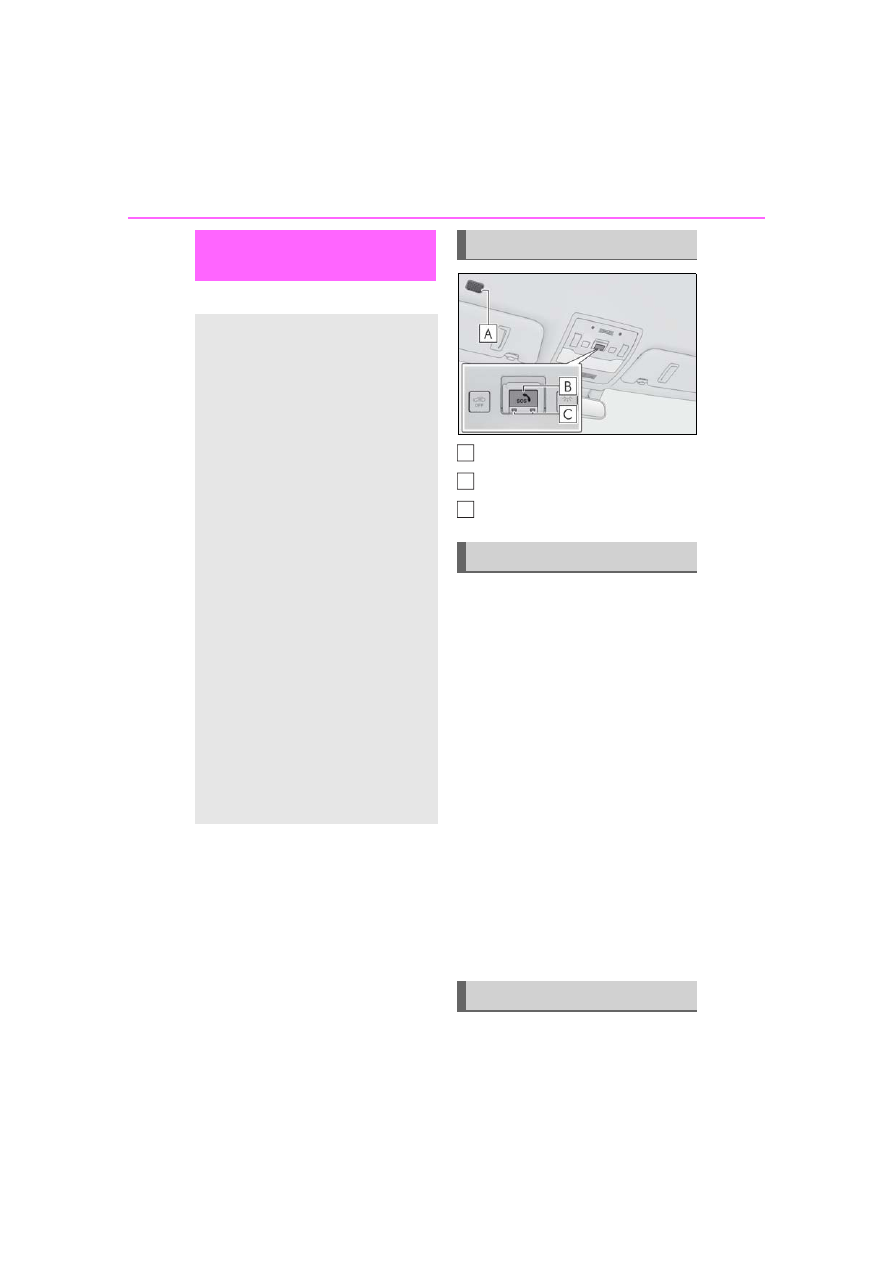
Microphone

“SOS” button

LED light indicators

Subscribers have the following Safety 
Connect services available:

Automatic Collision Notification

*

Helps drivers receive necessary response 
from emergency service providers. 
(

P.58

)

*

: U.S. Patent No. 7,508,298 B2

Stolen Vehicle Location

Helps drivers in the event of vehicle theft. 
(

P.58

)

Emergency Assistance Button 
(“SOS”)

Connects drivers to response-center sup-
port. (

P.58

)

Enhanced Roadside Assistance

Provides drivers various on-road assis-
tance. (

P.58

)

After you have signed the Telematics 

Lexus Enform Safety Con-
nect

*

Safety Connect is a subscription-
based telematics service that uses 
Global Positioning System (GPS) 
data and embedded cellular tech-
nology to provide safety and secu-
rity features to subscribers. Safety 
Connect is supported by Lexus’ 
designated response center, which 
operates 24 hours per day, 7 days 
per week.

Safety Connect service is available 
by subscription on select, telemat-
ics hardware-equipped vehicles.

By using the Safety Connect ser-
vice, you are agreeing to be bound 
by the Telematics Subscription Ser-
vice Agreement and its Terms and 
Conditions, as in effect and 
amended from time to time, a cur-
rent copy of which is available at 
Lexus.com. All use of the Safety 
Connect service is subject to such 
then-applicable Terms and Condi-
tions.

System components

Services

Subscription

A
B
C

57

1-3. LEXUS Enform

1

For safety and security

Subscription Service Agreement and 
are enrolled, you can begin receiving 
services.
A variety of subscription terms is avail-
able for purchase. Contact your Lexus 
dealer, call the following or push the 
“SOS” button in your vehicle for fur-
ther subscription details.
• The United States

1-800-25-LEXUS (1-800-255-3987)

• Canada

1-800-26-LEXUS (1-800-265-3987)

• Puerto  Rico

1-877-539-8777

Safety Connect Services Information

Phone calls using the vehicle’s 
Bluetooth

®

 technology will not be possi-

ble during Safety Connect.

Safety Connect is available beginning 

Fall 2009 on select Lexus models (in the 

contiguous United States only). Contact 

with the Safety Connect response center 

is dependent upon the telematics device 

being in operative condition, cellular con-

nection availability, and GPS satellite sig-

nal reception, which can limit the ability to 

reach the response center or receive 

emergency service support. Enrollment 

and Telematics Subscription Service 

Agreement required. A variety of sub-

scription terms is available; charges vary 

by subscription term selected and loca-

tion.

Automatic Collision Notification, Emer-

gency Assistance and Stolen Vehicle 

Location will function in the United 

States, including Hawaii and Alaska, 

Puerto Rico and in Canada, and 

Enhanced Roadside Assistance will func-

tion in the United States, Puerto Rico and 

in Canada.

Automatic Collision Notification, Emer-

gency Assistance, Stolen Vehicle and 

Enhanced Road Assistance will not func-

tion in the United States Virgin Islands.

For vehicles first sold in the USVI, no 

Safety Connect services will function in 

and outside the United States Virgin 

Islands.

Safety Connect services are not subject 

to section 255 of the Telecommunica-

tions Act and the device is not TTY com-

patible.

Languages

The Safety Connect response center will 

offer support in multiple languages. The 

Safety Connect system will offer voice 

prompts in English, Spanish, and French. 

Please indicate your language of choice 

when enrolling.

When contacting the response center

You may be unable to contact the response 

center if the network is busy.

When the engine switch is turned to 
ON, the red indicator light comes on 
for 2 seconds then turns off. Afterward, 
the green indicator light comes on, 
indicating that the service is active.
The following indicator light patterns 
indicate specific system usage condi-
tions:

Green indicator light on = Active 
service

Green indicator light flashing = 
Safety Connect call in process

Red indicator light (except at vehi-
cle start-up) = System malfunction 
(contact your Lexus dealer)

No indicator light (off) = Safety 
Connect service not active

Safety Connect LED light Indi-
cators

58

1-3. LEXUS Enform

Automatic Collision Notification

In case of either airbag deployment or 
severe rear-end collision, the system is 
designed to automatically call the 
response center. The responding 
agent receives the vehicle’s location 
and attempts to speak with the vehicle 
occupants to assess the level of emer-
gency. If the occupants are unable to 
communicate, the agent automatically 
treats the call as an emergency, con-
tacts the nearest emergency services 
provider to describe the situation, and 
requests that assistance be sent to the 
location.

Stolen Vehicle Location

If your vehicle is stolen, Safety Connect 
can work with local authorities to assist 
them in locating and recovering the 
vehicle. After filing a police report, call 
the Safety Connect response center at 
1-800-25-LEXUS (1-800-255-
3987) in the United States, 1-877-
539-8777 in Puerto Rico or 1-800-
265-3987 in Canada, and follow the 
prompts for Safety Connect to initiate 
this service.
In addition to assisting law enforce-
ment with recovery of a stolen vehicle, 
Safety-Connect-equipped vehicle 
location data may, under certain cir-
cumstances, be shared with third par-
ties to locate your vehicle. Further 
information is available at Lexus.com.

Emergency Assistance Button 
(“SOS”)

In the event of an emergency on the 
road, push the “SOS” button to reach 
the Safety Connect response center. 
The answering agent will determine 
your vehicle’s location, assess the 
emergency, and dispatch the neces-
sary assistance required.

If you accidentally press the “SOS” button, 
tell the response-center agent that you are 
not experiencing an emergency.

Enhanced Roadside Assistance

Enhanced Roadside Assistance adds 
GPS data to the already included war-
ranty-based Lexus roadside service.
Subscribers can press the “SOS” but-
ton to reach a Safety Connect 
response-center agent, who can help 
with a wide range of needs, such as: 
towing, flat tire, fuel delivery, etc. For a 
description of the Roadside Assistance 
services and their limitations, please 
see the Safety Connect Terms and 
Conditions, which are available at 
Lexus.com.

Important! Read this information about 
exposure to radio frequency signals 
before using Safety Connect;
The Safety Connect system installed in 
your vehicle is a low-power radio 
transmitter and receiver. It receives 
and also sends out radio frequency 
(RF) signals.

Safety Connect services

Safety information for Safety 
Connect

59

1-3. LEXUS Enform

1

For safety and security

In August 1996, the Federal Commu-
nications Commission (FCC) adopted 
RF exposure guidelines with safety lev-
els for mobile wireless phones. Those 
guidelines are consistent with the 
safety standards previously set by the 
following U.S. and international stan-
dards bodies.

ANSI (American National Stan-
dards Institute) C95.1 [1992]

NCRP (National Council on Radia-
tion Protection and Measurement) 
Report 86 [1986]

ICNIRP (International Commission 
on Non-Ionizing Radiation Protec-
tion) [1996]

Those standards were based on com-
prehensive and periodic evaluations of 
the relevant scientific literature. Over 
120 scientists, engineers, and physi-
cians from universities, and govern-
ment health agencies and industries 
reviewed the available body of 
research to develop the ANSI Stan-
dard (C95.1).
The design of Safety Connect com-
plies with the FCC guidelines in addi-
tion to those standards.

60

1-4. Theft deterrent system

1-4.Theft deterrent system

The security indicator flashes after the 
engine switch has been turned off to 
indicate that the system is operating.
The indicator light stops flashing after 
the engine switch has been turned to 
ACC or ON to indicate that the sys-
tem has been canceled.

System maintenance

The vehicle has a maintenance-free type 

engine immobilizer system.

Conditions that may cause the system to 

malfunction

If the grip portion of the key is in contact 

with a metallic object

If the key is in close proximity to or touch-

ing a key registered to the security sys-

tem (key with a built-in transponder chip) 

of another vehicle

Engine immobilizer system

The vehicle’s keys have built-in 
transponder chips that prevent the 
engine from starting if a key has not 
been previously registered in the 
vehicle’s on-board computer.
Never leave the keys inside the 
vehicle when you leave the vehicle.

This system is designed to help pre-
vent vehicle theft but does not guar-
antee absolute security against all 
vehicle thefts.

Operating the system

NOTICE

To ensure the system operates cor-

rectly

Do not modify or remove the system. If 

modified or removed, the proper opera-

tion of the system cannot be guaranteed.

61

1-4. Theft deterrent system

1

For safety and security

Items to check before locking the 
vehicle

To prevent unexpected triggering of 
the alarm and vehicle theft, make sure 
of the following:

Nobody is in the vehicle.

The windows and moon roof (if 
equipped) are closed before the 
alarm is set.

No valuables or other personal 
items are left in the vehicle.

Setting

Close the doors and hood, and lock all 
the doors using the entry function or 
wireless remote control. The system 
will be set automatically after 30 sec-
onds.
Except for Canada, the alarm can also 
be set using the mechanical key.

The security indicator changes from being 
on to flashing when the system is set.

Canceling or stopping

Do one of the following to deactivate 
or stop the alarms:

Except for Canada:

Unlock the doors.

Turn the engine switch to ACC or 
ON, or start the engine. (The alarm 
will be deactivated or stopped after 
a few seconds.)

For Canada

Unlock the doors using the entry 
function or wireless remote control.

Start the engine. (The alarm will be 
deactivated or stopped after a few 
seconds.)

System maintenance

The vehicle has a maintenance-free type 

alarm system.

Alarm

The alarm uses light and sound to 
give an alert when an intrusion is 
detected.
The alarm is triggered in the follow-
ing situations when the alarm is set:

Except for Canada: A locked 
door is unlocked or opened in any 
way other than using the entry 
function, wireless remote control 
or mechanical key. (The doors will 
lock again automatically.)

For Canada: A locked door is 
unlocked or opened in any way 
other than using the entry func-
tion or wireless remote control. 
(The doors will lock again auto-
matically.)

The hood is opened.

Setting/canceling/stopping the 
alarm system

62

1-4. Theft deterrent system

Triggering of the alarm

The alarm may be triggered in the following 

situations: 

(Stopping the alarm deactivates the alarm 

system.)

For Canada: The doors are unlocked 

using the mechanical key.

A person inside the vehicle opens a door 

or hood, or unlocks the vehicle using an 

inside lock button.

The battery is recharged or replaced 

when the vehicle is locked. (

P.380)

Alarm-operated door lock

In the following cases, depending on the sit-

uation, the door may automatically lock to 

prevent improper entry into the vehicle:

When a person remaining in the vehicle 

unlocks the door and the alarm is acti-

vated.

While the alarm is activated, a person 

remaining in the vehicle unlocks the door.

When recharging or replacing the bat-

tery.

NOTICE

To ensure the system operates cor-

rectly

Do not modify or remove the system. If 

modified or removed, the proper opera-

tion of the system cannot be guaranteed.

63

1-4. Theft deterrent system

1

For safety and security

Theft prevention labels (for 
the U.S.A.)

These labels are attached to the 
vehicle to reduce vehicle theft by 
facilitating the tracing and recov-
ery of parts from stolen vehicles. 
Do not remove under penalty of 
law.

65

2

2

Vehi

cle

 status 

inform

ati

on a

nd i

ndic
ators

Vehicle status information

and indicators

2-1. Instrument cluster

Warning lights and indicators.

66

Gauges and meters (except F 

SPORT models) ........................

70

Gauges and meters (F SPORT 

models)..........................................

73

Multi-information display..........

77

Head-up display ...........................

84

Fuel consumption information

88

66

2-1. Instrument cluster

2-1.Instrument cluster

For the purpose of explanation, the following illustrations display all warning lights 
and indicators illuminated.

Except F SPORT models

F SPORT models

The location of warning lights and indicators may differ depending on the main 
meter position.

Warning lights and indicators

The warning lights and indicators on the instrument cluster, center panel and 
outside rear view mirrors inform the driver of the status of the vehicle’s various 
systems.

Warning lights and indicators displayed on the instrument cluster

67

2-1. Instrument cluster

2

Vehi

cle

 status 

inform

ati

on a

nd i

ndic
ators

Warning lights inform the driver of 
malfunctions in the indicated vehicle’s 
systems.

Warning lights

(U.S.A.)

Brake system warning light

*1


(

P.354)

(red)

(Canada)

Brake system warning light

*1


(

P.354)

Charging system warning 
light

*2

 (

P.354)

Low engine oil pressure warn-
ing light

*2

 (

P.354)

(U.S.A.)

Malfunction indicator lamp

*1


(

P.355)

(Canada)

Malfunction indicator lamp

*1


(

P.355)

High coolant temperature 
warning light

*2

 (

P.355)

Tire pressure warning light

*1


(

P.355)

(yellow)

Brake system warning light

*1


(

P.356)

SRS warning light

*1

 (

P.356)

(U.S.A.)

ABS warning light

*1

 (

P.356)

(Canada)

ABS warning light

*1

 (

P.356)

(red)

Electric power steering system 
warning light

*1

 (

P.356)

(yellow)

Electric power steering system 
warning light

*1

 (

P.356)

Slip indicator

*1

 (

P.357)

(Flashes)

(U.S.A.)

Parking brake indicator 
(

P.357)

(Flashes)

(Canada)

Parking brake indicator 
(

P.357)

(Flashes)

Brake hold operated indica-
tor

*1

 (

P.357)

(Flashes)

Intuitive parking assist OFF indi-
cator

*1

 (if equipped) (

P.357)

(Flashes)

RCTA OFF indicator

*1

 (if 

equipped) (

P.358)

(Flashes)

PKSB OFF indicator

*1

 (if 

equipped) (

P.358)

Low fuel level warning light 
(

P.358)

Driver’s and front passenger’s 
seat belt reminder light 
(

P.358)

Rear passengers’ seat belt 
reminder lights

*2

 (

P.359)

Brake Override System warn-
ing light/Drive-Start Control 
warning light/PKSB warning 
light

*2

 (

P.359)

(orange)

LTA indicator

*2

 (

P.360)

(Flashes or 

illuminates)

PCS warning light

*1

 (

P.360)

68

2-1. Instrument cluster

*1

: These lights come on when the engine 

switch is turned to ON to indicate that a 
system check is being performed. They 
will go off after the engine is on, or after 
a few seconds. There may be a malfunc-
tion in a system if the lights do not come 
on, or go off. Have the vehicle 
inspected by your Lexus dealer.

*2

: This light illuminates on the multi-infor-

mation display.

The indicators inform the driver of the 
operating state of the vehicle’s various 
systems.

WARNING

If a safety system warning light does 

not come on

Should a safety system light such as the 

ABS and SRS warning light not come on 

when you start the engine, this could 

mean that these systems are not avail-

able to help protect you in an accident, 

which could result in death or serious 

injury. Have the vehicle inspected by 

your Lexus dealer immediately if this 

occurs.

Indicators

Turn signal indicator (

P.156)

(U.S.A.)

Headlight indicator (

P.162)

(Canada)

Tail light indicator (

P.162)

Headlight high beam indicator 
(

P.164)

Automatic High Beam indica-
tor

*1

 (

P.165)

Fog light indicator (if 
equipped) (

P.168)

PCS warning light

*1, 2


(

P.183)

Cruise control indicator

*3


(

P.201)

Dynamic radar cruise control 
indicator

*3

 (

P.201)

Cruise control “SET” indica-
tor

*3

 (

P.201)

(white)

LTA indicator

*3, 4

 (

P.195)

(green)

LTA indicator

*3, 4

 (

P.195)

(orange)

LTA indicator

*3, 4, 5

 (

P.195)

BSM outside rear view mirror 
indicators

*1, 6

 (if equipped) 

(

P.211)

BSM indicator (if equipped) 
(

P.211)

Intuitive parking assist OFF indi-
cator

*1, 2

 (if equipped) 

(

P.219)

RCTA OFF indicator

*1, 2

 (if 

equipped) (

P.227)

PKSB OFF indicator

*1, 2

 (if 

equipped) (

P.232)

Slip indicator

*1, 5

 (

P.241)

VSC OFF indicator

*1, 2


(

P.241)

Smart access system with push-
button start indicator

*3


(

P.148)

(U.S.A.)

Parking brake indicator 
(

P.157)

69

2-1. Instrument cluster

2

Vehi

cle

 status 

inform

ati

on a

nd i

ndic
ators

Drive mode indicators

Except F SPORT models

F SPORT models

*1

: These lights come on when the engine 

switch is turned to ON to indicate that a 
system check is being performed. They 
will go off after the engine is on, or after 

a few seconds. There may be a malfunc-
tion in a system if the lights do not come 
on, or go off. Have the vehicle 
inspected by your Lexus dealer.

*2

: This light comes on when the system is 

turned off.

*3

: This light illuminates on the multi-infor-

mation display.

*4

: Depending on the operating condition, 

the color and illuminating/flashing state 
of the light change.

*5

: This light flashes to indicate that the sys-

tem is operating.

*6

: This light illuminates on the outside rear 

view mirrors.

*7

: Except F SPORT models: This light illu-

minates on the multi-information dis-
play.

*8

: When the outside temperature is 

approximately 37°F (3°C) or lower, 
this indicator will flash for approxi-
mately 10 seconds, then stay on.

*9

: This light illuminates on the center 

panel.

(Canada)

Parking brake indicator 
(

P.157)

Brake hold standby indicator

*1


(

P.160)

Brake hold operated indica-
tor

*1

 (

P.160)

Eco Driving Indicator Light

*1, 7


(

P.80)

Low outside temperature indi-
cator

*3, 8

 (

P.70, 73)

Security indicator

*9

 (

P.60, 

61)

(U.S.A.)

“AIR BAG ON/OFF” indica-
tor

*9

 (

P.39)

(Canada)

“AIR BAG ON/OFF” indica-
tor

*9

 (

P.39)

Eco drive mode indicator 
(

P.239)

Sport mode indicator 
(

P.239)

Eco drive mode indicator 
(

P.239)

Sport mode indicator 
(

P.239)

70

2-1. Instrument cluster

Locations of gauges and meters

The units of measure may differ depending on the intended destination of the vehicle.

Multi-information display

Presents the driver with a variety of vehicle data (

P.77)

Displays warning messages if a malfunction occurs (

P.363)

Outside temperature

Displays the outside temperature within the range of -40°F (-40°C) to 122°F (50°C)
Low outside temperature indicator comes on when the ambient temperature is 37°F 
(3°C) or lower

Speedometer

Tachometer

Displays the engine speed in revolutions per minute
When Sport mode is selected for the driving mode, the periphery of the tachometer will 
change color and the scale of the tachometer will be emphasized.

Clock

Time displayed is linked to the analog clock on the center panel. (

P.282)

Engine coolant temperature gauge

Displays the engine coolant temperature

Fuel gauge

Displays the quantity of fuel remaining in the tank

Gauges and meters (except F SPORT models)

Meter display

A

B

C
D

E

F

G

71

2-1. Instrument cluster

2

Vehi

cle

 status 

inform

ati

on a

nd i

ndic
ators

Shift position/shift range (

P.152)

Odometer and trip meter display (

P.71)

Outside temperature display

In the following situations, the correct 

outside temperature may not be dis-

played, or the display may take longer 

than normal to change:

• When stopped, or driving at low speeds 

(less than 12 mph [20 km/h])

• When the outside temperature has 

changed suddenly (at the entrance/exit 

of a garage, tunnel, etc.)

When “--” or “E” is displayed, the system 

may be malfunctioning. Take your vehicle 

to your Lexus dealer.

Speed unit setting for the speedometer

When the speed unit has been changed 

from the default setting, the vehicle speed in 

the default unit is also displayed in the 

meter.

Liquid crystal display

P.78

Customization

The gauges and meters can be customized 
on 

 of the multi-information display. 

(

P.405)

Display items

Odometer

Displays the total distance the vehicle has 
been driven.

Trip meter A/trip meter B

Displays the distance the vehicle has been 
driven since the meter was last reset. Trip 

H

I

WARNING

The information display at low tem-

peratures

Allow the interior of the vehicle to warm 

up before using the liquid crystal infor-

mation display. At extremely low tem-

peratures, the information display 

monitor may respond slowly, and display 

changes may be delayed.
For example, there is a lag between the 

driver’s shifting and the new gear num-

ber appearing on the display. This lag 

could cause the driver to downshift 

again, causing rapid and excessive 

engine braking and possibly an accident 

resulting in death or injury.

NOTICE

To prevent damage to the engine and 

its components

Do not let the indicator of the tachom-

eter enter the red zone, which indi-

cates the maximum engine speed.

The engine may be overheating if the 

engine coolant temperature gauge is 

in the red zone (H). In this case, imme-

diately stop the vehicle in a safe place, 

and check the engine after it has 

cooled completely. (

P.382)

Odometer and trip meter dis-
play

72

2-1. Instrument cluster

meters A and B can be used to record and 
display different distances independently.

Distance until next engine oil 
change

Displays the distance the vehicle can be 
driven until an oil change is necessary.

Changing the display

Each time the “ODO TRIP” switch is 
pressed, the displayed item will be 
changed. When the trip meter is dis-
played, pressing and holding the switch 
will reset the trip meter.

Pop-up display

Distance until the next engine oil 
change will displayed when a warning 
message indicating that oil mainte-
nance should be performed soon or is 
required is displayed.

The brightness of the instrument panel 
lights can be adjusted.

1

Darker

2

Brighter

Instrument panel brightness adjustment

The instrument panel brightness levels 

when the surroundings are bright (daytime 

etc.) and dark (nighttime etc.) can be 

adjusted individually.

Changing the instrument panel 
light brightness


Content      ..     1      2      3      4      ..