Lexus UX 300e (2022 year). Manual in english - page 13
 

  Index      Manuals     Lexus UX 300e (2022 year). Manual in english


Search            copyright infringement  


Content      ..     11      12      13      14     ..


Lexus UX 300e (2022 year). Manual in english - page 13


224

5-2. Driving procedures

5-2.Driving procedures

1

Check that the charging cable is 
disconnected. (

P.116, 125)

2

Press the parking brake switch to 
check that the parking brake is set. 
(

P.234)

Parking brake indicator will come on.

3

Firmly depress the brake pedal.

 and a message will be displayed on the 

multi-information display.

If it is not displayed, the EV system cannot 

be started.
When the shift position is in N, the EV sys-

tem cannot start. Shift the shift position to P 

when starting the EV system. (

P.229)

4

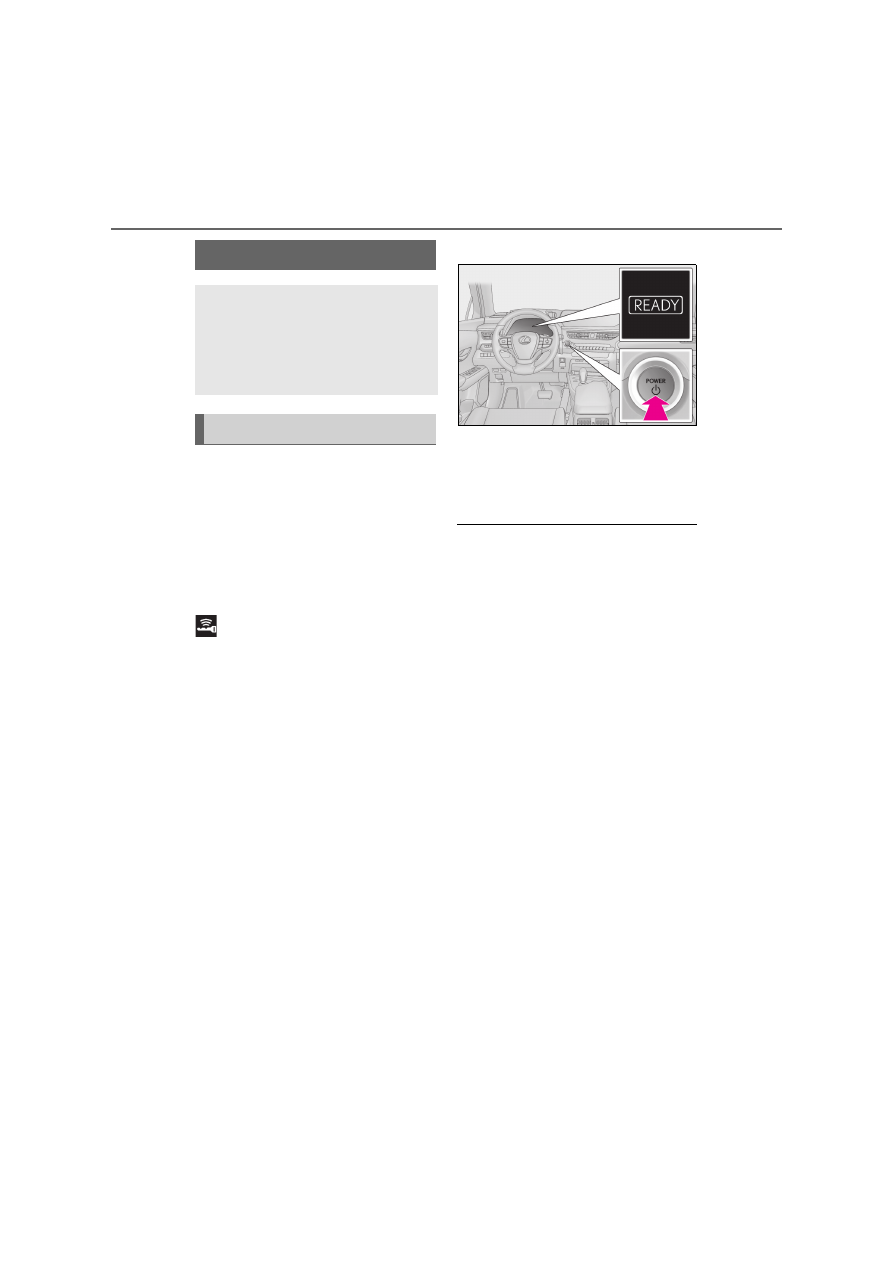
Press the power switch shortly and 
firmly.

When operating the power switch, one 

short, firm press is enough.

It is not necessary to press and hold the 

switch.

If the “READY” indicator turns on, the EV 

system will operate normally.

Continue depressing the brake pedal until 

the “READY” indicator is illuminated.

The EV system can be started from any 

power switch mode.

5

Check that the “READY” indicator 
is illuminated.

The vehicle will not move when the 

“READY” indicator is off.

Q

Power switch illumination

According to the situation, the power 

switch illumination operates as follows.

O

When a front door is opened, or the 

power switch mode is changed from 

ACC or ON to OFF, the power switch 

illumination slowly blinks.

O

When depressing the brake pedal with 

carrying the electronic key on your per-

son, the power switch illumination rapidly 

blinks.

O

When the power switch is in ACC or 

ON, the power switch illumination illumi-

nates.

Q

If the EV system does not start

O

The immobilizer system may not have 

been deactivated. (

P.71)

Contact any authorized Lexus retailer or 

Lexus authorized repairer, or any reliable 

repairer.

O

The charging cable may be connected to 

the vehicle. (

P.114

O

If a message related to start-up is shown 

on the multi-information display, read the 

message and follow the instructions.

O

The smart entry & start system may not 

be operating properly. (

P.460)

O

If the door is unlocked with the mechani-

cal key, the EV system cannot be started 

Power (ignition) switch

Performing the following opera-
tions when carrying the electronic 
key on your person starts the EV 
system or changes power switch 
modes.

Starting the EV system

225

5

5-2. Driving procedures

Dr

ivin
g

using the smart entry & start system. 

Refer to P.460 to start the EV system. 

However, if the electronic key is carried 

inside the vehicle and the doors are 

locked (

P.181), the EV system can be 

started.

Q

When the ambient temperature is low, 

such as during winter driving conditions

O

When starting the EV system, the flashing 

time of the “READY” indicator may be 

long. Leave the vehicle as it is until the 

“READY” indicator is steady on, as 

steady means the vehicle is able to move.

O

When the traction battery is extremely 

cold (below approximately -30°C [-

22°F]) under the influence of the outside 

temperature, it may not be possible to 

start the EV system. In this case, try to 

start the EV system again after the tem-

perature of the traction battery increases 

due to the outside temperature increase 

etc.

Q

Sounds and vibrations specific to an 

electric vehicle

P.80

Q

If the 12-volt battery is discharged

The EV system cannot be started using the 

smart entry & start system. Refer to P.461 to 

restart the EV system.

Q

Electronic key battery depletion

P.174

Q

Conditions affecting operation

P.197

Q

Note for the entry function

P.197

Q

Steering lock function

O

After turning the power switch off and 

opening and closing the doors, the steer-

ing wheel will be locked due to the steer-

ing lock function. Operating the power 

switch again automatically cancels the 

steering lock.

O

When the steering lock cannot be 

released, “Push POWER Switch while 

Turning the Steering Wheel in Either 

Direction” will be displayed on the multi-

information display.

Check that the shift position is in P. Press 

the power switch shortly and firmly while 

turning the steering wheel left and right.

O

To prevent the steering lock motor from 

overheating, operation of the motor may 

be suspended if the EV system is turned 

on and off repeatedly in a short period of 

time. In this case, refrain from operating 

the EV system. After about 10 seconds, 

the steering lock motor will resume func-

tioning.

Q

If the “READY” indicator does not 

come on

In the event that the “READY” indicator 

does not come on even after performing 

the proper procedures for starting the vehi-

cle, contact any authorized Lexus retailer 

or Lexus authorized repairer, or any reli-

able repairer immediately.

Q

If the EV system is malfunctioning

P.84

Q

Electronic key battery

P.414

Q

Operation of the power switch

O

If the switch is not pressed shortly and 

firmly, the power switch mode may not 

change or the EV system may not start.

O

If attempting to restart the EV system 

immediately after turning the power 

switch off, the EV system may not start in 

some cases. After turning the power 

switch off, please wait a few seconds 

before restarting the EV system.

Q

Customization

If the smart entry & start system has been 

deactivated in a customized setting, refer to 

226

5-2. Driving procedures

P.458.

1

Stop the vehicle completely.

2

If the parking brake is in manual 
mode, set the parking brake. 
(

P.234)

3

Press the P position switch. 
(

P.229)

Check that the shift position indicator 

shows P and the parking brake indicator is 

illuminated.

4

Press the power switch.

The EV system will stop, and the meter dis-

play will be extinguished (the shift position 

indicator will be extinguished a few sec-

onds after the meter display).

5

Release the brake pedal and check 
that “ACCESSORY” or “IGNI-
TION ON” is not shown on the 
meter.

Q

When the shift control system malfunc-

tions

When attempting to turn the power switch 

off while there is a malfunction in the shift 

control system, the power switch mode may 

change to ACC. In this case, ACC may be 

turned off by applying the parking brake 

and pressing the power switch again. If 

there is a malfunction in the system, have 

the vehicle inspected by any authorized 

Lexus retailer or Lexus authorized repairer, 

or any reliable repairer immediately.

Q

Automatic P position selection function

P.230

WARNING

Q

When starting the EV system

Always start the EV system while sitting 

in the driver’s seat. Do not depress the 

accelerator pedal while starting the EV 

system under any circumstances.

Doing so may cause an accident result-

ing in death or serious injury.

Q

Caution while driving

If EV system failure occurs while the 

vehicle is moving, do not lock or open 

the doors until the vehicle reaches a safe 

and complete stop. Otherwise, the steer-

ing lock function will activate and this 

may lead to an accident, resulting in 

death or serious injury.

NOTICE

Q

When starting the EV system

If the EV system becomes difficult to 

start, have your vehicle checked by any 

authorized Lexus retailer or Lexus 

authorized repairer, or any reliable 

repairer immediately.

Q

Symptoms indicating a malfunction 

with the power switch

If the power switch seems to be operat-

ing somewhat differently than usual, such 

as the switch sticking slightly, there may 

be a malfunction. Contact any autho-

rized Lexus retailer or Lexus authorized 

repairer, or any reliable repairer immedi-

ately.

Stopping the EV system

227

5

5-2. Driving procedures

Dr

ivin
g

Modes can be changed by pressing 
the power switch with the brake pedal 
released. (The mode changes each 
time the switch is pressed.)

1

OFF

The emergency flashers can be used.

2

ACC

Some electrical components such as the 
audio system can be used.
“ACCESSORY” will be displayed on the 
meter.

3

ON

All electrical components can be used. 
“IGNITION ON” will be displayed on the 
meter.

Q

Auto power off function

If the vehicle is left in ACC for more than 

20 minutes or ON (the EV system is not 

operating) for more than an hour with the 

shift position in P, the power switch will 

automatically turn off. However, this func-

tion cannot entirely prevent the 12-volt bat-

tery discharge. Do not leave the vehicle 

with the power switch in ACC or ON for 

long periods of time when the EV system is 

not operating.

WARNING

Q

Stopping the EV system in an emer-

gency

O

If you want to stop the EV system in an 

emergency while driving the vehicle, 

press and hold the power switch for 

more than 2 seconds, or press it briefly 

3 times or more in succession. 

(

P.424)

However, do not touch the power 

switch while driving except in an emer-

gency. Turning the EV system off while 

driving will not cause loss of steering 

or braking control, however, power 

assist to the steering will be lost. This 

will make it more difficult to steer 

smoothly, so you should pull over and 

stop the vehicle as soon as it is safe to 

do so.

O

If the power switch is operated while 

the vehicle is running, a warning mes-

sage will be shown on the multi-infor-

mation display and a buzzer sounds.

O

When restarting the EV system after 

an emergency shutdown, press the 

power switch.

Changing power switch modes

228

5-2. Driving procedures

Q

Restraining sudden start (Drive-Start 

Control)

P.217

Q

If a message about a shift operation is 

shown

To prevent the shift position from being 

selected incorrectly or the vehicle from 

moving unexpectedly, the shift position may 

be changed automatically or operating the 

shift lever may be required. In this case, 

change the shift position following the mes-

sages on the multi-information display.

Q

After recharging/reconnecting the 12-

volt battery

P.395

NOTICE

Q

To prevent 12-volt battery discharge

O

Do not leave the power switch in ACC 

or ON for long periods of time without 

the EV system on.

O

If “ACCESSORY” or “IGNITION 

ON” is displayed on the multi-informa-

tion display while the EV system is not 

operating, the power switch is not 

OFF. Exit the vehicle after turning the 

power switch off.

Transmission

Select the shift position depending 
on your purpose and situation.

Shift position purpose and func-
tions

Shift position

Objective or function

P

Parking the vehicle/start-

ing the EV system

R

Reversing

N

Neutral 

(Condition in which the 

power is not transmitted)

D

Normal driving

B

Regenerative braking 

power selection mode 

driving

229

5

5-2. Driving procedures

Dr

ivin
g

Shift lever

Operate the shift lever gently and securely 
in the direction of the arrow on the shift 
position indicator.
To shift to N, slide the shift lever in the 
direction of the arrow and hold it.
Release the shift lever after each shifting 
operation to allow it to return to its regular 

position (

).

Shifting to B is only possible when the shift 
position is in D.
When shifting from P to N, D or R, from N, 
D, B or R to P, from D or B to R, or from R 
to D, ensure that the brake pedal is being 
depressed and the vehicle is stationary.

Shift position indicator

Meter display:
The current shift position is illuminated.
Shift lever display:
The current shift position is illuminated.
When selecting the shift position, make 
sure that the shift position has been 
changed to the desired position by check-
ing the shift position indicator provided on 
the instrument cluster.

P position switch

Fully stop the vehicle and set the parking 
brake, and then press the P position switch.
When the shift position is changed to P, the 
switch illuminates.
Check that the shift position indicator 
shows P.

Q

Changing the shift position in each 

power switch mode

O

The shift position cannot be changed 

when the power switch is in ACC or off.

O

When the power switch is in ON, if the 

“READY” indicator is not illuminated, the 

shift position can only be changed to N.

WARNING

Q

When driving on slippery road sur-

faces

Be careful of sudden acceleration, as this 

could result in the vehicle skidding to the 

side or spinning.

NOTICE

Q

Situations where shift control system 

malfunctions are possible

If any of the following situations occur, 

shift control system malfunctions are 

possible. Immediately stop the vehicle in 

a safe place on level ground, apply the 

parking brake, and then contact any 

authorized Lexus retailer or Lexus 

authorized repairer, or any reliable 

repairer.

O

When the warning message indicating 

the shift control system malfunction 

appears on the multi-information dis-

play. (

P.441)

O

The display indicates that no shift posi-

tion is selected for more than a few 

seconds.

Shift position display and how to 
change the shift position

A

B

C

230

5-2. Driving procedures

O

When the “READY” indicator is illumi-

nated, the shift position can be changed 

from P to D, N, or R.

O

When the “READY” indicator is flashing, 

the shift position cannot be changed from 

P to any other position, even if the shift 

lever is operated. Operate the shift lever 

again after the “READY” indicator 

changes from flashing to illuminated.

Q

Shifting the shift position from P to other 

positions

O

While depressing the brake pedal firmly, 

operate the shift lever. If the shift lever is 

operated without depressing the brake 

pedal, the buzzer will sound and the shift-

ing operation will be disabled.

O

When selecting the shift position, make 

sure that the shift position has been 

changed to the desired position by 

checking the shift position indicator pro-

vided on the instrument cluster.

O

The shift position cannot be changed 

from P to B directly.

Q

The shift position cannot be changed 

when

In the following situations, a buzzer will 

sound to inform you that the shift position 

cannot be changed. Use the appropriate 

operation to attempt to change the shift 

position again.

O

When attempting to change the shift 

position from P with the brake pedal not 

depressed

O

When attempting to change the shift 

position from P with the accelerator 

pedal depressed

O

When attempting to change the shift 

position from N while stopped or driving 

at an extremely low speed with the brake 

pedal not depressed

O

When attempting to change the shift 

position from N while stopped or driving 

at an extremely low speed with the accel-

erator pedal depressed

O

When attempting to change the shift 

position from P or N to B

O

When the P position switch is pressed 

while driving

When driving at an extremely low speed, 

the shift position may change to P.

Q

The shift position automatically changes 

to N when

In the following situations, a buzzer will 

sound to inform you that the shift position 

has been changed to N. Use the appropri-

ate operation to attempt to change the shift 

position again.

O

When attempting to change the shift 

position to R while the vehicle is moving 

forward

When driving at a low speed, the shift posi-
tion may change to R.

O

When attempting to change the shift 

position to D while the vehicle is moving 

backward

When driving at a low speed, the shift posi-
tion may change to D.

O

When attempting to change the shift 

position from R to B

Q

If the N shift position is selected while 

driving

If the shift lever is moved to N while driving 

above a certain speed, the shift position will 

change to N without holding the shift lever 

in the N position. In this situation, a buzzer 

will sound and a message will be displayed 

on the multi-information display to inform 

you that the shift position has been changed 

to N.

Q

Automatic P position selection function

In the following situations, the shift position 

is automatically changed to P.

O

When pressing the power switch with the 

vehicle stopped while the power switch is 

in ON and the shift position is in a posi-

tion other than P (after the shift position 

has been changed to P, the power switch 
will turn off)

*

O

If the driver’s door is opened and all of the 

following conditions are met, while the 

shift position is in a position other than P:

• The power switch is in ON.

• The driver is not wearing the seat belt.

231

5

5-2. Driving procedures

Dr

ivin
g

• The brake pedal is not depressed.
To start off the vehicle after the shift position 
is changed to P, operate the shift lever 
again.

O

When the vehicle is stopped after the EV 

system has been stopped in an emer-

gency while driving

O

When voltage of the 12-volt battery 

drops while the shift position is in a posi-

tion other than P

*

: When the power switch is pressed while 

driving at extremely slow speeds, such as 
immediately before stopping the vehicle, 
the shift position may automatically 
change to P. Make sure that the vehicle is 
completely stopped before pressing the 
power switch.

Q

If the shift position cannot be shifted 

from P

There is a possibility that the 12-volt battery 

is discharged. Check the 12-volt battery in 

this situation. (

P.461)

Q

Customization

Some functions can be customized. 

(

P.481)

Performing the following operations 
allows the power switch to be set to 
ACC with the shift position held in 
N.

WARNING

Q

For the shift lever

O

Do not remove the shift lever knob or 

use anything but a genuine Lexus shift 

lever knob. Also, do not hang anything 

on the shift lever. 

Doing so could prevent the shift lever 

from returning to position, causing 

unexpected accidents to occur when 

the vehicle is in motion.

O

In order to prevent the shift position 

from accidentally being changed, do 

not touch the shift lever when not using 

it.

Q

P position switch

O

Do not press the P position switch 

while the vehicle is moving.

If the P position switch is pressed when 

driving at very low speeds (for exam-

ple, directly before stopping the vehi-

cle), the vehicle may stop suddenly 

when the shift position switches to P, 

which could lead to an accident.

O

In order to prevent the shift position 

from accidentally being changed, do 

not touch the P position switch when 

not using it.

NOTICE

Q

Notes regarding shift lever and P 

position switch operation

Avoid repeatedly operating the shift 

lever and P position switch in quick suc-

cession. 

The system protection function may acti-

vate and it will not be temporarily possi-

ble to shift the shift position to a position 

other than P. If this happens, please wait 

for a while before attempting to change 

the shift position again.

Q

When exiting the vehicle (driver’s 

seat only)

Check that the shift position indicator 

shows P and that the parking brake indi-

cator is illuminated before opening the 

door and exiting the vehicle.

When the power switch is 
changed to ACC with the shift 
position held in N

232

5-2. Driving procedures

1

Operate the shift lever and change 
the shift position to N when the EV 
system is operating.

2

Return the shift lever to its regular 
position (

).

3

Operate the shift lever to N and 
hold it there until the buzzer 
sounds.

4

Press the power switch within 5 
seconds after the buzzer sounds.

The power switch will be set to ACC with 
the shift position in N.

*

Make sure to check that the buzzer sounds 

and “Holding N Push P Switch When 

Done” is displayed on the multi-informa-

tion display.

To change to a shift position other 
than N, press the P position switch. 
The shift position will be changed to 
P.

Even if the EV system is not operat-
ing, by operating the shift lever and 
the power switch, the power switch 
may be changed to ACC with the 
shift position held in N. Make sure 
that the EV system is operating 
before performing the operation.

*

: To keep this state, do not operate the 

power switch. If the power switch is 
operated repeatedly, the power switch 
will turn off after the shift position has 
automatically changed to P.

Q

Driving mode

P.327

Shifting the shift position to B and 
operating the paddle shift switches 
enables driving with a fixed regenera-
tive braking power when the accelera-
tion pedal is released or the brake 
pedal is depressed.
The regenerative braking power can 
be selected from 4 levels.
The regenerative braking power 
becomes strong as the number of the 

arrows 

 of 

 (regenerative brak-

ing power indicator) on the multi-infor-
mation display increases.

Q

To temporarily increase the regenera-

tive braking power

Operating the “-” paddle shift switch while 

driving with the shift position in D increases 

the regenerative braking power. At this 

time, the regenerative braking power indi-

cator will be displayed on the multi-infor-

mation display.

Selecting the driving mode

Operation method for regener-
ative braking power selection 
mode

233

5

5-2. Driving procedures

Dr

ivin
g

The temporarily increase regenerative 

braking power is automatically deactivated 

in the following situations.

O

The vehicle is stopped

O

The accelerator pedal is continuously 

depressed for a certain period of time

O

The shift position is shifted to a position 

other than D

O

The “+” paddle shift switch is pressed and 

held

Q

Using regenerative brake

O

When driving at a high speed, the feeling 

of deceleration with regenerative brak-

ing is less than that on conventional vehi-

cles.

O

If “Regenerative Braking Limited Press 

Brake to Decelerate” appears on the 

multi-information display, firmly depress 

the brake pedal to decelerate the vehicle. 

(

P.442)

The turn signal lever can be used to 
show the following intentions of the 
driver.

1

Right turn

2

Lane change to the right (move the 
lever partway and release it)

The right hand signals will flash 3 times.

3

Lane change to the left (move the 
lever partway and release it)

The left hand signals will flash 3 times.

4

Left turn

Q

Turn signals can be operated when

The power switch is in ON.

Q

If the indicator flashes faster than usual

Check that a light bulb in the front or rear 

turn signal lights has not burned out.

Turn signal lever

Operating instructions

234

5-2. Driving procedures

Q

If the turn signals stop flashing before a 

lane change has been performed

Operate the lever again.

Q

Using the manual mode

The parking brake can be set and 
released manually.

1

Push the switch to set the parking 
brake

The parking brake indicator light will turn 
on.
Press and hold the parking brake switch if 
an emergency occurs and it is necessary to 
operate the parking brake while driving.

2

Pull the switch to release the park-
ing brake

Parking brake

The parking brake can be set or 
released automatically or manually. 
In automatic mode, the parking 
brake can be set or released auto-
matically according to shift lever 
operation. Also, even in automatic 
mode, the parking brake can be set 
or released manually.

Operating instructions

235

5

5-2. Driving procedures

Dr

ivin
g

• Operate the parking brake switch while 

depressing the brake pedal.

• Using the parking brake automatic 

release function, the parking brake can 
be released by depressing the accelera-
tor pedal. When using this function, 
slowly depress the accelerator pedal.

Make sure that the parking brake indicator 
light turn off.

Q

Turning the automatic mode on

While the vehicle is stopped, press and 
hold the parking brake switch until a 
message is shown on the multi-infor-
mation display

When the automatic mode is turned 
on, the parking brake operates as fol-
lows.

When the shift position is shifted 
from P, the parking brake will be 
released, and the parking brake 
indicator light will turn off.

When the shift position is shifted to 
P, the parking brake will be set, and 
the parking brake indicator light will 
turn on.

Operate the shift lever and P position 
switch with the vehicle stopped and the 
brake pedal depressed.

Q

Turning the automatic mode off

While the vehicle is stopped, pull and 
hold the parking brake switch until a 
message is shown on the multi-infor-
mation display

Q

Parking brake operation

O

When the power switch is not in ON, the 

parking brake cannot be released using 

the parking brake switch.

O

When the power switch is not in ON, 

automatic mode (automatic brake setting 

and releasing) is not available.

Q

Parking brake automatic release func-

tion

O

When the shift position is shifted from P, 

the parking brake will be released in 

automatic mode.

O

When all of the following conditions are 

met in manual mode, the parking brake 

can be released by depressing the accel-

erator pedal.

• The driver’s door is closed

• The driver is wearing the seat belt

• The shift position is in D, B or R

Q

If “Parking Brake Temporarily Unavail-

able” is displayed on the multi-informa-

tion display

If the parking brake is operated repeatedly 

over a short period of time, the system may 

restrict operation to prevent overheating. If 

this happens, refrain from operating the 

parking brake. Normal operation will return 

after about 1 minute.

236

5-2. Driving procedures

Q

If “Parking Brake Unavailable” or “EPB 

Unavailable” is displayed on the multi-

information display

Operate the parking brake switch. If the 

message does not disappear after operat-

ing the switch several times, the system may 

be malfunctioning. Have the vehicle 

inspected by any authorized Lexus retailer 

or Lexus authorized repairer, or any reli-

able repairer.

Q

Parking brake operation sound

When the parking brake operates, a motor 

sound (whirring sound) may be heard. This 

does not indicate a malfunction.

Q

Parking brake indicator light

O

Depending on the power switch mode, 

the parking brake indicator light will turn 

on and stay on as described below: 

ON: Comes on until the parking brake is 

released. 

Not in ON: Stays on for approximately 15 

seconds.

O

When the power switch is turned off with 

the parking brake set, the parking brake 

indicator light will stay on for about 15 

seconds. This does not indicate a mal-

function.

Q

When the parking brake switch mal-

functions

Automatic mode (automatic brake setting 

and releasing) will be turned on automati-

cally.

Q

Parking the vehicle

P.216

Q

Parking brake engaged warning buzzer

A buzzer will sound if the vehicle is driven 

with the parking brake engaged. “EPB 

Applied” is displayed on the multi-informa-

tion display (with the vehicle reached a 

speed of 5 km/h [3 mph]).

Q

If the brake system warning light comes 

on

P.432

Q

Usage in winter time

P.333

WARNING

Q

When parking the vehicle

Do not leave a child in the vehicle alone. 

The parking brake may be released unin-

tentionally and there is the danger of the 

vehicle moving that may lead to an acci-

dent resulting in death or serious injury.

NOTICE

Q

When parking the vehicle

Before you leave the vehicle, shift the 

shift position to P, set the parking brake 

and make sure that the vehicle does not 

move.

Q

When the system malfunctions

Stop the vehicle in a safe place and 

check the warning messages.

Q

When the parking brake cannot be 

released due to a malfunction

Driving the vehicle with the parking 

brake set will lead to brake components 

overheating, which may affect braking 

performance and increase brake wear.
Have the vehicle inspected by any autho-

rized Lexus retailer or Lexus authorized 

repairer, or any reliable repairer immedi-

ately if this occurs.

237

5

5-2. Driving procedures

Dr

ivin
g

Turns the brake hold system on

The brake hold standby indicator (green) 

 comes on. While the system is holding 

the brake, the brake hold operated indica-
tor (yellow) 

 comes on.

Q

Brake hold system operating conditions

The brake hold system cannot be turned on 

in the following conditions:

O

The driver’s door is not closed.

O

The driver is not wearing the seat belt.

O

The parking brake is engaged.

If any of the conditions above are detected 

when the brake hold system is enabled, the 

system will turn off and the brake hold 

standby indicator light will go off. In addi-

tion, if any of the conditions are detected 

while the system is holding the brake, a 

warning buzzer will sound and a message 

will be shown on the multi-information dis-

play. The parking brake will then be set 

automatically.

Q

Brake hold function

O

If the brake pedal is left released for a 

period of about 3 minutes after the sys-

tem has started holding the brake, the 

parking brake will be set automatically. In 

this case, a warning buzzer sounds and a 

message is shown on the multi-informa-

tion display.

O

To turn the system off while the system is 

holding the brake, firmly depress the 

brake pedal and press the button again.

O

The brake hold function may not hold the 

vehicle when the vehicle is on a steep 

incline. In this situation, it may be neces-

sary for the driver to apply the brakes. A 

warning buzzer will sound and the multi-

information display will inform the driver 

of this situation. If a warning message is 

shown on the multi-information display, 

read the message and follow the instruc-

tions.

Q

When the parking brake is set automati-

cally while the system is holding the 

brakes

Perform any of the following operations to 

release the parking brake.

O

Depress the accelerator pedal. (The 

parking brake will not be released auto-

matically if the seat belt is not fastened.)

O

Operate the parking brake switch with 

the brake pedal depressed.

Make sure that the parking brake indicator 
light goes off. (

P.234)

Q

When an inspection at any authorized 

Lexus retailer or Lexus authorized 

repairer, or any reliable repairer is nec-

essary

When the brake hold standby indicator 

(green) does not illuminate even when the 

brake hold switch is pressed with the brake 

hold system operating conditions met, the 

system may be malfunctioning. Have the 

Brake Hold

The brake hold system keeps the 
brake applied when the shift posi-
tion is in D, B or N with the system 
on and the brake pedal has been 
depressed to stop the vehicle. The 
system releases the brake when the 
accelerator pedal is depressed with 
the shift position in D or B to allow 
smooth start off.

Enabling the system

A

B

238

5-2. Driving procedures

vehicle inspected at any authorized Lexus 

retailer or Lexus authorized repairer, or any 

reliable repairer.

Q

If “Brake Hold Fault Depress Brake to 

Deactivate Visit Your Dealer” or 

“Brake Hold Malfunction Visit Your 

Dealer” is displayed on the multi-infor-

mation display

The system may be malfunctioning. Have 

the vehicle inspected by any authorized 

Lexus retailer or Lexus authorized repairer, 

or any reliable repairer immediately.

Q

Warning messages and buzzers

Warning messages and buzzers are used to 

indicate a system malfunction or to inform 

the driver of the need for caution. If a warn-

ing message is shown on the multi-informa-

tion display, read the message and follow 

the instructions.

Q

If the brake hold operated indicator 

flashes

P.434

WARNING

Q

When the vehicle is on a steep incline

When using the brake hold system on a 

steep incline, exercise caution. The brake 

hold function may not hold the vehicle in 

such a situation.

Q

When stopped on a slippery road

The system cannot stop the vehicle when 

the gripping ability of the tires has been 

exceeded. Do not use the system when 

stopped on a slippery road.

NOTICE

Q

When parking the vehicle

The brake hold system is not designed 

for use when parking the vehicle for a 

long period of time. Turning the power 

switch off while the system is holding the 

brake may release the brake, which 

would cause the vehicle to move. When 

operating the power switch, depress the 

brake pedal, shift the shift position to P 

and set the parking brake.

239

5

5-2. Driving procedures

Dr

ivin
g

Press the ASC switch.

The indicator on the switch will turn on.
Press the ASC switch again to turn the 
ASC system off.

ASC (Active Sound Con-
trol/Acceleration Sound 
Control)

The ASC system directs certain 
sounds from the front of the cabin 
to the vehicle interior, and harmo-
nizes these sounds with the actual 
sound of the electric motor in order 
to allow the driver to feel accelera-
tion more strongly.

Turning ASC system on


Content      ..     11      12      13      14     ..