Lexus LS500h (2022 year). Manual in english - page 22
 

  Index      Manuals     Lexus LS500h (2022 year). Manual in english


Search            copyright infringement  


Content      ..     20      21      22      23     ..


Lexus LS500h (2022 year). Manual in english - page 22


366

5-3. Using the air conditioning system and defogger

LEXUS LS500h Owner's Manual

screen. (

P.360)

Select “DUAL” on the option con-
trol screen.

Adjust the passenger’s side tem-
perature setting.

The indicator on the main control screen 
comes on when the “DUAL” mode is on.

Vehicles with 4-ZONE climate con-
trol

To turn on the “4-ZONE” mode, per-
form any of the following procedures:

Select “4-ZONE” on the main con-
trol screen. (

P.360)

Select “4-ZONE” on the option 
control screen.

Adjust a passenger seat tempera-
ture setting.

The indicator on the main control screen 
comes on when the “4-ZONE” mode is on.

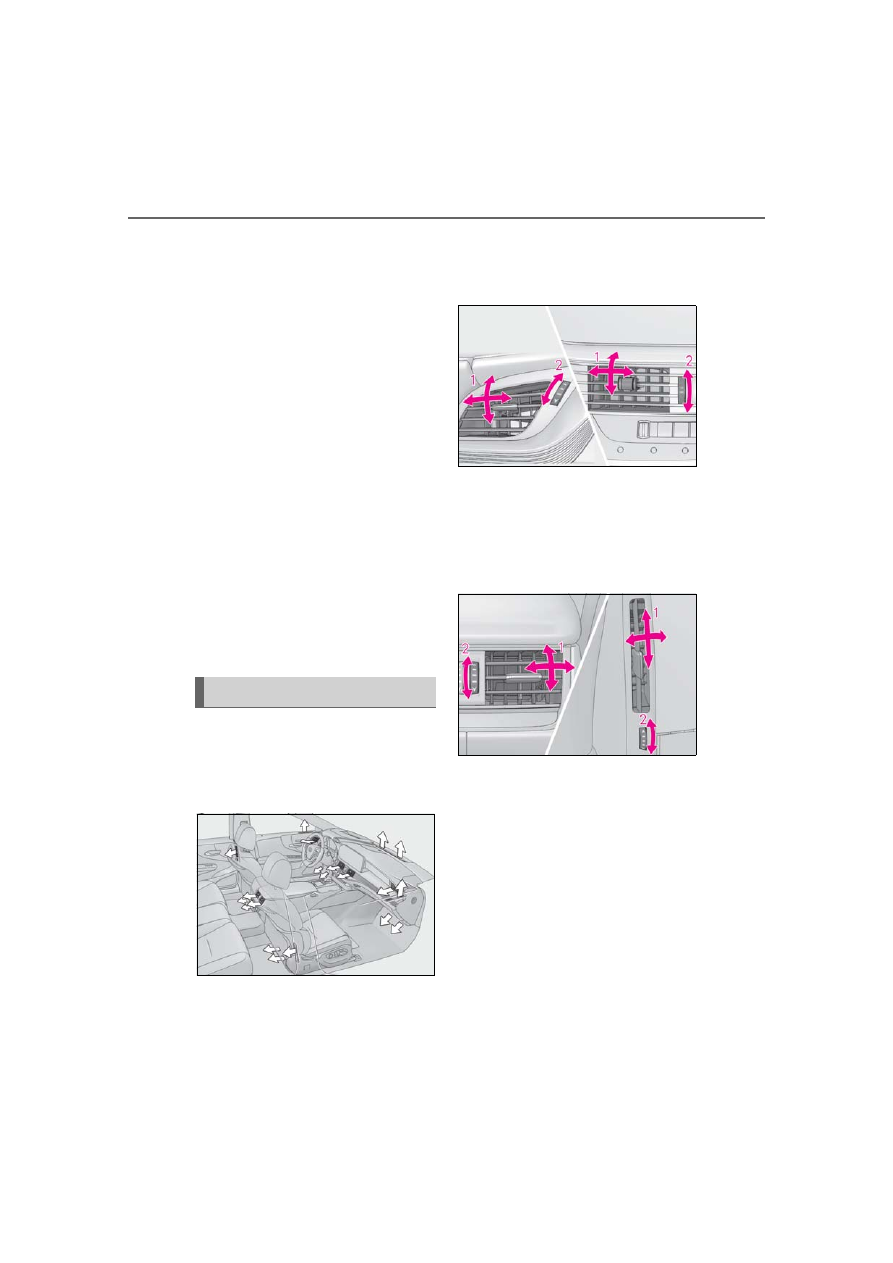
Location of air outlets

The air outlets and air volume changes 
according to the selected air flow 
mode.

Adjusting the position of and open-
ing and closing the air outlets

Front center/front side

1

Direct air flow to the left or right, up 
or down

2

Turn the knob to open or close the 
vent

Rear center/rear side

1

Direct air flow to the left or right, up 
or down

2

Turn the knob to open or close the 
vent

Air outlet layout and operations

367

5-3. Using the air conditioning system and defogger

LEXUS LS500h Owner's Manual

5

In

te

rio

r f

ea

tu

re

s

*

: If equipped

Center Display

Press the “MENU” button on the 
Remote Touch to display the main 

menu and move the cursor to 

 to 

display the climate control shortcut 

buttons. Then, select 

 to display the 

rear air conditioning control screen.

This system can also be operated by the 
touch screen.

Adjust the left side rear seat tem-
perature setting
Select the left side rear seat air flow 
mode

WARNING

To prevent the windshield defogger 

from operating improperly

Do not place anything on the instrument 

panel which may cover the air outlets. 

Otherwise, air flow may be obstructed, 

preventing the windshield defoggers 

from defogging.

Rear automatic air condi-
tioning system

*

The air outlets and fan speed are 
automatically adjusted according 
to the temperature setting.

The rear air conditioning system 
can be operated using the Center 
Display and Rear Multi Operation 
Panel.

Rear air conditioning control 
screen

A

B

368

5-3. Using the air conditioning system and defogger

LEXUS LS500h Owner's Manual

: Air flows to the upper body

: Air flows to the upper body and feet

: Air flows to the feet

Adjust the rear seats fan speed set-
ting
Select the right side rear seat air 
flow mode
Adjust the right side rear seat tem-
perature setting
Switch the following functions on 
and off

“REAR Off”: Turn the rear seats fan off
“REAR AUTO”: Set the rear seats auto-
matic mode on/off (

P.369)

: Disables operation of the rear air 

conditioning system using the Rear Multi 
Operation Panel

Rear Multi Operation Panel

Touch “Climate” on the home screen to 
display the rear air conditioning con-
trol screen.(

P.352)

Some functions of the rear air condi-
tioning system can also be operated 
from the shortcut screen.

The Rear Multi Operation Panel cannot be 
used to operate the rear air conditioning 
system if the function is disabled.

Rear air conditioning control screen

Adjust the left side rear seat tem-
perature setting
Select the left side rear seat air flow 
mode

: Air flows to the upper body

: Air flows to the upper body and feet

: Air flows to the feet

Set the rear seats automatic mode 
on/off (

P.369)

Select the right side rear seat air 
flow mode
Turn the rear seats fan off
Adjust the right side rear seat tem-
perature setting
Adjust the rear seats fan speed set-
ting

Shortcut screen

Adjust the left side rear seat tem-

C

D

E

F

A

B

C

D

E
F

G

A

369

5-3. Using the air conditioning system and defogger

LEXUS LS500h Owner's Manual

5

Interio

r fe

atures

perature setting
Adjust the right side rear seat tem-
perature setting

Center Display

1

Select “REAR AUTO” on the rear 
air conditioning control screen. 
(

P.367)

2

To stop the operation, select 
“REAR Off” on the rear air condi-
tioning control screen. (

P.367)

If the fan speed setting or air flow 
modes are operated, the automatic 
mode indicator goes off. However, 
automatic mode for functions other 
than that operated is maintained.

Rear Multi Operation Panel

1

Select “AUTO” on the rear air con-
ditioning control screen. (

P.368)

2

To stop the operation, select “OFF” 
on the rear air conditioning control 
screen. (

P.367)

If the fan speed setting or air flow 
modes are operated, the automatic 
mode indicator goes off. However, 
automatic mode for functions other 
than that operated is maintained.

Using automatic mode

Fan speed is adjusted automatically accord-

ing to the temperature setting and the 

ambient conditions.
Therefore, the fan may stop for a while until 

warm or cool air is ready to flow immedi-

ately after “REAR AUTO” is selected or 

“AUTO” is touched.
Cool air may blow around the upper body 

even when the heater is on due to sunlight.

The temperature setting of the rear 
seats can be adjusted using the follow-
ing methods:

When the “4-ZONE” indicator is 
off: Adjust the driver’s seat tempera-
ture.

Adjust the temperature setting of each 
rear seat using the Center Display or Rear 
Multi Operation Panel.

Adjust the temperature setting of 
each rear seat using the Center Dis-
play (rear air conditioning control 
screen) or Rear Multi Operation 
Panel.

The temperature setting of each rear seat 
can be changed independently.

Location of air outlets

The air outlets and air volume changes 
according to the selected air flow 
mode.

Using automatic mode

B

Adjusting the temperature set-
ting of the rear seats

Air outlet layout and operations

370

5-3. Using the air conditioning system and defogger

LEXUS LS500h Owner's Manual

Adjusting the position of and open-
ing and closing the air outlets

Rear center outlets and rear side 
outlets

1

Direct air flow to the left or right, up 
or down

2

Turn the knob to open or close the 
vent

Roof side outlets (if equipped)

Direct air flow to the left or right, up or 
down

*

: If equipped

NOTICE

To prevent 12-volt battery discharge

Do not leave the air conditioning system 

on longer than necessary when the 

hybrid system is off.

Heated steering wheel

*

/seat 

heaters/seat ventilators

Heated steering wheel

Warms up the grip of the steering 
wheel

Front seat heaters/Rear seat 
heaters

Warm up the seat upholstery

Front seat ventilators/Rear seat 
ventilators

Maintain good ventilation by pulling 
air through the seat upholstery

The Center Display and Rear Multi 
Operation Panel/rear control 
panel can be used to operate the 
heated steering wheel, seat heaters 
and seat ventilators.

WARNING

To prevent minor burn injuries

Care should be taken if anyone in the fol-

lowing categories comes in contact with 

the steering wheel or seats when the 

heater is on:

Babies, small children, the elderly, the 

sick and the physically challenged

Persons with sensitive skin

Persons who are fatigued

Persons who have taken alcohol or 

drugs that induce sleep (sleeping 

drugs, cold remedies, etc.)

371

5-3. Using the air conditioning system and defogger

LEXUS LS500h Owner's Manual

5

In

te

rio

r f

ea

tu

re

s

Center Display

Press the switch to display the heated 
steering wheel/front seat heater/front 
seat ventilator control screen.

Vehicles without heated steering 
wheel
Vehicles with heated steering 
wheel

The heated steering wheel/front seat 
heater/front seat ventilator control screen 
can also be displayed by pressing the 
“MENU” button on the Remote Touch and 

then moving the cursor to 

 and select-

ing 

 from the displayed shortcut menu.

To display the rear seat heater/rear seat 

ventilator control screen, select 

. (if 

equipped)

Main screen

Using the touchpad of the Remote 
Touch, select the button on the screen.

This system can also be operated by the 
touch screen.

Adjust the seat ventilator fan speed 
level

The seat ventilator can be adjusted in 3 lev-
els. (Low, Mid or Hi)

Adjust the seat heater temperature 
level

The seat heater can be adjusted in 3 levels. 
(Low, Mid or Hi)

Adjust the heated steering wheel 
temperature level

*

The heated steering wheel can be adjusted 
in 2 levels. (Low or Hi)

Change the following functions to 
automatic mode.

When the automatic mode is on, the indi-
cator illuminates on the screen.

: Left-hand side seat heater/seat 

ventilator

: Heated steering wheel

*

: Right-hand side seat heater/seat 

ventilator

*

: Available on the front seat control 

screen only

NOTICE

To prevent damage to the seat heat-

ers and seat ventilators

Do not put heavy objects that have an 

uneven surface on the seat and do not 

stick sharp objects (needles, nails, etc.) 

into the seat.

To prevent 12-volt battery discharge

Do not use the functions when the hybrid 

system is off.

Control screen

A

B

A

B

C

D

372

5-3. Using the air conditioning system and defogger

LEXUS LS500h Owner's Manual

Side screen

Display the air conditioning control 
screen: 

P.363

Adjust the front seat heater tem-
perature level

Each time the switch is selected, the tem-
perature level and level indicator (orange) 
change as follows:
AUTO

Hi

Mid

Lo

OFF

Adjust the front seat ventilator fan 
speed level

Each time the switch is selected, the fan 
speed level and level indicator (blue) 
change as follows:
AUTO

Hi

Mid

Lo

OFF

Adjust the heated steering wheel 
temperature level

Each time the switch is selected, the tem-
perature level and level indicator change 
as follows:
AUTO

Hi

Lo

OFF

Rear Multi Operation Panel (if 
equipped)

Touch “Climate” on the home screen to 
display the air conditioning control 
screen.(

P.352)

The rear seat heaters and rear seat ventila-
tors can also be operated from the short-
cut screen.
The Rear Multi Operation Panel cannot be 

used to operate the rear air conditioning 
system if the function is disabled. 
(

P.367)

Rear air conditioning control screen

Adjust the rear seat heater tem-
perature level

Each time the switch is selected, the tem-
perature level and level indicator (orange) 
change as follows:
AUTO

Hi

Mid

Lo

OFF

Adjust the rear seat ventilator fan 
speed level

Each time the switch is selected, the fan 
speed level and level indicator (blue) 
change as follows:
AUTO

Hi

Mid

Lo

OFF

Shortcut screen

Adjust the rear seat heater tem-
perature level

Each time the switch is selected, the tem-
perature level and level indicator (orange) 
change as follows:

A

B

C

D

A

B

A

373

5-3. Using the air conditioning system and defogger

LEXUS LS500h Owner's Manual

5

In

te

rio

r f

ea

tu

re

s

AUTO

Hi

Mid

Lo

OFF

Adjust the rear seat ventilator fan 
speed level

Each time the switch is selected, the fan 
speed level and level indicator (blue) 
change as follows:
AUTO

Hi

Mid

Lo

OFF

Rear control panel (if equipped)

Increases the rear seat heater tem-
perature level

The seat ventilator can be adjusted in 3 lev-
els. (Low, Mid or Hi)

Enables/Disables the automatic 
mode of the rear seat heaters
Decreases the rear seat heater 
temperature level

If this switch is selected when the rear seat 
heater temperature level is set to Lo, the 
rear seat heater will turn off.

The heated steering wheel, seat heaters 

and seat ventilators can be used when

The power switch is in ON mode.

Air conditioning system-linked control 

mode

When the seat ventilator fan speed level is 

Hi, the seat ventilator fan speed becomes 

higher according to the fan speed of the air 

conditioning system.

When the air conditioning system is 

operating in front seat concentrated air-

flow mode (S-FLOW)

If a passenger is not detected in the front 

passenger seat, the seat ventilator and seat 

heater of the front passenger’s seat will be 

turned off if on. (

P.365)

Customization

Some functions can be customized. 

(

P.513)

B

A

B

C

WARNING

To prevent overheating and minor 

burn injuries

Observe the following precautions when 

using the seat heaters.

Do not cover the seat with a blanket or 

cushion when using the seat heater.

Do not use seat heater more than nec-

essary.

374

5-4. Using the interior lights

LEXUS LS500h Owner's Manual

5-4.Using the interior lights

Rear personal lights (

P.375)

Inside door handle lights
Front personal lights (

P.375)

Front interior lights (

P.375)

Clock light
Footwell lights
Power switch light
Door trim ornament lights
Door courtesy lights
Seat belt buckle lights
Outer foot lights
Rear interior light (

P.375)

Shift lever lights

Interior lights list

Location of the interior lights

A
B
C
D

E
F

G

H

I

J

K

L

M

375

5-4. Using the interior lights

LEXUS LS500h Owner's Manual

5

Interio

r fe

atures

Turning the door position on

Press the door-linked interior light 
switch

The lights are turned on and off according 
to whether the doors are opened/closed.
When the door position is on, the indicator 

 illuminates.

Turning the lights on/off

Front

Turns the lights on/off (touch the light)

When a door is opened while the door 
position is on, the lights turn on.

Rear

On/off

The rear interior lights turn on/off together 
the front interior lights.
When a door is opened while the door 
position is on, the lights turn on.

Using the Rear Multi Operation 
Panel (if equipped)

1

Display the home screen and then 
touch “Shade/Lamp” or “Lamp”. 
(

P.352)

2

To turn on/off the rear interior 
lights, touch the respective button.

Turning the lights on/off

Front

Turns the lights on/off (touch the light)

When a door is opened while the door 
position is on, the lights turn on.

Operating the interior lights

A

Operating the personal lights

376

5-4. Using the interior lights

LEXUS LS500h Owner's Manual

Rear

On/dimmed/off

When a door is opened while the door 
position is on, the lights turn on.

Using the Rear Multi Operation 
Panel (if equipped)

1

Display the home screen and then 
touch “Shade/Lamp” or “Lamp”. 
(

P.352)

2

To turn on/dimmed/off the rear per-
sonal lights, touch the respective 
button.

Illuminated entry system

The lights automatically turn on/off accord-

ing to the power switch mode, the presence 

of the electronic key, whether the doors are 

locked/unlocked, and whether the doors 

are open/closed.

To prevent the 12-volt battery from 

being discharged

If the interior lights remain on when the 

power switch is turned off, the lights will go 

off automatically after 20 minutes.

When front interior light or front per-

sonal lights do not respond as normal

When water, dirt, etc., have adhered to 

the lens surface

When operated with a wet hand

When wearing gloves, etc.

The interior lights may turn on automati-

cally when

If any of the SRS airbags deploy (inflate) or 

in the event of a strong rear impact, the inte-

rior lights will turn on automatically.
The interior lights will turn off automatically 

after approximately 20 minutes.
The interior lights can be turned off manu-

ally. However, in order to help prevent fur-

ther collisions, it is recommended that they 

be left on until safety can be ensured.
(The interior lights may not turn on auto-

matically depending on the force of the 

impact and conditions of the collision.)

Customization

Some functions can be customized. 

(

P.513)

NOTICE

To prevent 12-volt battery discharge

Do not leave the lights on longer than 

necessary when the hybrid system is off.

377

5-4. Using the interior lights

LEXUS LS500h Owner's Manual

5

In

te

rio

r f

ea

tu

re

s

NOTICE

Removing light lenses

Never remove the lens for the front inte-

rior light and front personal lights. Other-

wise, the lights will be damaged. If a lens 

needs to be removed, contact your Lexus 

dealer.

378

5-5. Using the storage features

LEXUS LS500h Owner's Manual

5-5.Using the storage features

Vehicles without power rear seat

Glove box (

P.379)

Auxiliary boxes (

P.382)

Cup holders (

P.380)

Console box (

P.381)

Coin holder (

P.380)

List of storage features

Location of the storage features

A
B
C
D

E

379

5-5. Using the storage features

LEXUS LS500h Owner's Manual

5

In

te

rio

r f

ea

tu

re

s

Vehicles with power rear seat

Glove box (

P.379)

Auxiliary boxes (

P.382)

Cup holders (

P.380)

Console box (

P.381)

Coin holder (

P.380)

1

Open (push button)

2

Unlock with the mechanical key

3

Lock with the mechanical key

A

B

C

D

E

WARNING

Items that should not be left in the 

storage spaces

Do not leave glasses, lighters or spray 

cans in the storage spaces, as this may 

cause the following when cabin tempera-

ture becomes high:

Glasses may be deformed by heat or 

cracked if they come into contact with 

other stored items.

Lighters or spray cans may explode. If 

they come into contact with other 

stored items, the lighter may catch fire 

or the spray can may release gas, 

causing a fire hazard.

Glove box

380

5-5. Using the storage features

LEXUS LS500h Owner's Manual

Glove box light

The glove box light turns on when the tail 

lights are on.

Trunk opener main switch

The trunk opener main switch is located in 

the glove box. (

P.115)

Removing the partition

The partition inside the glove box can be 

removed by pulling it.

Push the button.

Coin holder light

The coin holder light turns on when the tail 

lights are on.

Front

Press in and release the button.

Rear (vehicles without power rear 
seat)

Pull the armrest down then push in the 
cup holder trim to extend the cup hold-
ers.

Rear (vehicles with power rear seat)

Press in and release the button.

WARNING

Caution while driving

Keep the glove box closed. In the event 

of sudden braking or sudden swerving, 

an accident may occur due to an occu-

pant being struck by the open glove box 

or the items stored inside.

Coin holder

WARNING

Caution while driving

Keep the coin holder closed.

Injuries may result in the event of an acci-

dent or sudden braking.

Cup holders

381

5-5. Using the storage features

LEXUS LS500h Owner's Manual

5

In

te

rio

r f

ea

tu

re

s

When stowing the rear cup holders 

(vehicles without power rear seat)

Stow the cup holder with the armrest down. 

The cup holder cannot be stowed if the 

armrest is not down.

Press a button to open the console box.
The console box can be opened from 
either side.

Tray in the console box

The tray can be slid and removed.

Console box light

The console box light turns on when the tail 

lights are on.

WARNING

Items unsuitable for the cup holder

Do not place anything other than cups or 

beverage cans in the cup holders.

Inappropriate items must not be stored in 

the cup holders even if the lid is closed.

Other items may be thrown out of the 

holders in the event of an accident or 

sudden braking and cause injury. If possi-

ble, cover hot drinks to prevent burns.

When not in use

Keep the cup holders closed.

Injuries may result in the event of an acci-

dent or sudden braking.

NOTICE

To prevent damage to the rear cup 

holder (vehicles without power rear 

seat)

Stow the cup holder before stowing the 

armrest.

To avoid damaging the power outlet

Close the lid of the power outlet in the 

front cup holder when the power outlet is 

not in use. Foreign objects or liquids that 

enter the power outlet may cause a short 

circuit.

Console box

WARNING

Caution while driving

Keep the console box closed.

Injuries may result in the event of an acci-

dent or sudden braking.

NOTICE

Tray

Do not insert items exceeding the height 

of the tray. Doing so may prevent open-

ing and closing of the lid.


Content      ..     20      21      22      23     ..