Lexus LC500 (2022 year). Manual in english - page 5
 

  Index      Manuals     Lexus LC500 (2022 year). Manual in english


Search            copyright infringement  


Content      ..     3      4      5      6     ..


Lexus LC500 (2022 year). Manual in english - page 5


97

2

2-1. Instrument cluster

V

eh

icle 

st

at

us

 in

fo

rm

at

ion
 an

d i

nd

ica

tor

s

Q

Opening image display

When the engine switch <power switch> is 

in ACCESSORY mode or IGNITION ON 

mode <ON mode>, the opening image is 

displayed on the multi-information display.

While the opening image is being dis-

played, the meter display cannot be 

changed even if the drive mode is changed. 

When the opening image is finished, the 

meter display for the currently selected 

mode will be displayed.

Q

When disconnecting and reconnecting 

12-volt battery terminals

Record of the maximum G-forces will be 

reset.

Q

Liquid crystal display

P.95

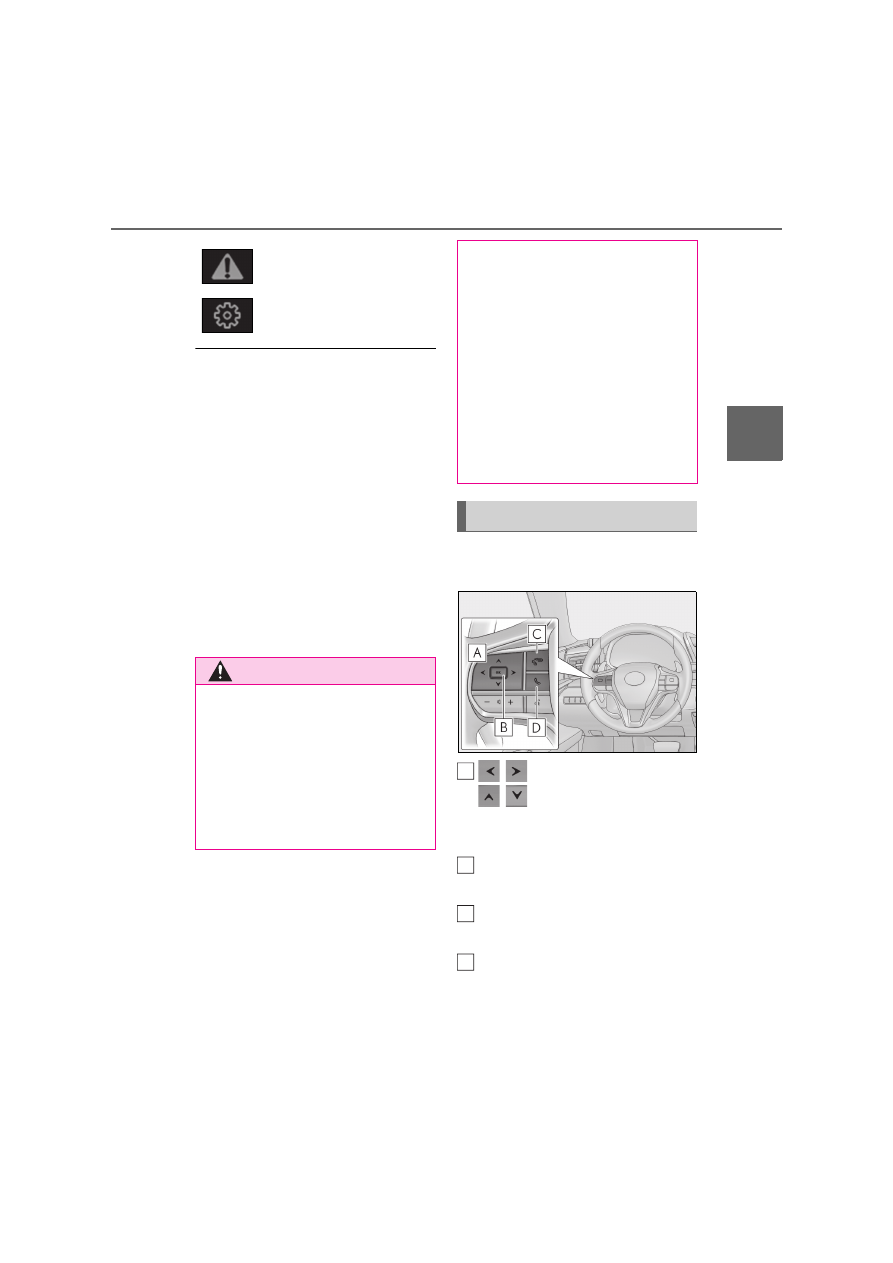
The multi-information display is oper-
ated using the meter control switches.

/

:  Switch  menu

/

: Change displayed con-

tent, scroll up/down the screen and 
move the cursor up/down

Press: Enter/Set
Press and hold: Reset

Return to the previous screen and 
move the main meter

Call sending/receiving and history 
display

Linked with the hands-free system, sending 
or receiving call is displayed. For details 

Warning message display
(

P.381)

Settings display (

P.100)

WARNING

Q

Caution for use while driving

O

When operating the multi-information 

display while driving, pay extra atten-

tion to the safety of the area around 

the vehicle.

O

Do not look continuously at the multi-

information display while driving as 

you may fail to see pedestrians, objects 

on the road, etc. ahead of the vehicle.

Q

The information display at low tem-

peratures

Allow the interior of the vehicle to warm 

up before using the liquid crystal infor-

mation display. At extremely low tem-

peratures, the information display 

monitor may respond slowly, and display 

changes may be delayed.

For example, there is a lag between the 

driver’s shifting and the new gear num-

ber appearing on the display. This lag 

could cause the driver to downshift 

again, causing rapid and excessive 

engine braking and possibly an accident 

resulting in death or injury.

Changing the meter display

A

B

C

D

98

2-1. Instrument cluster

regarding the hands-free system, refer to 
“NAVIGATION SYSTEM OWNER’S 
MANUAL” or “Navigation and Multime-
dia System Owner’s Manual”.

Q

Content of drive information

Select to display various drive data.
Up to 2 of the following items can be 
selected.
Items displayed can be switched by 
pressing 

 or 

 of the meter con-

trol switches to select 

 and pressing 

 or 

.

Current fuel consumption

*1

Displays the current rate of fuel consump-
tion

Average fuel economy (after 
reset

*2

/after start/after refuel)

*1

Displays the average fuel consumption 
since the function was reset, the engine 
<hybrid system> was started, and the vehi-
cle was refueled, respectively
Use the displayed average fuel consump-
tion as a reference.

Average speed (after reset

*2

/after 

start)

*1

Displays the average vehicle speed since 
the function was reset and the engine 
<hybrid system> was started, respectively

Elapsed time (after reset

*2

/after 

start)

*1

Displays the elapsed time since the func-
tion was reset and the engine <hybrid sys-

tem> was started, respectively

Distance (range/after start)

*1

Displays the estimated maximum distance 
that can be driven with the quantity of fuel 
remaining and the distance driven after the 
engine <hybrid system> was started 
respectively.
• This distance is computed based on your 

average fuel consumption. As a result, 
the actual distance that can be driven 
may differ from that displayed.

• When only a small amount of fuel is 

added to the tank, the display may not be 
updated.
When refueling, turn the engine switch 
<power switch> off. If the vehicle is refu-
eled without turning the engine switch 
<power switch> off, the display may not 
be updated.

*1

: Displayed when the item is set in “Drive 

Info 1” and “Drive Info 2”.

*2

: The function can be reset by pressing 

“OK” of the meter control switches for 
longer than 1 second when the item to 
reset is displayed.
If there is more than one item that can 
be reset, the item selection screen will 
appear.

Q

Eco Driving Indicator/engine oil 
temperature gauge (LC500)

P.90, 92

Q

Hybrid System Indicator/motor 
power display (LC500h)

P.90

Q

Energy monitor (LC500h)

P.108

Q

Tire pressure

P.336

Drive information

99

2

2-1. Instrument cluster

V

eh

icle 

st

at

us

 in

fo

rm

at

ion
 an

d i

nd

ica

tor

s

Q

Gear positions

Displays the current shift range or gear 
position when the shift position is in D 
or M.

Q

Units (if equipped)

The units of measure used can be 
changed while driving.

Unlike the units setting performed on the 
settings display, the units setting per-
formed on the drive information menu can 
be changed while driving.

Q

G-force

Displays lateral G-forces on the vehi-
cle

Reading the display

• Normal display
Displays the following on the multi-infor-
mation display

Acceleration G-force on the vehicle

Current G-force value (analyzed value 
of front/rear and left/right G-forces)

• Advanced display
Displays the following on the multi-infor-
mation display and main meter
Multi-information display:

Acceleration G-force on the vehicle

Record of the maximum G-forces

Value of the maximum G-force since 
display reset (analyzed value of 
front/rear and left/right G-forces)

This display is intended for use as a guide-
line. Depending on factors such as the 
road surface condition, temperature and 
vehicle speed, the display may not show 
the actual condition of the vehicle.
Main meter:

G-force direction

Current G-force value (analyzed value 
of front/rear and left/right G-forces)

This display is intended for use as a guide-
line. Depending on factors such as the 
road surface condition, temperature and 
vehicle speed, the display may not show 
the actual condition of the vehicle.

Switching the display

A

B

A

B

C

A

B

100

2-1. Instrument cluster

To switch to advanced display, press “OK”.
To return to normal display, press “OK”.

Resetting the record of maximum 
G-forces

With the record of maximum G-forces dis-
played, press and hold “OK” to reset the 
display.

Peak hold function (advanced dis-
play only)

If lateral G-forces of 0.5 G or greater are 
generated, the G-force value displayed on 
the main meter will turn yellow and be held 
for 3 seconds.

Q

Rear wing position (if equipped)

Displays the raised/retracted state of 
the active rear wing

Q

LKA (Lane-Keeping Assist) vehi-
cle sway warning (if equipped)

P.214

Q

Display off

A blank screen is displayed

Select to display the following naviga-
tion system-linked information.

Route guidance

Compass display

Select to enable selection of an audio 
source etc. on the meter using the 
meter control switches.

Select to display the dynamic radar 
cruise control with full-speed range 
(

P.225)/LKA (Lane-Keeping 

Assist) (

P.213) information, when 

the system is used.

Select to display warning messages 
and measures to be taken if a malfunc-
tion is detected. (

P.381)

Select to change the meter display set-
tings.

Q

Language

Select to change the language on the 
display.

Q

Units

Select to change the unit of measure 
for fuel consumption.

Q

Eco Driving Indicator Light 
(LC500)

Select to activate/deactivate the Eco 
Driving Indicator Light.

Navigation system-linked dis-
play (if equipped)

Audio system-linked display

Driving assist system informa-
tion

Warning message display

Settings display

101

2

2-1. Instrument cluster

V

eh

icle 

st

at

us

 in

fo

rm

at

ion
 an

d i

nd

ica

tor

s

Q

EV indicator (LC500h)

Select to activate/deactivate the EV 
indicator.

Q

Drive information 1/Drive informa-
tion 2

Select up to 2 items that will be dis-
played on the “Drive Info 1” screen and 
“Drive Info 2” screen respectively. 
(

P.98)

Q

Pop-up display

Select to set the following pop-up dis-
plays, which may appear in some situa-
tions, on/off.
• Route guidance display of the navi-

gation system-linked system (if 
equipped)

• Making call display of the hands-

free phone system

• Audio system operation display
• Instrument panel brightness adjust-

ment display

Q

Ring position memory

Select to change the meter ring posi-
tion when the engine <hybrid system> is 
started.
The position before the engine <hybrid 
system> is stopped or the center posi-
tion can be selected.

Q

Accent color

Select to change the accent color on 
the screen, such as the cursor color.

Q

Rev indicator

Select to set the rev indicator on/off.
When set to on, proceed to select the 
engine speed at which the rev indica-

tor will be displayed.

Q

Rev peak

Select to set the rev peak on/off.

Q

Clock

Select to switch between 24-hour dis-
play and 12-hour display.

Q

Initialization

Select to reset the meter display set-
tings.

Q

Suspension of the settings display

In the following situations, operation of the 

settings display will be temporarily sus-

pended.

O

When a warning message appears on the 

multi-information display

O

When the vehicle begins to move

Q

Customization

The settings can be changed on 

 of the 

multi-information display.

O

Settings of the driving assist systems 

(

P.425)

O

Vehicle settings (

P.104, 338, 340, 

425)

WARNING

Q

Cautions during setting up the dis-

play

As the engine <hybrid system> needs to 

be running <operating> during setting up 

the display, ensure that the vehicle is 

parked in a place with adequate ventila-

tion. In a closed area such as a garage, 

exhaust gases including harmful carbon 

monoxide (CO) may collect and enter 

the vehicle. This may lead to death or a 

serious health hazard.

102

2-1. Instrument cluster

Displays suggestions to the driver in 
the following situations. For some sug-
gestions, a response to a displayed 
suggestion can be selected. To select a 
response, use the meter control 
switches.

The suggestion function can be turned 
on/off.

Q

Suggestion to turn on the head-
lights

If the headlight switch is in other than 

 or 

, and the vehicle speed is 5 

km/h (3 mph) or higher for a certain 
amount of time when the surroundings 
are dark, a suggestion message will be 
displayed.

Q

Suggestion to close the power win-
dows (linked to windshield wiper 
operation)

If the windshield wipers are operated 
with a power window open, a sugges-
tion message will be displayed asking if 
you wish to close the power windows. 
To close all of the power windows, 
select “Yes”.

Q

Suggestion to unlock the power 
windows

If it is attempt to close the passenger’s 

side window using the power window 
switch on the driver’s door, a sugges-
tion message will be displayed.

Q

Customization

The suggestion function can be turned 

on/off. (Customizable features: 

P.425)

NOTICE

Q

While setting up the display

To prevent 12-volt battery discharge, 

ensure that the engine is running <hybrid 

system is operating> while setting up the 

display features.

Suggestion function

103

2

2-1. Instrument cluster

V

eh

icle 

st

at

us

 in

fo

rm

at

ion
 an

d i

nd

ica

tor

s

*

: If equipped

Navigation system-linked display 
area (if equipped)

Displays the following items, which are 
linked to the navigation system:
• Speed limit
• Street  name
• Route guidance to destination
• Compass

Driving assist system status display 
area

Displays the current shift position, and shift 
range/gear position, or the operational 
status of the following systems:
• Pre-collision warning (Pre-Collision 

System) (

P.205)

• Dynamic radar cruise control with full-

speed range (

P.225) (if equipped)

• LKA (Lane-Keeping Assist) (

P.213)

• Lexus parking assist-sensor (

P.239)

Displayed content is the same as that dis-
played on the multi-information display. 
For details, refer to the explanations of 
each system.

Vehicle speed display

Information display area (

P.105)

Displays the following items:
• Warning/message

/


icon  (

P.105)

• Audio system operation status
• Dynamic radar cruise control with full-

speed range status (

P.225) (if 

equipped)

• Hands-free system status (

P.105) (if 

equipped)

• Eco Driving Indicator/tachometer 

(

P.106) (LC500)

• Hybrid System Indicator/motor power 

display/tachometer (

P.107) 

(LC500h)

HUD (Head-up display) switch

Q

Enabling/Disabling the head-up 
display

Pressing the switch turns the head-up 
display on/off.

Head-up display

*

The head-up display is linked to the 
meters and navigation system and 
projects a variety of information in 
front of the driver, such as the cur-
rent vehicle speed and route guid-
ance to a set destination.

System components

A

B

Using the head-up display

C
D

E

104

2-1. Instrument cluster

Q

Changing settings of the head-up 
display

Select 

 on the multi-information dis-

play (

P.96) to change the following 

settings:

Display brightness/position

Select to adjust the brightness and position 
of the head-up display.

Eco Driving Indicator/tachometer 
(LC500)

Select to display Eco Driving Indicator, 
tachometer or no content.

Hybrid System Indicator/motor 
power display/tachometer 
(LC500h)

Select to display Hybrid System Indicator, 
tachometer or no content.
Motor power display can be displayed 
when Hybrid System Indicator is selected 
while the driving mode (

P.238

) is other 

than the Eco drive mode.

Display content

Select to enable/disable the following 
items:
• Route guidance to destination
• Driving assist system status
• Compass
• Audio system operation status

Display angle

Select to adjust the angle of the head-up 
display.

Q

Head-up display

O

The head-up display may seem dark and 

hard to see when viewed through sun-

glasses, especially polarized sunglasses. 

Adjust the brightness of the head-up dis-

play or remove your sunglasses.

O

When the head-up display is turned off, it 

will remain off even if the engine switch 

<power switch> is turned to ACCES-

SORY mode or IGNITION ON mode 

<ON mode> after the engine switch 

<power switch> has been turned off.

O

The startup image will be displayed on 

the head-up display after the engine 

switch <power switch> has been turned to 

IGNITION ON mode <ON mode> while 

the head-up display switch is set to on.

Q

Display brightness

The brightness of the head-up display can 
be adjusted on 

 of the multi-information 

display. Also, it is automatically adjusted 

according to the ambient brightness.

Q

Head-up display automatic position 

adjustment

If the display position is recorded into mem-

ory, the head-up display will be automati-

cally adjusted to the desired position. 

(

P.132)

Q

When the 12-volt battery is discon-

nected

The customize settings of the head-up dis-

play will be reset.

Q

Customization

Settings (e.g. display) can be changed. 

(Customizable features: 

P.425)

105

2

2-1. Instrument cluster

V

eh

icle 

st

at

us

 in

fo

rm

at

ion
 an

d i

nd

ica

tor

s

Displays the following items in the 
appropriate situation:

Q

Warning/message

Displays the following warning/mes-
sages:
• Master warning message
• Notification message (Dynamic 

radar cruise control with full-speed 
range)

• Other messages

Q

/


icons

Displays the following multi-informa-
tion display linked icons:

: Master warning icon

Displayed when a warning message is 
displayed on the multi-information dis-
play. (

P.381)

: Information icon

Displayed when a suggestion/advice 
pop-up display is displayed on the 
multi-information display. (

P.102)

Q

Hands-free system status

Displayed when the hands-free system 

WARNING

Q

Before using the head-up display

O

Check that the position and brightness 

of the head-up display image does not 

interfere with safe driving. Incorrect 

adjustment of the image’s position or 

brightness may obstruct the driver’s 

view and lead to an accident, resulting 

in death or serious injury.

O

Do not continuously look at the head-

up display while driving as you may fail 

to see pedestrians, objects on the 

road, etc. ahead of the vehicle.

Q

Caution for changing settings of the 

head-up display

As the engine needs to be running 

<hybrid system needs to be operating> 

while changing the settings of the head-

up display, ensure that the vehicle is 

parked in a place with adequate ventila-

tion. In a closed area such as a garage, 

exhaust gases including harmful carbon 

monoxide (CO) may collect and enter 

the vehicle. This may lead to death or a 

serious health hazard.

NOTICE

Q

To prevent damage to components

O

Do not place any drinks near the head-

up display projector. If the projector 

gets wet, electrical malfunctions may 

result.

O

Do not place anything on or put stick-

ers onto the head-up display projector. 

Doing so could interrupt head-up dis-

play indications.

O

Do not touch the inside of the head-up 

display projector or thrust sharp edges 

or the like into the projector. 

Doing so could cause mechanical mal-

functions.

Q

When changing the settings of the 

head-up display

To prevent battery discharge, ensure 

that the engine is running <hybrid system 

is operating> while changing the settings 

of the head-up display.

Information display area

106

2-1. Instrument cluster

is operated.

Q

Audio system operation status

Displayed when the audio system is 
operated.

Q

Eco Driving Indicator/tachometer 
(LC500)

Displays either of Eco Driving Indica-
tor or the tachometer.

Q

Hybrid System Indicator/motor 
power display/tachometer 
(LC500h)

Displays either of Hybrid System Indi-
cator or the tachometer.
Motor power display can be displayed 
when Hybrid System Indicator is 
selected while the driving mode 
(

P.238) is other than the Eco drive 

mode.

Displays the following items which are 
linked to the navigation system:

Q

Speed limit

The speed limit on the current road.

Q

Street name

When the navigation system is per-
forming route guidance, the name of 
the next street will be displayed on the 
top of the display area.

Q

Route guidance to destination

Displayed when the navigation system 
is performing route guidance. When 
approaching an intersection, an arrow 

will be displayed to indicate the sug-
gested direction of travel.

Q

Compass

Displays the direction of travel.

Q

Street name display

Only street names which are included in the 

map data will be displayed.

Q

Eco Driving Indicator

Eco Driving Indicator Zone Display

Eco driving ratio based on acceler-
ation

Zone of Eco driving

Displayed content is the same as that dis-
played on the multi-information display 
(Eco Driving Indicator). For details, refer to 
P.90.

Q

Tachometer

Displays the engine speed in revolu-
tions per minute.

Navigation system-linked dis-
play area (if equipped)

Eco Driving Indicator/tachome-
ter (LC500)

A
B

C

107

2

2-1. Instrument cluster

V

eh

icle 

st

at

us

 in

fo

rm

at

ion
 an

d i

nd

ica

tor

s

Q

Hybrid System Indicator

Charge area

Hybrid Eco area

Eco area

Power area

Displayed content is the same as that dis-
played on the meter (Hybrid System Indi-
cator). For details, refer to P.90.

Q

Motor power display

Charge area

Power area

Displayed content is the same as that dis-
played on the meter (Motor power dis-
play). For details, refer to P.91.
Motor power display can be displayed 

when Hybrid System Indicator is selected 
while the driving mode (

P.238) is other 

than the Eco drive mode.

Q

Tachometer

Displays the engine speed in revolu-
tions per minute.

Hybrid System Indicator/motor 
power display/tachometer 
(LC500h)

A
B
C
D

A
B

108

2-1. Instrument cluster

*

: If equipped

Multi-information display

Center Display

Meter control switches

“MENU” button

Touchpad

The energy monitor can be used to 
check the vehicle drive status, hybrid 
system operation status and energy 
regeneration status.

Q

Display procedure

Multi-information display

Press 

 or 

 of the meter control 

switches and select 

, and then press 

 or 

 to select the energy monitor 

display.

Center Display

Press the “MENU” button on the 
Remote Touch, then select 

 on the 

menu screen.

If the “Trip information” or “History” screen 
is displayed, select “Energy”.

Q

Reading the display

The arrows will appear in accordance 
with the energy flow. When there is no 
energy flow, arrows will not be dis-
played.

The color of the arrows will change as fol-
lows
Blue: When the hybrid battery (traction 
battery) is regenerated or charged.
Yellow: When the hybrid battery (traction 
battery) is in use.
Red: When the gasoline engine is in use.

Energy monitor

*

/consump-

tion screen

You can view the status of your 
hybrid system (LC500h) and fuel 
consumption information on the 
multi-information display and Cen-
ter Display.
The energy monitor or consump-
tion screen can be displayed on the 
side display.

System components

A
B
C
D

E

Energy monitor (LC500h)

109

2

2-1. Instrument cluster

V

eh

icle 

st

at

us

 in

fo

rm

at

ion
 an

d i

nd

ica

tor

s

Multi-information display

The image shows all the arrows as an 
example. The actual display will vary 
depending on conditions.

Gasoline engine

Hybrid battery (traction battery)

Tires

Center Display

The image shows all the arrows as an 
example. The actual display will vary 
depending on conditions.

Gasoline engine

Electric motor (traction motor)

Hybrid battery (traction battery)

Tires

Side display

The image shows all the arrows as an 
example. The actual display will vary 
depending on conditions.

Gasoline engine

Hybrid battery (traction battery)

Tires

Q

Hybrid battery (traction battery) status

The display changes in 8 levels according 

to the remaining charge amount of the 

hybrid battery (traction battery).

O

The figure shows the multi-information 

display as an example for explanation.

O

These images are examples only, and 

may vary slightly from actual conditions.

Low

High

Q

Remaining charge amount warning of 

hybrid battery (traction battery)

O

The buzzer sounds intermittently when 

the hybrid battery (traction battery) 

remains without charging while the shift 

A
B
C

A
B
C
D

A
B
C

A

B

110

2-1. Instrument cluster

lever is in N, or the remaining charge 

amount drops below a certain level. If the 

remaining charge amount drops further, 

the buzzer sounds continuously.

O

When a warning message is shown on 

the multi-information display and the 

buzzer sounds, follow the instructions 

displayed on the screen to perform trou-

bleshooting. 

Press the “MENU” button on the 
Remote Touch, then select 

 on the 

menu screen, and then select “Trip 
information” or “History”.

Q

Trip information

If a screen other than “Trip informa-
tion” is displayed, select “Trip informa-
tion”.

Resetting the consumption data

Fuel consumption in the past 15 
minutes

Current fuel consumption

Regenerated energy in the past 15 
minutes (LC500h)

One symbol indicates 50 Wh. Up to 5 
symbols are shown.

Average vehicle speed since the 
engine <hybrid system> was started.

Elapsed time since the engine 
<hybrid system> was started.

Cruising range

Average fuel consumption for the past 15 
minutes is divided by color into past aver-
ages and averages attained since the 
engine switch <power switch> was last 
turned to IGNITION ON mode <ON 
mode>. Use the displayed average fuel 
consumption as a reference.
The image is an example only, and may 
vary slightly from actual conditions.

Q

History

If a screen other than “History” is dis-
played, select “History”.

Best recorded fuel consumption

Latest fuel consumption

Previous fuel consumption record

Resetting the History data

Updating the latest fuel consump-
tion data

The latest fuel consumption history is 
divided by color into past averages and the 
average fuel consumption since the last 
updated. Use the displayed average fuel 
consumption as a reference.
The image is an example only, and may 
vary slightly from actual conditions.

Consumption

A
B

C
D

E

F

G

A
B
C
D

E

111

2

2-1. Instrument cluster

V

eh

icle 

st

at

us

 in

fo

rm

at

ion
 an

d i

nd

ica

tor

s

Q

Updating the History data

Update the latest fuel consumption by 

selecting “Update” to measure the current 

fuel consumption again.

Q

Resetting the data

The fuel consumption data can be deleted 

by selecting “Clear”.

Q

Cruising range

Displays the estimated maximum distance 

that can be driven with the quantity of fuel 

remaining.
This distance is computed based on your 

average fuel consumption. As a result, the 

actual distance that can be driven may differ 

from that displayed.

Display the vehicle information on the 
side display (

P.277) and then select 

 or 

 to display the desired 

screen.

Q

Trip information (type A)

Displays the average fuel consumption 
and regenerated energy for the past 10 
minutes in 1 minute intervals 
(LC500h), as well as the cruising 
range.

The image is an example only, and may 
vary slightly from actual conditions.
Use the displayed average fuel consump-

tion as a reference.

Q

Trip information (type B)

Displays the cruising range, latest fuel 
consumption and the amount of time 
elapsed since the engine <hybrid sys-
tem> was started.

The image is an example only, and may 
vary slightly from actual conditions.
Use the displayed average fuel consump-
tion as a reference.

Q

History

Displays the average fuel consump-
tion, last average fuel consumption and 
highest fuel consumption.

The image is an example only, and may 

vary slightly from actual conditions.
Use the displayed average fuel consump-

tion as a reference.

Q

Energy monitor (LC500h)

Displays the hybrid system operation 
and energy recovery states. (

P.108)

Using the side display

3

113

3

Before drivi

ng

Before driving

3-1. Key information

Keys ..................................................

114

3-2. Opening, closing and locking the 

doors and trunk

Doors ...............................................

118

Trunk ...............................................

122

Smart entry & start system.....

125

3-3. Adjusting the seats

Front seats.....................................

130

Driving position memory ........

132

Head restraints............................

136

3-4. Adjusting the steering wheel and 

mirrors

Steering wheel ............................

138

Inside rear view mirror.............

139

Outside rear view mirrors......

140

3-5. Opening, closing the windows

Power windows ..........................

143


Content      ..     3      4      5      6     ..