Lexus LC500h (2021 year). Manual in english - page 9
 

  Index      Manuals     Lexus LC500h (2021 year). Manual in english


Search            copyright infringement  


Content      ..     7      8      9      10     ..


Lexus LC500h (2021 year). Manual in english - page 9


157

4-2. Driving procedures

4

Driving

cal key, the hybrid system cannot be 

started using the smart access system 

with push-button start. Refer to P.368 t

start the hybrid system. However, if the 

electronic key is carried inside the vehicle 

and the doors are locked (

P.112), 

hybrid system can be started.

When the ambient temperature is low, 

such as during winter driving conditions

When starting the hybrid system, the 

flashing time of the “READY” indicator 

may be long. Leave the vehicle as it is until 

the “READY” indicator is steady on, as 

steady means the vehicle is able to move.

When the hybrid battery (traction bat-

tery) is extremely cold (below approxi-

mately -22°F [-30°C]) under the 

influence of the outside temperature, it 

may not be possible to start the hybrid 

system. In this case, try to start the hybrid 

system again after the temperature of the 

hybrid battery increases due to the out-

side temperature increase etc.

Sounds and vibrations specific to a 

hybrid vehicle

P.64

If the 12-volt battery is discharged

The hybrid system cannot be started using 

the smart access system with push-button 

start. Refer to P.370 to restart the hybrid 

system.

Electronic key battery depletion

P.106

Conditions affecting operation

P.119

Notes for the entry function

P.120

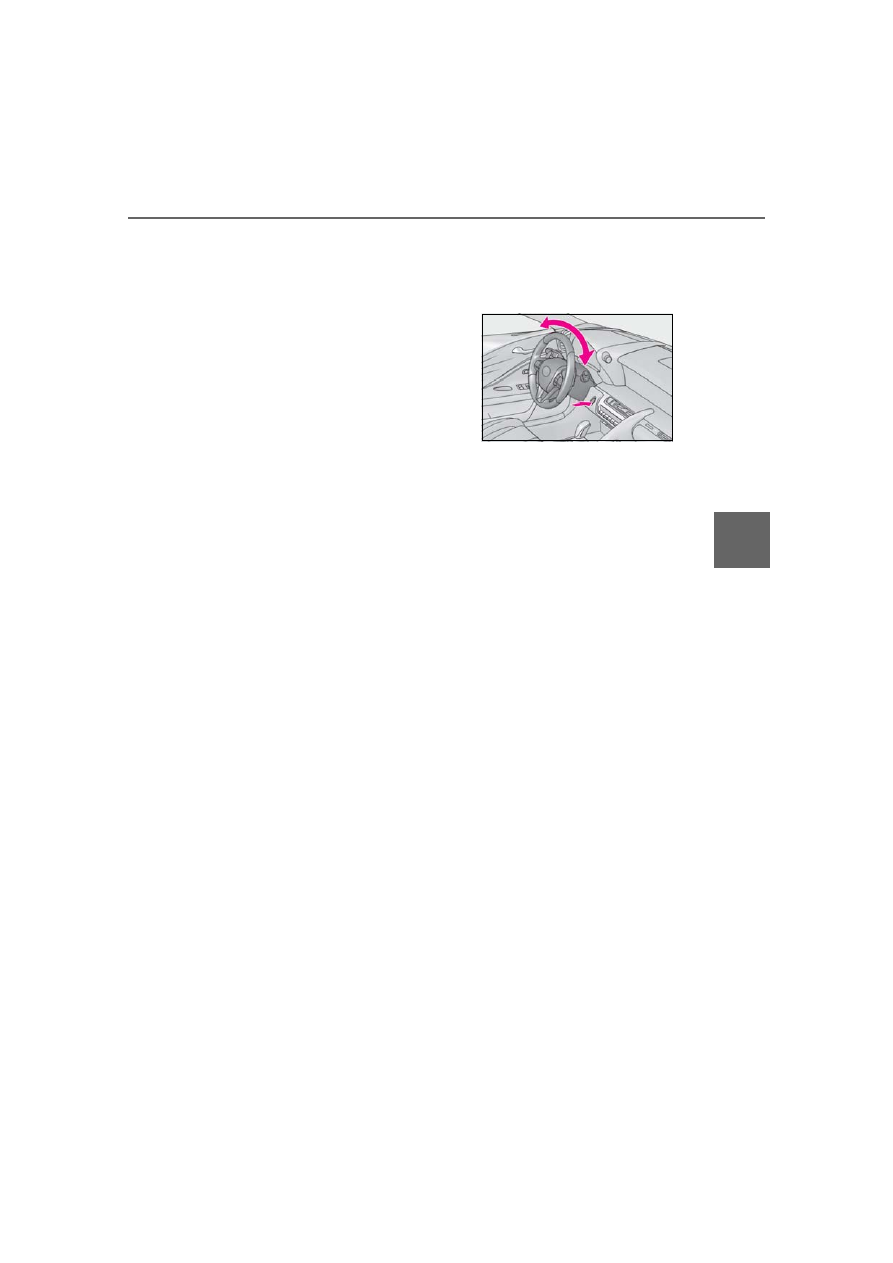
Steering lock function

After turning the power switch off and 

opening and closing the doors, the steer-

ing wheel will be locked due to the steer-

ing lock function. Operating the power 

switch again automatically cancels the 

steering lock.

When the steering lock cannot be 

released, “Push power switch while turn-

ing steering wheel in either direction” will 

be displayed on the multi-information dis-

play. 

Press the power switch shortly and firmly 

while turning the steering wheel left and 

right.

To prevent the steering lock motor from 

overheating, the motor may be sus-

pended if the hybrid system is turned on 

and off repeatedly in a short period of 

time. In this case, refrain from operating 

the power switch. After about 10 sec-

onds, the steering lock motor will resume 

functioning.

If there is a malfunction in the smart 

access system with push-button start

If “Access System with Elec. Key Malfunc-

tion” is displayed on the multi-information 

display, the system may be malfunctioning. 

Have the vehicle inspected by your Lexus 

dealer immediately.

If the “READY” indicator does not come 

on

In the event that the “READY” indicator 

does not come on even after performing 

the proper procedures for starting the vehi-

cle, contact your Lexus dealer immediately.

If the hybrid system is malfunctioning

P.68

Electronic key battery

P.330

Operation of the power switch

If the switch is not pressed shortly and 

firmly, the power switch mode may not 

change or the hybrid system may not 

start.

If attempting to restart the hybrid system 

immediately after turning the power 

switch off, the hybrid system may not start 

in some cases. After turning the power 

158

4-2. Driving procedures

switch off, please wait a few seconds 

before restarting the hybrid system.

Customization

If the smart access system with push-button 

start has been deactivated in a customized 

setting, refer to P.367.

1

Stop the vehicle completely.

2

If the parking brake is in manual 
mode, set the parking brake. 
(

P.176)

3

Shift the shift position to P. (

P.171)

Check that the shift position indicator 

shows P. (

P.171)

4

Press the power switch.

The hybrid system will stop, and the meter 

display will be extinguished (the shift posi-

tion indicator will be extinguished a few 

seconds after the meter display).

5

Check that “ACCESSORY” or 
“IGNITION ON” is not shown on 
the meter.

Automatic hybrid system shut off fea-

ture

The vehicle is equipped with a feature 

that automatically shuts off the hybrid sys-

tem when the shift position is in P with the 

hybrid system operating for an extended 

period.

The hybrid system will automatically shut 

off after approximately 1 hour if it has 

been left running while the shift position is 

in P.

The timer for the automatic hybrid system 

shut off feature will reset if the brake 

pedal is depressed or if the shift position 

is in a position other than P.

After the vehicle is parked, if the door is 

locked with the door lock switch (

P.112) 

from the inside or the mechanical key 

(

P.367) from the outside, the auto-

matic hybrid system shut off feature will 

be disabled. The timer for the automatic 

hybrid system shut off feature will be re-

enabled if the driver’s door is opened.

Automatic P position selection function

P.172

WARNING

When starting the hybrid system

Always start the hybrid system while sit-

ting in the driver’s seat. Do not depress 

the accelerator pedal while starting the 

hybrid system under any circumstances. 

Doing so may cause an accident result-

ing in death or serious injury.

Caution while driving

If hybrid system failure occurs while the 

vehicle is moving, do not lock or open the 

doors until the vehicle reaches a safe and 

complete stop. Activation of the steering 

lock in this circumstance may lead to an 

accident, resulting in death or serious 

injury.

NOTICE

When starting the hybrid system

If the hybrid system becomes difficult to 

start, have your vehicle checked by your 

Lexus dealer immediately.

Symptoms indicating a malfunction 

with the power switch

If the power switch seems to be operat-

ing somewhat differently than usual, such 

as the switch sticking slightly, there may 

be a malfunction. Contact your Lexus 

dealer immediately.

Stopping the hybrid system

159

4-2. Driving procedures

4

Driving

Modes can be changed by pressing 
the power switch with the brake pedal 
released. (The mode changes each 
time the switch is pressed.)

1

Off

The emergency flashers can be used.

2

ACCESSORY mode

Some electrical components such as the 
audio system can be used.
“ACCESSORY” will be displayed on the 
meter.

3

ON mode

All electrical components can be used.
“IGNITION ON” will be displayed on the 
meter.

WARNING

Stopping the hybrid system in an 

emergency

If you want to stop the hybrid system in 

an emergency while driving the vehi-

cle, press and hold the power switch 

for more than 2 seconds, or press it 

briefly 3 times or more in succession. 

(

P.338)

However, do not touch the power 

switch while driving except in an emer-

gency. Turning the hybrid system off 

while driving will not cause loss of 

steering or braking control, however, 

power assist to the steering will be lost. 

This will make it more difficult to steer 

smoothly, so you should pull over and 

stop the vehicle as soon as it is safe to 

do so.

If the power switch is operated while 

the vehicle is running, a warning mes-

sage will be shown on the multi-infor-

mation display and a buzzer sounds.

When restarting the hybrid system 

after an emergency shutdown, press 

the power switch.

When parking

Exhaust gases include harmful carbon 

monoxide (CO), which is colorless and 

odorless. Observe the following precau-

tions.
Failure to do so may cause exhaust gases 

to enter the vehicle and may lead to an 

accident caused by light-headedness, or 

may lead to death or a serious health 

hazard.

If the vehicle is in a poorly ventilated 

area or a closed area, such as a 

garage, stop the hybrid system.

Do not leave the vehicle with the 

hybrid system operating for a long 

time. If such a situation cannot be 

avoided, park the vehicle in an open 

space and ensure that exhaust fumes 

do not enter the vehicle interior.

Do not leave the hybrid system operat-

ing in an area with snow build-up, or 

where it is snowing. If snowbanks build 

up around the vehicle while the hybrid 

system is operating, exhaust gases 

may collect and enter the vehicle.

Changing power switch modes

160

4-2. Driving procedures

Auto power off function

If the vehicle is left in ACCESSORY mode 

for more than 20 minutes or ON mode (the 

hybrid system is not operating) for more 

than an hour with the shift position in P, the 

power switch will automatically turn off. 

However, this function cannot entirely pre-

vent the 12-volt battery discharge. Do not 

leave the vehicle with the power switch in 

ACCESSORY or ON mode for long peri-

ods of time when the hybrid system is not 

operating.

When the shift control system malfunc-

tions

When attempting to turn the power switch 

off while there is a malfunction in the shift 

control system, the power switch mode may 

change to ACCESSORY mode. In this 

case, ACCESSORY mode may be turned 

off by applying the parking brake and press-

ing the power switch again. If there is a mal-

function in the system, have the vehicle 

inspected by your Lexus dealer immedi-

ately.

Turns EV drive mode on/off

When EV drive mode is turned on, the EV 
drive mode indicator will come on. Press-
ing the switch when in EV drive mode will 
return the vehicle to normal driving (using 
the gasoline engine and electric motor 
[traction motor]).

Situations in which EV drive mode can-

not be turned on

It may not be possible to turn EV drive 

mode on in the following situations. If it can-

not be turned on, a buzzer will sound and a 

message will be shown on the multi-infor-

NOTICE

To prevent 12-volt battery discharge

Do not leave the power switch in 

ACCESSORY or ON mode for long 

periods of time without the hybrid sys-

tem on.

If “ACCESSORY” or “IGNITION 

ON” is displayed on the meter, the 

power switch is not off. Exit the vehicle 

after turning the power switch off.

EV drive mode (LC500h)

In EV drive mode, electric power is 
supplied by the hybrid battery 
(traction battery), and only the 
electric motor (traction motor) is 
used to drive the vehicle.
This mode allows you to drive in res-
idential areas early in the morning 
and late at night, or in indoor park-
ing lots etc. without concern for 
noises and gas emissions. 
However, when the vehicle proxim-
ity notification system is active, the 
vehicle may produce sound.

Operating instructions

161

4-2. Driving procedures

4

Driving

mation display.

The temperature of the hybrid system is 

high. 

The vehicle has been left in the sun, 

driven on a hill, driven at high speeds, etc.

The temperature of the hybrid system is 

low. 

The vehicle has been left in temperatures 

lower than about 32°F (0°C) for a long 

period of time etc.

The gasoline engine is warming up.

The hybrid battery (traction battery) is 

low. 

The remaining battery level indicated in 

the “Energy Monitor” display is low. 

(

P.98)

Vehicle speed is high.

The accelerator pedal is depressed firmly 

or the vehicle is on a hill etc.

The windshield defogger is in use.

When the shift position is in M.

Switching to EV drive mode when the 

gasoline engine is cold

If the hybrid system is started while the gas-

oline engine is cold, the gasoline engine will 

start automatically in order to warm up. In 

this case, you will become unable to switch 

to EV drive mode.
To prevent gasoline engine warm up in 

order to reduce noises, start the hybrid sys-

tem without starting the gasoline engine, 

pressing the power switch with fully 

depressing the brake pedal and pressing 

the EV drive mode switch.

Automatic cancelation of EV drive 

mode

When driving in EV drive mode, the gaso-

line engine may automatically restart in the 

following situations. When EV drive mode 

is canceled, a buzzer will sound and the EV 

drive mode indicator will flash and go off.

The hybrid battery (traction battery) 

becomes low. 

The remaining battery level indicated in 

the “Energy Monitor” display is low. 

(

P.98)

Vehicle speed is high.

The accelerator pedal is depressed firmly 

or the vehicle is on a hill etc.

When it is possible to inform the driver of 

automatic cancelation in advance, a prior 

notice screen will appear on the multi-infor-

mation display.

Possible driving distance when driving in 

EV drive mode

EV drive mode’s possible driving distance 

ranges from a few hundred meters to 

approximately 0.6 mile (1 km). However, 

depending on vehicle conditions, there are 

situations when EV drive mode cannot be 

used. 

(The distance that is possible depends on 

the hybrid battery [traction battery] level 

and driving conditions.)

Fuel economy

The hybrid system is designed to achieve 

the best possible fuel economy during nor-

mal driving (using the gasoline engine and 

electric motor [traction motor]). Driving in 

EV drive mode more than necessary may 

lower fuel economy.

If “EV Mode Unavailable” is shown on 

the multi-information display

The EV drive mode is not available. The rea-

son the EV drive mode is not available (the 

vehicle is idling, battery charge is low, vehi-

cle speed is higher than the EV drive mode 

operating speed range or accelerator pedal 

is depressed too much) may be displayed. 

Use the EV drive mode when it becomes 

available.

If “EV Mode Deactivated” is shown on 

the multi-information display

The EV drive mode has been automatically 

canceled. The reason the EV drive mode is 

not available (the battery charge is low, 

vehicle speed is higher than the EV drive 

mode operating speed range or accelera-

162

4-2. Driving procedures

tor pedal is depressed too much) may be 

displayed. Drive the vehicle for a while 

before attempting to turn on the EV drive 

mode again.

*1

: To improve fuel efficiency and reduce 

noise, set the shift position in D for nor-
mal driving. You can choose gear range 
suitable for your driving situation by 
operating the paddle shift switches.

*2

: Any gear range can be fixed when driv-

ing in M mode.

For the shift positions

When the engine switch is off or in 

ACCESSORY mode, the shift position 

cannot be changed.

When the engine switch is in IGNITION 

ON mode, the shift position can only be 

changed to N.

When the engine is running, the shift 

position can be changed from P to D, N 

or R.

The shift position can only be changed to 

M directly from D.

WARNING

Caution while driving

When driving in EV drive mode, pay spe-

cial attention to the area around the vehi-

cle. Because there is no engine noise, 

pedestrians, people riding bicycles or 

other people and vehicles in the area 

may not be aware of the vehicle starting 

off or approaching them, so take extra 

care while driving. Therefore, take extra 

care while driving even if the vehicle 

proximity notification system is active.

Automatic transmission 
(LC500)

Select the shift position depending 
on your purpose and situation.

Shift position purpose and func-
tions

Shift posi-

tion

Objective or function

P

Parking the vehicle/starting 

the engine

R

Reversing

N

Neutral

(Condition in which the 

power is not transmitted)

D

Normal driving

*1

M

M mode driving

*2

 (

P.168)

163

4-2. Driving procedures

4

Driving

In addition, if an attempt is made to change 

the shift position by moving the shift lever or 

by pressing the P position switch in any of 

the following situations, the buzzer will 

sound and the shifting operation will be dis-

abled or the shift position will automatically 

change to N. When this happens, select an 

appropriate shift position.

Situations where the shifting operation 

will be disabled:

• When an attempt is made to change the 

shift position from P to another position 

by moving the shift lever without depress-

ing the brake pedal.

• When an attempt is made to change the 

shift position from P or N to M by moving 

the shift lever.

• When the P position switch is pressed 

while the vehicle is running.

*1

Situations where the shift position will 

automatically change to N:

• When an attempt is made to select the R 

position by moving the shift lever when 
the vehicle is moving forward.

*2

• When an attempt is made to select the D 

position by moving the shift lever when 
the vehicle is moving in reverse.

*3

• When the shift position is changed from 

R to M

If N is selected while driving at a certain 

speed, even if the shift lever is not held in 

the N position, the shift position changes 

to N. In this situation, the buzzer sounds 

and a confirmation message is displayed 

on the multi-information display to inform 

the driver that the shift position has 

changed to N.

*1

: Shift position may be changed to P when 

driving at extremely low speeds.

*2

: Shift position may be changed to R when 

driving at low speeds.

*3

: Shift position may be changed to D 

when driving at low speeds.

Reverse warning buzzer

When shifting into R, a buzzer will sound to 

inform the driver that the shift position is in 

R.

To protect the automatic transmission

If the automatic transmission fluid tempera-

ture is high, “Transmission Fluid Temp High 

See Owner’s Manual” will be displayed on 

the multi-information display and the vehi-

cle will go into transmission protection 

mode automatically. Have the vehicle 

inspected by your Lexus dealer.

When driving with dynamic radar cruise 

control with full-speed range activated

Even when performing the following 

actions with the intent of enabling engine 

braking, engine braking will not be acti-

vated because dynamic radar cruise con-

trol with full-speed range will not be 

canceled.

While driving in the D position, down-

shifting to 9, 8, 7, 6, 5 or 4.

When switching the driving mode to 

sport mode while driving in D position. 

(

P.224)

Restraining sudden start (Drive-Start 

Control)

P.143

AI-SHIFT

The AI-SHIFT automatically selects the suit-

able gear according to driver performance 

and driving conditions. 

The AI-SHIFT automatically operates when 

the shift position is in D. (Shifting the shift 

position to M cancels the function.)

If a message about a shift operation is 

shown

To prevent the shift position from being 

selected incorrectly or the vehicle from 

moving unexpectedly, the shift position may 

be changed automatically or operating the 

shift lever may be required. In this case, 

change the shift position following the mes-

sages on the multi-information display.

After recharging/reconnecting the 12-

volt battery

P.311

Customization

Settings (e.g. reverse warning buzzer) can 

be changed. (Customizable features: 

P.405)

164

4-2. Driving procedures

Shift lever

Operate the shift lever gently and securely 
in the direction of the arrow on the shift 
position indicator.
To shift to N, slide the shift lever in the 
direction of the arrow and hold it.
Release the shift lever after each shifting 
operation to allow it to return to its regular 

position (

).

Shifting to M is only possible when the shift 
position is in D.
When shifting from P to N, D or R, from N, 
D, M or R to P, from D or M to R, or from R 
to D, ensure that the brake pedal is being 
depressed and the vehicle is stationary.

Shift position indicator

Meter display:
The current shift position is highlighted.
When any shift position other than D or M 
is selected, the arrow toward M and M 
position indicator are displayed in gray.

WARNING

When driving on slippery road sur-

faces

Do not accelerate or shift the shift posi-

tion suddenly. 

Sudden changes in engine braking may 

cause the vehicle to spin or skid, resulting 

in an accident.

NOTICE

Situations where shift control system 

malfunctions are possible

If any of the following situations occurs, 

shift control system malfunctions are 

possible. 

Immediately stop the vehicle in a safe 

place on level ground, apply the parking 

brake, and then contact your Lexus 

dealer.

When the warning message indicating 

the shift control system appears on the 

multi-information display.

The display indicates that no shift posi-

tion is selected for more than a few 

seconds.

Shifting the shift lever

A

B

165

4-2. Driving procedures

4

Driving

Shift lever display:
The current shift position is illuminated.
When selecting the shift position, make 
sure that the shift position has been 
changed to the desired position by check-
ing the shift position indicator provided on 
the instrument cluster.

P position switch

When shifting the shift position to P

Fully stop the vehicle and set the park-
ing brake, and then press the P position 
switch.

When the shift position is changed to P, the 
switch illuminates.
Check that the shift position indicator 
shows P.

Shifting the shift position from P to 
other positions

While depressing the brake pedal 
firmly, operate the shift lever. If the 
shift lever is operated without 
depressing the brake pedal, the 
buzzer will sound and the shifting 
operation will be disabled.

When selecting the shift position, 
make sure that the shift position has 
been changed to the desired posi-
tion by checking the shift position 
indicator provided on the instru-
ment cluster.

The shift position cannot be 
changed from P to M directly.

Automatic P position selection function

In the following situations, the shift position 

is automatically changed to P.

When pressing the engine switch with the 

vehicle stopped while the engine switch is 

in IGNITION ON mode and the shift 

position is in a position other than P (after 

the shift position has changed to P, the 
engine switch will turn off)

*

When the driver’s door is opened and all 

of the following conditions are met, while 

the shift position is in a position other than 

P

• The engine switch is in IGNITION ON 

mode.

• The driver is no wearing the seat belt.

• The brake pedal is not depressed.
To start off the vehicle after the shift position 
is changed to P, operate the shift lever 
again.

When the vehicle is stopped after the 

engine has been stopped in an emer-

gency while driving

When voltage of the 12-volt battery 

drops while the shift position is in a posi-

tion other than P

WARNING

For the shift lever

Do not remove the shift lever knob or 

use anything but a genuine Lexus shift 

lever knob. Also, do not hang anything 

on the shift lever. 

Doing so could prevent the shift lever 

from returning to position, causing 

unexpected accidents to occur when 

the vehicle is in motion.

In order to prevent the shift position 

from accidentally being changed, do 

not touch the shift lever when not using 

them.

P position switch

C

166

4-2. Driving procedures

*

: When the engine switch is pressed while 

driving at extremely slow speeds, such as 
immediately before stopping the vehicle, 
the shift position may automatically 
change to P. Make sure that the vehicle is 
completely stopped before pressing the 
engine switch.

When the engine switch is changed to 

ACCESSORY mode with the shift posi-

tion held in N

Performing the following operations 

allows the engine switch to be set to 

ACCESSORY mode with the shift posi-

tion held in N.

1

Operate the shift lever and change the 

shift position to N when the engine is 

running.

2

Return the shift lever to its regular posi-
tion (

).

3

Operate the shift lever to N and hold it 

there until the buzzer sounds.

4

Press the engine switch within 5 sec-

onds after the buzzer sounds.

The engine switch will be set to ACCES-
SORY mode with the shift position in N.

*


Make sure to check that the buzzer sounds 

and “Holding N Push P Switch When 

Done” is displayed on the multi-information 

display.

To change to a shift position other than N, 

press the P position switch. The shift posi-

tion will be changed to P.

*

: To keep this state, do not operate the 

engine switch. If the engine switch is 
operated repeatedly, the engine switch 
will turn off after the shift position has 
automatically changed to P.

If the shift position cannot be shifted 

from P

There is a possibility that the 12-volt battery 

is discharged. Check the 12-volt battery in 

this situation. (

P.369)

WARNING

P position switch

Do not press the P position switch 

while the vehicle is moving.

If the P position switch is pressed when 

driving at very low speeds (for exam-

ple, directly before stopping the vehi-

cle), the vehicle may stop suddenly 

when the shift position switches to P, 

which could lead to an accident.

In order to prevent the shift position 

from accidentally being changed, do 

not touch the P position switch or shift 

lever when not using them.

NOTICE

Notes regarding shift lever and P 

position switch operation

Avoid repeatedly operating the shift 

lever and P position switch in quick suc-

cession. 

The system protection function may acti-

vate and it will not be temporarily possi-

ble to shift the shift position other than P. 

If this happens, please wait for a while 

before attempting to change the shift 

position again.

When exiting the vehicle (driver’s 

seat only)

Check that the shift position indicator 

shows P and that the parking brake indi-

cator is illuminated before opening the 

door and exiting the vehicle.

When changing the engine switch to 

ACCESSORY mode with the shift 

position held in N

Even if the engine is not running, by oper-

ating the shift lever and the engine 

switch, the engine switch may be 

changed to ACCESSORY mode with 

the shift position held in N. Make sure 

that the engine is running before per-

forming the operation.

167

4-2. Driving procedures

4

Driving

Driving mode

P.224

Snow mode

Snow mode can be selected to suit the 
conditions when driving on slippery 
road surfaces, such as on snow.

Turn the 

 switch backward.

The snow mode indicator comes on.

Turn the 

 switch backward again to 

return to normal mode.

Snow mode automatic deactivation

Snow mode is automatically deactivated if 

the engine switch is turned off after driving 

in snow mode.

To drive using temporary shift range 
selection, operate the “-” or “+” paddle 
shift switch. 
When the “-” paddle shift switch is 
operated, the shift range switches to a 
range that enables engine braking 
force that is suitable to driving condi-
tions. When the “+” paddle shift switch 

is operated, the shift range switches to 
a range that is one range higher than 
the current range. 
Changing the shift range allows 
restriction of the highest gear, prevent-
ing unnecessary upshifting and 
enabling the level of engine braking 
force to be selected.

1

Upshifting

2

Downshifting

The selected shift range, from D1 to D10, 
will be displayed in the meter.
To return to normal D position driving, the 
“+” paddle shift switch must be held down 
for a period of time.

A lower shift range will provide greater 
engine braking forces than a higher shift 
range.

Automatic deactivation of shift range 

selection in the D position

Shift range selection in the D position will 

be deactivated in the following situations:

Selecting the driving mode

Selecting shift ranges in the D 
position

Meter dis-

play

Function

D2 - D10

A gear in the range between 

D1 and the selected shift 

range is automatically cho-

sen depending on vehicle 

speed and driving conditions

D1

Setting the shift range at D1

168

4-2. Driving procedures

When the vehicle comes to a stop

If the accelerator pedal is depressed for 

more than a certain period of time

When the shift lever is moved to D again

When pressing and holding the “+” pad-

dle shift switch

Downshifting restriction warning 

buzzer

To help ensure safety and driving perfor-

mance, downshifting operation may some-

times be restricted. In some circumstances, 

downshifting may not be possible even 

when the paddle shift switch is operated. (A 

buzzer will sound twice.)

To enter M mode, shift the shift position 
to M. Gears can be selected by oper-
ating the paddle shift switches, allowing 
you to drive in the gear of your choos-
ing.

1

Upshifting

2

Downshifting

The gear changes once every time the 
paddle shift switch is operated.
The selected gear, from M1 to M10, will be 
fixed and displayed in the meter.

When in the M position, the gear will 
not change unless the paddle shift 
switches are operated.
However, even when in the M position, 
the gears will be automatically 

changed in the following situation:

When vehicle speed drops (down-
shift only).

When it is necessary to protect the 
engine or automatic transmission 
when the engine coolant tempera-
ture is low, the automatic transmis-
sion fluid temperature is high or low, 
or other reasons.

Also, the gear will not shift when the 
vehicle speed is low, even if an upshift 
operation is performed.

Downshifting restriction warning 

buzzer

To help ensure safety and driving perfor-

mance, downshifting operation may some-

times be restricted. In some circumstances, 

downshifting may not be possible even 

when the paddle shift switch is operated. (A 

buzzer will sound twice.)

Selecting gears in the M position

169

4-2. Driving procedures

4

Driving

*1

: To improve fuel efficiency and reduce 

noise, set the shift position in D for nor-
mal driving. You can choose gear range 
suitable for your driving situation by 
operating the paddle shift switches.

*2

: Any gear range can be fixed when driv-

ing in M mode.

For the shift positions

When the power switch is off, the shift 

position cannot be changed.

When the power switch is in ON mode 

(the hybrid system is not operating), the 

shift position can only be changed to N.

When the “READY” indicator is on, the 

shift position can be changed from P to D, 

N or R.

When the “READY” indicator is flashing, 

the shift position cannot be changed from 

P to another position even if the shift lever 

is operated. Wait until the “READY” indi-

cator changes from a flashing to a solid 

light, and then operate the shift lever 

again.

The shift position can only be changed to 

M directly from D.

In addition, if an attempt is made to change 

the shift position by moving the shift lever or 

by pressing the P position switch in any of 

the following situations, the buzzer will 

sound and the shifting operation will be dis-

abled or the shift position will automatically 

change to N. When this happens, select an 

appropriate shift position.

Situations where the shifting operation 

will be disabled:

• When an attempt is made to change the 

shift position from P to another position 

by moving the shift lever without depress-

ing the brake pedal.

• When an attempt is made to change the 

shift position from P or N to M by moving 

the shift lever.

• When the P position switch is pressed 

while the vehicle is running.

*1

Situations where the shift position will 

automatically change to N:

• When an attempt is made to select the R 

position by moving the shift lever when 
the vehicle is moving forward.

*2

• When an attempt is made to select the D 

position by moving the shift lever when 
the vehicle is moving in reverse.

*3

• When the shift position is changed from 

R to M

If N is selected while driving at a certain 

speed, even if the shift lever is not held in 

the N position, the shift position changes 

to N. In this situation, the buzzer sounds 

and a confirmation message is displayed 

on the multi-information display to inform 

the driver that the shift position has 

changed to N.

*1

: Shift position may be changed to P when 

driving at extremely low speeds.

*2

: Shift position may be changed to R when 

driving at low speeds.

*3

: Shift position may be changed to D 

when driving at low speeds.

Hybrid transmission 
(LC500h)

Select the shift position depending 
on your purpose and situation.

Shift position purpose and func-
tions

Shift posi-

tion

Objective or function

P

Parking the vehicle/starting 

the hybrid system

R

Reversing

N

Neutral (Condition in which 

the power is not transmitted)

D

Normal driving

*1

M

M mode driving

*2

 (

P.174)

170

4-2. Driving procedures

Reverse warning buzzer

When shifting into R, a buzzer will sound to 

inform the driver that the shift position is in 

R.

To protect the hybrid transmission

If the transmission fluid temperature is high, 

“Transmission Fluid Temp High See 

Owner’s Manual” will be displayed on the 

multi-information display and the vehicle 

will go into transmission protection mode 

automatically. Have the vehicle inspected 

by your Lexus dealer.

When driving with dynamic radar cruise 

control with full-speed range activated

When dynamic radar cruise control with 

full-speed range is operating, the system 

does not respond to paddle shift switch 

operations.

Even when the driving mode is switched 

to sport mode with the intent of enabling 

engine braking, dynamic radar cruise 

control with full-speed range is not can-

celed and engine braking is not activated.

Restraining sudden start (Drive-Start 

Control)

P.143

AI-SHIFT

The AI-SHIFT automatically selects the suit-

able gear according to driver performance 

and driving conditions. 

The AI-SHIFT automatically operates when 

the shift position is in D. (Shifting the shift 

position to the M position cancels the func-

tion.)

If a message about a shift operation is 

shown

To prevent the shift position from being 

selected incorrectly or the vehicle from 

moving unexpectedly, the shift position may 

be changed automatically or operating the 

shift lever may be required. In this case, 

change the shift position following the mes-

sages on the multi-information display.

After recharging/reconnecting the 12-

volt battery

P.311

Customization

Settings (e.g. reverse warning buzzer) can 

be changed. 

(Customizable features: 

P.405)

WARNING

When driving on slippery road sur-

faces

Do not accelerate or shift the shift posi-

tion suddenly. 

Sudden changes in engine braking may 

cause the vehicle to spin or skid, resulting 

in an accident.

NOTICE

Hybrid battery (traction battery) 

charge

If the shift position is in N, the hybrid bat-

tery (traction battery) will not be 

charged. To help prevent the battery 

from discharging, avoid leaving the N 

position selected for an extended period 

of time.

Situations where shift control system 

malfunctions are possible

If any of the following situations occurs, 

shift control system malfunctions are 

possible. 

Immediately stop the vehicle in a safe 

place on level ground, apply the parking 

brake, and then contact your Lexus 

dealer.

When the warning message indicating 

the shift control system appears on the 

multi-information display.

The display indicates that no shift posi-

tion is selected for more than a few 

seconds.

171

4-2. Driving procedures

4

Driving

Shift lever

Operate the shift lever gently and securely 
in the direction of the arrow on the shift 
position indicator.
To shift to N, slide the shift lever in the 
direction of the arrow and hold it.
Release the shift lever after each shifting 
operation to allow it to return to its regular 

position (

).

Shifting to M is only possible when the shift 
position is in D.
When shifting from P to N, D or R, from N, 
D, M or R to P, from D or M to R, or from R 
to D, ensure that the brake pedal is being 
depressed and the vehicle is stationary.

Shift position indicator

Meter display:
The current shift position is highlighted.
When any shift position other than D or M 
is selected, the arrow toward M and M 
position indicator are displayed in gray.

Shift lever display:
The current shift position is illuminated.
When selecting the shift position, make 
sure that the shift position has been 
changed to the desired position by check-
ing the shift position indicator provided on 
the instrument cluster.

P position switch

When shifting the shift position to P

Fully stop the vehicle and set the park-
ing brake, and then press the P position 
switch.

When the shift position is changed to P, the 
switch illuminates.
Check that the shift position indicator 
shows P.

Shifting the shift lever

A

B

WARNING

For the shift lever

Do not remove the shift lever knob or 

use anything but a genuine Lexus shift 

lever knob. Also, do not hang anything 

on the shift lever.

Doing so could prevent the shift lever 

from returning to position, causing 

unexpected accidents to occur when 

the vehicle is in motion.

In order to prevent the shift position 

from accidentally being changed, do 

not touch the shift lever when not using 

them.

P position switch

C

172

4-2. Driving procedures

Shifting the shift position from P to 
other positions

While depressing the brake pedal 
firmly, operate the shift lever. If the 
shift lever is operated without 
depressing the brake pedal, the 
buzzer will sound and the shifting 
operation will be disabled.

When selecting the shift position, 
make sure that the shift position has 
been changed to the desired posi-
tion by checking the shift position 
indicator provided on the instru-
ment cluster.

The shift position cannot be 
changed from P to M directly.

Automatic P position selection function

In the following situations, the shift position 

is automatically changed to P.

When pressing the power switch with the 

vehicle stopped while the power switch is 

in ON mode and the shift position is in a 

position other than P (after the shift posi-

tion has changed to P, the power switch 
will turn off)

*

When the driver’s door is opened and all 

of the following conditions are met, while 

the shift position is in a position other than 

P

• The power switch is in ON mode.

• The driver is no wearing the seat belt.

• The brake pedal is not depressed.
To start off the vehicle after the shift position 
is changed to P, operate the shift lever 
again.

When the vehicle is stopped after the 

hybrid system has been stopped in an 

emergency while driving

When voltage of the 12-volt battery 

drops while the shift position is in a posi-

tion other than P

*

: When the power switch is pressed while 

driving at extremely slow speeds, such as 
immediately before stopping the vehicle, 
the shift position may automatically 
change to P. Make sure that the vehicle is 
completely stopped before pressing the 
power switch.

When the power switch is changed to 

ACCESSORY mode with the shift posi-

tion held in N

Performing the following operations 

allows the power switch to be set to 

ACCESSORY mode with the shift posi-

tion held in N.

1

Operate the shift lever and change the 

shift position to N when the hybrid sys-

tem is operating.

2

Return the shift lever to its regular posi-
tion (

).

3

Operate the shift lever to N and hold it 

there until the buzzer sounds.

4

Press the power switch within 5 sec-

onds after the buzzer sounds.

The power switch will be set to ACCES-
SORY mode with the shift position in N.

*


Make sure to check that the buzzer sounds 

and “Holding N Push P Switch When 

Done” is displayed on the multi-information 

display.

To change to a shift position other than N, 

press the P position switch. The shift posi-

tion will be changed to P.

*

: To keep this state, do not operate the 

power switch. If the power switch is oper-
ated repeatedly, the power switch will 
turn off after the shift position has auto-
matically changed to P.

If the shift position cannot be shifted 

from P

There is a possibility that the 12-volt battery 

is discharged. Check the 12-volt battery in 

this situation. (

P.369)


Content      ..     7      8      9      10     ..