Lexus GS350 (2020 year). Manual in english - page 22
355
5-5. Using the other interior features
5
Inte
rior fe
ature
s
Test the HomeLink
®
operation by pressing the newly programmed button
and observing the indicator light:
●
Indicator light illuminates: Programming of a fixed code device has com-
pleted. The garage door or other device should operate when a Home-
Link
®
button is pressed and released.
●
Indicator light flashes rapidly: The garage door opener motor or other
device is equipped with a rolling code. To complete programming, firmly
press and hold the HomeLink
®
button for 2 seconds then release it.
●
If the garage door or other device does not operate, proceed to “Pro-
gramming a rolling code system”.
Repeat the steps above to program another device for any of the remaining
HomeLink
®
buttons.
■
Programming a rolling code system
2 or more people may be necessary to complete rolling code programming.
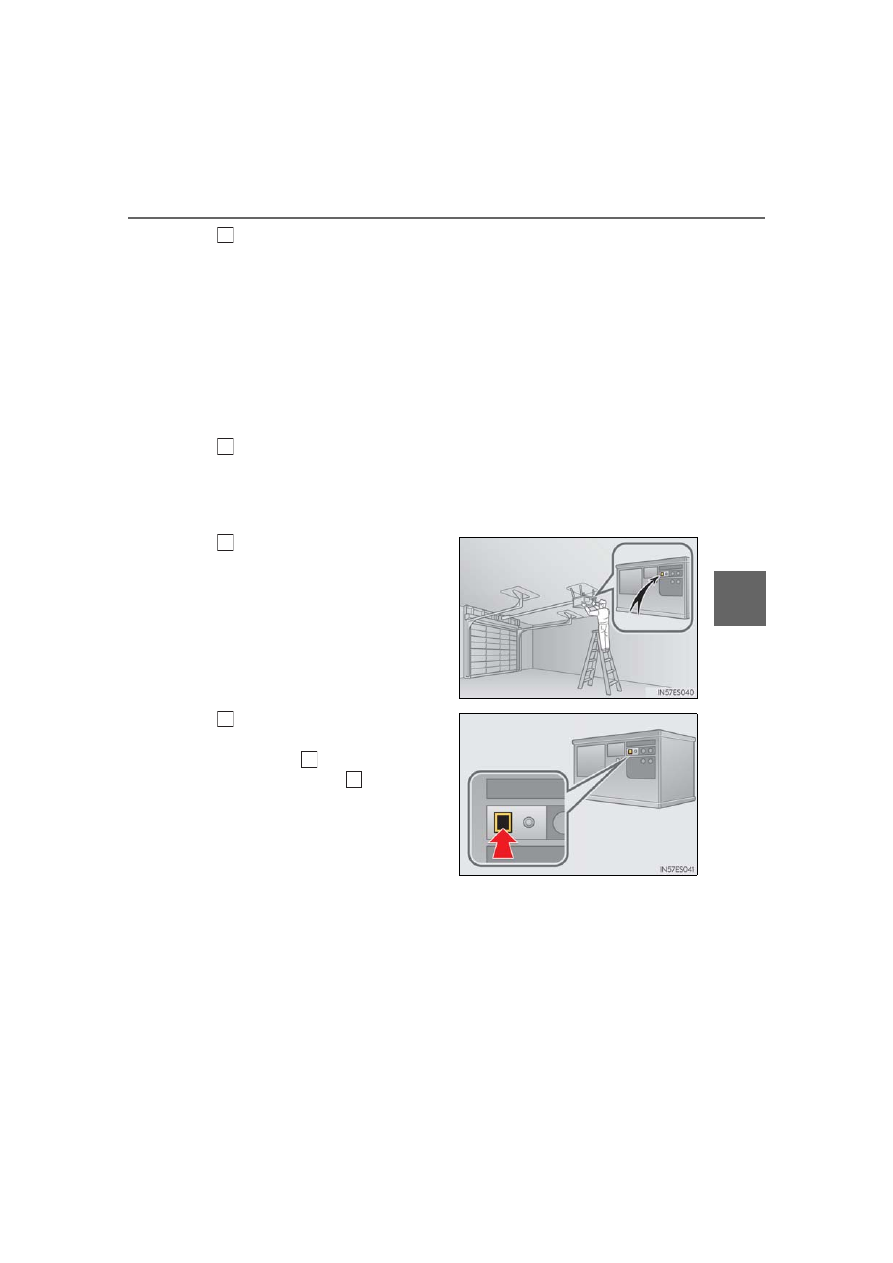
Locate the “Learn” or “Smart”
button on the garage door
opener motor in the garage.
This button can usually be found
where the hanging antenna wire is
attached to the unit. The name and
color of the button may vary by man-
ufacturer. Refer to the owner’s man-
ual supplied with the garage door
opener motor for details.
Press and release the “Learn” or
“Smart” button.
Perform within 30 seconds
after performing .
4
5
1
2
3
2