Jaguar XK. Manual - part 71
 

  Index      Jaguar     Jaguar XK - service repair manual 2007 year


Search            


Content   ..  69  70  71  72   ..


Jaguar XK. Manual - part 71


287

Compact disc player

R

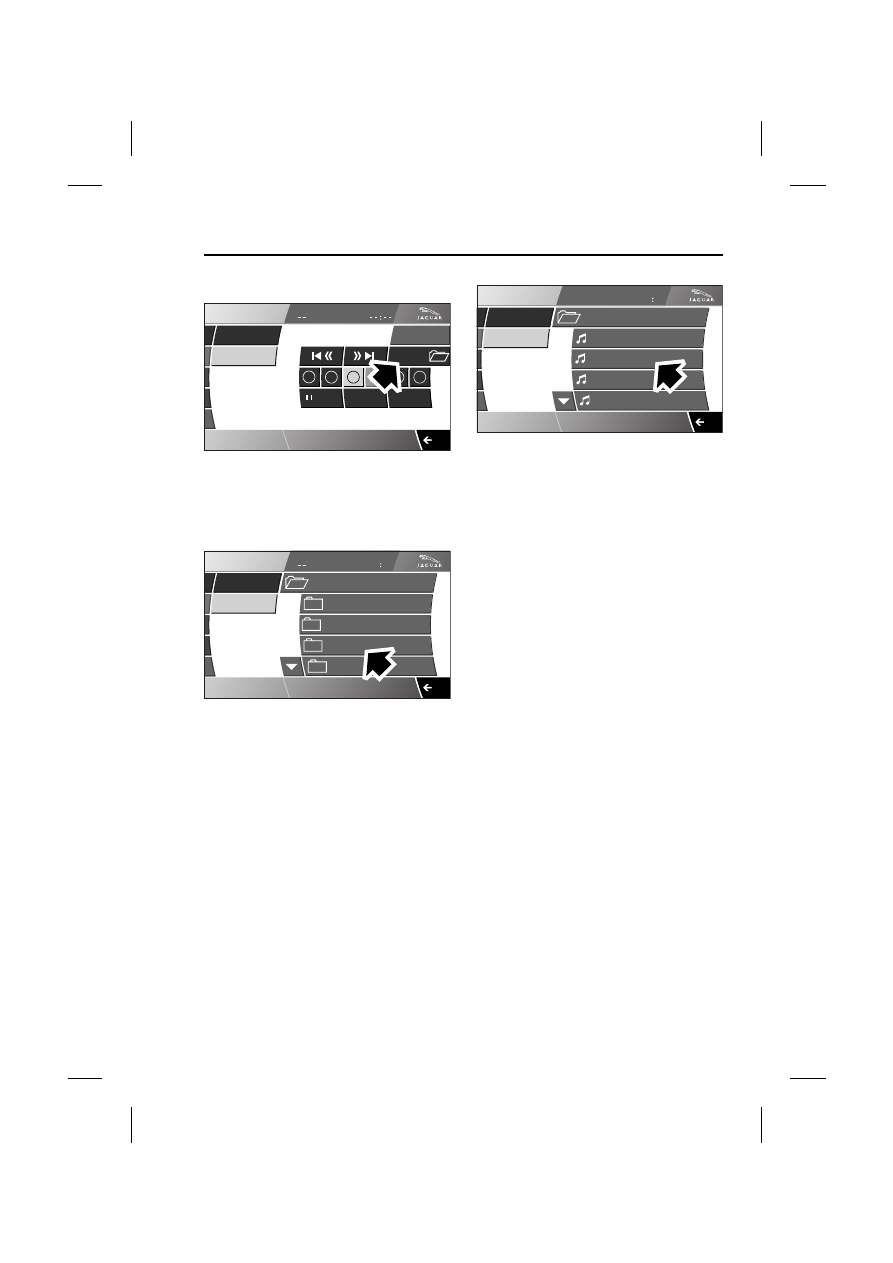
Playing MP3 discs

If the MP3 disc has been recorded with 
the music files contained within folders, 
additional information is available by 
selecting Folders.

The titles of any tracks and folders 
recorded on the CD will be displayed in 
alphabetical order as the disc may be 
recorded in another order.

Select the folder to access the tracks 
contained within the folder.

MP3 folder and track format

A CD-R or CD-RW can have MP3 folders 
and tracks recorded in many different 
ways, with many layers of folders and 
with tracks distributed throughout the 
folder structure.

To minimise the loading on the system, a 
rigid folder structure is recommended.

Note: Any CD containing a mixture of 
MP3 and CDDA tracks will be treated as a 
CD (any MP3 tracks will be ignored).

Note: The CD player may take a long time 
(one minute or more) to load an MP3 disc 
owing to the number of tracks on it.

CD

Settings

A u d i o

/

CD

4

5

6

12 : 26 pm

Mix

Repeat

AM FM

TP

TA

3CH

Folders

1

2

3

Tr

E93976

CD

Tr

A u d i o

/

CD

12 : 26 pm

AM FM

TP

TA

3CH

00 00

CD 3

Please Please Me

Beatles-Hits

Revolver

Sgt. Pepper's

Help

E93977

CD

Tr

A u d i o

/

CD

12 : 26 pm

AM FM

TP

TA

3CH

00 00

CD 3

Eleanor Rigby 

Revolver

I'm Only Sleeping 

Love You To 

Taxman

2

E93978

Satellite radio

288

L

Satellite radio

GENERAL INFORMATION

Signals from a satellite broadcast radio 
service are encoded and a subscription 
to the broadcast operator (SIRIUS) is 
required to receive them.

The following features are inhibited when 
driving:
• Parental lock.
• Channel skip.
• Edit favourites - song seek list.

As a digital signal is used, satellite radio is 
able to provide output of radio 
broadcasts with the sound quality and 
clarity of CD playback.

RECEIVING RADIO 
BROADCASTS

To access satellite radio from the vehicle 
Home screen:

• Select Audio on the touch-screen.

• Select Sat Radio .

If you are not currently subscribed to 
SIRIUS, No Subscription will be 
displayed below Sat Radio followed by a 
subscription screen. 

E94003

Home

Audio

Climate

Phone

Navigation

Vehicle

External

Left

Right

Valet

12 : 26 pm

71

70

F

F

62

F

.5

.0

Sat Radio

Ch021 Octane

Rock

E94009

AM/FM

Sat Radio

CD

Octane

I-90

1053

Bridge

Pulse

Nation

Guns & Roses

Sat Options

 SR1   CH022 Octane

Rock Hits

Settings

Audio

12 : 34 pm

E94010

289

Satellite radio

R

RADIO DISPLAY

Satellite radio display panel

1. Category of music which is currently 

selected.

2. Channel which is currently selected.

3. Seek up and seek down buttons.

4. Back - to previous screen or setting.

5. Programme description text (PDT) 

description, which provides details 
(where available) of the artist’s name, 
song title and the composer and 
subscription information.

6. PDT text display area - artist currently 

playing.

7. Six preset memorised radio channels. 

Press to select the required channel 
e.g. Octane preset is selected in the 
above example.

RADIO CONTROLS

Preset memorised radio channels

Three screens are available, listed as 
SR1, SR2 and SR3, each displayed on 
the top line of the screen. Each screen 
can display up to six preset channels, 
giving a total of 18 possible preset 
channels.

Selecting Sat Radio repeatedly, cycles 
through the three screens.

Preset memorised channel - 
setting

To save a channel as a preset, tune into 
the channel that is to be stored, then 
press and hold the desired preset button 
for approximately two seconds. Audio 
output is muted while the channel is 
being stored and returns once the 
operation is complete.

To change a preset, select the desired 
channel either via Category lists or 
manually, Direct channel entry. Then 
press and hold the desired preset until 
the new channel is stored.

AM/FM

Sat Radio

CD

Octane

I-90

1053

Bridge

Pulse

Nation

Guns & Roses

Sat Options

 SR1   CH022 Octane

Rock Hits

Settings

Audio

12 : 34 pm

E94015

AM/FM

Sat Radio

CD

Octane

Wax

CNBC

Strobe

The Pulse

Disney

Guns & Roses

Sat Options

 SR2   Ch101 Vista

Dance

Settings

Audio

12 : 34 pm

E94016

SR2

SR3

SR1

Satellite radio

290

L

Note: If manual tuning is used and a 
channel is selected that is an existing 
preset, the preset will highlight. If the 
same channel is stored in more than one 
preset (on different screens for example) 
and manual tuning is performed, the first 
preset will highlight.

If required, repeat the procedure to store 
up to 17 other satellite channels.

Recalling a preset channel

Select the appropriate source where the 
desired channel is located (SR1, SR2 or 
SR3) by pressing Sat Radio to cycle 
through the list.

Select the desired preset button, e.g. 
Octane. Audio output will switch to the 
satellite channel stored on the selected 
preset.

Seek Up and Seek Down

Short press : Either the seek down 
button 1 or seek up button 2 to step to 
the next numerical channel.

The channel which is displayed on 
release of either button will be the 
channel that satellite radio will tune to.

Song Seek

Song Seek can store up to 10 song titles 
along with the artist’s name etc., if it is 
transmitted with the PDT (Programme 
Descriptive Text) information.

If, while listening to any satellite channel, 
one of the stored Song Seek Favourites is 
playing on any other satellite channel, the 
user will be alerted visually. The user can 
choose to tune to that channel.

AM/FM

Sat Radio

CD

Octane

I-90

1053

Bridge

Pulse

Nation

Guns & Roses

Sat Options

 SR1   CH022 Octane

Rock Hits

Settings

Audio

12 : 34 pm

E94017

Octane

SR1

AM/FM

Sat Radio

CD

Octane

I-90

1053

Bridge

Pulse

Nation

Guns & Roses

Sat Options

 SR1   CH022 Octane

Rock Hits

Settings

Audio

12 : 34 pm

E94018

1

2


Content   ..  69  70  71  72   ..