Infiniti Q50 (2021 year). Manual in english - page 17
5-46
Starting and driving
WAF0555X
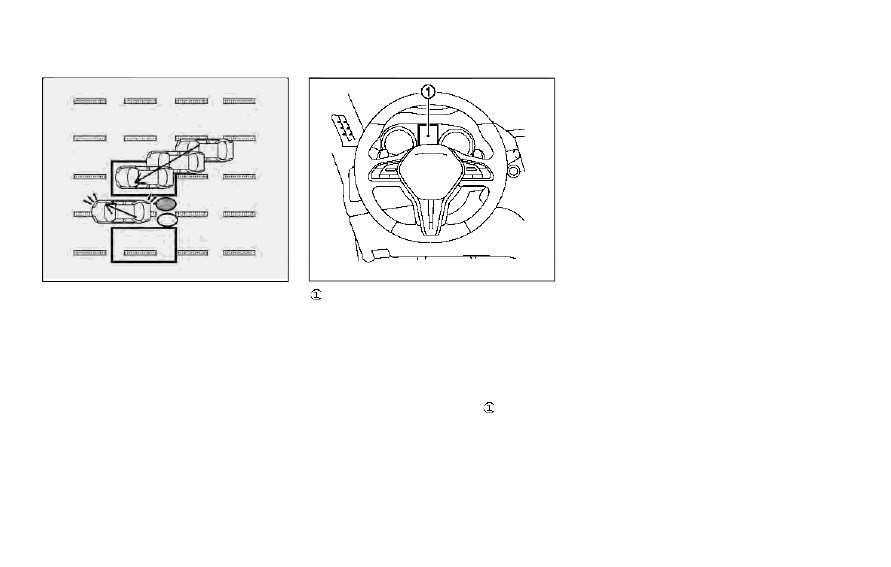
Illustration 6 – Entering from the side
Illustration 6: If the driver activates the turn
signal, then the system chimes (twice) and
the side indicator light flashes.
NOTE:
.
The radar sensors may not detect a
vehicle which is traveling at about the
same speed as your vehicle when it
enters the detection zone.
.
If the driver activates the turn signal
before a vehicle enters the detection
zone, the side indicator light will flash
but no chime will sound when the other
vehicle is detected.
JVS0824X
Vehicle information display
SYSTEM TEMPORARILY UNA-
VAILABLE
When radar blockage is detected, the BSW
system will be turned off automatically, a
chime will sound and the “side radar ob-
struction” warning message will appear in
the vehicle information display
.
The system is not available until the condi-
tions no longer exist.
The radar sensors may be blocked by
temporary ambient conditions such as
splashing water, mist or fog. The blocked
condition may also be caused by objects
such as ice, frost or dirt obstructing the radar
sensors.
Action to take:
When the above conditions no longer exist,
the system will resume automatically.
If the “side radar obstruction” warning
message continues to appear, have the
system checked. It is recommended you visit
an INFINITI retailer for this service.
SYSTEM MALFUNCTION
When the BSW system malfunctions, it will
be turned off automatically, a chime will
sound, and the system “malfunction” warn-
ing message with the driver assist system
blind spot indicator (orange) will appear in
the vehicle information display.
Action to take:
Stop the vehicle in a safe location and place
the shift lever in the P (Park) position. Turn
the engine off and restart the engine. If the
system “malfunction” warning message with
the driver assist system blind spot indicator
(orange) continues to be displayed, have the
BSW system checked. It is recommended
you visit an INFINITI retailer for this service.