Infiniti QX4 (R50). Manual - part 404
Initialization
NBEL0237
This procedure is for initializing the current location. Perform “Ini-
tialize Location” when the vehicle is transported a long distance by
trailer, etc.
Map with grey background appears and the vehicle location can-
not be adjusted by scrolling the display when the vehicle location
in the memory is out of the area of the inserted map data.
Perform “Initialize Location” when this occurs.
NOTE:
I
Only initialize the system when the display & NAVI control
unit is replaced. If the system is initialized in other cases,
it may cause inaccurate positioning of the position marker
for a while.
I
Initialize the system outside for receiving the radio wave
from the GPS satellite.
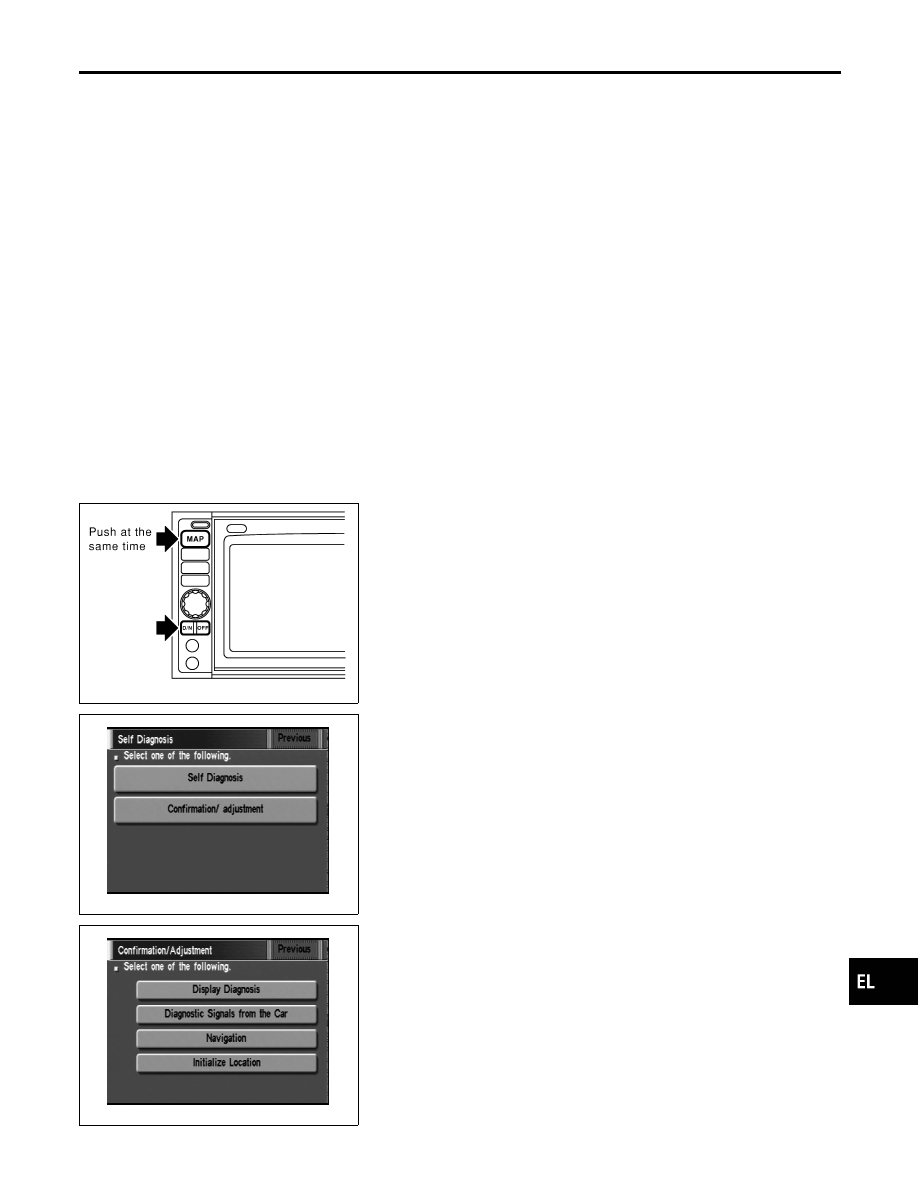
SEL583X
HOW TO PERFORM
NBEL0237S01
1.
Switch the navigation system mode to self-diagnosis by push-
ing both “MAP” and “D/N” switches at the same time for more
than 5 seconds.
SEL584X
2.
Touch “Confirmation/ adjustment”.
SEL588X
3.
Touch “Initialize Location”. Then the previous screen is dis-
played.
GI
MA
EM
LC
EC
FE
AT
TF
PD
AX
SU
BR
ST
RS
BT
HA
SC
IDX
NAVIGATION SYSTEM
Initialization
EL-433