Infiniti G35 (V35). Manual - part 584
LT-16
HEADLAMP - XENON TYPE -
2.
CHECK POWER SUPPLY CIRCUIT
1.
Turn ignition switch OFF.
2.
Disconnect BCM connector.
3.
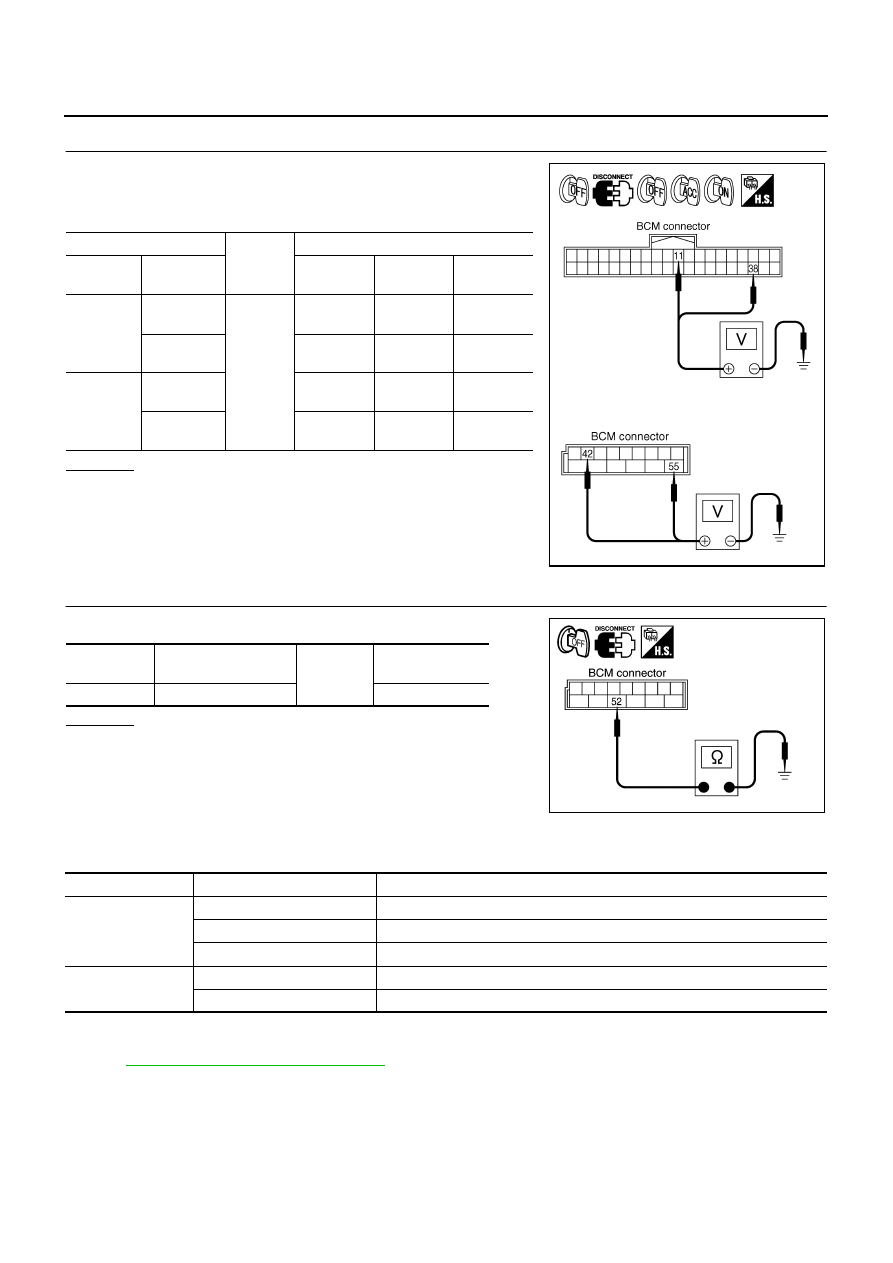
Check voltage between BCM harness connector and ground.
OK or NG
OK
>> GO TO 3.
NG
>> Repair harness or connector.
3.
CHECK GROUND CIRCUIT
Check continuity between BCM harness connector and ground.
OK or NG
OK
>> INSPECTION END
NG
>> Repair harness or connector.
CONSULT-II Functions (BCM)
NKS002NN
CONSULT-II can display each diagnostic item using the diagnostic test mode shown following.
CONSULT-II BASIC OPERATION
Refer to
GI-37, "CONSULT-II Start Procedure"
WORK SUPPORT
Operation Procedure
1.
Touch “HEAD LAMP” on “SELECT TEST ITEM” screen.
2.
Touch “WORK SUPPORT” on “SELECT DIAG MODE” screen.
3.
Touch “BATTERY SAVER SET” on “SELECT WORK ITEM” screen.
(+)
(
−
)
Ignition switch position
OFF
ACC
ON
BCM
connector
Terminal
M1
11
Ground
Approx. 0 V
Battery
voltage
Battery
voltage
38
Approx. 0 V
Approx. 0 V
Battery
voltage
M2
42
Battery
voltage
Battery
voltage
Battery
voltage
55
Battery
voltage
Battery
voltage
Battery
voltage
PKIA5204E
BCM
connector
Terminal
Ground
Continuity
M2
52
Yes
PKIA6256E
BCM diagnosis part
Diagnosis mode
Description
HEADLAMP
WORK SUPPORT
Changes the setting for each function.
DATA MONITOR
Displays BCM input data in real time.
ACTIVE TEST
Operation of electrical loads can be checked by sending drive signal to them.
BCM
SELF-DIAG RESULTS
BCM performs self-diagnosis of CAN communication.
CAN DIAG SUPPORT MNTR
The result of transmit/receive diagnosis of CAN communication can be read.