Hyundai Nexo (2024 year). Manual in english - page 7
 

  Index      Manuals     Hyundai Nexo (2024 year). Manual in english


Search            copyright infringement  


Content      ..     5      6      7      8     ..


Hyundai Nexo (2024 year). Manual in english - page 7


3-59

Con

v

enience f

eatur

es of y

our v

ehicle

3

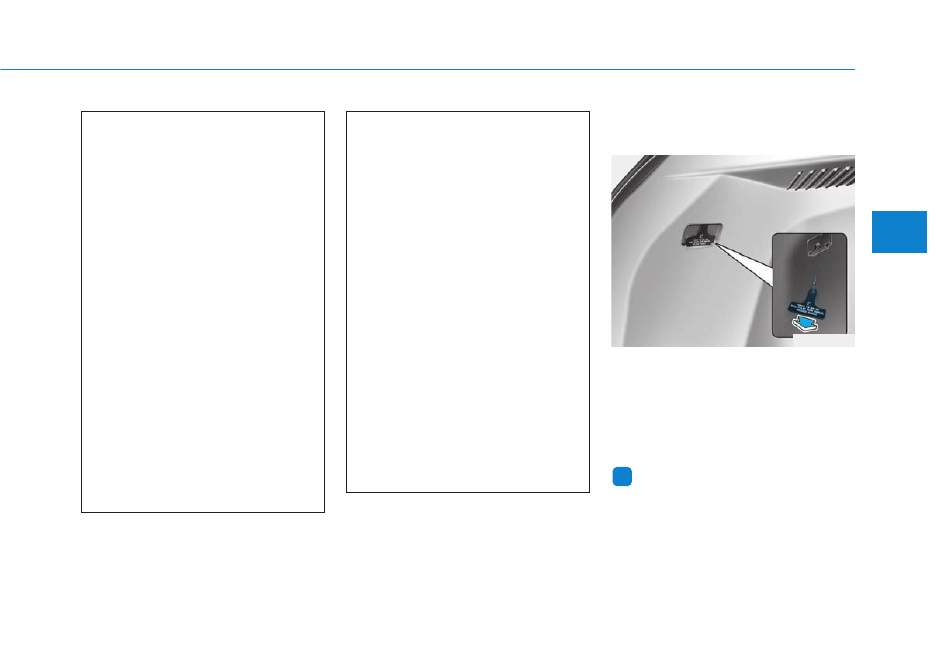
Emergency Fuel Filler Door
Release

If the fuel filler door does not open
due to the battery discharge and fail-
ure of the electrical wiring, open the
liftgate and lightly pull the handle
towards the arrow direction to open
the lid.

Information 

Do not pull the handle excessively,
otherwise the luggage area trim or
release handle may be damaged.

i

Do not get back into a vehicle
once you have begun refueling
since you can generate static
electricity by touching, rubbing
or sliding against any item or
fabric (polyester, satin, nylon,
etc.) capable of producing stat-
ic electricity. Static electricity
discharge can ignite fuel
vapors resulting in rapid burn-
ing. If you must reenter the
vehicle, you should once again
eliminate potentially danger-
ous static electricity discharge
by touching a metal part of the
vehicle, away from the fuel filler
neck, nozzle or other gasoline
source.

Do not use cellular phones
while refueling. Electric current
and/or electronic interference
from cellular phones can
potentially ignite fuel vapors
causing a fire.

When refueling, always shut
the power off. Once refueling
is complete, check to make
sure the filler cap and filler
door are securely closed,
before starting the vehicle.

DO NOT use matches or a
lighter and DO NOT SMOKE or
leave a lit cigarette in your
vehicle while at a gas station
especially during refueling.
Automotive fuel is highly
flammable and can, when
ignited, result in fire.

If a fire breaks out during refu-
eling, leave the vicinity of the
vehicle, and immediately con-
tact the manager of the gas
station and then contact the
local fire department. Follow
any safety instructions they
provide.

OFE048419

3-60

Convenience features of your vehicle

IIN

NS

ST

TR

RU

UM

ME

EN

NT

T  C

CL

LU

US

ST

TE

ER

R

1. Power gauge

2. Speedometer

3. Fuel cell stack temperature gauge

4. Fuel gauge

5. Odometer/Cluster display/Trip computer

6. Warning and indicator lights

OFE048100N

The actual cluster in the vehicle may differ
from the illustration.
For more details, refer to the "Gauges and
Meters" in this chapter.

Type A

3-61

Con

v

enience f

eatur

es of y

our v

ehicle

3

1. Power gauge

2. Speedometer 

3. Fuel cell stack temperature gauge

4. Fuel gauge

5. Warning and indicator lights

6. Odometer/Cluster display/Trip computer

OFE041480N

The actual cluster in the vehicle may differ
from the illustration.
For more details, refer to the "Gauges and
Meters" in this chapter.

Type B

3-62

Convenience features of your vehicle

Instrument Cluster Control

Adjusting instrument cluster
illumination

When the vehicle's parking lights or
headlights are on, press the illumina-
tion control button to adjust the
brightness of the instrument panel
illumination.
When pressing the illumination con-
trol button, the interior switch illumi-
nation intensity is also adjusted.

• The brightness of the instrument

panel illumination is displayed.

• If the brightness reaches the maxi-

mum or minimum level, a chime
will sound.

Gauges and Meters

Speedometer

The speedometer indicates the
speed of the vehicle and is calibrated
in miles per hour (MPH) and/or kilo-
meters per hour (km/h).

Never adjust the instrument
cluster while driving. Doing so
could lead to driver distraction
which may cause an accident
and lead to vehicle damage,
serious injury, or death.

WARNING

OFE049043L

OFE048101N

OFE041481N

Type A 

Type B 

3-63

Con

v

enience f

eatur

es of y

our v

ehicle

3

Power gauge

The power gauge shows the energy
consumption rate of the traction
motor.

• CHARGE : It shows the charging

status of the battery when it is
being charged by the regenerative
brakes (decelerating or driving on
a downhill road).
The more electric energy is
charged, the lower the gauge level.

• ECO : It shows the energy con-

sumption rate during normal driv-
ing condition.

• POWER : It shows the energy con-

sumption rate of the vehicle when
driving uphill or accelerating. The
more electric energy is used, the
higher the gauge level.

Fuel cell stack temperature
gauge

This gauge shows the temperature
of the fuel cell stack coolant when
the POWER button is ON.

OFE048102

OFE041102N

Type A 

Type B 

OFE048103

OFE041103N

Type A 

Type B 

3-64

Convenience features of your vehicle

Do not continue driving with an over-
heated fuel cell stack. If your vehicle
overheats, have the vehicle inspected
by an authorized HYUNDAI dealer.

- Fuel Cell Stack

Overheats

If the gauge pointer moves
beyond the normal range area
toward the "H" position, it indi-
cates overheating that may dam-
age the fuel cell stack.

Hydrogen fuel gauge

This gauge indicates the approxi-
mate amount of fuel remaining in the
fuel tank (The fuel tank capacity is
given in chapter 8).

The fuel gauge is supplemented by a
low fuel warning light which will illu-
minate when the fuel tank is nearly
empty.

Information -

Hydrogen
Fueling Station

According to the hydrogen fueling sta-
tion condition, the hydrogen fuel may
not filled fully.

i

NOTICE

Running Out of Fuel

Running out of fuel can expose
vehicle occupants to danger.
You must stop and obtain addi-
tional fuel as soon as possible
after the warning light comes
on or when the gauge indicator
comes close to the ''E'' (Empty)
level.

WARNING

Radiator Cap

Never remove the radiator cap
when the fuel cell power mod-
ule is hot. Otherwise the fuel
cell stack coolant may be under
pressure and cause severe
burns. Wait until the fuel cell
power module is cool before
adding coolant to the reservoir.

WARNING

OFE048133

OFE041133N

Type A 

Type B 

3-65

Con

v

enience f

eatur

es of y

our v

ehicle

3

Outside temperature gauge

This gauge indicates the current out-
side air temperature by 1 degrees F
(1 degrees C).

- Temperature range : -40°F ~ 140°F 

(-40°C ~ 60°C)

Note that the temperature indicated
on the LCD display may not change
as quickly as the outside tempera-
ture (there may be a slight delay
before the temperature changes.) 
The temperature unit (from °C to °F
or from °F to °C) can be changed by:

Press the AUTO button while
pressing the OFF button on the cli-
mate control unit for 3 seconds

- Go to General settings mode 

Unit 

→ 

Temperature in the

Infotainment system display.

Both the temperature unit on the
cluster LCD display and climate con-
trol screen will change.

Information 

The infotainment system may change
after software updates. For more
information, refer to the user’s manu-
al provided in the infotainment system
and the quick reference guide.

Odometer

The odometer indicates the total dis-
tance that the vehicle has been driv-
en and should be used to determine
when periodic maintenance should
be performed.

i

OFE048104N

OFE041104N

Type A 

Type B 

OFE048106N

OFE041106N

Type A 

Type B 

3-66

Convenience features of your vehicle

Range

• The range is the estimated dis-

tance the vehicle can be driven
with the remaining fuel.

• If the estimated distance is below

1 mi. (1 km), the trip computer will
display "---" as range.

• If the hydrogen supply line is empty,

the gauge may indicate that the
hydrogen is not in the hydrogen
tank.

Information 

• If the vehicle is not on level ground

or the battery power has been inter-
rupted, the range function may not
operate correctly.

• The range may differ from the actu-

al driving distance as it is only an
estimate of the available driving
range for the vehicle and driving
conditions.

• The range may vary significantly

based on driving conditions, driving
habits, and condition of the vehicle.

Gear shift indicator  

This indicator displays which gear is
selected.

i

OFE048108N

OFE041482N

Type A 

Type B 

OFE048105

OCN7040013N

Type A 

Type B 

3-67

Con

v

enience f

eatur

es of y

our v

ehicle

3

Regenerative braking rate indi-
cator

While using the regenerative brakes,
you may select the regenerative
braking rate from 0 to 3 by pulling the
paddle shifter.

For more details,

refer to

"Regenerative Braking System" in
chapter 5.

Icy road warning light 
(if equipped)

This warning light is to warn the driv-
er the road may be icy.
When the temperature on the out-
side temperature gauge is approxi-
mately below 40°F (4°C), the Icy
Road Warning Light and Outside
Temperature Gauge blinks, and then
illuminates. Also, the warning chime
is sound.

Information 

If the icy road warning light appears
while driving, you should drive more
attentively and safely refraining from
over-speeding, rapid acceleration,
sudden braking or sharp turning, etc.

i

OFE058136N

OFE051018N

Type A 

Type B 

OFE048149L

OFE041149N

Type A 

Type B 

3-68

Convenience features of your vehicle

Warning and Indicator lights

Information

Make sure that all warning lights are
OFF after starting the vehicle. If any
light is still ON, this indicates a situa-
tion that needs attention.

Ready Indicator 

This indicator illuminates :

When the vehicle is ready to be driven.
- ON : Normal driving is possible.
- OFF : Normal driving is not possible,

or a problem has occurred.

- Blinking : Emergency driving.

When the ready indicator goes OFF
or blinks, there is a problem with the
system. In this case, have your vehi-
cle inspected by an authorized
HYUNDAI dealer.

Service Warning Light

This warning light illuminates :

• When the POWER button is in the

ON position.
- It illuminates for approximately 3

seconds and then goes off.

• When there is a problem with relat-

ed parts of the fuel cell electric
vehicle control system, such as
sensors, etc.

When the warning light illuminates
while driving, or does not go OFF
after starting the vehicle, have your
vehicle inspected by an authorized
HYUNDAI dealer.

Power Down Warning
Light

This warning light illuminates :

• When the vehicle power should be

limited due to a malfunction with
fuel cell stack.
If the warning light continuously
remains on when the vehicle is in
"READY" state, or comes on dur-
ing driving, this indicates that there
may be a malfunction with the fuel
cell stack. If this occurs, have the
vehicle inspected by an authorized
HYUNDAI dealer.

If the warning light turns on again
when restarting the vehicle after
parking your vehicle on an incline.

NOTICE

i

3-69

Con

v

enience f

eatur

es of y

our v

ehicle

3

Icy Road Warning Light
(if equipped)

This warning light is to warn the driver
the road may be icy.
When the temperature on the out-
side temperature gauge is approxi-
mately below 40°F (4°C), the Icy
Road Warning Light and Outside
Temperature Gauge blinks and then
illuminates. Also, the warning chime
sounds 1 time.
The Icy Road Warning function can
be activated or deactivated from the
Vehicle Settings mode in the
Infotainment system screen.

Information 

If the icy road warning light appears
while driving, you should drive more
attentively and safely, refraining from
over-speeding, rapid acceleration, sud-
den braking or sharp turning, etc.

Hydrogen Gas Leak
Warning Light

This warning light illuminates:

• [Red] When the hydrogen leakage

is detected in the vehicle.

• [Yellow] When there is a malfunc-

tion with the hydrogen leakage
detection sensor.

If the warning light continuously
remains on when the vehicle is in
"READY" state, or comes on during
driving, this indicates that there may
be hydrogen leakage or a malfunc-
tion with the hydrogen leakage
detection sensor. If this occurs, stop
the vehicle and have the hydrogen
system inspected by an authorized
HYUNDAI dealer.

Low Fuel Level
Warning Light

This warning light illuminates:

When the fuel tank is nearly empty.

If the fuel tank is nearly empty:

Add fuel as soon as possible.

i

3-70

Convenience features of your vehicle

Supplemental Restraint
System Warning Light

This warning light illuminates:

• When the POWER button is in the

ON position.
- It illuminates for approximately 6

seconds and then goes off.

• When there is a malfunction with

the SRS.
In this case, have your vehicle
inspected by an authorized HYUNDAI
dealer.

Seat Belt Warning Light

This warning light informs the driver
that the seat belt is not fastened.

For more details, refer to the "Seat
Belts" in chapter 2.

Regenerative Brake
Warning Light

This warning light illuminates :

When the regenerative brake does
not operate and the brake does not
perform well. This causes the Brake
Warning light (red) and Regenerative
Brake Warning Light (yellow) to illu-
minate simultaneously.
In this case, drive safely and have
your vehicle inspected by an author-
ized HYUNDAI dealer.
The operation of the brake pedal may
be more difficult than normal and the
braking distance can increase.

(yellow)

3-71

Con

v

enience f

eatur

es of y

our v

ehicle

3

Parking Brake & Brake
Fluid Warning Light

This warning light illuminates:

• When the POWER button is in the

ON position.
- It illuminates for approximately 3

seconds.

- It remains on if the parking brake

is applied.

• When the parking brake is applied.
• When the brake fluid level in the

reservoir is low.
- If the warning light illuminates

with the parking brake released, it
indicates the brake fluid level in
reservoir is low.

If the brake fluid level in the reser-
voir is low:

1. Drive carefully to the nearest safe

location and stop your vehicle.

2. With the vehicle turned off, check

the brake fluid level immediately
and add fluid as required 

(For more

details, refer to "Brake Fluid" in
chapter 7)

. After adding brake fluid,

check all brake components for fluid
leaks. If a brake fluid leak is found,
or if the warning light remains on, or
if the brakes do not operate proper-
ly, do not drive the vehicle. Have the
vehicle inspected by an authorized
HYUNDAI dealer.

Dual-diagonal braking system

Your vehicle is equipped with dual-
diagonal braking systems. This
means you still have braking on two
wheels even if one of the dual sys-
tems should fail.
With only one of the dual systems
working, more than normal pedal
travel and greater pedal pressure is
required to stop the vehicle.

Also, the vehicle will not stop in as
short a distance with only a portion
of the brake system working.

Parking Brake & Brake Fluid
Warning Light

Driving the vehicle with a warn-
ing light ON is dangerous. If the
Parking Brake & Brake Fluid
Warning Light illuminates with
the parking brake released, it
indicates that the brake fluid
level is low.
In this case, have your vehicle
inspected by an authorized
HYUNDAI dealer.

WARNING

3-72

Convenience features of your vehicle

Anti-lock Brake System
(ABS) Warning Light

This warning light illuminates:

• When the POWER button is in the

ON position.
- It illuminates for approximately 3

seconds and then goes off.

• When there is a malfunction with

the ABS (The normal braking sys-
tem will still be operational without
the assistance of the anti-lock
brake system).
In this case, have your vehicle
inspected by an authorized HYUNDAI
dealer.

Electronic
Brake Force
Distribution
(EBD) System Warning Light

These two warning lights illuminate
at the same time while driving:

When the ABS and regular brake sys-
tem may not work normally.
In this case, have your vehicle inspect-
ed by an authorized HYUNDAI dealer.

Information 

- Electronic

Brake Force Distribution
(EBD) System Warning Light

When the ABS Warning Light is on or
both ABS and Parking Brake & Brake
Fluid Warning Lights are on, the
speedometer, odometer, or tripmeter
may not work. Also, the MDPS
Warning Light may illuminate and
the steering effort may increase or
decrease.

In this case, have your vehicle inspect-
ed by an authorized HYUNDAI dealer.

i

Electronic Brake Force
Distribution (EBD) System
Warning Light

When both ABS and Parking
Brake & Brake Fluid Warning
Lights are on, the brake system
will not work normally and you
may experience an unexpected
and dangerous situation during
sudden braking.
In this case, avoid high speed
driving and abrupt braking.
In this case, have your vehicle
inspected by an authorized
HYUNDAI dealer.

WARNING

3-73

Con

v

enience f

eatur

es of y

our v

ehicle

3

Motor Driven Power
Steering (MDPS)
Warning Light 

This warning light illuminates:

• When the POWER button is in the

ON position.
- It illuminates for approximately 3

seconds and then goes off.

• When there is a malfunction with

the MDPS.
In this case, have your vehicle
inspected by an authorized HYUNDAI
dealer.

Charging System
Warning Light
(for 12 V battery)

This warning light illuminates:

• When the 12-volt battery level is

low or a failure occurs on the
charging system such as LDC.

• If the warning light turns on while

driving, move the vehicle to a safe
location, turn off and turn on the
vehicle again, and check if the
warning light turns off. If the warn-
ing light remains on, have the vehi-
cle inspected by an authorized
HYUNDAI dealer.

• Even if the warning light turns off,

have the vehicle inspected by an
authorized HYUNDAI dealer.
If you drive the vehicle while the
warning light is on, vehicle speed
may be limited and the 12-volt bat-
tery may be discharged.

LDC : Low voltage DC-DC Converter.

Low Tire  Pressure
Warning Light 

This warning light illuminates:

• When the POWER button is in the

ON position.
- It illuminates for approximately 3

seconds and then goes off.

• When one or more of your tires are

significantly underinflated (The
location of each underinflated tire
is displayed on the LCD display).

For more details, refer to "Tire
Pressure Monitoring System
(TPMS)" in chapter 6.

3-74

Convenience features of your vehicle

This warning light remains ON
after blinking for approximately 60
seconds, or repeatedly blinks ON
and OFF in 3 second intervals:

When there is a malfunction with the
TPMS.
In this case, have your vehicle inspect-
ed by an authorized HYUNDAI dealer.

For more details, refer to "Tire
Pressure Monitoring System
(TPMS)" in chapter 6.

Electronic Parking
Brake (EPB) Warning
Light

This warning light illuminates:

• When the POWER button is in the

ON position.
- It illuminates for approximately 3

seconds and then goes off.

• When there is a malfunction with

the EPB.
In this case, have the vehicle inspect-
ed by an authorized HYUNDAI deal-
er.

Information

The Electronic Parking Brake (EPB)
Warning Light may illuminate when
the Electronic Stability control (ESC)
Indicator Light comes on to indicate
that the ESC is not working properly
(This does not indicate malfunction of
the EPB).

AUTO HOLD Indicator
Light 

This indicator light illuminates:

• [White] When you activate the auto

hold system by pressing the AUTO
HOLD switch.

• [Green] When you stop the vehicle

completely by depressing the
brake pedal with the auto hold sys-
tem activated.

• [Yellow] When there is a malfunc-

tion with the auto hold system.
In this case, have the vehicle inspect-
ed by an authorized HYUNDAI deal-
er.

For more details, refer to "Auto
Hold" in chapter 5.

i

Safe Stopping

The TPMS cannot alert you to
severe and sudden tire damage
caused by external factors.

If you notice any vehicle insta-
bility, immediately take your
foot off the accelerator pedal,
apply the brakes gradually with
light force, and slowly move to
a safe position off the road.

WARNING

E

EP

PB

B

3-75

Con

v

enience f

eatur

es of y

our v

ehicle

3

Forward Safety warn-
ing light (if equipped)

This warning light illuminates :

• When the POWER button is in the

ON position.
- It illuminates for approximately 3

seconds and then goes off.

• When FCA is turned off.
• When the radar sensor or cover is

blocked with dirt or snow. Check
the sensor and cover and clean
them by using a soft cloth.

• When there is a malfunction with

FCA. In this case, have your vehi-
cle inspected by an authorized
HYUNDAI dealer.

For more details, refer to "Forward
Collision-Avoidance Assist (FCA)"
in chapter 5.

Lane Safety indicator
light (if equipped)

This indicator light illuminates:

• [Green] When the function operat-

ing conditions are satisfied for
LKA.

• [White] When system operating

conditions are not satisfied or
when the sensor does not detect
the lane line.

• [Yellow] When there is a malfunc-

tion with Lane Keeping Assist
(LKA).

In this case, have your vehicle
inspected by an authorized HYUNDAI
dealer.

For more details, refer to "Lane
Keeping Assist (LKA)" in chapter 5.

LED Headlight Warning
Light (if equipped)

This warning light illuminates:

• When the POWER button is in the

ON position.
- It illuminates for approximately 3

seconds and then goes off.

• When there is a malfunction with

the LED headlight.

In this case, have the vehicle inspect-
ed by an an authorized HYUNDAI
dealer.

This warning light blinks:

When there is a malfunction with a
LED headlight related part.
In this case, have the vehicle
inspected by an an authorized
HYUNDAI dealer.

Continuous driving with the LED
Headlight Warning Light on or
blinking can reduce LED headlight
life.

NOTICE

3-76

Convenience features of your vehicle

Master Warning Light

This warning light illuminates:

When there is a malfunction in oper-
ation in any of the following func-
tions:
- Forward Collision-Avoidance

Assist malfunction 

- Forward Collision-Avoidance

Assist radar blocked 

- Blind-Spot Collision-Avoidance

Assist malfunction

- Blind-Spot Collision-Avoidance

Assist radar blocked 

- LED headlight malfunction 
- High Beam Assist malfunction 
- Smart Cruise Control malfunction 
- Smart Cruise Control radar

blocked 

- Tire Pressure Monitoring System

(TPMS) malfunction

To identify the details of the warning,
look at the cluster display.

Electronic Stability
Control (ESC) Indicator
Light

This indicator light illuminates:

• When the POWER button is in the

ON position.
- It illuminates for approximately 3

seconds and then goes off.

• When there is a malfunction with

the ESC system.
In this case, have your vehicle
inspected by an authorized
HYUNDAI dealer.

This indicator light blinks:

While the ESC is operating.

For more details,

refer to

"Electronic Stability Control (ESC)"
in chapter 5.

Electronic Stability
Control (ESC) OFF
Indicator Light

This indicator light illuminates:

• When the POWER button is in the

ON position.
- It illuminates for approximately 3

seconds and then goes off.

• When you deactivate the ESC sys-

tem by pressing the ESC OFF but-
ton.

For more details,

refer to

"Electronic Stability Control (ESC)"
in chapter 5.

3-77

Con

v

enience f

eatur

es of y

our v

ehicle

3

Immobilizer Indicator
Light

This indicator light illuminates for
up to 30 seconds:

When the vehicle detects the smart
key in the vehicle with the POWER
button in the ACC or ON position.
- At this time, you can start the vehi-

cle.

- The indicator light goes off after

starting the vehicle.

This indicator light blinks for a few
seconds:

When the smart key is not in the
vehicle.
- At this time, you cannot start the

vehicle.

This indicator light illuminates for
2 seconds and goes off:

If the smart key is in the vehicle and
the POWER button is ON, but the
vehicle cannot detect the smart key.
In this case, have your vehicle inspect-
ed by an authorized HYUNDAI dealer.

This indicator light blinks:

• When the battery voltage of the

smart key is low.
- At this time, you can not start the

vehicle. However, you can start the
if you press the POWER button
with the smart key.

(For more

details, refer to "Starting the
vehicle" in chapter 5)

.

• When there is a malfunction with

the immobilizer system.
In this case, have your vehicle
inspected by an authorized HYUNDAI
dealer.

Turn Signal Indicator
Light

This indicator light blinks:

When you operate the turn signal
indicator.

If any of the following occurs, there
may be a malfunction with the turn
signal system.

- The turn signal indicator light illu-

minates but does not blink

- The turn signal indicator light

blinks rapidly

- The turn signal indicator light

does not illuminate at all

If either of these conditions occur,
have your vehicle inspected by an
authorized HYUNDAI dealer.

3-78

Convenience features of your vehicle

High Beam Indicator
Light

This indicator light illuminates:

• When the headlights are on and in

the high beam position.

• When the turn signal lever is pulled

into the Flash-to-Pass position.

Light ON Indicator
Light

This indicator light illuminates:

When the tail lights or headlights are
on.

ECO Mode Indicator
Light

This indicator light illuminates : 

When you select "ECO" mode as
drive mode.

For more details, refer to "Drive
Mode Integrated Control System"
in this chapter.

3-79

Con

v

enience f

eatur

es of y

our v

ehicle

3

Cluster Display Messages

Shift to P

This warning message is displayed if
you try to turn off the vehicle with the
gear in the N (Neutral) position.
At this time, the POWER button
changes to the ACC position (If you
press the POWER button once more,
it will turn to the ON position).

Low Key Battery 

This warning message is displayed if
the battery of the smart key is dis-
charged while changing the POWER
button to the OFF position.

Press POWER button while
turning wheel 

This warning message is displayed if
the steering wheel does not unlock
normally when the POWER button is
pressed.
You should press the POWER button
while turning the steering wheel right
and left.

Check Steering Wheel Lock
System 

This warning message is displayed if
the steering wheel does not lock nor-
mally while the POWER button
changes to the OFF position.

Press brake pedal to start vehicle

This warning message is displayed if
the POWER button changes to the
ACC position twice by pressing the
button repeatedly without depressing
the brake pedal.
You can start the vehicle by depress-
ing the brake pedal.

Key not in vehicle

This warning message is displayed if
the smart key is not in the vehicle
when you press the POWER button.
When attempting to start the vehicle,
always have the smart key with you.

3-80

Convenience features of your vehicle

Key not detected 

This warning message is displayed if
the smart key is not detected when
you press the POWER button.

Press POWER button again

This message is displayed if you
were unable to start the vehicle when
the POWER button was pressed.
If this occurs, attempt to start the
vehicle by pressing the POWER but-
ton again.
If the warning message appears
each time you press the POWER
button, have your vehicle inspected
by an authorized HYUNDAI dealer.

Press POWER button with key 

This warning message is displayed if
you press the POWER button while
the warning message "Key not
detected" is displayed.
At this time, the immobilizer indicator
light blinks.

Check BRAKE SWITCH fuse

This warning message is displayed if
the brake switch fuse is disconnected.
You need to replace the fuse with a
new one before starting the vehicle.
If that is not possible, you can start the
vehicle by pressing the POWER but-
ton for 10 seconds in the ACC posi-
tion.

Shift to P to start vehicle

This warning message is displayed if
you try to start the vehicle without
shifting to the P (Park) position.

Door / Hood / Liftgate open

This warning is displayed indicating
which door, or the hood, or the lift-
gate is open.

OFE040110

Before driving the vehicle, you
should confirm that the door/
hood/liftgate is fully closed.
Also, check there is no door/
hood/liftgate open warning light
or message displayed on the
instrument cluster.

CAUTION

3-81

Con

v

enience f

eatur

es of y

our v

ehicle

3

Sunroof open

This warning is displayed if you turn
off the vehicle when the sunroof is
open.

Low Pressure

This warning message is displayed if
the tire pressure is low. The corre-
sponding tire on the vehicle will be
illuminated.

For more details, refer to "Tire
Pressure Monitoring System
(TPMS)" in chapter 6.

Check headlight (if equipped)

This warning message is displayed if
the headlights are not operating
properly. The headlight bulb may
need to be replaced.

Information

Make sure to replace the burned out
bulb with a new one of the same
wattage rating.

For more details, refer to "Bulb
Wattage" in chapter 8.

Check headlight LED 
(if equipped)

This warning message is displayed if
there is a problem with the LED
headlight. Have the vehicle inspected
by an authorized HYUNDAI dealer.

i

OFE040111

OTM040022L

3-82

Convenience features of your vehicle

Check headlight FAN
(if equipped)

This warning message is displayed if
there is a problem with headlight fan.
Have the vehicle inspected by an
authorized HYUNDAI dealer.

Lights Mode 

This indicator displays which exterior
light is selected using the lighting
control.

Wiper

This indicator displays which wiper
speed is selected using the wiper
control.

Check Virtual Engine Sound
System

This message is displayed when
there is a problem with the Virtual
Engine Sound System (VESS).
In this case, have your vehicle inspect-
ed by an authorized HYUNDAI dealer.

Check HBA (High Beam Assist)
system

This warning message is displayed if
there is a problem with the High
Beam Assist. Have the vehicle
inspected by an authorized
HYUNDAI dealer.

For more details, refer to “High
Beam Assist (HBA)” in this chap-
ter.

Check FCA (Forward Collision
Avoidance Asst.) (if equipped)

This warning message is displayed if
there is a problem with the Forward
Collision-Avoidance Assist. Have the
vehicle inspected by an authorized
HYUNDAI dealer.

For more details, refer to "Forward
Collision-Avoidance Assist (FCA)"
in chapter 5.

OFE041153N

3-83

Con

v

enience f

eatur

es of y

our v

ehicle

3

Check SCC (Smart Cruise
Control) system (if equipped)

This warning message is displayed if
there is a problem with the Smart
Cruise Control. Have the vehicle
inspected by an authorized HYUNDAI
dealer.

For more details, refer to "Smart
Cruise Control (SCC)" in chapter
5.

Check LKA (Lane Keep Assist)
system (if equipped)

This warning message is displayed if
there is a problem with the Lane
Keeping Assist. Have the vehicle
inspected by an authorized HYUNDAI
dealer.

For more details, refer to “Lane
Keeping Assist (LKA)” in chapter
5.

Check DAW (Driver Attention
Warning) system (if equipped)

This warning message is displayed if
there is a problem with the Driver
Attention Warning. Have the vehicle
inspected by an authorized HYUNDAI
dealer.

For more details, refer to “Driver
Attention Warning (DAW)” in chap-
ter 5.

3-84

Convenience features of your vehicle

C

CL

LU

US

ST

TE

ER

R  D

DIIS

SP

PL

LA

AY

Y

Cluster Display Control

The cluster display modes can be
changed by using the control but-
tons.

(1)

: MODE button for changing

modes

(2)

,  : MOVE switch for

changing items

(3) OK : SELECT/RESET  button  for

setting or resetting the
selected item

OFE048431L

3-85

Con

v

enience f

eatur

es of y

our v

ehicle

3

Cluster Display Modes 

The information provided may differ depending on which functions are applicable to your vehicle.

Consumption Info

Route Guidance

Driver Attention Warning 

The Master Warning mode
displays warning messages
related to the vehicle when
one or more systems is not
operating normally.

Accumulated Info

Destination Info

Tire Pressure

Drive Info

Digital Speedometer

Menu

Trip Computer

TBT  

Assist  

Master warning 

Up/Down

3-86

Convenience features of your vehicle

Trip computer mode

The trip computer mode displays
information related to vehicle driving
parameters including fuel economy,
tripmeter information and vehicle
speed.

For more details, refer to "Trip
Computer" in this chapter.

Turn By Turn (TBT) mode 

This mode displays the state of the
navigation.

Information mode

Tire Pressure

This mode displays information relat-
ed to Tire Pressure.

For more details, refer to "Tire
Pressure Monitoring System
(TPMS)" in chapter 6.

OIK047147N

OFE041121N

OFE048154N

OFE040502E

Type A 

Type B 

3-87

Con

v

enience f

eatur

es of y

our v

ehicle

3

Driver Attention Warning

This mode displays information relat-
ed to Driver Attention Warning.

For more details, refer to "Driver
Attention Warning (DAW)" in chap-
ter 5.

Warning messages

If one of followings occurs, warning
messages will be displayed on the
cluster display for several seconds.
- Forward Collision-Avoidance 

Assist malfunction (if equipped)

- Blind-Spot Collision-Avoidance

Assist malfunction (if equipped)

- High Beam Assist malfunction 

(if equipped)

- Exterior lamp malfunction 

(if equipped)

- Tire Pressure Monitoring System

(TPMS, if equipped)

OFE048156L

OIG059288L

Type A 

Type B 

3-88

Convenience features of your vehicle

The trip computer is a microcomput-
er-controlled driver information sys-
tem that displays information related
to driving.

Information 

Some driving information stored in the
trip computer (for example Average
Vehicle Speed) resets if the battery is
disconnected.

Trip modes

To change the trip mode, toggle the
"

,

" switch on the steering

wheel.

i

T

TR

RIIP

P  C

CO

OM

MP

PU

UT

TE

ER

R

• Tripmeter 
• Fuel Economy
• Timer

Accumulated Info

• Tripmeter 
• Fuel Economy
• Timer

Drive Info

• Average Fuel Economy
• Instant Fuel Economy

Fuel Economy

Digital Speedometer

Energy Flow

OFE048431L

3-89

Con

v

enience f

eatur

es of y

our v

ehicle

3

Average fuel economy/
Instant fuel economy

Average Fuel Economy (1)

• The average fuel economy is calcu-

lated by the total driving distance
and fuel consumption since the last
average fuel economy reset.

• The average fuel economy can be

reset both manually and automati-
cally.

Manual reset

To clear the average fuel economy
manually, press the OK button on the
steering wheel for more than 1 sec-
ond when the average fuel economy
is displayed.

Automatic reset

To automatically reset the average
fuel economy, select between "After
Ignition" or "After Refueling" in the
Vehicle Settings mode in the
Infotainment system screen.
- After ignition: When the vehicle has

been OFF for 4 hours or longer the
average fuel economy will reset
automatically.

- After refueling: The average fuel

economy will reset automatically
after refueling.

Information 

The vehicle must be driven for a min-
imum of 0.19 miles (300 meters) since
the last ignition key cycle before the
average fuel economy will be recalcu-
lated.

Instant Fuel Economy (2)

• The instantaneous fuel economy is

displayed according to the bar
graph in the LCD display while
driving.

i

OFE041529N

3-90

Convenience features of your vehicle

Accumulated Info display 

This display shows the accumulated
trip distance (1), the average fuel
economy (2), and the total driving
time (3).
The information is accumulated start-
ing from the last reset.
To reset the details, press and hold
the OK button when viewing the
Accumulated driving info. The trip
distance, the average fuel economy,
and total driving time will reset simul-
taneously.

The accumulated driving information
will continue to be counted while the
vehicle is still running (for example,
when the vehicle is in traffic or
stopped at a stop light).

Information 

The vehicle must be driven for a min-
imum of 0.19 miles (300 meters) since
the last ignition key cycle before the
average fuel economy will be recalcu-
lated.

Drive Info display

This display shows the trip distance
(1), the average fuel economy (2),
and the total driving time (3).
The information is combined for each
ignition cycle. However, when the
vehicle has been OFF for 4 hours or
longer the Drive Info screen will reset.
To reset the details, press and hold
the OK button when viewing the Drive
Info. The trip distance, the average
fuel economy, and total driving time
will reset simultaneously.

i

OJK041043N

OJK041039N


Content      ..     5      6      7      8     ..