Hyundai Tucson (2022 year). Manual in english - page 5
Instrument cluster
SPORT Mode Indicator Light
SMART Mode Indicator Light
This indicator light illuminates
This indicator light illuminates:
When you select "SPORT" mode as drive
When you select ''SMART" mode as drive
mode.
mode.
For more details, refer to "Drive Mode
For more details, refer to "Drive Mode
Integrated Control System" in chapter
Integrated Control System'' in chapter
6.
6.
Master warning light
This warning light illuminates:
When there is a malfunction in operation
in any of the following systems:
--
Forward Collision-Avoidance Assist
malfunction (if equipped)
--
Forward Collision-Avoidance Assist
radar blocked (if equipped)
--
Blind-Spot Collision Warning
malfunction (if equipped)
--
Blind-Spot Collision Warning radar
blocked (if equipped)
--
LED headlamp malfunction
(if equipped)
--
High Beam Assist malfunction
(if equipped)
--
Smart Cruise Control with Stop & Go
malfunction (if equipped)
--
Smart Cruise Control with Stop & Go
radar blocked (if equipped)
--
Tire Pressure Monitoring System
(TPMS) malfunction
To identify the details of the warning,
look at the LCD display.
4-22
04
LCD Display Messages for
Key not in vehicle
Vehicles Equipped with Smart
This message is displayed if the smart
Key
key is not in the vehicle when you leave
Shift to P
the vehicle with the Engine Start/Stop
button in the ON or Start position.
This message is displayed if you try to
Always turn off the engine before leaving
turn off the vehicle without the gear in
your vehicle.
the P (Park) position.
If this occurs, the Engine Start/Stop
Key not detected
button turns to the ACC position.
This message is displayed if the smart
Low key battery
key is not detected when you press the
Engine Start/Stop button.
When the Engine Start/Stop button
is pressed to turn OFF the engine,
Press START button again
this message may be displayed. This
This message is displayed if you were
message indicates that the internal
battery of the Smart Key is low. Consider
unable to start the vehicle when the
Engine Start/Stop button was pressed.
replacing the Smart Key internal battery.
If this occurs, attempt to start the engine
Press START button while turning
by pressing the Engine Start/ Stop button
wheel
again.
This message is displayed if the steering
If the warning message appears each
wheel does not unlock normally when
time you press the Engine Start/Stop
the Engine Start/Stop button is pressed.
button, we recommend that you have
the vehicle inspected by an authorized
You should press the Engine Start/Stop
HYUNDAI dealer.
button while turning the steering wheel
right and left.
Check steering wheel lock system
This message is displayed if the steering
wheel does not lock normally while the
Engine Start/Stop button is pressed to
the OFF position.
Press brake pedal to start engine
This message is displayed if the Engine
Start/Stop button changes to the ACC
position twice by pressing the button
repeatedly without depressing the brake
pedal.
You can start the vehicle by depressing
the brake pedal and then pressing the
Engine Start/Stop button.
4-23
Instrument cluster
Press START button with key
Battery discharging due to external
electrical devices
This message is displayed if you press
the Engine Start/Stop button while the
This message is displayed if the vehicle
warning message “Key not detected” is
battery voltage is low or if a current draw
displayed.
is detected that could drain the vehicle
At this time, the immobilizer indicator
battery.
light blinks.
Check to see that there are no non-
factory external electronic devices
Check BRAKE SWITCH fuse
connected to the vehicle battery system,
otherwise battery discharge may occur.
This message is displayed if the brake
switch fuse is disconnected.
If this message appears in the LCD
cluster and there are no other non-
You need to replace the fuse with a new
factory electronic devices connected to
one before starting the engine.
the vehicle, have the vehicle inspected
If that is not possible, you can start the
by an authorized HYUNDAI dealer.
engine by pressing the Engine Start/
Stop button for 10 seconds in the ACC
position.
Shift to P or N to start engine
This message is displayed if you try to
start the engine in any other position
except P (Park) or N (Neutral).
Information
You can start the engine with the gear
in N (Neutral). But, for your safety, we
recommend that you start the engine with
the gear shifted to P (Park).
4-24
04
Door, Hood, Liftgate open indicator
Sunroof open indicator (if equipped)
ONX4040009
ONX4040010
This warning is displayed if any door or
This warning is displayed if you turn off
hood or liftgate is left open. The warning
the engine when the sunroof is open.
will indicate which door is open in the
Close the sunroof securely before leaving
display.
your vehicle.
Low tire pressure
CAUTION
Before driving the vehicle, you should
confirm that the door/ hood/liftgate is
fully closed.
Also, check there is no door/hood/
liftgate open warning light or message
displayed on the instrument cluster.
ONX4E040019
This warning message is displayed if the
tire pressure is low. The corresponding
tire on the vehicle will be illuminated.
For more details, refer to “Tire Pressure
Monitoring System (TPMS)” section in
chapter 8.
4-25
Instrument cluster
Lights
Low washer fluid (if equipped)
Type A
Type B
This message is displayed if the washer
fluid level in the reservoir is nearly empty.
Have the washer fluid reservoir refilled.
Low fuel
This message is displayed if the fuel tank
is almost out of fuel.
When this message is displayed, the low
fuel level warning light in the cluster will
come on.
OJX1049007L
OJX1049062L
It is recommended to look for the nearest
fueling station and refuel as soon as
This indicator displays which exterior
light is selected using the lighting
possible.
control.
Low engine oil
You can activate or deactivate Wiper/
Lights display function from the User
This warning message is displayed when
Settings menu in the cluster LCD display.
the engine oil level should be checked.
Select:
If this warning message is displayed,
--
Setup → User settings → Cluster →
check the engine oil level as soon as
Wiper/Lights display
possible and add engine oil as required.
Slowly pour the recommended oil little
Wiper
by little into a funnel.
Type A
Type B
Use only the specified engine oil. (Refer
to "Recommended Lubricants and
Capacities“ section in chapter 2.)
Do not overfill the engine oil. Make sure
the oil level is not above F (Full) mark on
the dipstick.
OJX1049008L
OJX1049063L
This indicator displays which wiper speed
is selected using the wiper control.
You can activate or deactivate Wiper/
Lights display function from the User
Settings menu in the cluster LCD display.
Select:
--
Setup → User settings → Cluster →
Wiper/Lights display
4-26
04
Engine overheated / Engine has
Check turn signal
overheated
This message is displayed if the turn
This message is displayed when the
signal lamps are not operating properly.
engine coolant temperature is above
A lamp may need to be replaced.
248°F (120°C). This means that the
Make sure to replace the burned out
engine is overheated and may be
bulb with a new one of the same wattage
damaged.
rating.
If your vehicle is overheated, refer to
“Overheating” section in chapter 8.
Check headlamp LED
This message is displayed if there is a
Check headlight
problem with the LED headlamp. We
This warning message is displayed if the
recommend that you have the vehicle
headlamps are not operating properly.
inspected by an authorized HYUNDAI
dealer.
In addition, if a specific lamp(turn signal
lamp etc.) is not operating properly, the
warning message according to a specific
lamp (turn signal lamp etc.) is displayed.
A corresponding bulb may need to be
replaced.
Make sure to replace the burned out
bulb with a new one of the same wattage
rating.
4-27
Instrument cluster
Check Forward Collision-Avoidance
Check Driver Attention Warning
Assist system
system
This warning message is displayed
This warning message is displayed if
if there is a problem with Forward
there is a problem with Driver Attention
Collision-Avoidance Assist. Have the
Warning. Have the vehicle inspected by
vehicle inspected by an authorized
an authorized HYUNDAI dealer.
HYUNDAI dealer.
For more details, refer to “Driver
For more details, refer to “Forward
Attention Warning (DAW)” in chapter 6.
Collision-Avoidance Assist (FCA)” in
chapter 6.
Check High Beam Assist system
This warning message is displayed if
Check Lane Keeping Assist system
there is a problem with the High Beam
This warning message is displayed if
Assist. Have the vehicle inspected by an
there is a problem with Lane Keeping
authorized HYUNDAI dealer.
Assist. Have the vehicle inspected by an
For more details, refer to “High Beam
authorized HYUNDAI dealer.
Assist (HBA)” in chapter 5.
For more details, refer to “Lane Keeping
Assist (LKA)” in chapter 6.
Check Smart Cruise Control system
(if equipped)
Check Blind-Spot Collision Warning
This warning message is displayed if
system (if equipped)
there is a problem with Smart Cruise
This warning message is displayed
Control. Have the vehicle inspected by
if there is a problem with Blind-Spot
an authorized HYUNDAI dealer.
Collision Warning. Have the vehicle
For more details, refer to “Smart Cruise
inspected by an authorized HYUNDAI
Control (SCC)” in chapter 6.
dealer.
For more details, refer to “Blind-Spot
Collision Warning (BCW) ” in chapter 6.
4-28
04
LCD DISPLAY
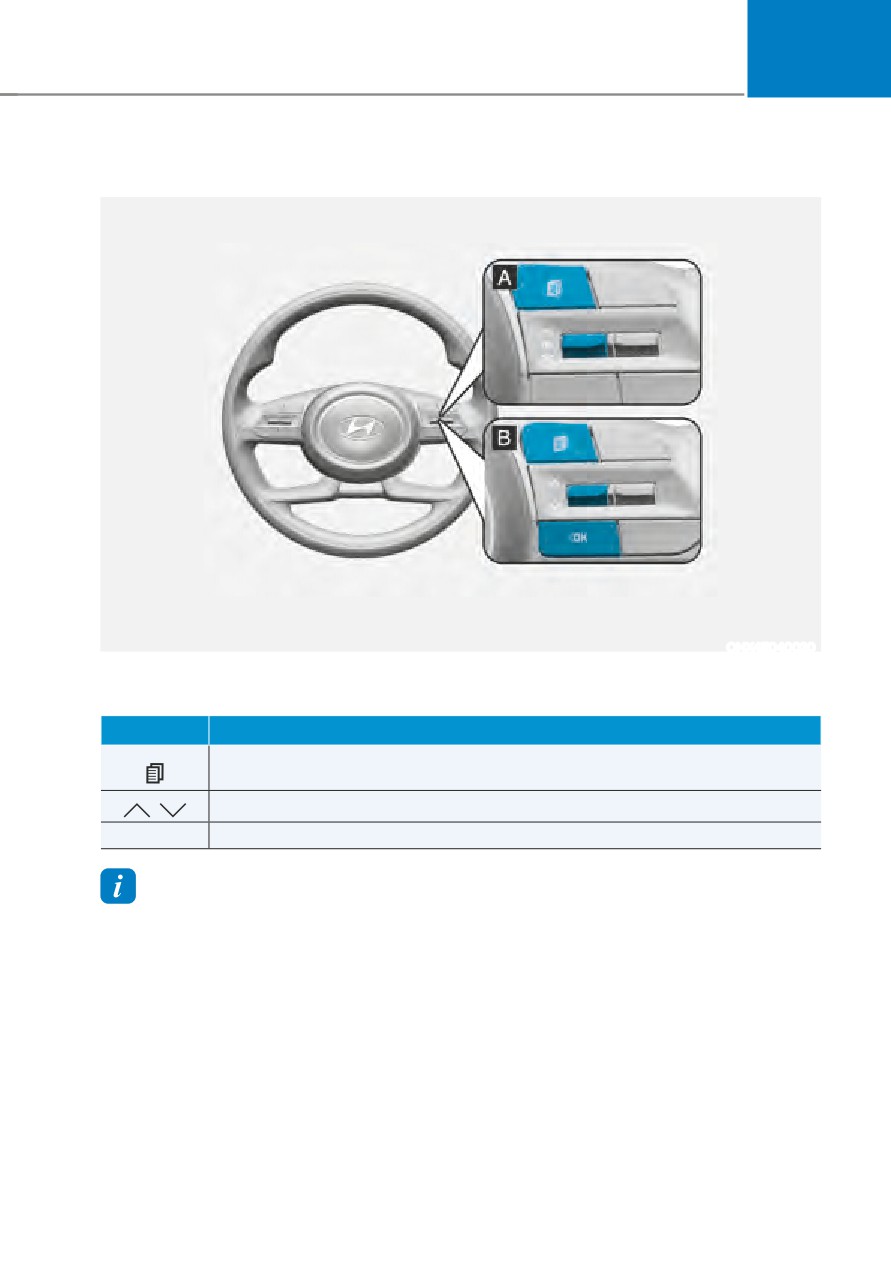
LCD display control
ONX4E040020
The LCD display modes can be changed by using the control buttons.
Switch
Function
MODE button for changing modes
,
MOVE switch for changing items
OK
SELECT/RESET button for setting or resetting the selected item
Information
When the infotainment system is applied, only the User’s Setting mode on the
infotainment system is supported but the User’s Setting mode on the instrument cluster is
not supported.
4-29
Instrument cluster
View modes
View modes
Symbol
Explanation
This mode displays the state of :
--
Smart Cruise Control (SCC)
--
Highway Driving Assist (HDA)
--
Lane Keeping Assist (LKA)
Driving Assist
--
Driver Attention Warning (DAW)
For more information, refer to "Smart Cruise Control
(SCC) ", "Highway Driving Assist (HDA) ", "Lane Keeping
Assist (LKA) ”, “Driver Attention Warning (DAW) ” in
chapter 7 and "4 Wheel Drive (AWD)" in chapter 6.
This mode displays driving information such as the
Trip
tripmeter, fuel economy, etc.
Computer
For more details, refer to "Trip Computer" in this chapter.
Turn By Turn
This mode displays the state of the navigation.
(TBT)
In this mode, you can change settings of the doors, lamps,
User Settings
etc.
The Warning mode displays warning messages related to
Warning
the vehicle when one or more systems are not operating
normally.
The information provided may differ depending on which functions are applicable
to your vehicle.
4-30
04
Trip computer mode
Driving Assist mode
OTMA060011
ONX4040013
The trip computer mode displays
SCC/HDA/LKA
information related to vehicle driving
This mode displays the state of the Smart
parameters including fuel economy,
Cruise Control (SCC), Highway Driving
tripmeter information and vehicle speed.
Assist (HDA) and Lane Keeping Assist
For more information, refer to "Trip
(LKA).
Computer" in this chapter.
For more details, refer to each system
information in chapter 7.
Turn By Turn (TBT) mode
OIK047147N
OIG059288L
Turn-by-turn navigation, distance/time
Driver Attention Warning
to destination information is displayed
This mode displays the state of the Driver
when Turn by Turn view is selected.
Attention Warning (DAW).
For more details, refer to “Driver
Attention Warning (DAW)” in chapter 7.
4-31
Instrument cluster
Master warning group
ONX4040014
Driving force distribution (AWD)
OIG059097L
This mode displays information related to
This warning light informs the driver the
AWD driving force.
following situations.
If the vehicle is in AWD lock state, this
--
Forward Collision-Avoidance Assist
mode is not displayed.
malfunction (if equipped)
For detailed information, refer to the
--
Forward Collision-Avoidance Assist
"Four Wheel Drive" in the chapter 6.
radar blocked (if equipped)
--
Blind-Spot Collision Warning
malfunction (if equipped)
--
Blind-Spot Collision Warning radar
blocked (if equipped)
--
LED headlamp malfunction
(if equipped)
--
High Beam Assist malfunction
(if equipped)
--
Smart Cruise Control malfunction (if
equipped)
--
Smart Cruise Control radar blocked (if
equipped)
--
Tire Pressure Monitoring System
(TPMS) malfunction
The Master Warning Light illuminates
if one or more of the above warning
situations occur.
At this time, a Master Warning icon (
)
will appear beside the User Settings icon
(
), on the LCD display.
If the warning situation is solved, the
master warning light will be turned
off and the Master Warning icon will
disappear.
4-32
04
Quick guide (Help)
This mode provides quick guides for the
systems in the User Settings mode.
Select an item, press and hold the OK
button.
For more details about each system,
refer to this Owner’s Manual.
Information
ONX4E040023
When the infotainment system is applied,
only the User’s Setting mode on the
Tire Pressure
infotainment system is supported but the
This mode displays information related to
User’s Setting mode on the instrument
Tire Pressure.
cluster is not supported.
For more details, refer to "Tire Pressure
Monitoring System (TPMS)" in chapter
8.
User settings mode
OTM040060L
In this mode, you can change the
settings of the instrument cluster, doors,
lamps, etc.
1. Driver Assistance
2. Cluster
3. Lights
4. Door
5. Convenience
6. Units
The information provided may differ
depending on which functions are
applicable to your vehicle.
4-33
Instrument cluster
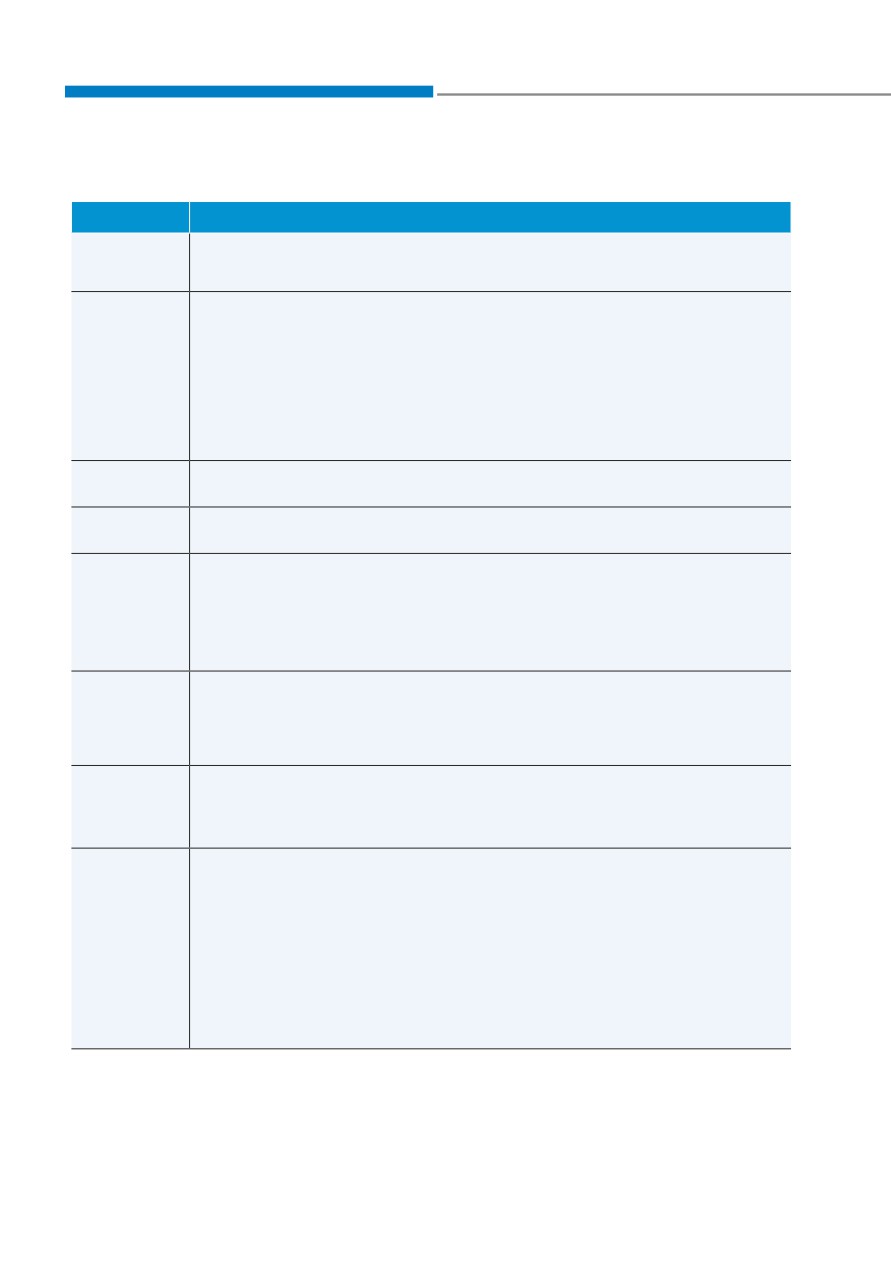
1. Driver Assistance
Items
Explanation
SCC
To adjust the sensitivity of the Smart Cruise Control system.
Reaction
• Fast/Normal/Slow
• Highway Driving Assist
To activate or deactivate Highway Driving Assist.
For more details, refer to "Highway Driving Assist (HDA)" in chapter 7.
Driving
Convenience
• Auto Highway Speed Control
To activate or deactivate Auto Highway Speed Control.
For more details, refer to "Navigation-based Smart Cruise Control
(NSCC)" in chapter 7.
Warning
To adjust the warning timing of the driver assistance system.
Timing
• Normal / Later
Warning
To adjust the warning volume of the driver assistance system.
Volume
• High / Medium / Low
• Leading vehicle departure alert
Driver
To activate or deactivate the Leading vehicle departure alert.
Attention
• Inattentive Driving Warning
Warning
To alert the driver's inattentive driving.
For more details, refer to "Driver attention Warning (DAW)" in chapter 7.
To adjust the Forward Collision-Avoidance Assist (FCA)
Forward
• Active Assist / Warning Only / Off
safety
For more details, refer to the "Forward Collision-Avoidance Assist (FCA)"
in chapter 7.
To adjust Lane Keeping Assist
Lane safety
• Active Assist / Warning Only / Off
For more details, refer to the "Lane Keeping Assist (LKA)" in chapter 7.
• Blind-Spot View
To activate or deactivate the Blind-Spot View.
For more details, refer to the "Blind-Spot View Monitor (BVM)" in chapter
7.
Blind-Spot
safety
• Safe Exit Warning (SEW)
To activate or deactivate Safe Exit Warning.
For more details, refer to the "Safe Exit Warning (SEW)" in chapter 7.
• Active Assist / Warning Only / Off
4-34

04
Items
Explanation
• Surround View Monitor Auto On
To activate or deactivate Surround View Monitor Auto On.
For more details, refer to "Surround View Monitor (SVM)" in chapter 7.
• Parking Distance Warning Auto On
To activate or deactivate Parking Distance Warning Auto On.
For more details, refer to "Forward/Reverse Parking Distance Warning
(PDW)" in chapter 7.
• Rear Cross-Traffic Safety
To activate or deactivate Rear Cross-Traffic Safety.
Parking
For more details, refer to "Rear Cross-Traffic Collision-Avoidance Assist
Safety
(RCCA)" in chapter 7.
• Rear Active Assist
To activate or deactivate Rear Active Assist.
For more details, refer to "Reverse Parking Collision-Avoidance Assist
(PCA)" in chapter 7.
• Rear Active Assist / Rear Warning Only / Off
To activate or deactivate Rear Active Assist.
For more details, refer to "Reverse Parking Collision-Avoidance Assist
(PCA)" in chapter 7.
4-35

Instrument cluster
2. Cluster
Items
Explanation
• At vehicle start
Reset fuel
• After refueling
economy
• Manually
To reset the fuel economy displayed.
To activate or deactivate the Wiper/ Light mode.
Wiper/Lights
When activated, the LCD display shows the selected Wiper/Light mode
Display
whenever you changed the mode.
Traffic Signs
To set the traffic signs displayed.
Icy Road
To activate or deactivate the icy road warning.
Warning
Welcome
To activate or deactivate the welcome sound.
Sound
You can select the theme of the cluster.
Theme
• Type A Cluster : Theme A / Theme B / Theme C
Selection
• Type B Cluster : Link to Drive Mode / Theme A / Theme B / Theme C /
Theme D
4-36
04
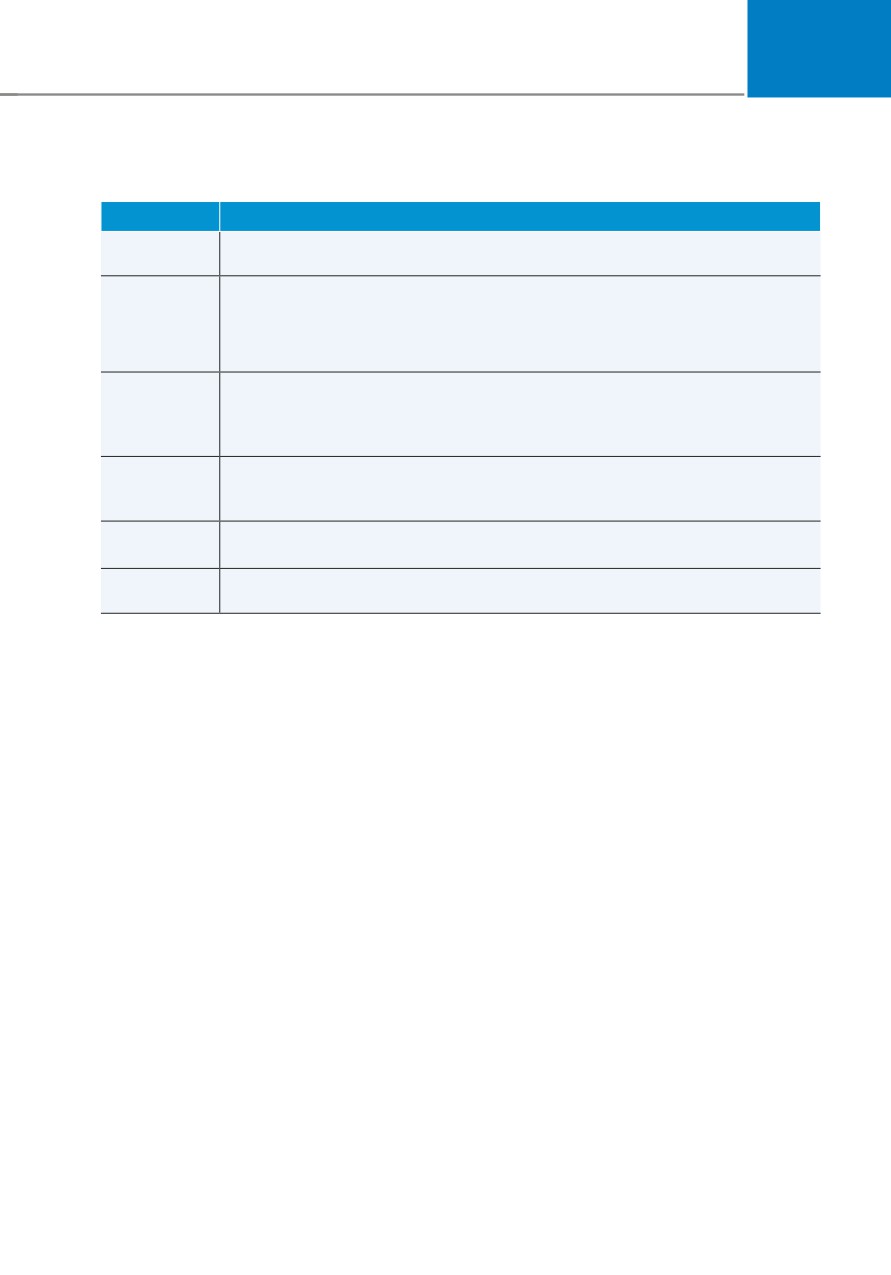
3. Lights
Items
Explanation
To adjust the illumination level.
Illumination
• Level 1~20
• Off : The one touch turn signal function will be deactivated.
One Touch
• 3, 5, 7 Flashes : The turn signal indicator will blink 3, 5, or 7 times when
Turn Signal
the turn signal lever is moved slightly.
For more details, refer to “Lighting” in chapter 5.
Ambient
Light
• Off
Brightness
• Level 1/2/3/4
(if equipped)
Ambient
• Polar White/Moon White/Ice Blue/Ocean Blue/Jade Green/Orchid Green/
Light Color
Freesia Yellow/ Sunrise Red/Aurora Purple/Lightening Violet
(if equipped)
Headlight
To activate or deactivate the headlamp delay function.
Delay
For more details, refer to "Lighting" in chapter 5.
High Beam
To activate or deactivate High Beam Assist function.
Assist
For more details, refer to "High Beam Assist (HBA)" in chapter 5.
4-37
Instrument cluster
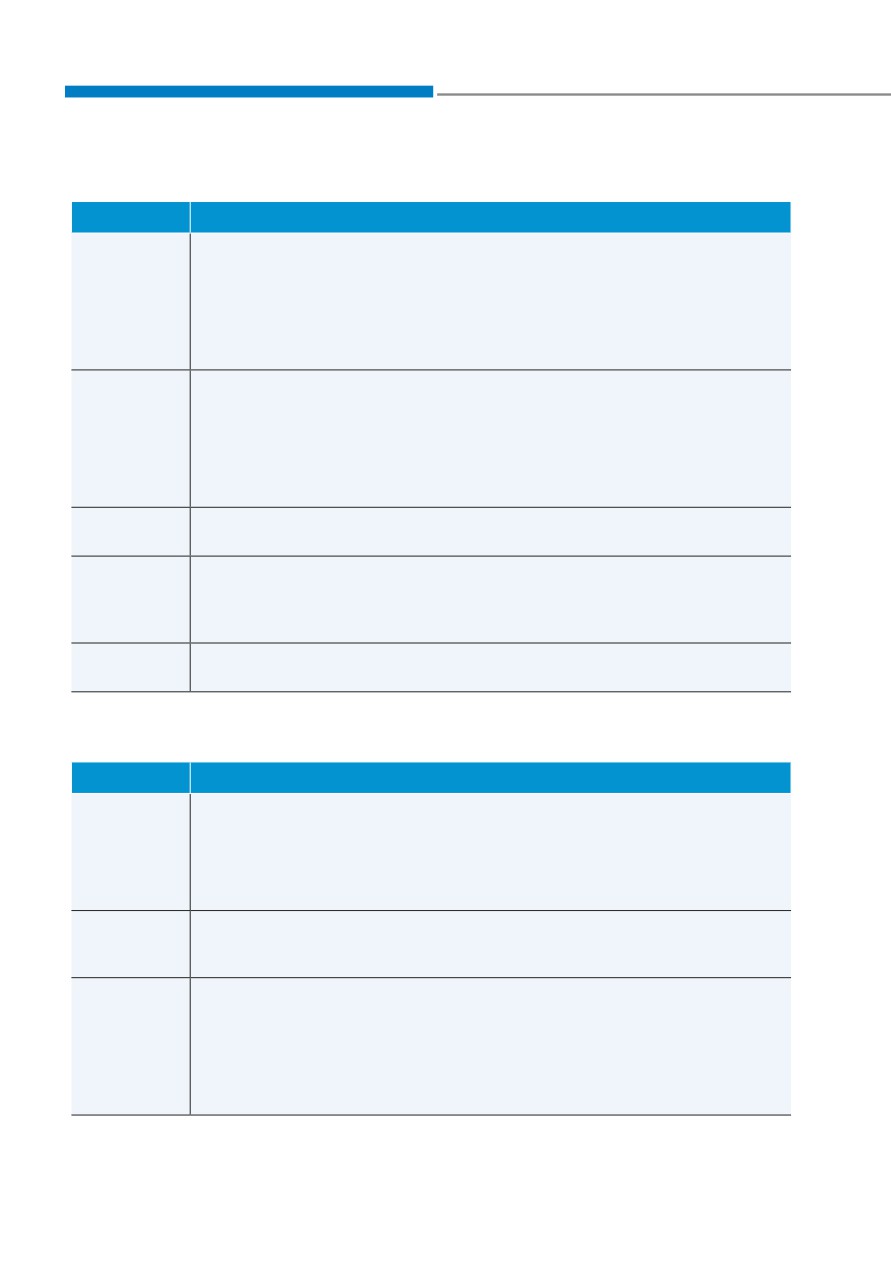
4. Door
Items
Explanation
• Enable on Shift : All doors will be automatically locked if the shift button
is shifted from the P (Park) position to the R (Reverse), N (Neutral), or D
(Drive) position. (only when the engine is running.)
Automatically
Lock
• Enable on Speed : All doors will be automatically locked when the vehicle
speed exceeds 9.3mph (15km/h).
• Off : The auto door lock operation will be deactivated.
• On Shift to P: All doors will be automatically unlocked if the shift button is
shifted to the P (Park) position. (only when the engine is running.)
Automatically
• On key out/On vehicle off : All doors will be automatically unlocked when
Unlock
the ignition key is removed from the ignition switch or the Engine Start/
Stop button is set to the OFF position.
• Off : The auto door unlock operation will be canceled.
Power
If this item is checked, the power liftgate function will be activated.
Liftgate
For more details, refer to "Power liftgate" in chapter 5.
Power
To adjust the power liftgate speed.
Liftgate
• Fast/Normal
Opening
For more details, refer to "Power liftgate" in chapter 5.
Speed
Smart
To activate or deactivate the smart liftgate.
Liftgate
For more details, refer to "Smart liftgate" in chapter 5.
5.
Convenience
Items
Explanation
• Off : The seat easy access function is deactivated.
• Normal/Extended : When you turn off the engine, the driver's seat will
Seat Easy
automatically move rearward short (Normal) or long (Extended) for you to
Access
enter or exit the vehicle more comfortably.
For more details, refer to "Driver Position Memory System" in chapter 5.
Rear
To activate or deactivate the Rear Occupant Alert.
Occupant
For more details, refer to "Rear Occupant Alert (ROA) system" in chapter
Alert
5.
• On door unlock : The side view mirrors are unfolded and the welcome
light turns on automatically when the doors are unlocked.
Welcome
• On driver approach : The side view mirrors are unfolded and the welcome
Mirror/Light
light turns on automatically when the vehicle is approached with the
smart key.
For more details, refer to ''Welcome System'' in chapter 5."
4-38
04
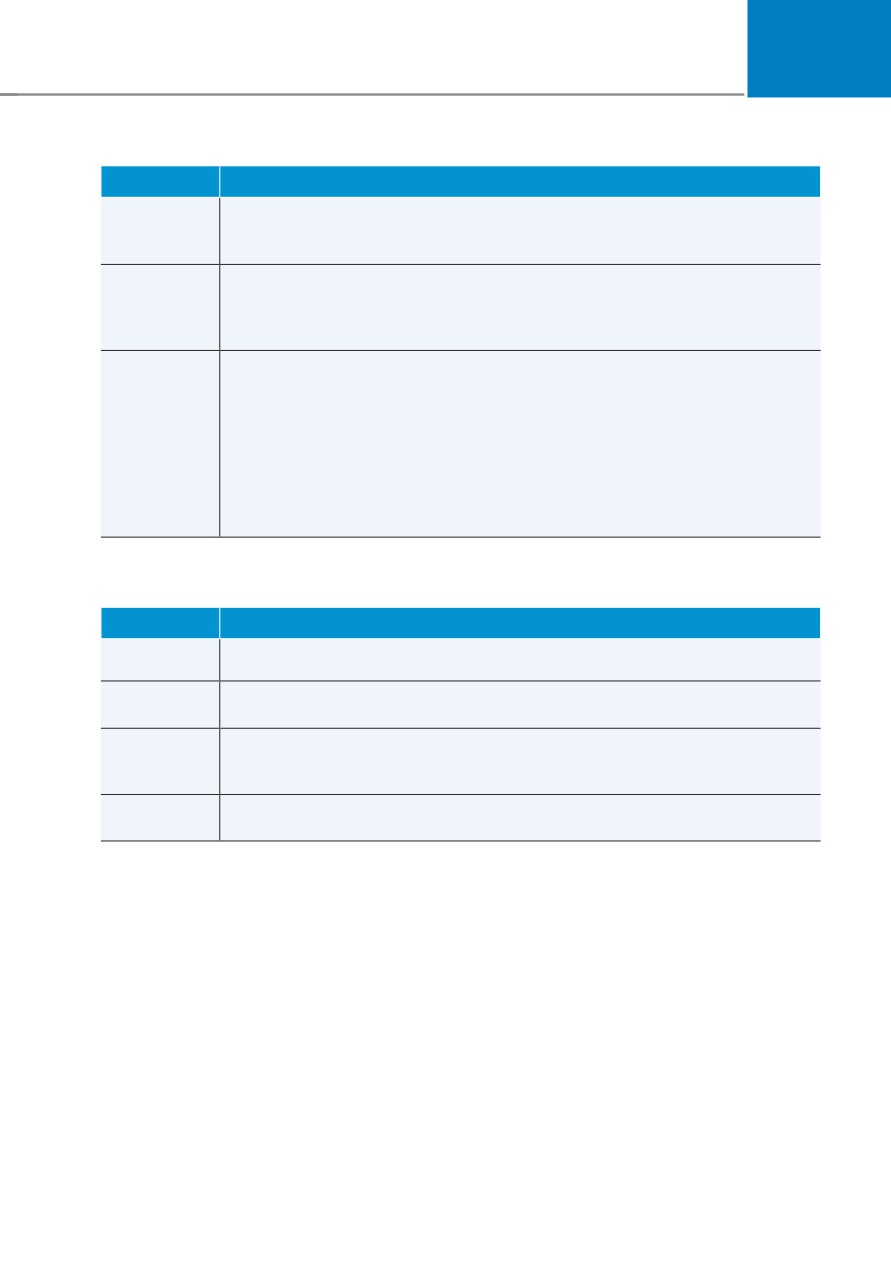
Items
Explanation
Wireless
To activate or deactivate the wireless charging system in the front seat.
Charging
For more details, refer to "Wireless cellular phone charging system" in
System
chapter 5.
To activate or deactivate the Auto Rear Wiper function.
Auto Rear
If you move the shift button from D to R when the front wiper operates, the
Wiper (in R)
rear wiper will operate automatically. Then, if you move the shift button
from R to D, the rear wiper will stop."
• Service Interval
To activate or deactivate the service interval function.
• Adjust Interval
Service
If the service interval menu is activated, you may adjust the time and
Interval
distance.
• Reset
To reset the service interval.
6. Units
Items
Explanation
Speed Unit
To select the speed unit. (km/h, MPH)
Temperature
To select the temperature unit. (°C,°F)
Unit
Fuel
Economy
To select the fuel economy unit. (km/L, L/100km, MPG)
Unit
Tire Pressure
To select the tire pressure unit. (psi, kPa, bar)
Unit
4-39
Instrument cluster
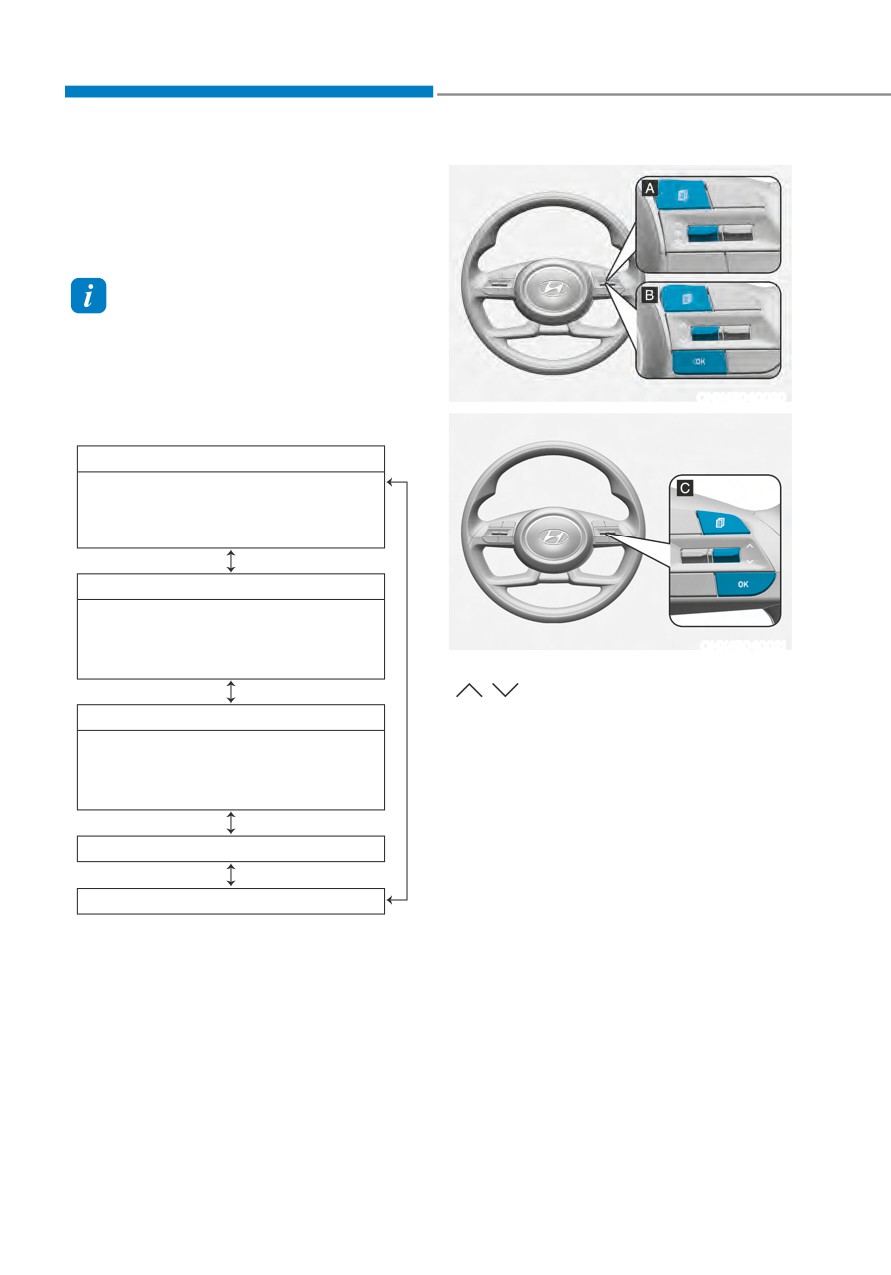
Trip computer (Type A)
The trip computer is a microcomputer-
controlled driver information system that
displays information related to driving.
Information
Some driving information stored in the
trip computer (for example Average
Vehicle Speed) resets if the battery is
disconnected.
ONX4E040020
Trip modes
Drive Info
• Trip distance
• Average Fuel Economy
• Instant Fuel Economy
Since refueling
• Trip distance
• Average Fuel Economy
ONX4E040021
• Instant Fuel Economy
To change the trip mode, toggle the
"
,
" switch on the steering wheel
Accumulated Info
• Trip distance
• Average Fuel Economy
• Instant Fuel Economy
Auto Stop (if equipped)
Digital speedometer
4-40
04
• Manual reset
Type A
Type B
To clear the average fuel economy
manually, press the OK switch on the
steering wheel for more than 1 second
when the Average Fuel Economy is
displayed.
• Automatic reset
To automatically reset the average
fuel economy, select between ‘After
Ignition’ or ‘After Refueling’ from
the Settings menu in the instrument
OTMA040004
OTMA040005
cluster.
Drive info
--
After Ignition: When the engine has
Trip distance (1), average fuel economy
been OFF for 3 minutes or longer
(2), and instant fuel economy (3) are
the average fuel economy will reset
displayed.
automatically.
The information is combined for each
--
After Refueling: The average fuel
ignition cycle. However, when the engine
economy will reset automatically
has been OFF for 3 minutes or longer the
after adding 6 liters (1.6 gallons) of
Drive Info screen will reset.
fuel or more and after driving speed
exceeds 1 mph (1 km/h).
To reset manually, press the OK switch
on the steering wheel for more than 1
ÃÃ
For 10.25-inch instrument cluster, you
second when ‘Drive Info’ is displayed.
can check the fuel economy in the
center bottom of the cluster.
Type A
Type B
OTMA040006
OTMA040007
Since refuel(l)ing
Trip distance (1), average fuel economy
(2), and instant fuel economy (3) after the
vehicle has been refueled are displayed.
To reset manually, press the OK switch
on the steering wheel for more than
1 second when ‘Since Refueling’ is
displayed.
4-41
Instrument cluster
Type A
Type B
OTMA040009
OTMA040010
OIK047151N
Accumulated info
Digital speedometer
Accumulated trip distance (1), average
Digital speedometer display shows the
fuel economy (2), and instant fuel
speed of the vehicle.
economy (3) are displayed.
The information is accumulated starting
from the last reset.
To reset manually, press the OK switch
on the steering wheel for more than
1 second when ‘Accumulated Info’ is
displayed.
OJX1069044
Auto stop (if equipped)
AUTO STOP display shows the elapsed
time of engine stop by Idle Stop and Go
system.
For more details, refer to “Idle Stop and
Go (ISG)” section in chapter 6.
4-42
04
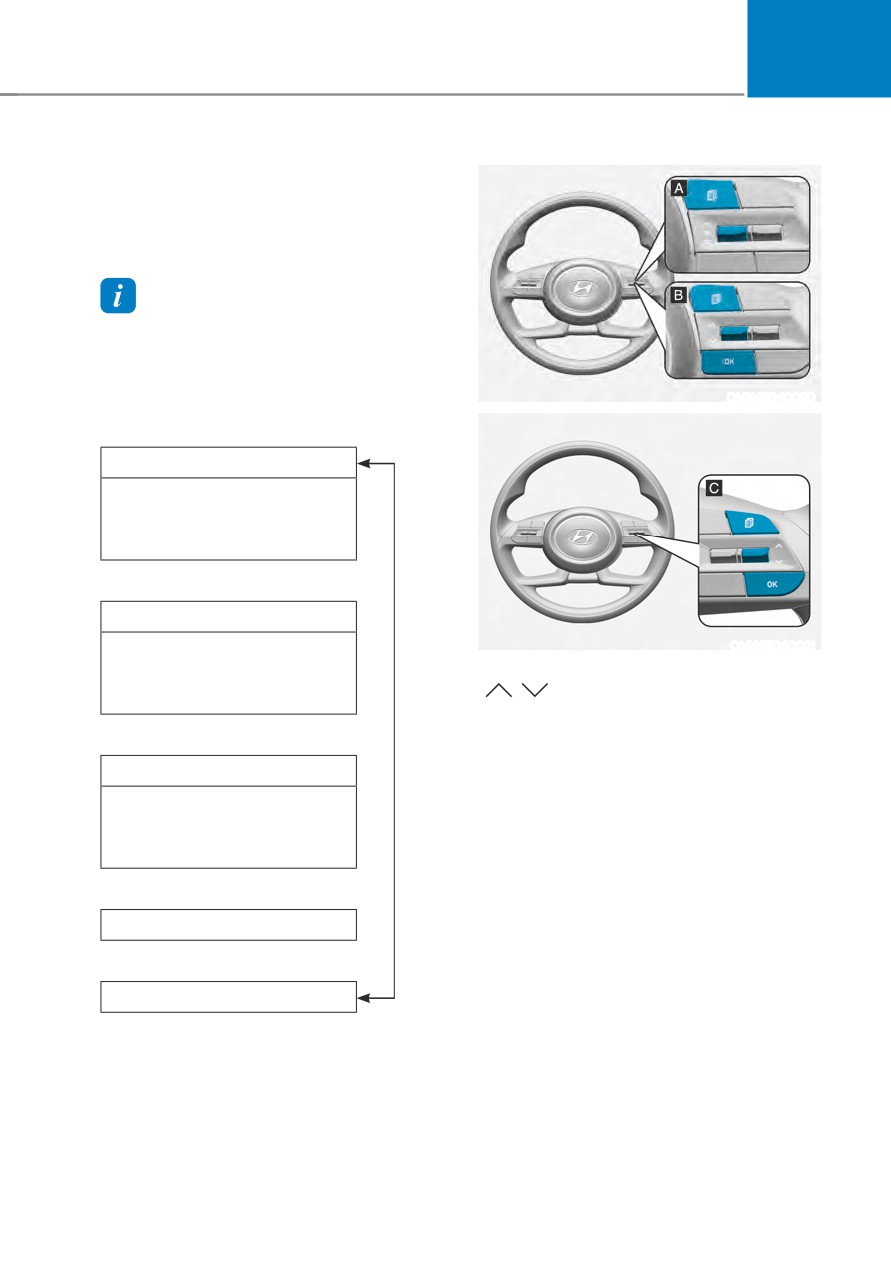
Trip computer (Type B)
The trip computer is a microcomputer-
controlled driver information system that
displays information related to driving.
Information
Some driving information stored in the
trip computer (for example Average
Vehicle Speed) resets if the battery is
disconnected.
ONX4E040020
Trip modes
Drive Info
•
Trip distance
•
Average Fuel Economy
•
Timer
Since refueling
•
Trip distance
ONX4E040021
•
Average Fuel Economy
To change the trip mode, toggle the
"
,
" switch on the steering wheel
•
Timer
Accumulated Info
•
Trip distance
•
Average Fuel Economy
•
Timer
Auto Stop (if equipped)
Digital speedometer
4-43
Instrument cluster
• Manual reset
Type A
Type B
To clear the average fuel economy
manually, press the OK switch on the
steering wheel for more than 1 second
when the Average Fuel Economy is
displayed.
• Automatic reset
To automatically reset the average
fuel economy, select between ‘After
Ignition’ or ‘After Refueling’ from
the Settings menu in the instrument
OTMA040012
OTMA040013
cluster.
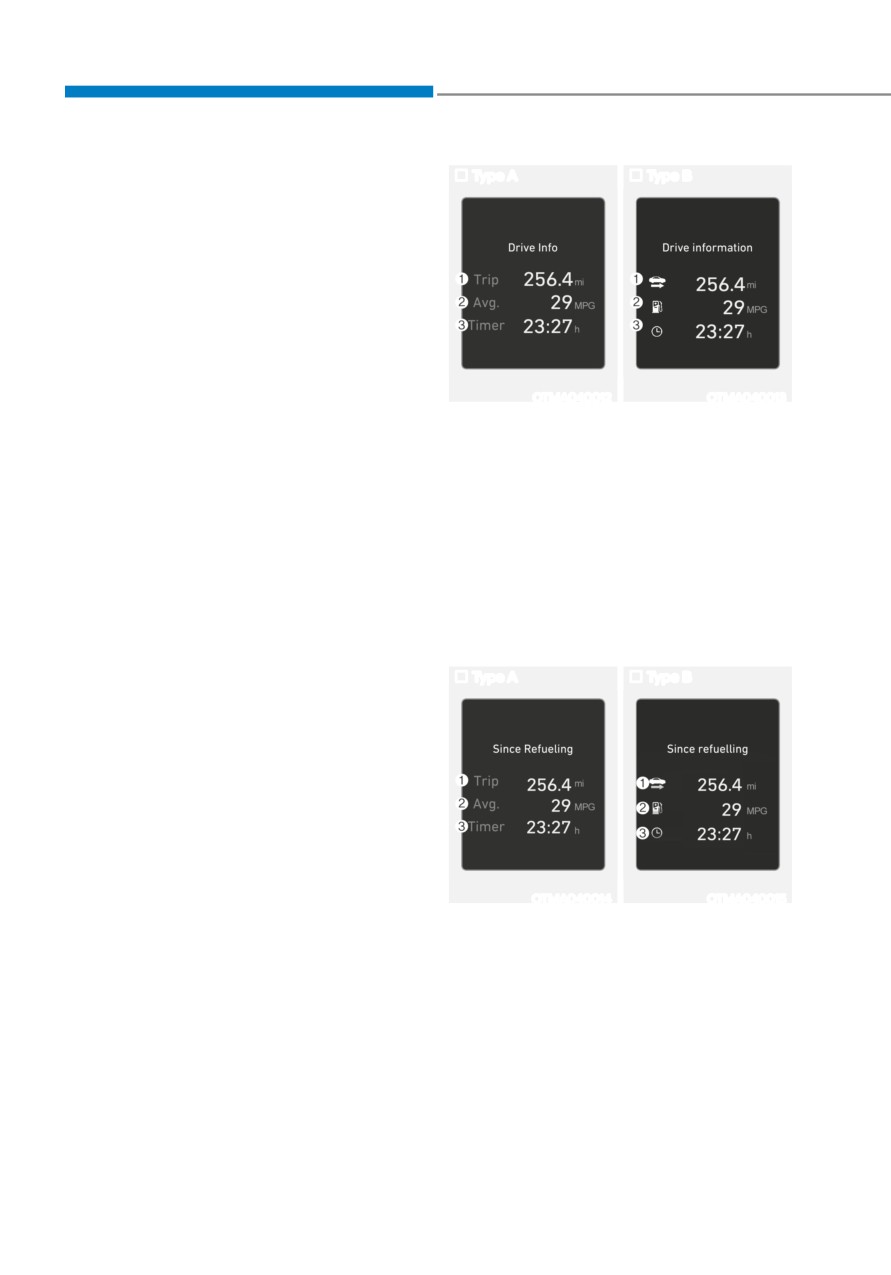
Drive info
--
After Ignition: When the engine has
Trip distance (1), average fuel economy
been OFF for 3 minutes or longer
(2), and total driving time (3) are
the average fuel economy will reset
displayed.
automatically.
The information is combined for each
--
After Refueling: The average fuel
ignition cycle. However, when the engine
economy will reset automatically
has been OFF for 3 minutes or longer the
after adding 6 liters (1.6 gallons) of
Drive Info screen will reset.
fuel or more and after driving speed
exceeds 1 mph (1 km/h).
To reset manually, press the OK switch
on the steering wheel for more than 1
ÃÃ
For 10.25-inch instrument cluster, you
second when ‘Drive Info’ is displayed.
can check the fuel economy in the
center bottom of the cluster.
Type A
Type B
OTMA040014
OTMA040015
Since refuel(l)ing
Trip distance (1), average fuel economy
(2), and total driving time (3) after the
vehicle has been refueled are displayed.
To reset manually, press the OK switch
on the steering wheel for more than
1 second when ‘Since Refueling’ is
displayed.
4-44
04
Type A
Type B
OTMA040016
OTMA040017
OTMA040018
Accumulated info
Digital speedometer
Accumulated trip distance (1), average
Digital speedometer display shows the
fuel economy (2), and total driving time
speed of the vehicle.
(3) are displayed.
The information is accumulated starting
from the last reset.
To reset manually, press the OK switch
on the steering wheel for more than
1 second when ‘Accumulated Info’ is
displayed.
OJX1069044
Auto stop (if equipped)
AUTO STOP display shows the elapsed
time of engine stop by Idle Stop and Go
system.
For more details, refer to “Idle Stop and
Go (ISG)” section in chapter 6.
4-45
Instrument cluster
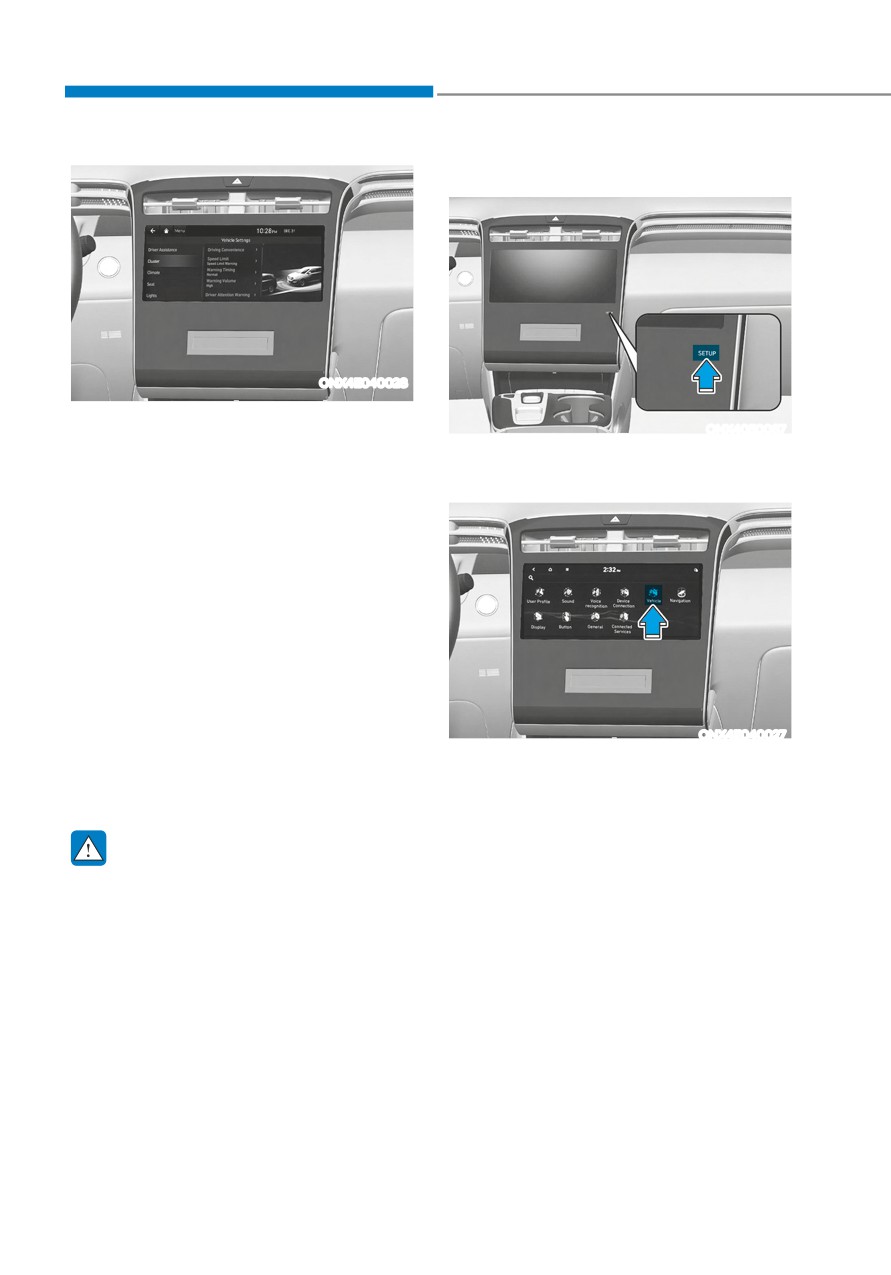
VEHICLE SETTINGS (INFOTAINMENT SYSTEM) (IF EQUIPPED)
Setting your vehicle
ONX4E040028
Vehicle Settings in the infotainment
ONX4050067
system provides user options for a
1. Press the SETUP button on the head
variety of settings including door lock/
unit of the infotainment system.
unlock features, convenience features,
driver assistance settings, etc.
Vehicle Settings menu
--
Driver Assistance
--
Cluster
--
Climate
--
Seat
--
Lights
--
Door
--
Convenience
ONX4E040027
The information provided may differ
2. Select ‘Vehicle’ and change the
depending on which functions are
setting of the features.
applicable to your vehicle.
For detailed information, please refer
to the infotainment system manual
separately supplied.
WARNING
Do not operate the Vehicle Settings
while driving. This may cause
distraction resulting in an accident.
4-46
5. Convenient features
Accessing your vehicle
5-4
Remote key
5-4
Smart key
5-7
Immobilizer system
5-14
Hyundai Digital Key
5-15
Door locks
5-31
Operating door locks from outside the vehicle
5-31
Operating door unlocks from inside the vehicle
5-33
Auto door lock/unlock features
5-35
Child-protector rear door locks
5-35
Theft-alarm system
5-36
Integrated memory system
5-37
Storing memory positions
5-37
Recalling memory positions
5-38
Resetting the system
5-38
Seat Easy Access Operation
5-39
Steering wheel
5-40
Electric Power Steering (EPS)
5-40
Tilt / Telescopic steering
5-41
5
Heated steering wheel
5-41
Horn
5-42
Mirrors
5-43
Inside rearview mirror
5-43
Side View mirrors
5-53
Windows
5-55
Power windows
5-56
Panoramic sunroof
5-60
Power sunshade
5-60
Tilt open/close
5-61
Slide open/close
5-61
Automatic reversal
5-62
Resetting the sunroof
5-63
Sunroof open warning
5-64
Exterior features
5-65
Hood
5-65
Liftgate
5-66
Power liftgate
5-68
Smart liftgate
5-74
Fuel filler door
5-76
Lighting
5-79
Exterior lights
5-79
High Beam Assist (HBA)
5-83
System settings
5-83
System operation
5-84
System malfunction and limitations
5-84
Interior lights
5-86
Interior Lamp AUTO OFF
5-86
Front lamps
5-86
Rear lamps
5-87
Vanity mirror lamp
5-87
Glove box lamp
5-87
Luggage compartment lamp
5-88
Welcome system
5-88
Wipers and washers
5-90
Windshield wipers
5-90
Front windshield washers
5-92
Rear window wiper and washer
5-93
Manual climate control system
5-94
5
Heating and air conditioning
5-95
System operation
5-99
System maintenance
5-101
Automatic climate control system
5-103
Automatic heating and air conditioning
5-104
Manual heating and air conditioning
5-105
Multi Air Mode
5-111
System operation
5-112
System maintenance
5-114
Windshield defrosting and defogging
5-116
Manual climate control system
5-116
Automatic climate control system
5-117
Auto Defogging System on Models with Automatic Temperature Control
5-118
Rear window defroster
5-119
5. Convenient features
Climate control additional features
5-120
Auto Defogging System on Models with Automatic Temperature Control
5-120
Auto dehumidify
5-121
Recirculating air when washer fluid is used
5-121
Sunroof inside air recirculation
5-122
Automatic Controls for the Driver Based on Climate Control System Settings
5-122
Scheduled Ventilation Control
5-122
Storage compartment
5-123
Center console storage
5-123
Glove box
5-124
Luggage tray
5-124
Interior features
5-125
Cup holder
5-125
Sunvisor
5-126
Power outlet
5-126
USB charger
5-127
Wireless smart phone charging system
5-128
Clock
5-130
Coat hook
5-131
Floor mat anchor(s)
5-131
5
Luggage net holder
5-132
Cargo security screen
5-132
Exterior features
5-135
Roof rack
5-135
Infotainment system
5-136
USB Port
5-136
Antenna
5-136
Steering wheel remote controls
5-136
Infotainment system
5-137
Voice recognition
5-137
Bluetooth® Wireless Technology
5-138
How vehicle radio works
5-138
Convenient features
ACCESSING YOUR VEHICLE
Remote key (if equipped)
WARNING
Do not leave the Smart Key in
your vehicle with children that are
unattended or unsupervised.
Children could inadvertently press
the Engine Start/Stop button or could
operate the power windows or other
vehicle controls or even cause the
vehicle to move. This could result in
serious injury or death.
Unlocking
OPD046001
To unlock:
Your HYUNDAI uses a remote key, which
you can use to lock or unlock the driver
1. Press the Door Unlock button (2) on
and passenger doors or the liftgate.
the remote key.
1. Door Lock
2. The doors will unlock. The hazard
warning lights will blink two times.
2. Door Unlock
3. Liftgate Open (if equipped)
Information
4. Panic
After unlocking the doors, the doors will
Locking
lock automatically after 30 seconds unless
a door is opened.
To lock :
1. Close all doors, engine hood and
Panic alarm
liftgate.
The horn sounds and the hazard warning
2. Press the Door Lock button (1) on the
lights blink for about 30 seconds if this
remote key.
button is pressed for more than 1 second.
3. The doors will lock. The hazard
To stop the horn and lights, press any
warning lights will blink.
button on the transmitter.
4. Make sure the doors are locked by
checking the indicator light on the
driver side door lock button.
5-4
05
Mechanical key (if equipped)
Information
The word “HOLD” is written on the
button to inform you that you must press
and hold the button for more than one
second.
Start-up
For detailed information refer to “Key
Ignition Switch” in chapter 6.
NOTICE
OPD046003
To prevent damaging the remote key:
If the remote key does not operate
•
Keep the remote key away from
normally, you can lock or unlock the door
liquids or any type of extreme heat.
by using the mechanical key.
If water or liquid gets inside of the
remote or if the remote is subjected
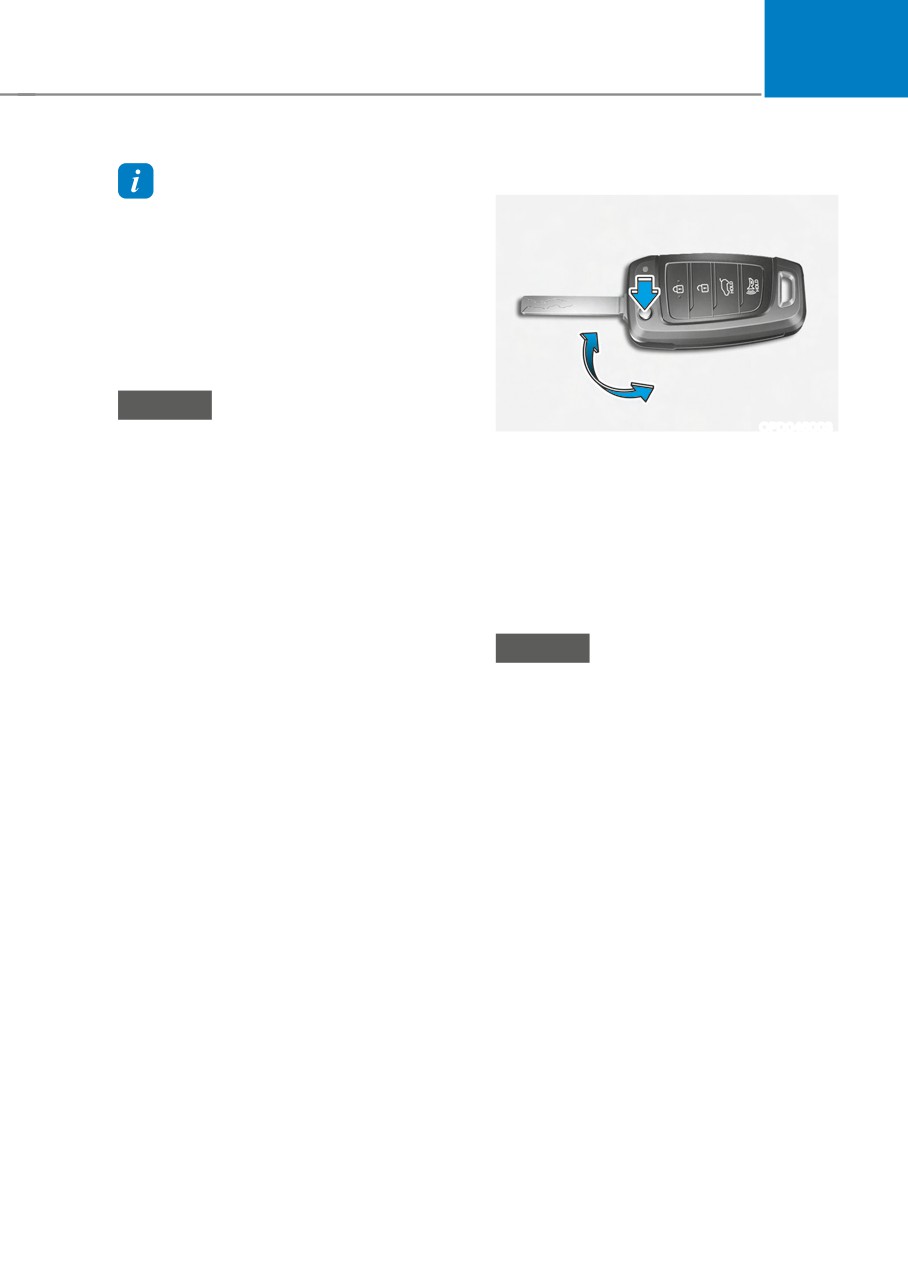
To unfold the key, press the release
to extreme heat, damage to the
button then the key will unfold
internal circuit may result. This
automatically.
would void the vehicle warranty.
To fold the key, fold the key manually
•
Avoid dropping or throwing the
while pressing the release button.
remote key.
•
Protect the remote key from extreme
NOTICE
temperatures.
Do not fold the key without pressing the
release button. This may damage the
key.
Remote key precautions
The remote key will not work if any of the
following occur:
• The key is in the ignition switch.
• You exceed the operating distance
limit (about 32 feet [10m]).
• The remote key battery is weak.
• Other vehicles or objects may be
blocking the signal.
• The weather is extremely cold.
• The remote key is close to a radio
transmitter such as a radio station or
an airport which can interfere with
normal operation of the remote key.
5-5