Hyundai Santa Fe (2023 year). Manual in english - page 13
Driving your vehicle
Backing up
WARNING
Hold the bottom of the steering wheel
Do not connect a trailer lighting system
with one hand. Then, to move the trailer
directly to your vehicle’s lighting
to the left, move your hand to the left. To
system. Use an approved trailer wiring
move the trailer to the right, move your
harness. Failure to do so could result
hand to the right. Always back up slowly
in damage to the vehicle electrical
and, if possible, have someone guide
system and/or personal injury. Consult
you.
an authorized HYUNDAI dealer for
assistance.
Making turns
When you’re turning with a trailer, make
Driving on hills
wider turns than normal. Do this so your
Reduce speed and shift to a lower gear
trailer won’t strike soft shoulders, curbs,
before you start down a long or steep
road signs, trees, or other objects. Avoid
downgrade. If you don’t shift down, you
jerky or sudden maneuvers. Signal well in
might have to use your brakes so much
advance.
that they would get overheated and may
not operate efficiently.
Turn signals
On a long uphill grade, shift down and
When you tow a trailer, your vehicle has
reduce your speed to around 45 mph (70
to have a different turn signal flasher and
km/h) to reduce the possibility of engine
extra wiring. The green arrows on your
and transmission overheating.
instrument panel will flash whenever you
If your trailer weighs more than the
signal a turn or lane change. Properly
maximum trailer weight without trailer
connected, the trailer lights will also flash
brakes and you have a automatic
to alert other drivers you’re about to turn,
transmission, you should drive in D
change lanes, or stop.
(Drive) when towing a trailer.
When towing a trailer, the green arrows
Operating your vehicle in D (Drive)
on your instrument panel will flash for
when towing a trailer will minimize heat
turns even if the bulbs on the trailer
build-up and extend the life of your
are burned out. Thus, you may think
transmission.
drivers behind you are seeing your
signals when, in fact, they are not. It’s
important to check occasionally to be
sure the trailer bulbs are still working.
You must also check the lights every time
you disconnect and then reconnect the
wires.
6-86
06
NOTICE
Parking on hills
To prevent engine and/or transmission
Generally, if you have a trailer attached
overheating:
to your vehicle, you should not park your
vehicle on a hill.
ś
When towing a trailer on steep
grades (in excess of 6%) pay close
attention to the engine coolant
However, if you ever have to park your
temperature gauge to ensure the
trailer on a hill, here’s how to do it:
engine does not overheat. If the
1. Pull the vehicle into the parking space.
needle of the coolant temperature
Turn the steering wheel in the
gauge moves towards “H” (HOT),
direction of the curb (right if headed
pull over and stop as soon as it is
down hill, left if headed up hill).
safe to do so, and allow the engine
2. Shift the gear to P (Park).
to idle until it cools down. You may
proceed once the engine has cooled
3. Set the parking brake and shut off the
sufficiently.
vehicle.
ś
If you tow a trailer with the maximum
4. Place wheel chocks under the trailer
gross vehicle weight and maximum
wheels on the down hill side of the
trailer weight, it can cause the
wheels.
engine or transmission to overheat.
5. Start the vehicle, hold the brakes, shift
When driving in such conditions,
to neutral, release the parking brake
allow the engine to idle until it cools
and slowly release the brakes until the
down. You may proceed once the
trailer chocks absorb the load.
engine or transmission has cooled
6. Reapply the brakes and parking
sufficiently.
brakes.
ś
When towing a trailer, your vehicle
7. Shift the gear to P (Park) when the
speed may be much slower than the
vehicle is parked on a uphill grade and
general flow of traffic, especially
in R (Reverse) on a downhill.
when climbing an uphill grade. Use
the right hand lane when towing a
8. Shut off the vehicle and release the
trailer on an uphill grade. Choose
vehicle brakes but leave the parking
your vehicle speed according to the
brake set.
maximum posted speed limit for
vehicles with trailers, the steepness
WARNING
of the grade, and your trailer weight.
To prevent serious or fatal injury:
ś Do not get out of the vehicle without
the parking brake firmly set. If you
have left the engine running, the
vehicle can move suddenly. You and
others could be seriously or fatally
injured.
ś Do not apply the accelerator pedal to
hold the vehicle on an uphill.
6-87
Driving your vehicle
Driving the vehicle after it has been
NOTICE
parked on a hill
To prevent vehicle damage:
1. With the gear in P (Park), apply your
ś
Due to higher load during trailer
brakes and hold the brake pedal down
usage, overheating might occur on
while you:
hot days or during uphill driving.
ś Start your engine;
If the coolant gauge indicates
over-heating, switch off the air
ś Shift into gear; and
conditioner and stop the vehicle in a
ś Release the parking brake.
safe area to cool down the engine.
2. Slowly remove your foot from the
ś
Do not switch off the engine while
brake pedal.
the coolant gauge indicates over-
3. Drive slowly until the trailer is clear of
heating.
the chocks.
(Keep the engine idle to cool down
4. Stop and have someone pick up and
the engine)
store the chocks.
ś
When towing check transmission
fluid more frequently.
Maintenance when towing a
ś
If your vehicle is not equipped with
trailer
an air conditioner, you should install
Your vehicle will need service more
a condenser fan to improve engine
often when you regularly pull a trailer.
performance when towing a trailer.
Important items to pay particular
attention to include engine oil,
transmission fluid, axle lubricant and
cooling system fluid. Brake condition
is another important item to frequently
check. If you’re trailering, it’s a good
idea to review these items before
you start your trip. Don’t forget to
also maintain your trailer and hitch.
Follow the maintenance schedule that
accompanied your trailer and check it
periodically. Preferably, conduct the
check at the start of each day’s driving.
Most importantly, all hitch nuts and bolts
should be tight.
6-88
06
VEHICLE LOAD LIMIT
Two labels on your driver’s door sill show
GAWR (Gross Axle Weight Rating)
how much weight your vehicle was
This is the maximum allowable weight
designed to carry: the Tire and Loading
that can be carried by a single axle (front
Information Label and the Certification
or rear). These numbers are shown on
Label.
the Certification Label. The total load on
Before loading your vehicle, familiarize
each axle must never exceed its GAWR.
yourself with the following terms for
determining your vehicle’s weight
GVW (Gross Vehicle Weight)
ratings, from the vehicle’s specifications
This is the Base Curb Weight plus actual
and the Certification Label:
Cargo Weight plus passengers.
Base Curb Weight
GVWR (Gross Vehicle Weight Rating)
This is the weight of the vehicle
This is the maximum allowable weight
including a full tank of fuel and all
of the fully loaded vehicle (including
standard equipment. It does not
all options, equipment, passengers
include passengers, cargo, or optional
and cargo). The GVWR is shown on the
equipment.
Certification Label located on the driver’s
door sill.
Vehicle Curb Weight
This is the weight of your new vehicle
when you picked it up from your dealer
plus any aftermarket equipment.
Cargo Weight
This figure includes all weight added to
the Base Curb Weight, including cargo
and optional equipment.
GAW (Gross Axle Weight)
This is the total weight placed on each
axle (front and rear) - including vehicle
curb weight and all payload.
6-89
Driving your vehicle
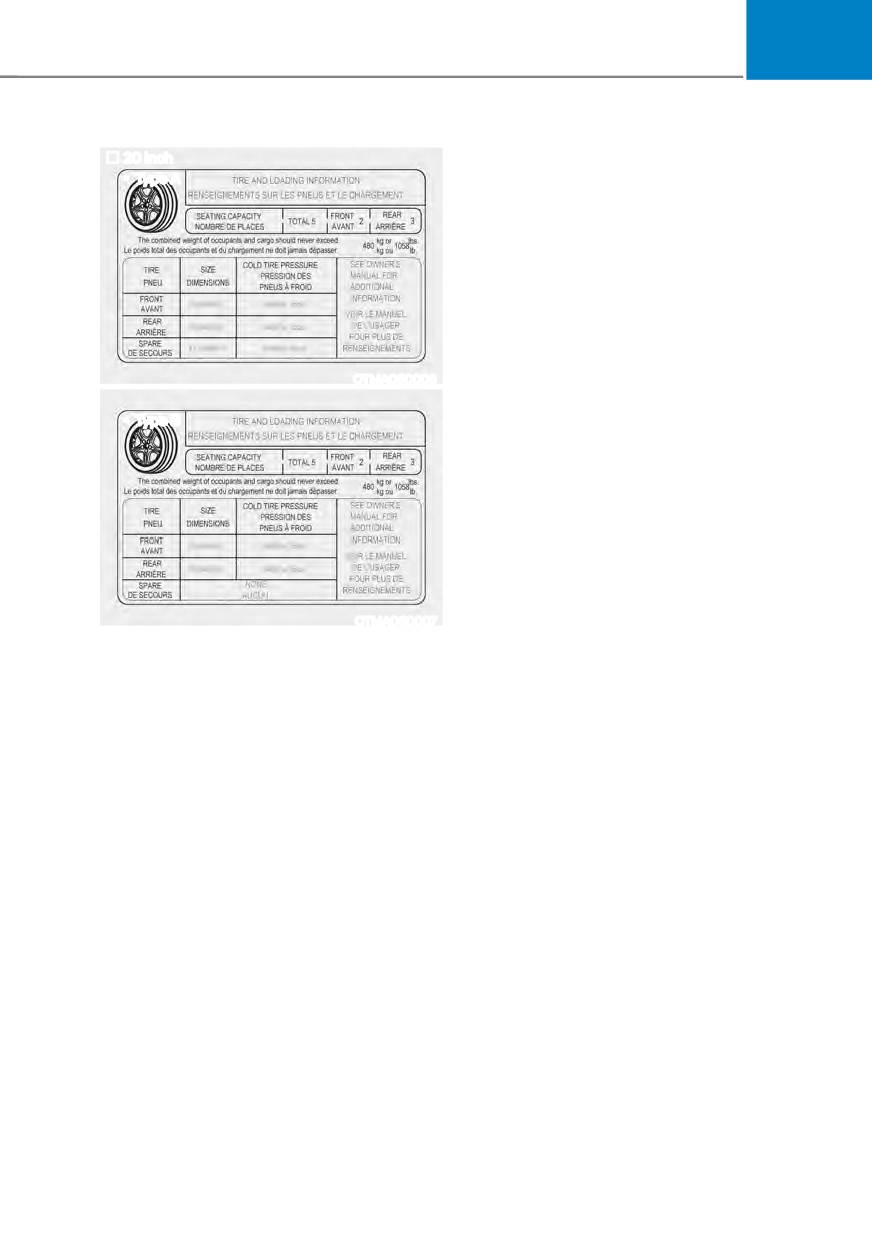
The Loading Information Label
19 inch
Type A
18 inch
Type A
OTMA060004
OTMA060002
Type B
Type B
OTMA060005
OTMA060003
6-90
06
20 inch
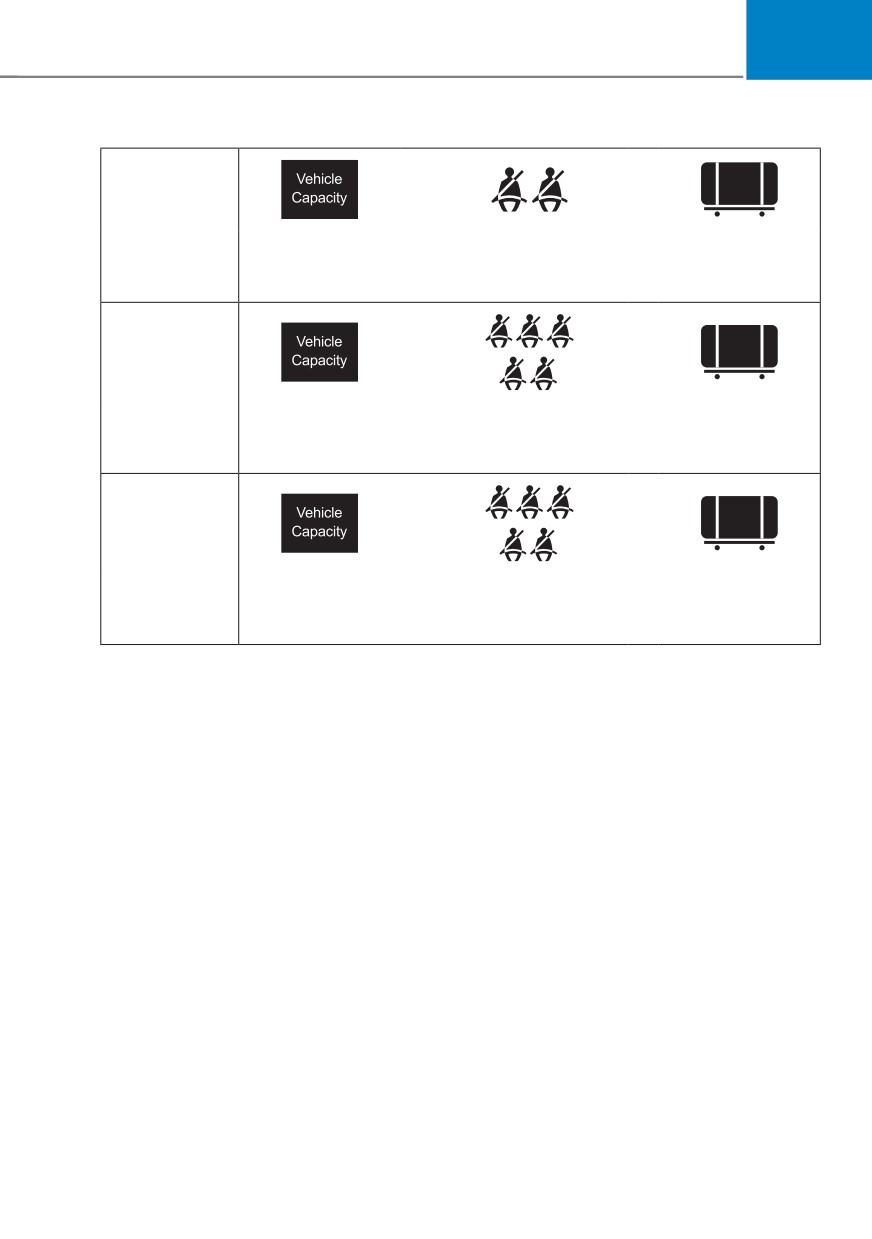
Vehicle capacity weight
Type A
5 persons : 903 lbs. (410 kg)
Vehicle capacity weight is the maximum
combined weight of occupants and
cargo. If your vehicle is equipped with a
trailer, the combined weight includes the
tongue load.
Seating capacity
Total : 5 persons (Front seat : 2 persons,
OTMA060006
Rear seat : 3 persons)
Seating capacity is the maximum
Type B
number of occupants including a driver,
your vehicle may carry. However, the
seating capacity may be reduced based
upon the weight of all of the occupants,
and the weight of the cargo being carried
or towed. Do not overload the vehicle as
there is a limit to the total weight, or load
limit including occupants and cargo, the
vehicle can carry.
OTMA060007
Towing capacity
The label located on the driver’s door
With brake system (PKG OPT) : 2,000 lbs
sill gives the original tire size, cold
(907 kg)
tire pressures recommended for your
With brake system (STD) : 2,800 lbs
vehicle, the number of people that can
(1,270 kg) (GDI) / 3,500 lbs (1,588 kg)
be in your vehicle and vehicle capacity
(T-GDI)
weight.
Towing capacity is the maximum trailer
weight including its cargo weight, your
vehicle can tow.
Cargo capacity
The cargo capacity of your vehicle will
increase or decrease depending on the
weight and the number of occupants
and the tongue load, if your vehicle is
equipped with a trailer.
6-91
Driving your vehicle
Steps for determining correct load
WARNING
limit
Do not overload the vehicle as there
1. Locate the statement "The combined
is a limit to the total weight, or load
weight of occupants and cargo should
limit, including occupants and cargo,
never exceed XXX kg or XXX lbs." on
the vehicle can carry. Overloading can
your vehicle's placard.
shorten the life of the vehicle. If the
2. Determine the combined weight of
GVWR or the GAWR is exceeded, parts
the driver and passengers that will be
on the vehicle can be broken and it can
riding in your vehicle.
change the handling of your vehicle.
3. Subtract the combined weight of the
These could cause you to lose control
driver and passengers from XXX kg or
and result in an accident.
XXX lbs.
4. The resulting figure equals the
available amount of cargo and
luggage load capacity. For example,
if the "XXX" amount equals 1400
lbs. and there will be five 150 lb
passengers in your vehicle, the
amount of available cargo and
luggage load capacity is 650 lbs.
(1400 - 750 (5 x 150) = 650 lbs.)
5. Determine the combined weight of
luggage and cargo being loaded on
the vehicle. That weight may not
safely exceed the available cargo and
luggage load capacity calculated in
Step 4.
6. If your vehicle will be towing a
trailer, load from your trailer will be
transferred to your vehicle. Consult
this manual to determine how this
reduces the available cargo and
luggage load capacity of your vehicle.
6-92
06
Example 1
ŧ
+
Maximum Load
Passenger Weight
Cargo Weight
(1400 lbs.)
(150 lbs. × 2 = 300 lbs.)
(1100 lbs.)
(635 kg)
(68 kg × 2 = 136 kg)
(499 kg)
Example 2
ŧ
+
Maximum Load
Passenger Weight
Cargo Weight
(1400 lbs.)
(150 lbs. × 5 = 750 lbs.)
(650 lbs.)
(635 kg)
(68 kg × 5 = 340 kg)
(295 kg)
Example 3
ŧ
+
Maximum Load
Passenger Weight
Cargo Weight
(1400 lbs.)
(172 lbs. × 5 = 860 lbs.)
(540 lbs.)
(635 kg)
(78 kg × 5 = 390 kg)
(245 kg)
6-93
Driving your vehicle
Certification label
WARNING
Overloading
ś Never exceed the GVWR for your
vehicle, the GAWR for either the front
or rear axle and vehicle capacity
weight. Exceeding these ratings
can affect your vehicle's handling
and braking ability, and cause an
accident.
ś Do not overload your vehicle.
Overloading your vehicle can cause
OBH059070
heat buildup in your vehicle's tires
and possible tire failure, increased
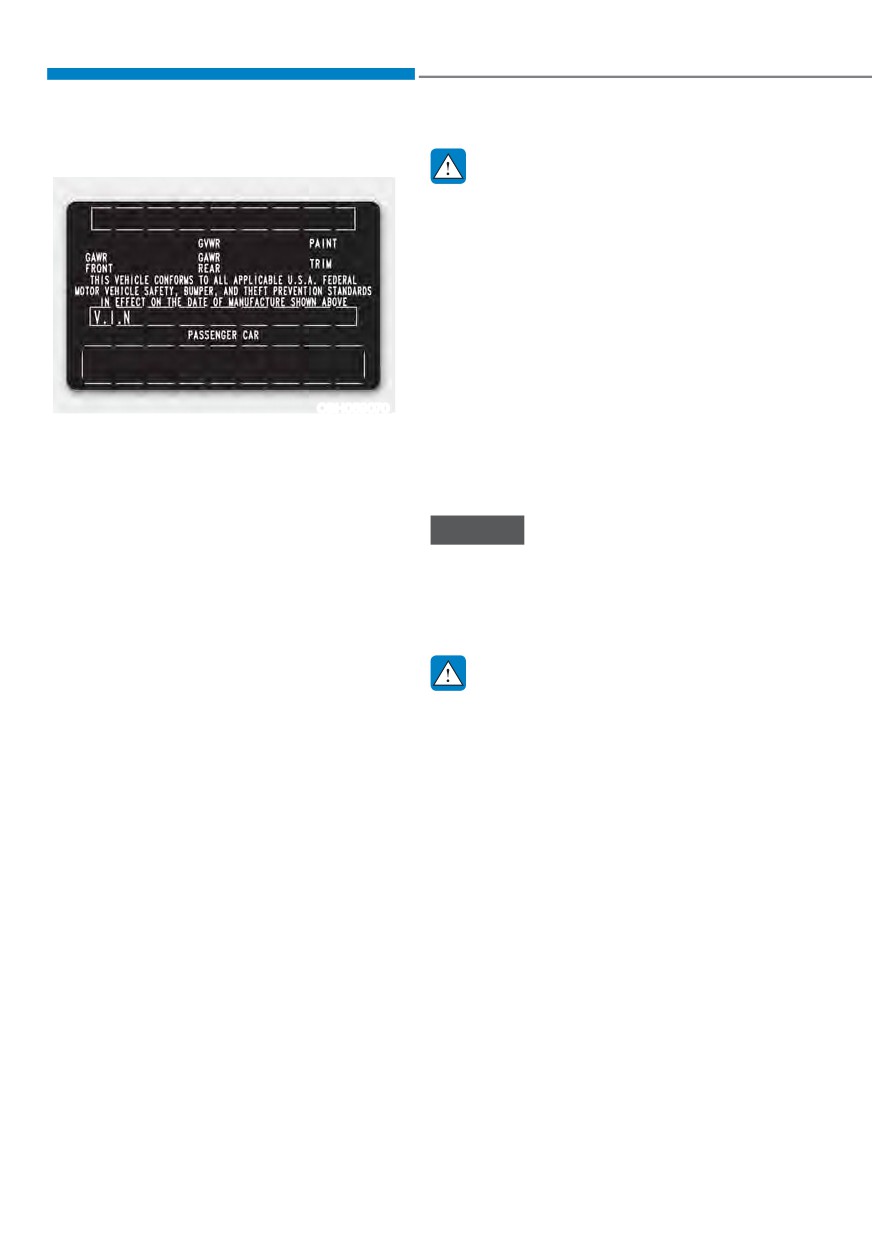
The certification label is located on the
stopping distances and poor vehicle
driver's door sill at the center pillar and
handling-all of which may result in a
shows the maximum allowable weight of
crash.
the fully loaded vehicle. This is called the
GVWR (Gross Vehicle Weight Rating). The
GVWR includes the weight of the vehicle,
NOTICE
all occupants, fuel and cargo.
Overloading your vehicle may cause
This label also tells you the maximum
damage. Repairs would not be covered
weight that can be supported by the
by your warranty. Do not overload your
front and rear axles, called Gross Axle
vehicle.
Weight Rating (GAWR).
The total weight of the vehicle, including
WARNING
all occupants, accessories, cargo, and
trailer tongue load must not exceed the
If you carry items inside your vehicle
Gross Vehicle Weight Rating (GVWR) or
(for example, suitcases, tools, packages,
the Gross Axle Weight Rating (GAWR).
or anything else), they are moving as
To find out the actual loads on your front
fast as the vehicle. If you have to stop
and rear axles, you need to go to a weigh
or turn quickly, or if there is a crash, the
station and weigh your vehicle. Be sure
items will keep going and can cause
to spread out your load equally on both
an injury if they strike the driver or a
sides of the centerline.
passenger.
ś Put items in the cargo area of your
vehicle. Try to spread the weight
evenly.
ś Do not stack items like suitcases
inside the vehicle above the tops of
the seats.
ś Do not leave an unsecured child
restraint in your vehicle.
ś When you carry something inside the
vehicle, secure it.
6-94
7. Driver assistance system
Due to the infotainment software update, the description of each function of the driver assistance
system may differ from the owner's manual. In this case, for detailed information on updates, refer
to the separately supplied infotainment system manual.
Driving Safety
Forward Collision-Avoidance Assist (FCA) (Sensor fusion)
7-2
Lane Keeping Assist (LKA)
7-18
Blind-Spot Collision-Avoidance Assist (BCA)
7-25
Safe Exit Assist (SEA)
7-39
Driver Attention Warning (DAW)
7-45
Blind-Spot View Monitor (BVM)
7-51
Driving Convenience
Smart Cruise Control (SCC)
7-53
Navigation-based Smart Cruise Control (NSCC)
7-70
Lane Following Assist (LFA)
7-77
Highway Driving Assist (HDA)
7-81
Parking Safety
Rear View Monitor (RVM)
7-88
Surround View Monitor (SVM)
7-92
Rear Cross-Traffic Collision-Avoidance Assist (RCCA)
7-97
Reverse Parking Distance Warning (PDW)
7-108
Forward/Reverse Parking Distance Warning (PDW)
7-111
Reverse Parking Collision-Avoidance Assist (PCA)
7-116
Remote Smart Parking Assist (RSPA)
7-123
Declaration of conformity
7-135
7
Driver assistance system
)25:$5' &2//,6,21Ǚ$92,'$1&( $66,67 ǣ)&$Ǥ ǣ6(1625
)86,21Ǥ
Basic function
Detecting sensor
OJX1070255L
OTM071001L
Forward Collision-Avoidance Assist is
designed to help detect and monitor the
vehicle ahead or help detect a pedestrian
or cyclist in the roadway and warn the
driver that a collision is imminent with
a warning message and an audible
warning, and if necessary, apply
emergency braking.
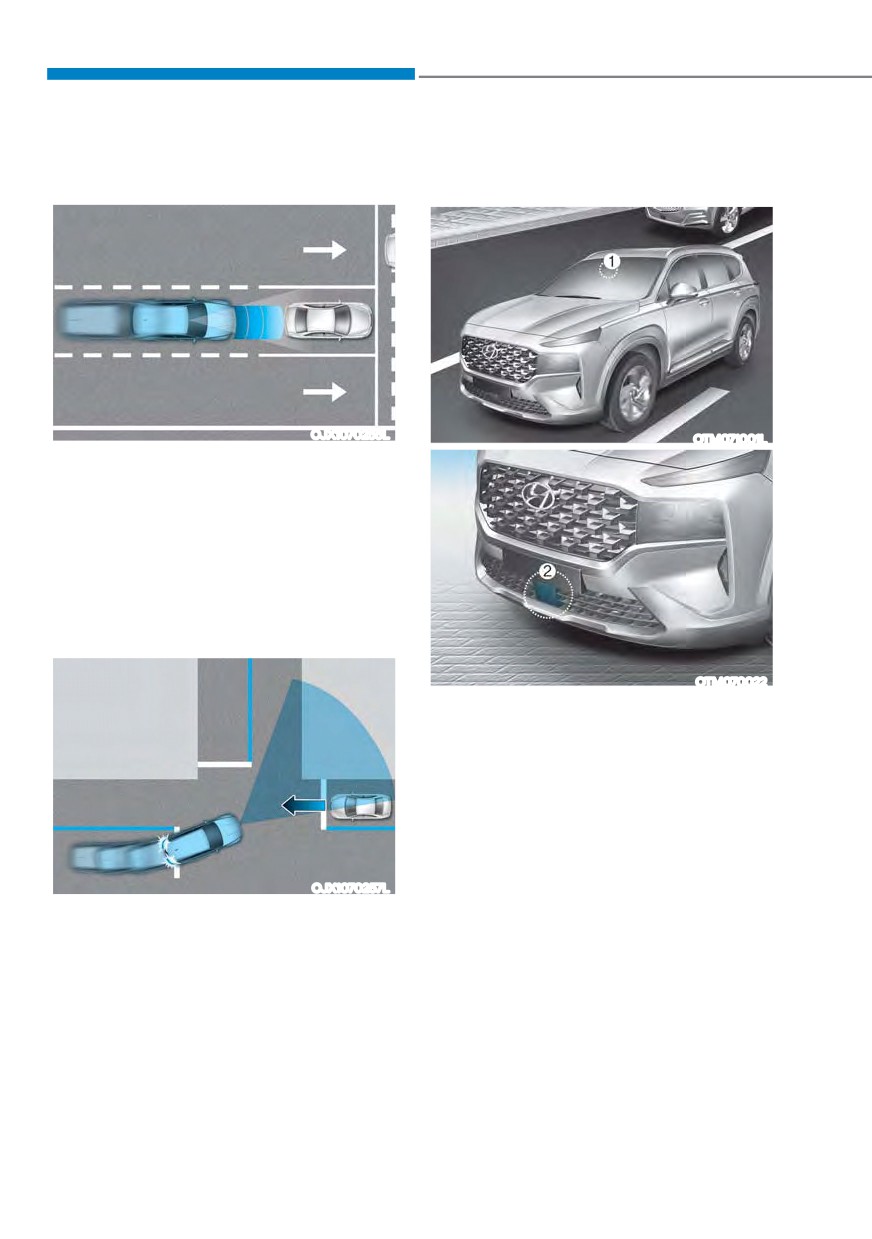
Junction Turning function (if equipped)
OTM070022
[1] : Front view camera,
[2] : Front radar
Refer to the picture above for the
detailed location of the detecting
sensors.
OJX1070257L
Junction Turning function will help avoid
a collision with an oncoming vehicle in
an adjacent lane when turning left at
a crossroad with the turn signal on by
applying emergency braking.
7-2
07
ś
If unnecessary force has been
CAUTION
applied to the radar or around the
Take the following precautions to
radar, Forward Collision-Avoidance
maintain optimal performance of the
Assist may not properly operate
detecting sensor:
even though a warning message
ś
Never disassemble the detecting
does not appear on the cluster.
sensor or sensor assembly, or apply
Have the vehicle be inspected by an
any impact on it.
authorized HYUNDAI dealer.
ś
If the detecting sensors have been
ś
Use only genuine parts to repair or
replaced or repaired, have your
replace a damaged front radar cover.
vehicle inspected by an authorized
Do not apply paint to the front radar
HYUNDAI dealer.
cover.
ś
Never install any accessories or
stickers on the front windshield, or
tint the front windshield.
ś
Exercise extreme caution to keep the
front view camera dry.
ś
Never place any reflective objects
(for example, white paper, mirror)
over the dashboard. Any light
reflection may prevent Forward
Collision-Avoidance Assist from
functioning properly.
ś
Do not place any objects near the
front windshield or install any
accessories on the front windshield.
It can affect the performance of the
defogging and defrosting function
of the climate control system, which
may prevent the Driver Assistance
systems from operating.
ś
Do not apply license plate frame or
objects, such as a bumper sticker,
film or a bumper guard, near the
front radar cover.
ś
Always keep the front radar and
cover clean and free of dirt and
debris.
Use only a soft cloth to wash the
vehicle. Do not spray pressurized
water directly on the sensor or
sensor cover.
7-3
Driver assistance system
Forward Collision-Avoidance
WARNING
Assist Settings
When the engine is restarted, Forward
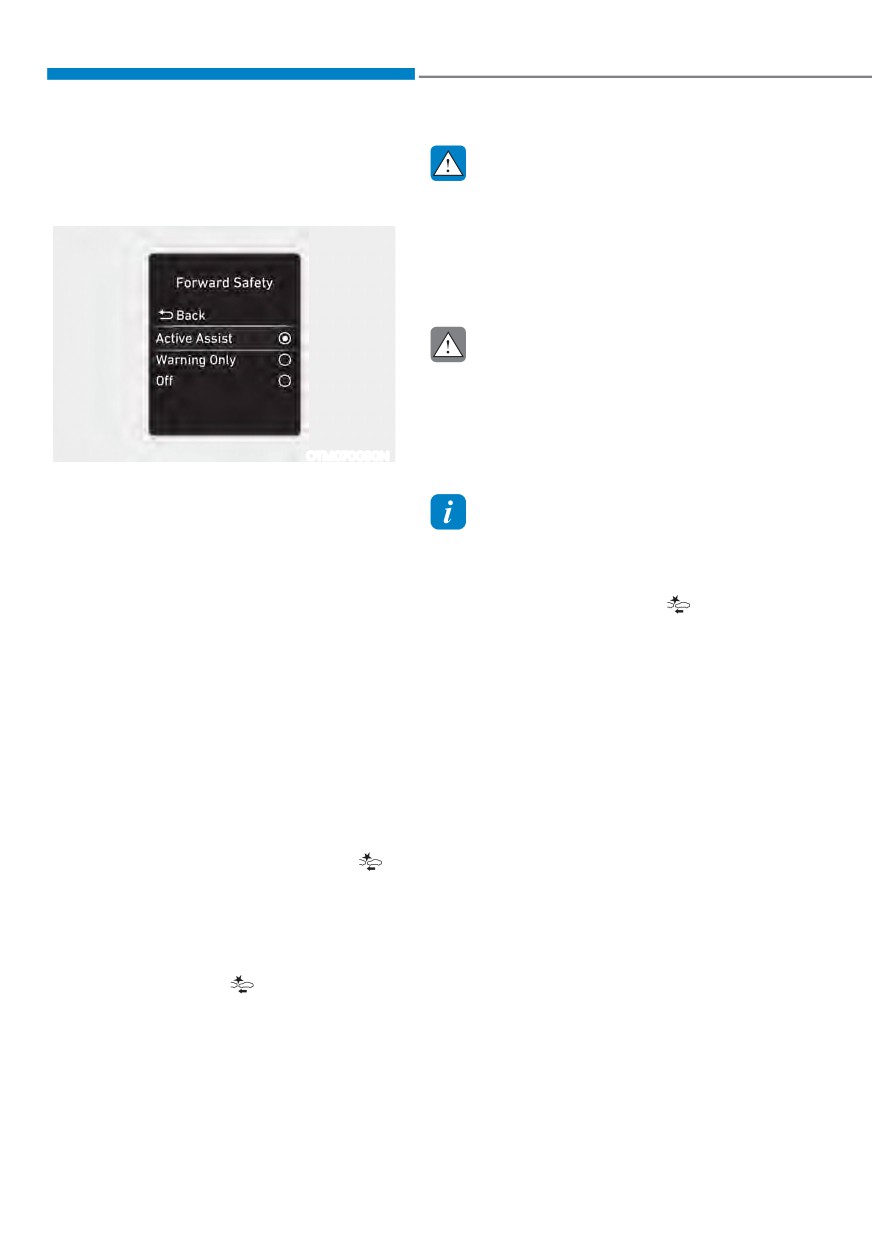
Forward Safety
Collision-Avoidance Assist will always
turn on. However, if ‘Off’ is selected
after the engine is restarted, the
driver should always be aware of the
surroundings and drive safely.
CAUTION
ś If ‘Warning Only’ is selected, braking
is not assisted.
ś The settings for Forward Safety
include ‘Basic function’ and ‘Junction
OTM070090N
Turning’ (if equipped).
With the engine on, select ‘Driver
$VVLVWDQFH Ɵ )RUZDUG 6DIHW\Ŕ IURP WKH
Settings menu to set whether or not to
Information
use each function.
Forward Collision-Avoidance Assist
-
,I œ$FWLYH $VVLVWŔ LV VHOHFWHG )RUZDUG
will turn off when ESC is turned off by
Collision-Avoidance Assist
pressing and holding the ESC OFF button
for more than 3 seconds. The
warning
- will warn the driver with a warning
light will illuminate on the cluster.
message and an audible warning
depending on the collision risk
levels. Braking assist will be applied
depending on the collision risk.
-
,I œ:DUQLQJ 2QO\Ŕ LV VHOHFWHG )RUZDUG
Collision-Avoidance Assist will warn
the driver with a warning message
and an audible warning depending on
the collision risk levels. Braking will
not be assisted.
-
,I œ2IIŔ LV VHOHFWHG
)RUZDUG &ROOLVLRQ
Avoidance Assist will turn off. The
warning light will illuminate on the
cluster.
The driver can monitor Forward Collision-
Avoidance Assist ON/OFF status from the
Settings menu. If the
warning light
remains ON when Forward Collision-
Avoidance Assist is ON, have the vehicle
be inspected by an authorized HYUNDAI
dealer.
7-4
07
Warning Timing
Warning Volume
OTM070140N
OTM070141N
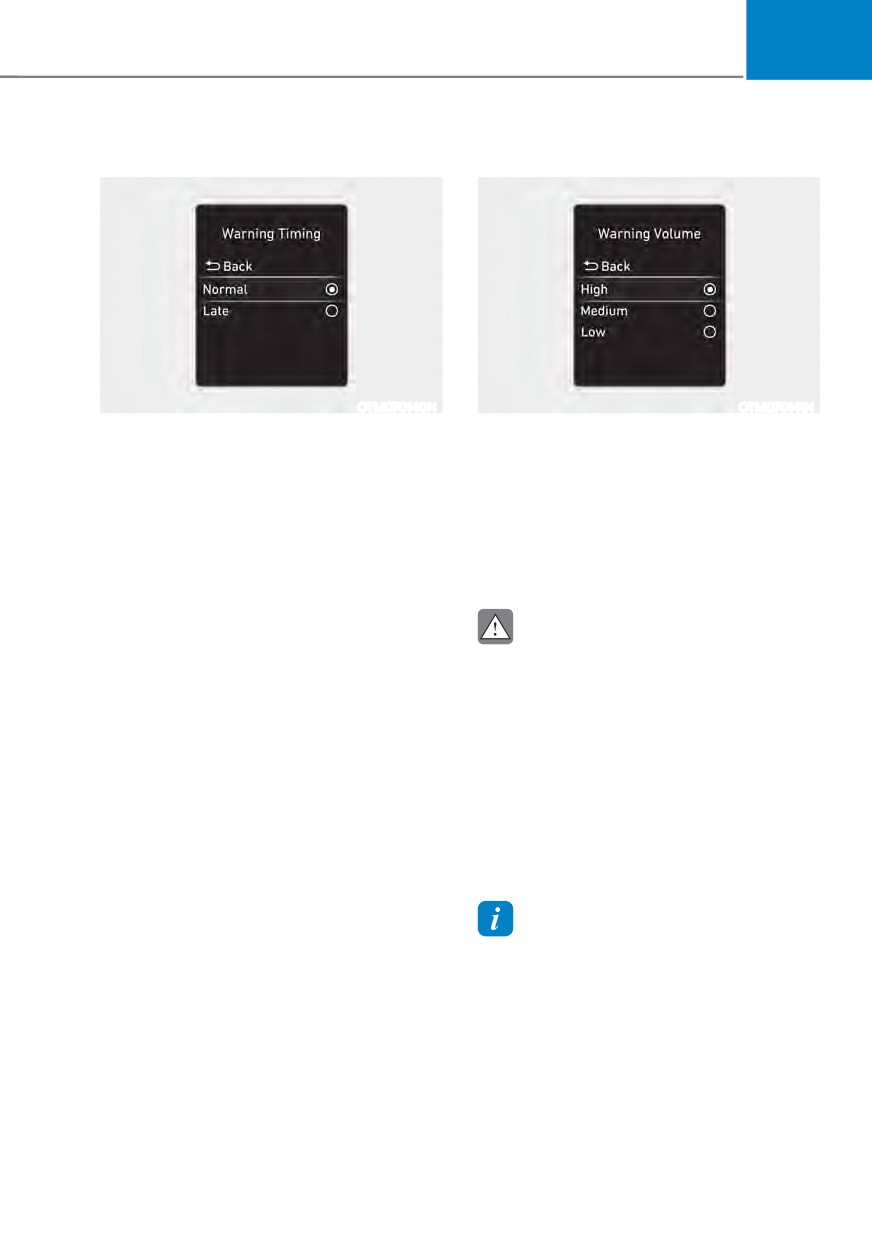
With the engine on, select ‘Driver
With the engine on, select ‘Driver
$VVLVWDQFH Ɵ :DUQLQJ 7LPLQJŔ IURP WKH
$VVLVWDQFH Ɵ :DUQLQJ 9ROXPHŔ IURP WKH
Settings menu to change the initial
Settings menu to change the Warning
warning activation time for Forward
9ROXPH WR œ+LJKŔ œ0HGLXPŔ RU œ/RZŔ IRU
Collision-Avoidance Assist.
Forward Collision-Avoidance Assist.
When the vehicle is first delivered,
If you change the warning volume,
:DUQLQJ 7LPLQJ LV VHW WR œ1RUPDOŔ ,I \RX
the Warning Volume of other Driver
change the Warning Timing, the warning
Assistance systems may change.
time of other Driver Assistance systems
may change.
CAUTION
ś The setting of the Warning Timing
and Warning Volume applies to
all functions of Forward Collision-
Avoidance Assist.
ś Even though ‘Normal’ is selected for
Warning Timing, if the front vehicle
suddenly stops, the initial warning
activation time may seem late.
ś Select ‘Late’ for Warning Timing
when traffic is light and when driving
speed is slow.
Information
If the engine is restarted, Warning Timing
and Warning Volume will maintain the
last setting.
7-5
Driver assistance system
Forward Collision-Avoidance
Assist operation
Basic function
The basic function for Forward Collision-
Avoidance Assist is to help warn and
control the vehicle depending on the
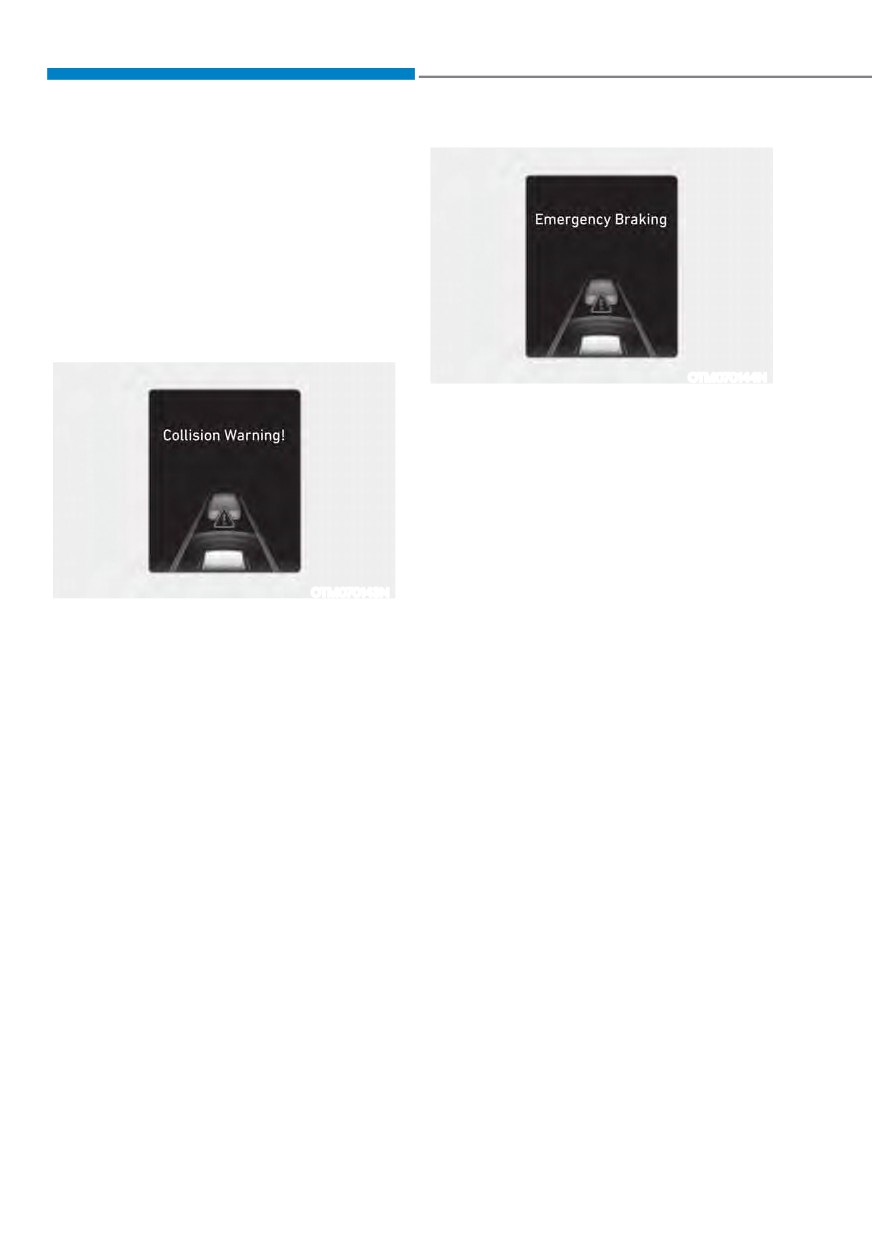
FROOLVLRQ OHYHO œ&ROOLVLRQ :DUQLQJŔ
œ(PHUJHQF\ %UDNLQJŔ DQG œ6WRSSLQJ
YHKLFOH DQG HQGLQJ EUDNH FRQWUROŔ
OTM070144N
Emergency Braking
ś
To warn the driver that emergency
braking will be assisted, the
œ(PHUJHQF\ %UDNLQJŔ ZDUQLQJ
message will appear on the cluster
and an audible warning will sound.
ś
If a vehicle is detected in front,
Forward Collision-Avoidance Assist
will operate when your vehicle speed
OTM070143N
is between approximately 6~47 mph
Collision Warning
(10~75 km/h).
ś
If a pedestrian or cyclist is detected
ś To warn the driver of a collision, the
œ&ROOLVLRQ :DUQLQJŔ ZDUQLQJ PHVVDJH
in front, Forward Collision-Avoidance
Assist will operate when your vehicle
will appear on the cluster and an
audible warning will sound.
speed is between approximately 6~40
mph (10~65 km/h).
ś If a vehicle is detected in front,
Forward Collision-Avoidance Assist
ś
In emergency braking situation,
braking is assisted with strong braking
will operate when your vehicle speed
is between approximately 6~112 mph
power by Forward Collision-Avoidance
Assist to help prevent collision with
(10~180 km/h).
the vehicle, pedestrian or cyclist
ś If a pedestrian or cyclist is detected
ahead.
in front, Forward Collision-Avoidance
Assist will operate when your vehicle
speed is between approximately 6~53
mph (10~85 km/h).
ś
,I œ$FWLYH $VVLVWŔ LV VHOHFWHG EUDNLQJ
may be assisted.
7-6
07
Junction Turning function (if
equipped)
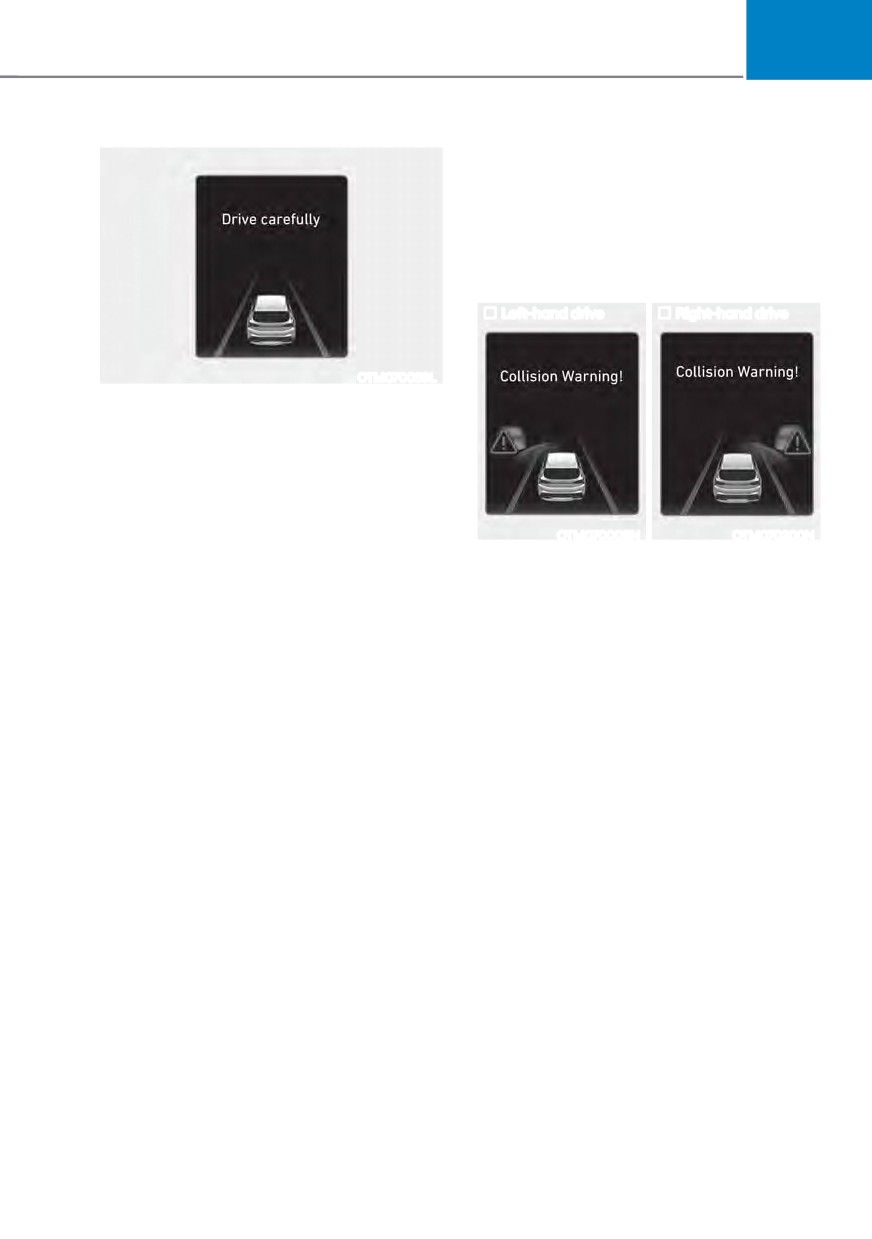
Junction Turning function will help warn
and control the vehicle depending on
WKH FROOLVLRQ OHYHO œ&ROOLVLRQ :DUQLQJŔ
œ(PHUJHQF\ %UDNLQJŔ DQG œ6WRSSLQJ
YHKLFOH DQG HQGLQJ EUDNH FRQWUROŔ
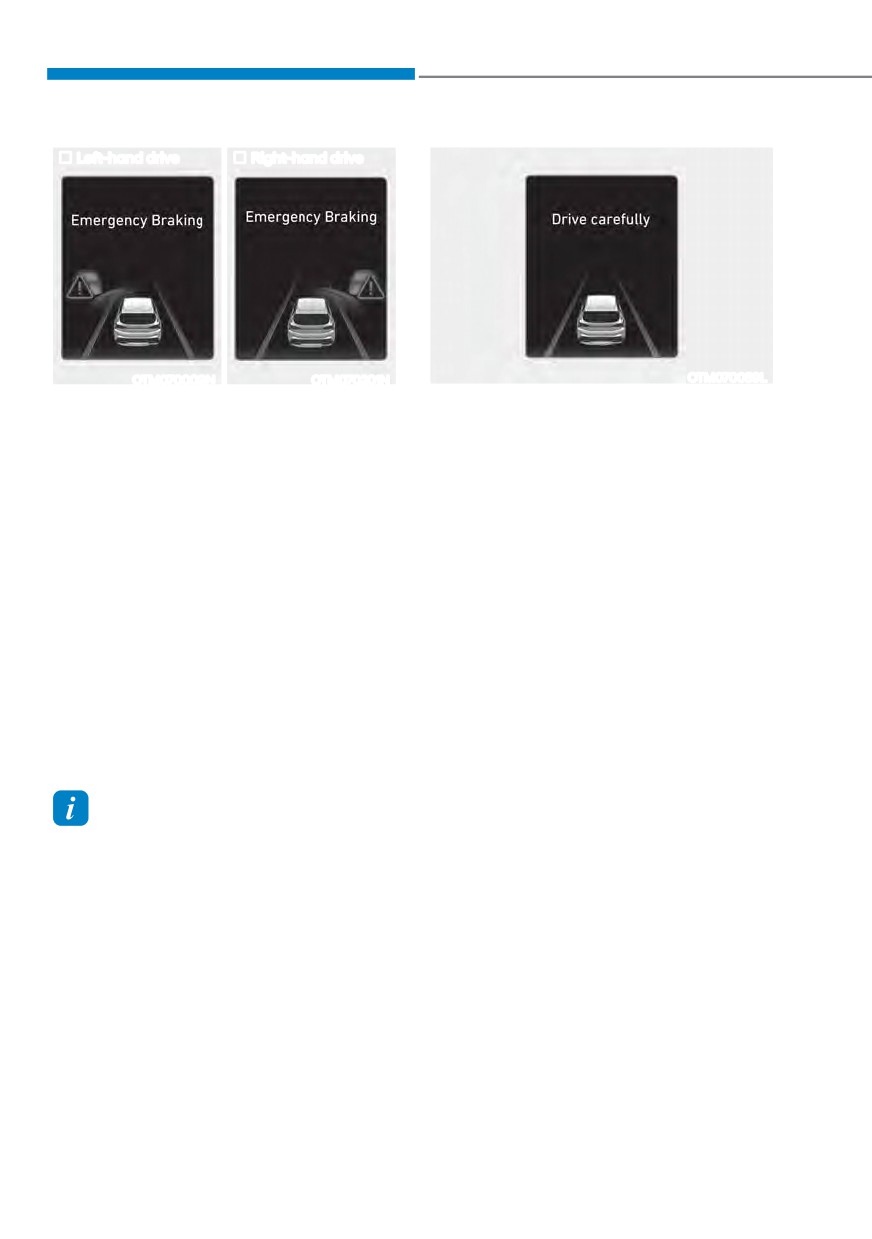
Left-hand drive
Right-hand drive
OTM070059L
Stopping vehicle and ending brake control
ś When the vehicle is stopped due
to emergency braking, the ‘Drive
FDUHIXOO\Ŕ ZDUQLQJ PHVVDJH ZLOO
appear on the cluster.
For your safety, the driver should
depress the brake pedal immediately
OTM070008N
OTM070200N
and check the surroundings.
Collision Warning
ś Brake control will end after the vehicle
ś To warn the driver of a collision, the
is stopped by emergency braking for
œ&ROOLVLRQ :DUQLQJŔ ZDUQLQJ PHVVDJH
approximately 2 seconds.
will appear on the cluster and an
audible warning will sound.
ś Forward Collision-Avoidance Assist
will operate when your vehicle
speed is between approximately
6~19 mph (10~30 km/h)and the
oncoming vehicle speed is between
approximately 19~44 mph (30~70
km/h).
ś
,I œ$FWLYH $VVLVWŔ LV VHOHFWHG EUDNLQJ
may be assisted.
7-7
Driver assistance system
Left-hand drive
Right-hand drive
OTM070009N
OTM070201N
OTM070059L
Emergency Braking
Stopping vehicle and ending brake control
ś To warn the driver that emergency
ś
When the vehicle is stopped due
braking will be assisted, the
to emergency braking, the ‘Drive
œ(PHUJHQF\ %UDNLQJŔ ZDUQLQJ
FDUHIXOO\Ŕ ZDUQLQJ PHVVDJH ZLOO
message will appear on the cluster
appear on the cluster.
and an audible warning will sound.
For your safety, the driver should
ś Forward Collision-Avoidance Assist
depress the brake pedal immediately
will operate when your vehicle
and check the surroundings.
speed is between approximately
ś
Brake control will end after the vehicle
6~19 mph (10~30 km/h) and the
is stopped by emergency braking for
oncoming vehicle speed is between
approximately 2 seconds.
approximately 19~44 mph (30~70
km/h).
ś In an emergency braking situation,
braking is assisted with strong braking
power by Forward Collision-Avoidance
Assist to help prevent a collision with
the oncoming vehicle.
Information
If the driver's seat is on the left side,
Junction Turning function will operate
only when the driver turns left. If the
driver's seat position is on right side, the
function will operate only when you turn
right.
7-8
07
ś
Depending on the road and driving
WARNING
conditions, Forward Collision-
Take the following precautions when
Avoidance Assist may warn the driver
using Forward Collision-Avoidance
late or may not warn the driver.
Assist:
ś
During Forward Collision-Avoidance
ś
For your safety, only change the
Assist operation, the vehicle may
Settings after parking the vehicle at a
stop suddenly injuring passengers
safe location.
and shifting loose objects. Always
ś
With ‘Active Assist’ or ‘Warning Only’
have the seat belt on and keep loose
selected, when ESC is turned off by
objects secured.
pressing and holding the ESC OFF
ś
If any other system’s warning
button for more than 3 seconds,
message is displayed or audible
Forward Collision-Avoidance Assist
warning is generated, Forward
will turn off automatically. In this
Collision-Avoidance Assist warning
case, Forward Collision-Avoidance
message may not be displayed
Assist cannot be set from the
and audible warning may not be
Settings menu and the warning
generated.
light will illuminate on the cluster
ś
You may not hear the warning sound
which is normal. If ESC is turned on
of Forward Collision-Avoidance
by pressing the ESC OFF button,
Assist if the surroundings are noisy.
Forward Collision-Avoidance Assist
ś
Forward Collision-Avoidance
will maintain the last setting.
Assist may turn off or may not
ś
Forward Collision-Avoidance Assist
operate properly or may operate
does not operate in all situations and
unnecessarily depending on the road
cannot avoid all collisions.
conditions and the surroundings.
ś
The driver has the responsibility to
control the vehicle. Do not solely
depend on Forward Collision-
WARNING
Avoidance Assist. Rather, maintain
ś
Even if there is a problem with
a safe braking distance, and if
Forward Collision-Avoidance
necessary, depress the brake pedal
Assist, the vehicle’s basic braking
to reduce driving speed or to stop
performance will operate normally.
the vehicle.
ś
During emergency braking, braking
ś
Never deliberately operate Forward
control by Forward Collision-
Collision-Avoidance Assist on people,
Avoidance Assist will automatically
animal, objects, etc. It may cause
cancel when the driver excessively
serious injury or death.
depresses the accelerator pedal or
ś
Forward Collision-Avoidance
sharply steers the vehicle.
Assist may not operate if the driver
depresses the brake pedal to avoid
collision.
7-9
Driver assistance system
Forward Collision-Avoidance
CAUTION
Assist malfunction and
ś
Forward Collision-Avoidance
limitations
Assist operating speed range may
reduce due to the conditions of
Forward Collision-Avoidance Assist
the vehicle or pedestrian in front
malfunction
or surroundings. Depending on the
Type A
Type B
speed, Forward Collision-Avoidance
Assist may only warn the driver, or it
may not operate.
ś
Forward Collision-Avoidance Assist
will operate under certain conditions
by judging the risk level based on
the condition of the oncoming
vehicle, driving direction, speed and
surroundings.
OTM070094N
OTM070094L
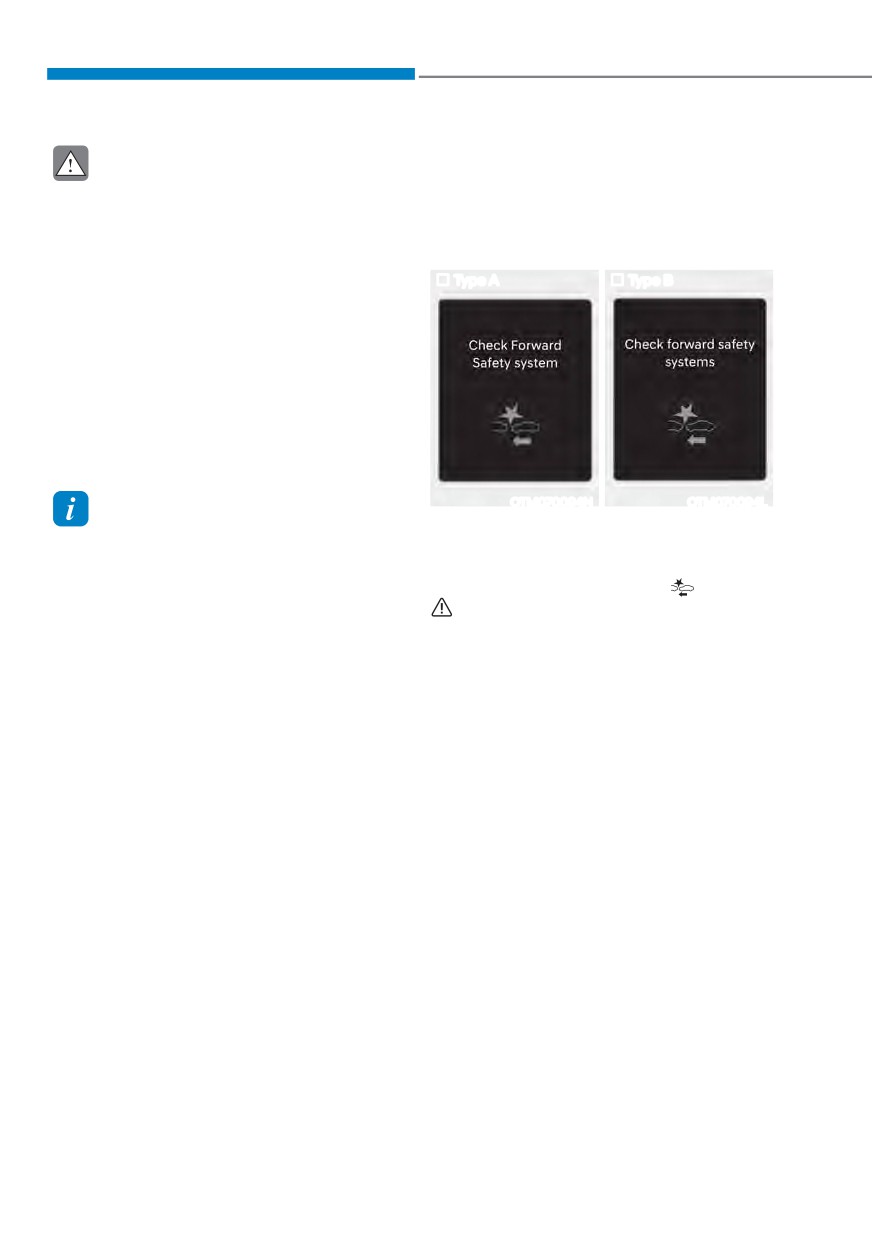
Information
When Forward Collision-Avoidance
ś
In a situation where collision is
Assist is not working properly, the ‘Check
imminent, braking may be assisted by
)RUZDUG 6DIHW\ V\VWHP V Ŕ ZDUQLQJ
Forward Collision-Avoidance Assist
message will appear, and the
and
when braking is insufficient by the
warning lights will illuminate on the
driver.
cluster. Have the vehicle be inspected by
ś
The images and colors in the
an authorized HYUNDAI dealer.
instrument cluster may differ
depending on the cluster type or theme
selected from the instrument cluster.
7-10
07
Forward Collision-Avoidance Assist
WARNING
disabled
ś Even though the warning message or
warning light does not appear on the
cluster, Forward Collision-Avoidance
Assist may not properly operate.
ś Forward Collision-Avoidance Assist
may not properly operate in an area
(for example, open terrain), where
any substance are not detected after
turning ON the engine.
Limitations of Forward Collision-
Avoidance Assist
OTM070093N
OTM070095N
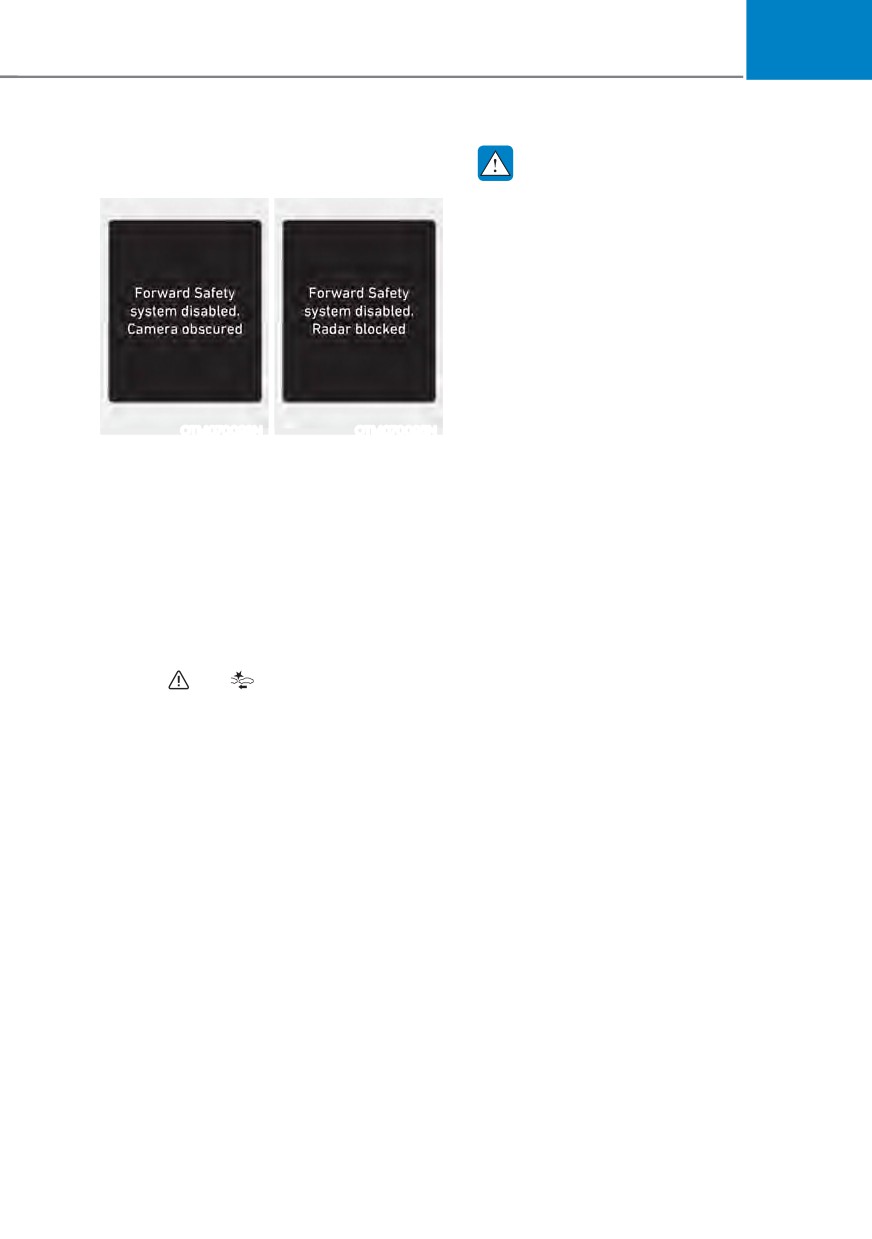
Forward Collision-Avoidance Assist
When the front windshield where the
may not operate normally, or Forward
front view camera is located, front radar
Collision-Avoidance Assist may operate
cover or sensor is covered with foreign
unexpectedly under the following
material, such as snow or rain, it can
circumstances:
reduce the detecting performance and
temporarily limit or disable Forward
ś
The detecting sensor or the
Collision-Avoidance Assist.
surroundings are contaminated or
damaged
If this occurs the ‘Forward Safety
V\VWHP V GLVDEOHG &DPHUD REVFXUHGŔ RU
ś
The temperature around the front
the ‘Forward Safety system(s) disabled.
view camera is high or low due to
5DGDU EORFNHGŔ ZDUQLQJ PHVVDJH
surrounding environment
and the and warning lights will
ś
The camera lens is contaminated due
illuminate on the cluster.
to tinted, filmed or coated windshield,
Forward Collision-Avoidance Assist will
damaged glass, or stuck of foreign
operate normally when when such snow,
material (sticker, bug, etc.) on the
rain or foreign material is removed.
glass
If Forward Collision-Avoidance Assist
ś
Moisture is not removed or frozen on
does not operate normally after
the windshield
obstruction (snow, rain, or foreign
ś
Washer fluid is continuously sprayed,
material) is removed, have the vehicle
or the wiper is on
be inspected by an authorized HYUNDAI
ś
Driving in heavy rain or snow, or thick
dealer.
fog
ś
The field of view of the front view
camera is obstructed by sun glare
ś
Street light or light from an oncoming
vehicle is reflected on the wet road
surface, such as a puddle on the road
ś
An object is placed on the dashboard
7-11
Driver assistance system
ś
Your vehicle is being towed
ś
Driving through a tunnel or iron bridge
ś
The surrounding is very bright
ś
Driving in large areas where there
ś
The surrounding is very dark, such as
are few vehicles or structures (for
example, desert, meadow, suburb,
in a tunnel, etc.
etc.)
ś
The brightness changes suddenly, for
ś
Driving near areas containing metal
example when entering or exiting a
substances, such as a construction
tunnel
zone, railroad, etc.
ś
The brightness outside is low, and the
ś
A material is near that reflects very
headlights are not on or are not bright
well on the front radar, such as a
ś
Driving through steam, smoke or
guardrail, nearby vehicle, etc.
shadow
ś
The cyclist in front is on a bicycle
ś
Only part of the vehicle, pedestrian or
made of material that does not reflect
cyclist is detected
on the front radar
ś
The vehicle in front is a bus, heavy
ś
The vehicle in front is detected late
truck, truck with a unusually shaped
ś
The vehicle in front is suddenly
luggage, trailer, etc.
blocked by an obstacle
ś
The vehicle in front has no tail lights,
ś
The vehicle in front suddenly changes
tail lights are located unusually, etc.
lane or suddenly reduces speed
ś
The brightness outside is low, and the
ś
The vehicle in front is bent out of
tail lamps are not on or are not bright
shape
ś
The rear of the front vehicle is small
ś
7KH IURQW YHKLFOHŔV VSHHG LV IDVW RU
or the vehicle does not look normal,
slow
such as when the vehicle is tilted,
overturned, or the side of the vehicle
ś
The vehicle in front steers in the
is visible, etc.
opposite direction of your vehicle to
ś
7KH IURQW YHKLFOHŔV JURXQG FOHDUDQFH LV
avoid a collision
low or high
ś
With a vehicle in front, your vehicle
ś
A vehicle, pedestrian or cyclist
changes lane at low speed
suddenly cuts in front
ś
The vehicle in front is covered with
snow
ś
The bumper around the front radar is
impacted, damaged or the front radar
ś
You are departing or returning to the
is out of position
lane
ś
The temperature around the front
ś
Unstable driving
radar is high or low
ś
You are on a roundabout and the
vehicle in front is not detected
ś
You are continuously driving in a circle
ś
The vehicle in front has an unusual
shape
ś
The vehicle in front is driving uphill or
downhill
7-12
07
ś The pedestrian or cyclist is not
ś
The pedestrian or cyclist is wearing
fully detected, for example, if the
clothing that easily blends into the
pedestrian is leaning over or is not
background, making it difficult to
fully walking upright
detect
ś The pedestrian or cyclist is wearing
ś
The pedestrian or cyclist is difficult to
clothing or equipment that makes it
distinguish from the similar shaped
difficult to detect as a pedestrian or
structure in the surroundings
cyclist
ś
You are driving by a pedestrian,
cyclist, traffic sign, structure, etc.,
near the intersection
ś
Driving in a parking lot
ś
Driving through a tollgate,
construction area, unpaved road,
partial paved road, uneven road,
speed bumps, etc.
ś
Driving on an incline road, curved
road, etc.
ś
Driving through a roadside with trees
or streetlights
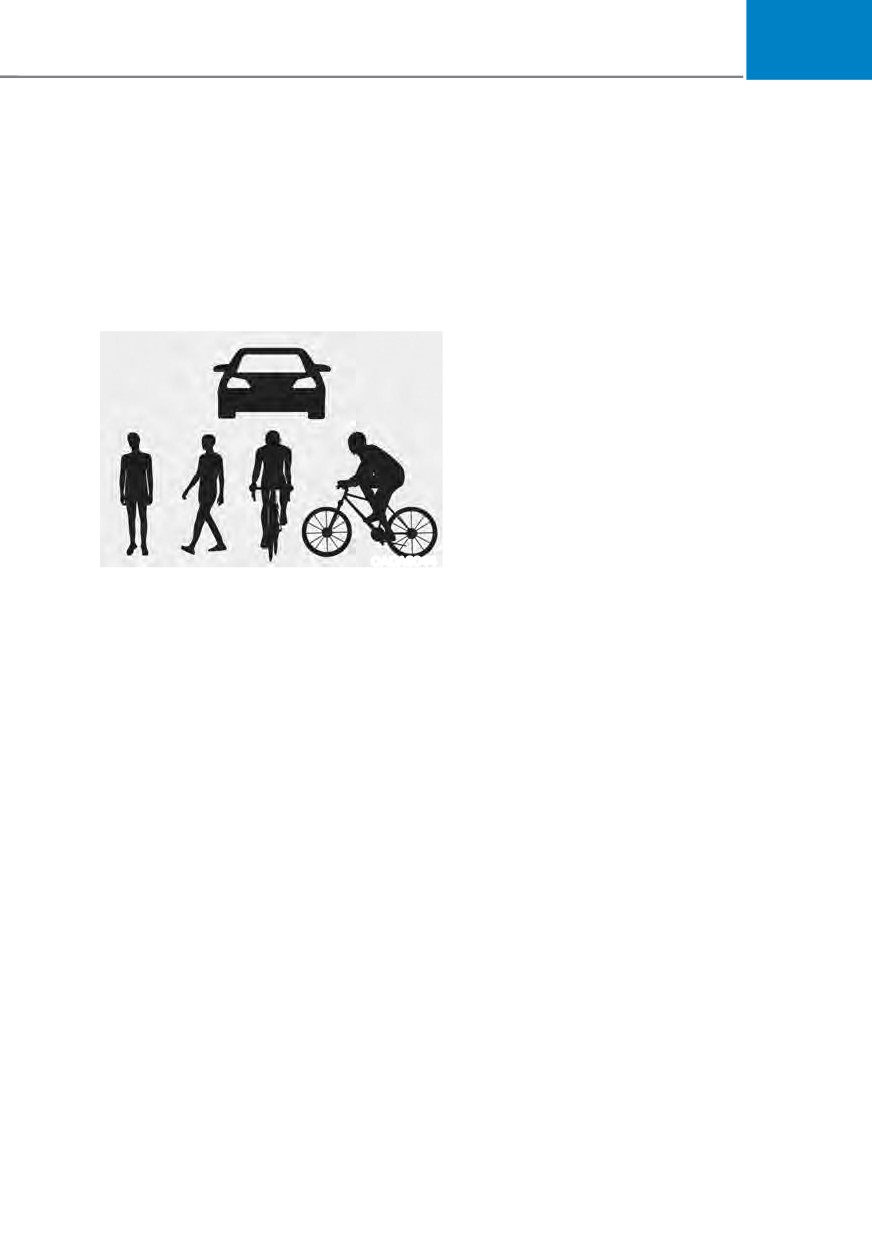
OADAS044
ś
The adverse road conditions cause
The illustration above shows the image
excessive vehicle vibrations while
the front view camera is capable of
driving
detecting as a vehicle, pedestrian and
ś
Your vehicle height is low or high
cyclist.
due to heavy loads, abnormal tire
ś The pedestrian or cyclist in front is
pressure, etc.
moving very quickly
ś
Driving through a narrow road where
ś The pedestrian or cyclist in front is
trees or grass are overgrown
short or is posing a low posture
ś
There is interference by
ś The pedestrian or cyclist in front has
electromagnetic waves, such as
impaired mobility
driving in an area with strong radio
ś The pedestrian or cyclist in front is
waves or electrical noise
moving intersected with the driving
direction
ś There is a group of pedestrians,
cyclists or a large crowd in front
7-13
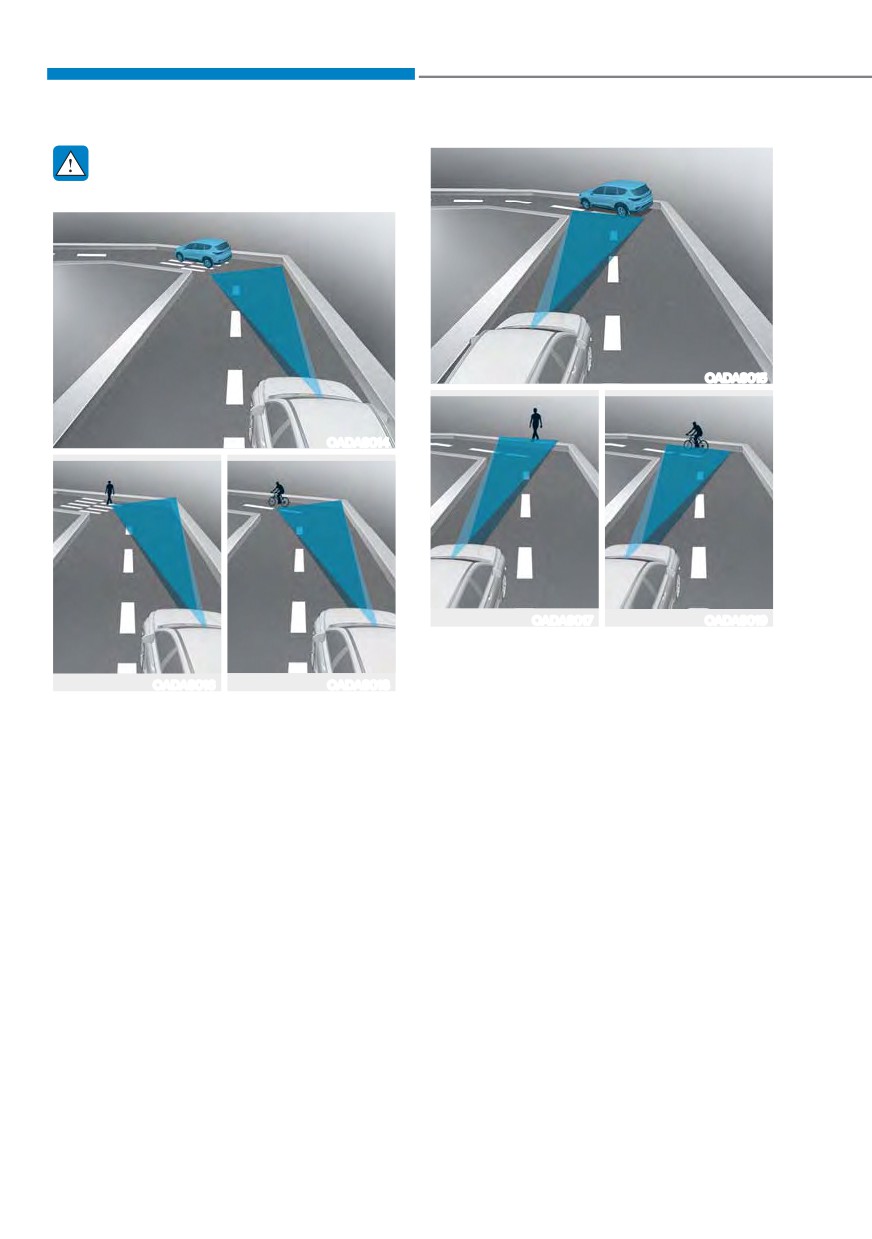
Driver assistance system
WARNING
ś Driving on a curved road
OADAS015
OADAS014
OADAS017
OADAS019
Forward Collision-Avoidance Assist
may detect a vehicle, pedestrian or
OADAS016
OADAS018
cyclist in the next lane or outside the
Forward Collision-Avoidance Assist
lane when driving on a curved road.
may not detect other vehicles,
If this occurs, Forward Collision-
pedestrians or cyclists in front of you
Avoidance Assist may unnecessarily
on curved roads adversely affecting
warn the driver and control the
the performance of the sensors. This
brake. Always check the traffic
may result in no warning or braking
conditions around the vehicle.
assist when necessary.
When driving on a curve, you must
maintain a safe braking distance,
and if necessary, steer the vehicle
and depress the brake pedal to
reduce your driving speed in order to
maintain a safe distance.
7-14
07
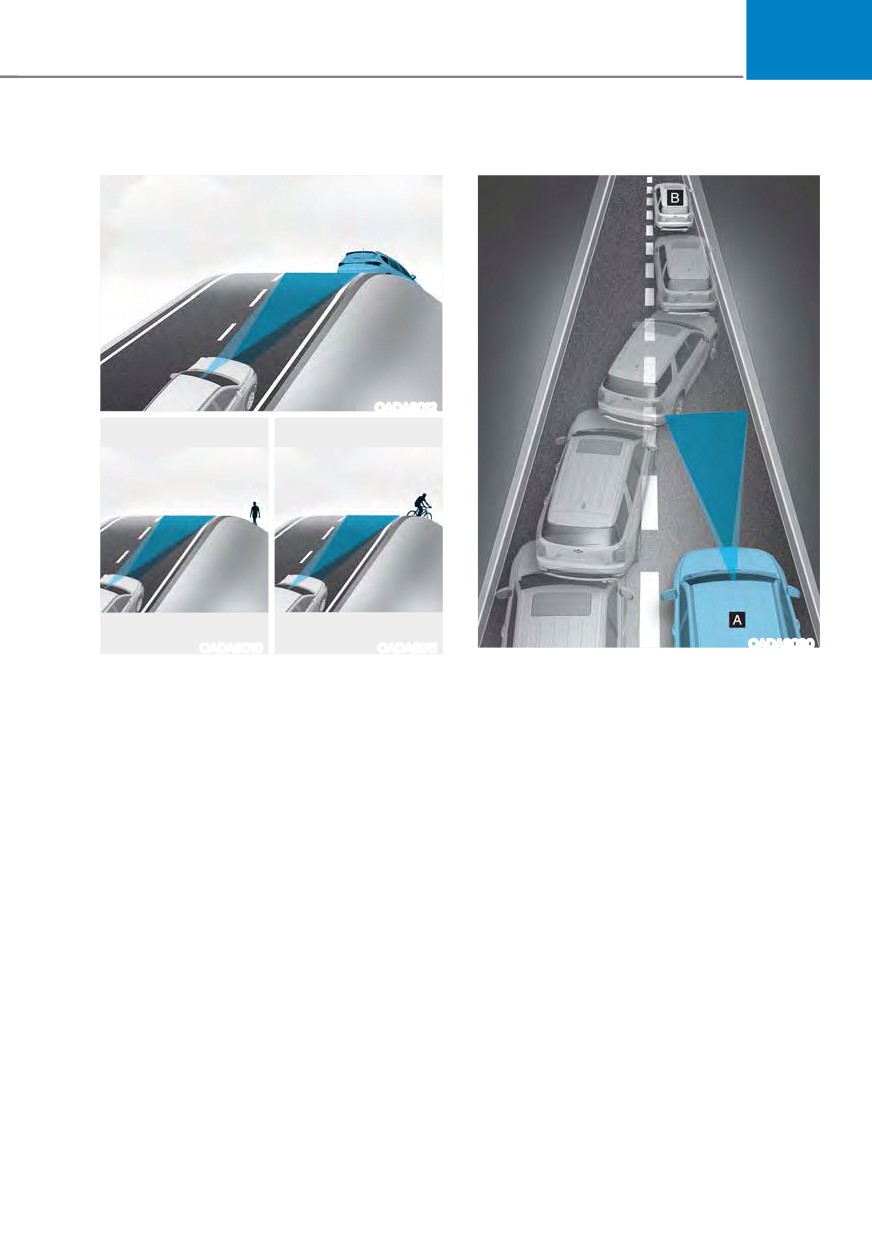
ś Driving on an inclined road
ś Changing lanes
OADAS012
OADAS010
OADAS011
OADAS030
[A] : Your vehicle,
Forward Collision-Avoidance Assist
[B] : Lane changing vehicle
may not detect other vehicles,
pedestrians or cyclists in front of
When a vehicle moves into your lane
you while driving uphill or downhill
from an adjacent lane, it cannot
adversely affecting the performance
be detected by the sensor until it
of the sensors.
is in the sensor's detection range.
Forward Collision-Avoidance Assist
This may result in unnecessary
may not immediately detect the
warning or braking assist, or no
vehicle when the vehicle changes
warning or braking assist when
lanes abruptly. In this case, you must
necessary.
maintain a safe braking distance,
Also, vehicle speed may rapidly
and if necessary, steer your vehicle
decrease when a vehicle, pedestrian
and depress the brake pedal to
or cyclist ahead is suddenly
reduce your driving speed in order to
detected.
maintain a safe distance.
Always have your eyes on the road
while driving uphill or downhill and
if necessary, steer your vehicle and
depress the brake pedal to reduce
your driving speed in order to
maintain a safe distance.
7-15
Driver assistance system
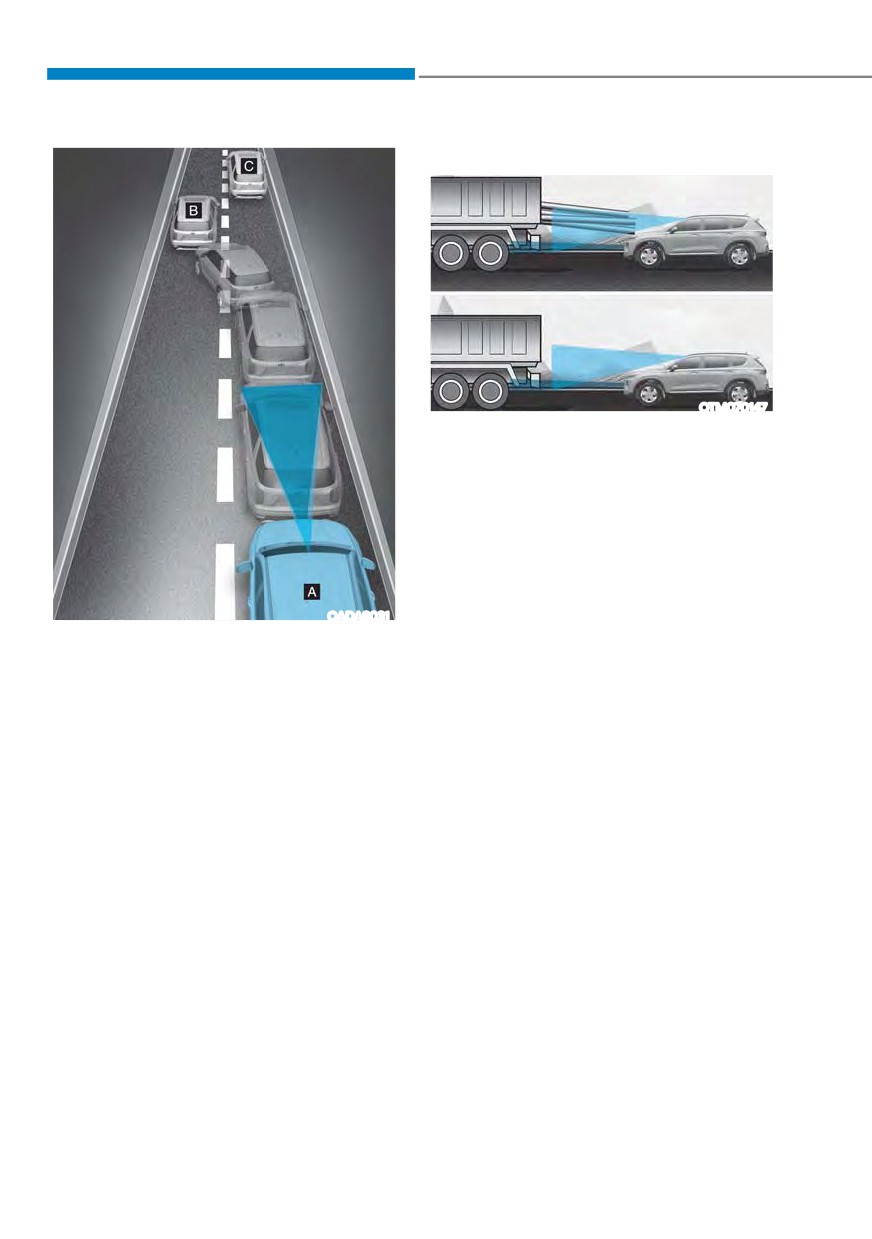
ś Detecting vehicle
OTM070147
If the vehicle in front of you has
cargo that extends rearward from
the cab, or when the vehicle in front
of you has higher ground clearance,
additional special attention is
required. Forward Collision-
Avoidance Assist may not be able
to detect the cargo extending from
the vehicle. In these instances,
OADAS031
you must maintain a safe braking
distance from the rearmost object,
[A] : Your vehicle, [B] : Lane changing vehicle,
[C] : Same lane vehicle
and if necessary, steer your vehicle
and depress the brake pedal to
When a vehicle in front of you
reduce your driving speed in order to
merges out of the lane, Forward
maintain distance.
Collision-Avoidance Assist may not
immediately detect the vehicle that
is now in front of you. In this case,
you must maintain a safe braking
distance, and if necessary, steer your
vehicle and depress the brake pedal
to reduce your driving speed in order
to maintain a safe distance.
7-16
07
WARNING
Information
ś
When you are towing a trailer or
In some instances, Forward Collision-
another vehicle, we recommend that
Avoidance Assist may be cancelled when
Forward Collision-Avoidance Assist is
subjected to electromagnetic interference.
turned off due to safety reasons.
ś
Forward Collision-Avoidance Assist
Information
may operate if objects that are
similar in shape or characteristics to
This device complies with Part 15 of the
vehicles, pedestrians and cyclists are
FCC rules.
detected.
Operation is subject to the following three
ś
Forward Collision-Avoidance Assist
conditions:
does not operate on bicycles,
1. This device may not cause harmful
motorcycles, or smaller wheeled
interference.
objects, such as luggage bags,
2. This device must accept any
shopping carts, or strollers.
interference received, including
ś
Forward Collision-Avoidance
interference that may cause undesired
Assist may not operate normally if
operation.
interfered by strong electromagnetic
3. Changes or modifications not expressly
waves.
approved by the party responsible
ś
Forward Collision-Avoidance Assist
for compliance could void the user's
may not operate for 15 seconds after
authority to operate the device.
the vehicle is started, or the front
view camera is initialized.
7-17
Driver assistance system
/$1( .((3,1* $66,67 ǣ/.$Ǥ
Lane Keeping Assist is designed to help
Lane Keeping Assist Settings
detect lane markings (or road edges)
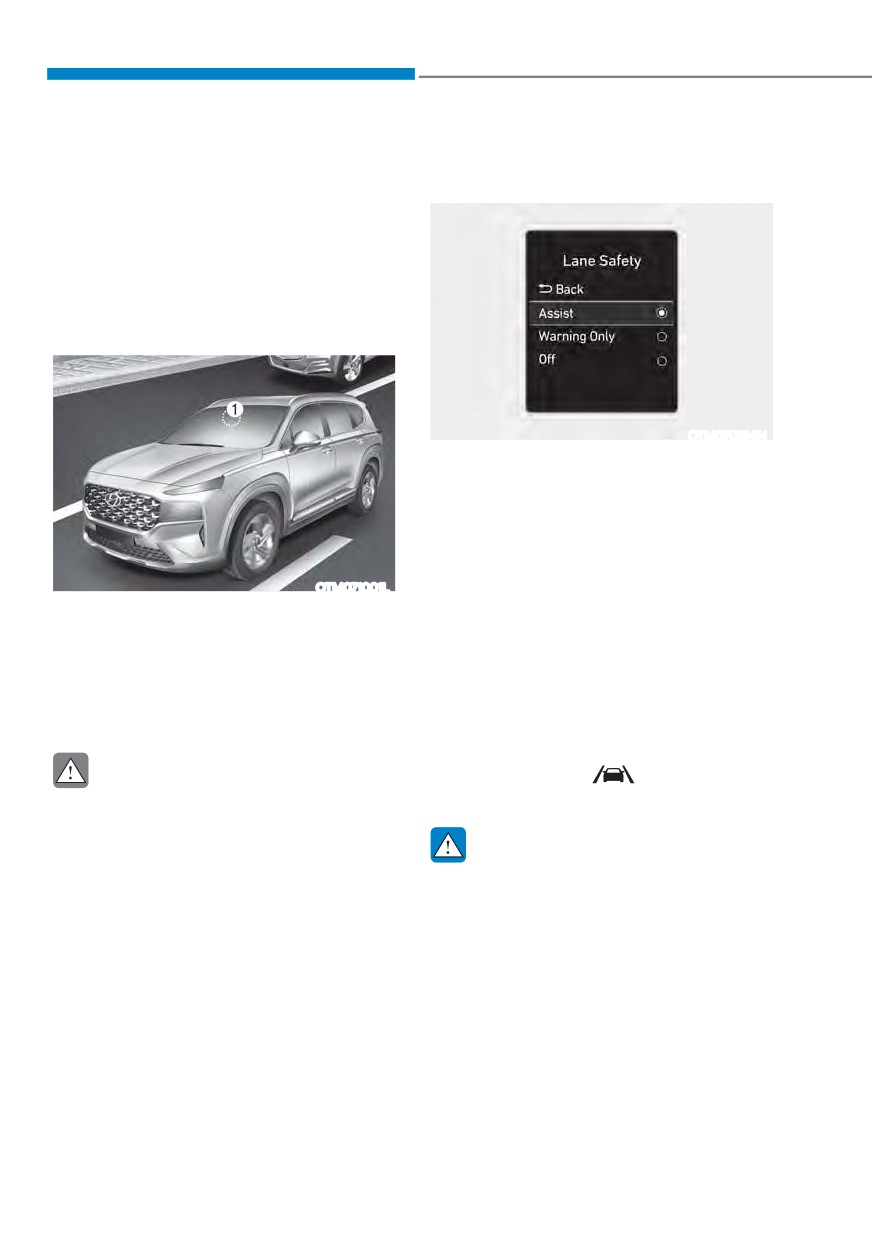
Lane Safety
while driving over a certain speed. Lane
Keeping Assist will warn the driver if the
vehicle leaves the lane without using the
turn signal, or will automatically assist
WKH GULYHUŔV VWHHULQJ WR KHOS SUHYHQW WKH
vehicle from departing the lane.
Detecting sensor
OTM070184N
With the engine on, select ‘Driver
$VVLVWDQFH Ɵ /DQH 6DIHW\Ŕ IURP WKH
Settings menu to set whether or not to
use each function.
-
,I œ$VVLVWŔ LV VHOHFWHG
/DQH .HHSLQJ
Assist will automatically assist the
OTM071001L
GULYHUŔV VWHHULQJ ZKHQ ODQH GHSDUWXUH
[1] : Front view camera
is detected to help prevent the vehicle
from moving out of its lane.
The front view camera is used as a
detecting sensor to detect lane markings
-
If 'Warning Only' is selected, Lane
Keeping Assist will warn the driver
(or road edges).
with an audible warning when lane
Refer to the picture above for the
departure is detected. The driver must
detailed location of the detecting sensor.
steer the vehicle.
-
,I œ2IIŔ LV VHOHFWHG
/DQH .HHSLQJ $VVLVW
CAUTION
will turn off. The
indicator light
will turn off on the cluster.
For more details on the precautions
of the front view camera, refer to
“Forward Collision-Avoidance Assist
WARNING
(FCA)” section in chapter 7.
ś
If 'Warning Only' is selected, steering
is not assisted.
ś
Lane Keeping Assist does not control
the steering wheel when the vehicle
is driven in the middle of the lane.
ś
The driver should always be aware
of the surroundings and steer the
vehicle if ‘Off’ is selected.
7-18
07
Warning Volume
Turning Lane Keeping Assist On/Off
(Lane Safety button)
OTM070141N
OTMA070001C
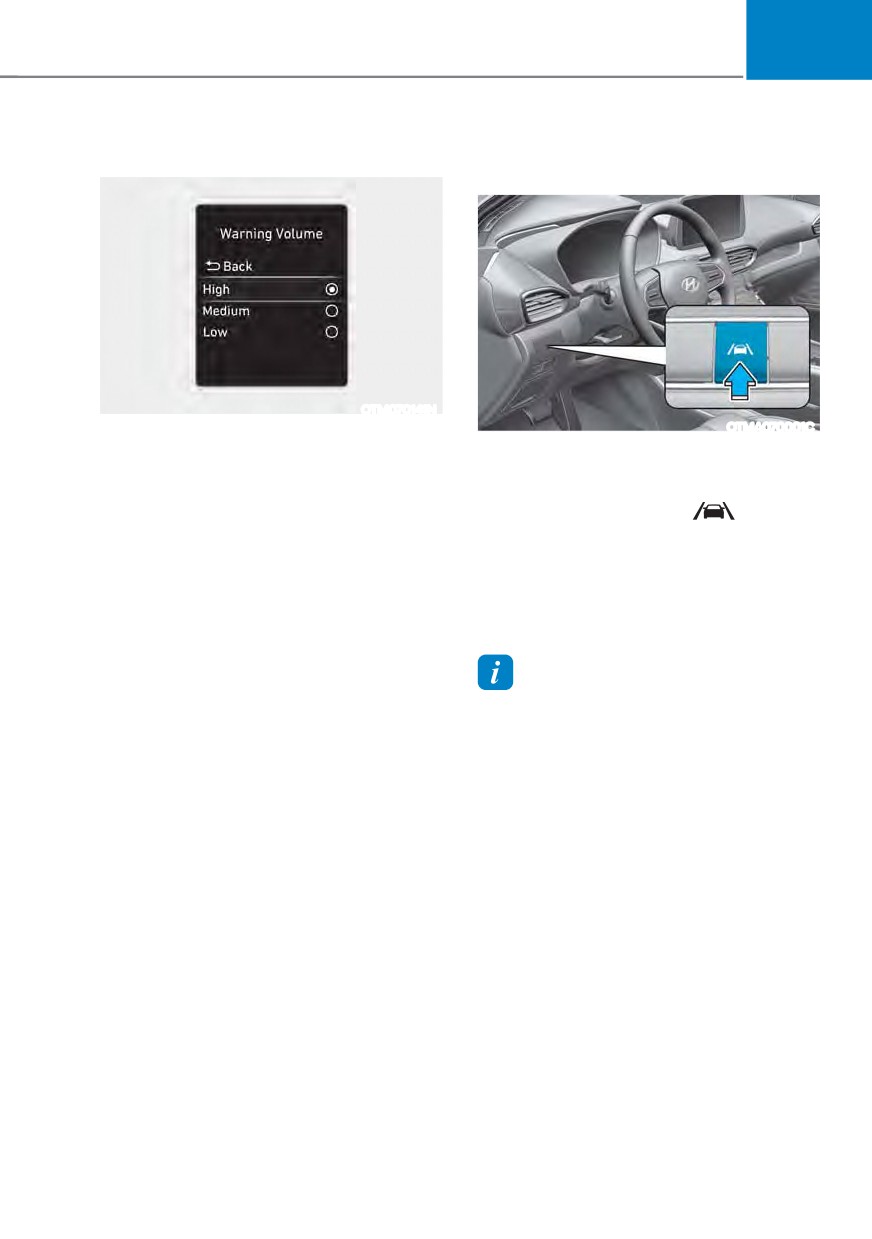
With the engine on, select ‘Driver
$VVLVWDQFH Ɵ :DUQLQJ 9ROXPHŔ IURP WKH
With the engine on, press and hold
Settings menu to change the Warning
the Lane Safety button located on
9ROXPH WR œ+LJKŔ œ0HGLXPŔ RU œ/RZŔ IRU
the instrument panel to turn on Lane
Lane Keeping Assist.
Keeping Assist. The white
indicator
light will illuminate on the cluster.
If you change the Warning Volume,
the Warning Volume of other Driver
Press and hold the button again to turn
Assistance systems may be changed.
off the function.
If the engine is restarted, Lane Keeping
Assist will maintain the last setting.
Information
When Lane Keeping Assist is turned off
with the Lane Safety button, Lane Safety
settings will turn off.
7-19
Driver assistance system
Turning Lane Keeping Assist On/Off
Lane Keeping Assist Operation
(Lane Driving Assist button)
Warning and control
Lane Keeping Assist will help warn
and help control the vehicle with Lane
Departure Warning and Lane Keeping
Assist.
Left
Right
OTM070063
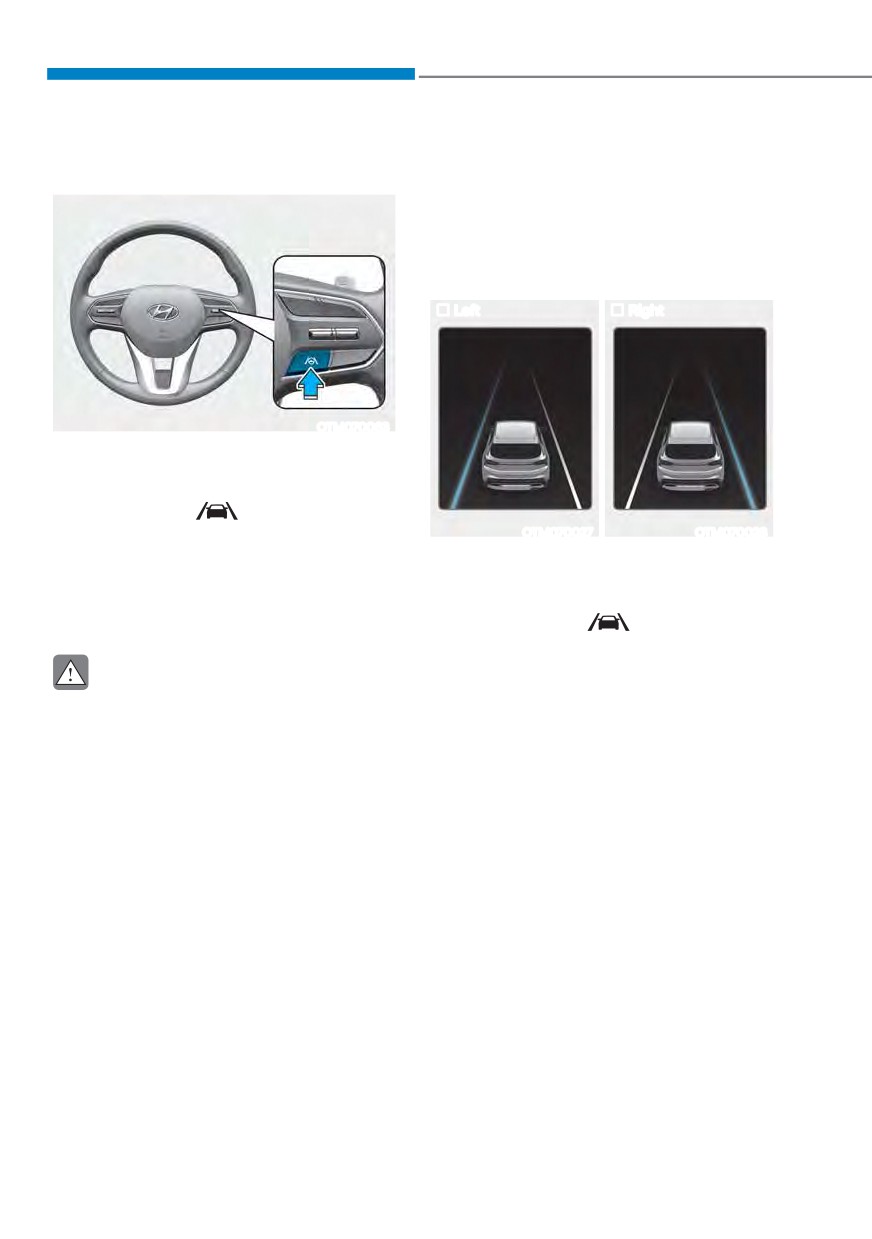
With the engine on, press and hold the
Lane Driving Assist button located on the
steering wheel to turn on Lane Keeping
Assist. The white
indicator light will
illuminate on the cluster.
OTM070027
OTM070028
Press and hold the button again to turn
Lane Departure Warning
off the function.
ś To warn the driver that the vehicle is
If the engine is restarted, Lane Keeping
departing from the projected lane in
Assist will maintain the last setting.
front, the green
indicator light
will blink on the cluster, the lane line
will blink on the cluster depending on
CAUTION
which direction the vehicle is veering,
When the Lane Driving Assist button is
and an audible warning will sound.
pressed shortly, Lane Following Assist
ś Lane Keeping Assist will operate
will turn on and off.
when your vehicle speed is between
approximately 40~120 mph (60~200
km/h).
7-20
07
Lane Keeping Assist
WARNING
ś To warn the driver that the vehicle
ś
The steering wheel may not be
is departing from the projected lane
assisted if the steering wheel is held
in front, the green
indicator
very tight or the steering wheel is
light will blink on the cluster, and the
steered over a certain degree.
steering wheel will make adjustments
to keep the vehicle inside the lane.
ś
Lane Keeping Assist does not operate
at all times. It is the responsibility of
ś Lane Keeping Assist will operate
the driver to safely steer the vehicle
when your vehicle speed is between
and to maintain the vehicle in its
approximately 40~120 mph (60~200
lane.
km/h).
ś
The hands-off warning message
may appear late depending on road
conditions. Always have your hands
on the steering wheel while driving.
ś
If the steering wheel is held very
lightly, the hands-off warning
message may appear because Lane
Keeping Assist may not recognize
that the driver has their hands on the
steering wheel.
ś
If you attach objects to the steering
wheel, the hands-off warning may
OTM070037N
not work properly.
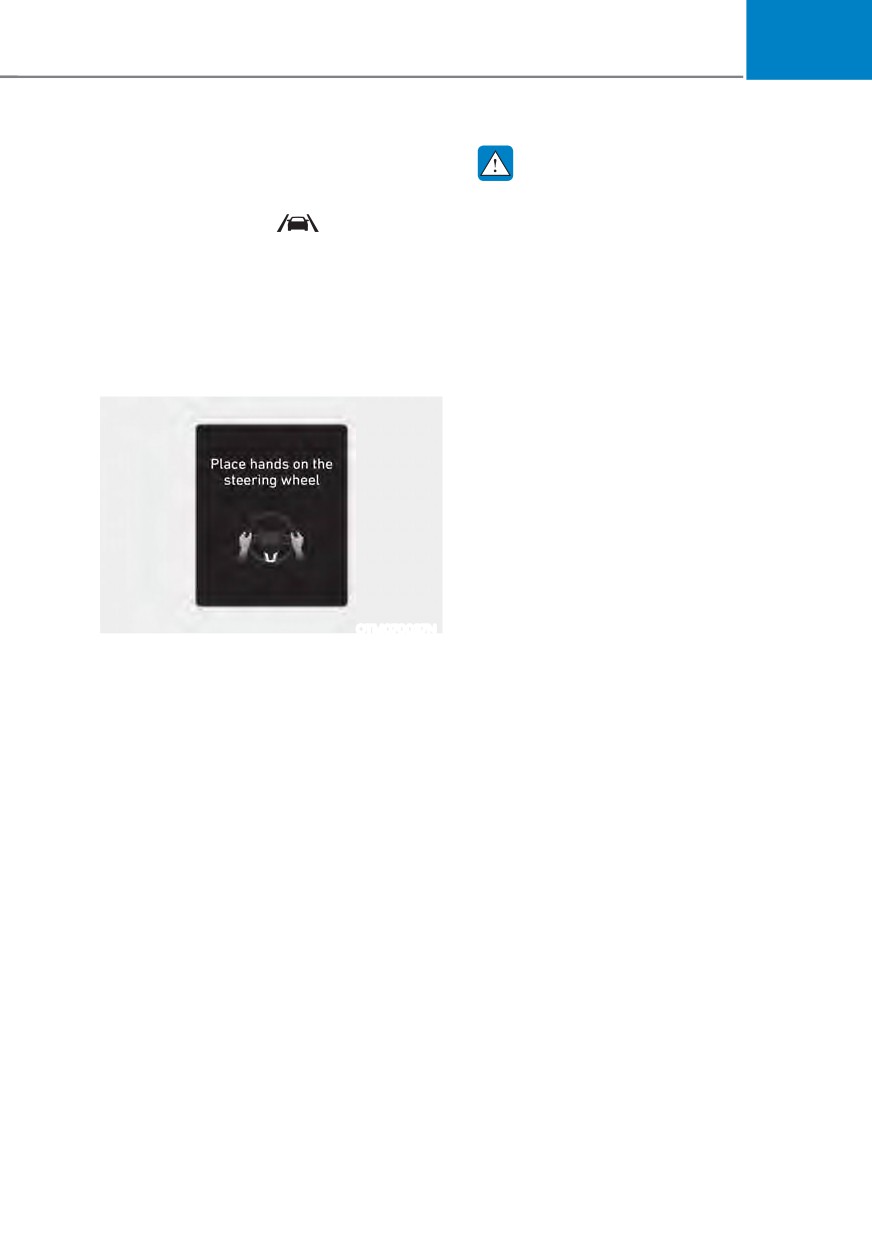
Hands-off warning
If the driver takes their hands off the
steering wheel for several seconds, the
œ3ODFH KDQGV RQ WKH VWHHULQJ ZKHHOŔ
warning message will appear on the
cluster, and an audible warning will
sound in stages.
7-21
Driver assistance system
Lane Keeping Assist Malfunction
Information
and Limitations
ś You may change settings from the
Lane Keeping Assist Malfunction
instrument cluster (User Settings) or
infotainment system (Vehicle Settings),
whichever option that is provided with
your vehicle. For more details, see
"User Settings" section in chapter 4, or
"Vehicle Settings" section in supplied
Infotainment Manual.
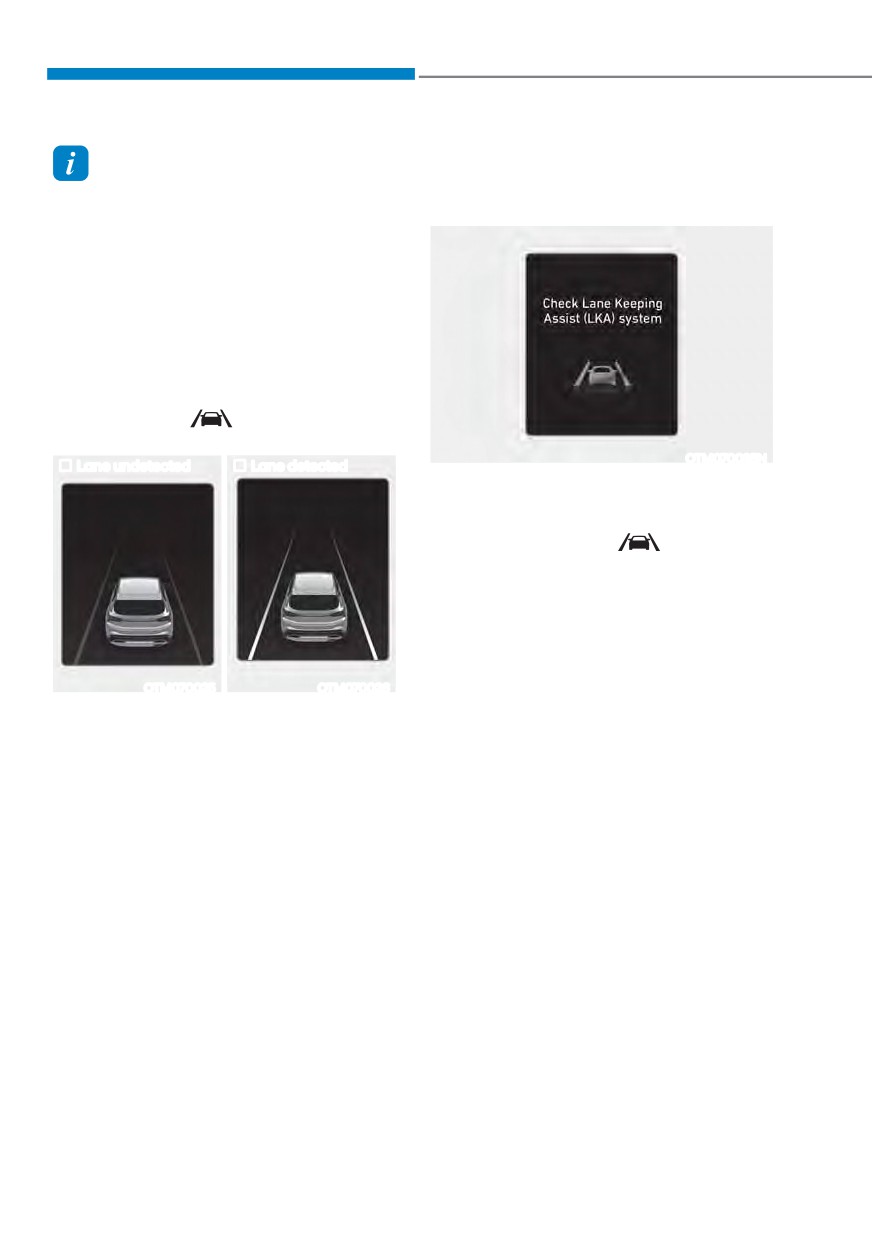
ś When lane markings (or road edges)
are detected, the lane lines on the
cluster will change from grey to white
and the green
indicator light will
illuminate.
OTM070035N
Lane undetected
Lane detected
When Lane Keeping Assist is not working
properly, the ‘Check Lane Keeping Assist
/.$ V\VWHPŔ ZDUQLQJ PHVVDJH ZLOO
appear and the yellow
indicator
light will illuminate on the cluster. If this
occurs, have the vehicle be inspected by
an authorized HYUNDAI dealer.
OTM070025
OTM070026
ś Even though the steering is assisted by
Lane Keeping Assist, the driver may
control the steering wheel.
ś The steering wheel may feel heavier
or lighter when the steering wheel is
assisted by Lane Keeping Assist than
when it is not.
ś The images and colors in the
instrument cluster may differ
depending on the cluster type or theme
selected from the instrument cluster.
7-22