Honda Odyssey (2024 year). Manual in english - page 3
 

  Index      Manuals     Honda Odyssey (2024 year). Manual in english


Search            copyright infringement  


Content      ..     1      2      3      4      ..


Honda Odyssey (2024 year). Manual in english - page 3


99

uu

Indicators

u

Continued

In

strum

e

nt Pa

nel

Indicator

Name

On/Blinking

Explanation

Message

System Message 
Indicator

Comes on along with a beep 
when a problem is detected. A 
system message on the driver 
information interface appears at 
the same time.

While the indicator is on, press the 


(home) button, select 

Warnings

, then 

press the 

ENTER

 button to see the 

message again.

Refer to the Indicators information in this 
chapter when a system message appears 
on the driver information interface. Take 
the appropriate action for the message.

The driver information interface does not 
return to the normal screen unless the 
warning is canceled, or the 

ENTER


button is pressed repeatedly.

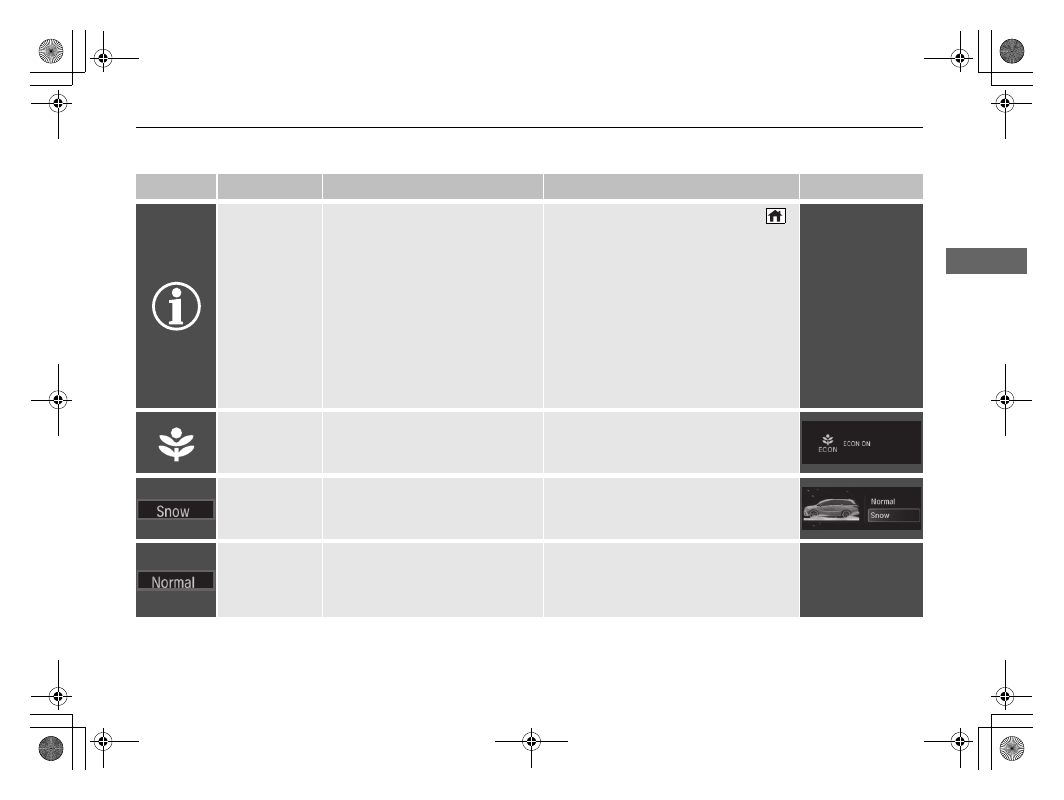
Econ Mode 
Indicator

Comes on when you press the 

ECON

 button.

2

ECON Button

 P. 491

Snow

 Mode 

Indicator

Comes on when you press the 

SNOW

 button and snow mode is 

selected.

2

Intelligent Traction Management


P. 492

Normal

 Mode 

Indicator

Comes on for a few seconds when 

Snow

 mode is selected, and the 

vehicle is powered off, then 
restarted.

2

Intelligent Traction Management


P. 492

100

uu

Indicators

u

In

strum

e

nt Pa

nel

Indicator

Name

On/Blinking

Explanation

Message

Auto Idle Stop 
Indicator (Green)

Comes on when Auto Idle Stop is 
in operation. The engine 
automatically shuts off.

2

Auto Idle Stop

 P. 486

Auto Idle Stop 

OFF

 Indicator

Comes on when the Auto Idle 
Stop system has been turned off 
by the Auto Idle Stop 

OFF

 Button.

2

Auto Idle Stop System ON/OFF


P. 487

Auto Idle Stop 
System Indicator 
(Amber)

Comes on for a few seconds when 
you set the power mode to ON, 
then goes off.

Blinks if there is a problem with 
the Auto Idle Stop system.

Have your vehicle checked by a dealer.

101

uu

Indicators

u

Continued

In

strum

e

nt Pa

nel

Indicator

Name

On/Blinking

Explanation

Message

Auto Idle Stop 
Suspend 
Indicator

Comes on while Auto Idle Stop is 
temporarily suspended in the 
following situations.

-

Brake pedal is not fully pressed.

Depress the brake pedal firmly.

-

The transmission is in a position 
other than 

(

D

.

2

Auto Idle Stop

 P. 486

-

System charging is prioritized.

-

Climate control system is 
prioritized.

-

 is ON (indicator on).

-

Engine coolant temperature is 
not in operating range.

-

The Intelligent Traction 
Management is set to 

Snow

.

-

The battery temperature is too low.

-

Auto Idle Stop does not activate 
for some reason.

102

uu

Indicators

u

In

strum

e

nt Pa

nel

Indicator

Name

On/Blinking

Explanation

Message

Lane Keeping 
Assist System 
(LKAS) Indicator 
(Amber)

Comes on for a few seconds when 
you set the power mode to ON, 
then goes off.

Comes on if there is a problem 
with the LKAS.

Stays on constantly 

- Have your 

vehicle checked by a dealer.

Lane Keeping 
Assist System 
(LKAS) Indicator 
(White/Green)

Lights up in white when you press 
the LKAS button.

Lights up in green when the LKAS 
is in operation.

2

Lane Keeping Assist System (LKAS)


P. 538

Adaptive Cruise 
Control (ACC) 
with Low Speed 
Follow Indicator 
(Amber)

Comes on for a few seconds when 
you set the power mode to ON, 
then goes off.

Comes on if there is a problem 
with ACC with Low Speed Follow.

Comes on while driving 

- Have your 

vehicle checked by a dealer.

Indicator may come on 
temporarily when the Maximum 
Load Limit is exceeded.

ACC with Low Speed Follow has 
been automatically canceled.

Make sure the total load is within the 
Maximum Load Limit.

2

Maximum Load Limit

 P. 461

Stays on constantly 

- Have your 

vehicle checked by a dealer.

Adaptive Cruise 
Control (ACC) 
with Low Speed 
Follow Indicator 
(White/Green)

Lights up in white when you press 
the  

button.

Lights up in green when you press 
the 

RES/+

 button or 

-/SET

 button.

2

Adaptive Cruise Control (ACC) with 
Low Speed Follow

 P. 522

103

uu

Indicators

u

Continued

In

strum

e

nt Pa

nel

Indicator

Name

On/Blinking

Explanation

Message

Cruise Mode 
Indicator 
(White/Green)

Lights up in white when you 
change to cruise mode.

Lights up in green when you have 
set a speed for cruise control.

2

To Switch ACC with Low Speed 
Follow to Cruise Control

 P. 536

Safety Support 
Indicator 
(Amber)

Comes on if there is a problem 
with RDM, CMBS

TM

, or blind spot 

information system.

Stays on constantly 

- Have your 

vehicle checked by a dealer.

Indicator may come on 
temporarily when the Maximum 
Load Limit is exceeded.

Make sure the total load is within the 
Maximum Load Limit.

2

Maximum Load Limit

 P. 461

104

uu

Indicators

u

In

strum

e

nt Pa

nel

Indicator

Name

On/Blinking

Explanation

Message

Safety Support 
Indicator 
(Amber)

Comes on when RDM and/or 
CMBS

TM

 shuts itself off.

Indicator may come on temporarily 
when passing through an enclosed 
space, such as a tunnel.

The area around the radar sensor is 
blocked by dirt, mud, etc. Stop your 
vehicle in a safe place and wipe the 
debris off with a soft cloth. Indicator may 
take some time to go off after the radar 
sensor is cleaned.

Have your vehicle checked by a dealer if 
the indicator does not go off even after 
you have cleaned the radar sensor.

2

Radar Sensor

 P. 554

Stays on 

- The temperature inside the 

camera is too high.
Use the climate control system to cool 
down the camera.
The system activates when the 
temperature inside the camera cools 
down.

2

Front Sensor Camera

 P. 552

105

uu

Indicators

u

Continued

In

strum

e

nt Pa

nel

Indicator

Name

On/Blinking

Explanation

Message

Safety Support 
Indicator 
(Amber)

Comes on when RDM and/or 
CMBS

TM

 shuts itself off.

Stays on 

- The area around the camera 

is blocked by dirt, mud, etc. Stop your 
vehicle in a safe place and wipe the 
debris off with a soft cloth.

Have your vehicle checked by a dealer if 
the indicator and message are still 
displayed even after you have cleaned 
the area around the camera.

2

Front Sensor Camera

 P. 552

Comes on when mud, snow, or ice 
has accumulated in the vicinity of 
the blind spot information system 
sensor.

Comes on while driving 

- Something 

may be interfering with the blind spot 
information system sensor. Check the 
vicinity of the blind spot information 
system sensor and remove any obstacles. 

2

Blind Spot Information System


P. 500

106

uu

Indicators

u

In

strum

e

nt Pa

nel

Indicator

Name

On/Blinking

Explanation

Message

Safety Support 
Indicator (Green/
Gray)

Lights up in green when RDM, 
CMBS

TM

, and blind spot 

information system are on.

Lights up in green and gray when 
RDM, CMBS

TM

, or blind spot 

information system or any two of 
these systems are off.

Lights up in gray when RDM, 
CMBS

TM

, and blind spot 

information system are off.

2

RDM On and Off

 P. 519

2

CMBS

TM

 On and Off

 P. 510

2

Blind spot information system on 
and off

 P. 502

107

uu

Indicators

u

Driver Information Interface Warning and Information Messages

Continued

In

strum

e

nt Pa

nel

Driver Information Interface Warning and Information Messages

The following messages appear only on the driver information interface. Press the 

 (home) button, select 

Warnings

, then press the 

ENTER

 button to see the message again with the system message indicator on.

Message

Condition

Explanation

Appears if any door or the tailgate is not completely 
closed.

Goes off when all doors and the tailgate are closed.

Appears when the hood is opened.

Close the hood.

Appears when the engine oil pressure is low.

Appears while driving 

- Immediately stop in a safe 

place.

2

If the Engine Oil Low Warning Appears

 P. 655

Appears if there is a problem with the shutter grille, 
and the radiator coolant temperature is too high.

Power output will be reduced, so you may not be able 
to accelerate or maintain your current speed. Have your 
vehicle checked by a dealer.

108

uu

Indicators

u

Driver Information Interface Warning and Information Messages

In

strum

e

nt Pa

nel

Message

Condition

Explanation

Appears when the washer fluid is low.

Refill the washer fluid.

2

Refilling Window Washer Fluid 

 P. 603

Appears when the temperature of the transmission 
is starting to get too hot.

The performance of the vehicle may be reduced.

Until the message disappears, reduce your speed and 
allow the system to cool down.

Appears if the battery charge becomes low.

Charge the battery.

Appears when the fuel fill door is opened.

Close the fuel fill door.

Canadian models

109

uu

Indicators

u

Driver Information Interface Warning and Information Messages

Continued

In

strum

e

nt Pa

nel

Message

Condition

Explanation

Appears when there is a problem with the battery 
charging system.

Have your vehicle checked by a dealer.

Appears when the scheduled maintenance is due 
soon.

Consequently, 

Maintenance Due Now

 and 

Maintenance Past Due

 follow.

2

Maintenance Minder Messages on the Driver 
Information Interface

 P. 587

Appears if there is a problem with the power sliding 
door system.

Turn off the main switch and manually operate the 
power sliding doors.

Have your vehicle checked by a dealer.

2

Opening/Closing the Power Sliding Doors 

 P. 174

U.S.

Canada

110

uu

Indicators

u

Driver Information Interface Warning and Information Messages

In

strum

e

nt Pa

nel

Message

Condition

Explanation

Appears when the engine coolant temperature gets 
abnormally high.

2

Overheating

 P. 653

Appears when there is a problem with the power 
tailgate system.

Manually open or close the power tailgate.

Have your vehicle checked by a dealer.

Appears when the starter system has a problem.

As a temporary measure, press and hold the 

ENGINE 

START/STOP

 button for up to 15 seconds while 

pressing the brake pedal and manually start the engine.

Have your vehicle checked by a dealer.

U.S.

Canada

Models with power tailgate

U.S.

Canada

111

uu

Indicators

u

Driver Information Interface Warning and Information Messages

Continued

In

strum

e

nt Pa

nel

Message

Condition

Explanation

Appears when you set the power mode to 
ACCESSORY or ON.

2

Starting the Engine

 P. 470

Appears when the engine does not restart 
automatically due to the following reason:

The hood is open.

There is a problem in the system that disables Auto 
Idle Stop.

Follow the normal procedure to start the engine.

2

Starting the Engine

 P. 470

Close the hood.

Appears when the steering wheel is locked.

Move the steering wheel left and right while pressing 
the 

ENGINE START/STOP

 button.

Appears when the power mode is in ACCESSORY.

Appears after the driver’s door is opened when the 
power mode is in ACCESSORY.

Change the power mode to VEHICLE OFF.

2

ENGINE START/STOP Button

 P. 188

Canadian models

112

uu

Indicators

u

Driver Information Interface Warning and Information Messages

In

strum

e

nt Pa

nel

Message

Condition

Explanation

Appears when you close the door with the power 
mode in ON without the remote inside the vehicle.

Disappears when you bring the remote back inside the 
vehicle and close the door.

2

Keyless Remote Reminder

 P. 190

Appears when the remote battery becomes weak.

Replace the battery as soon as possible.

2

Replacing the Remote Battery

 P. 626

Appears if the remote battery is too weak to start the 
engine or the key is not within operating range to 
start the engine.
A beeper sounds six times.

Bring the remote in front of the 

ENGINE START/STOP


button to be touched with.

2

If the Remote Battery is Weak

 P. 649

Appears if you press the 

ENGINE START/STOP


button while the vehicle is moving.

2

Emergency Engine Stop

 P. 650

Appears after the driver’s door is opened when the 
power mode is in ACCESSORY.

Press and hold the 

ENGINE START/STOP

 button with 

your foot off the brake pedal to change the power 
mode to VEHICLE OFF.

Appears when you attempt to change to another 
gear position with the transmission in 

(

P

 and the 

engine OFF.

To select another gear position while in 

(

P

, the engine 

must be ON.

Appears when you set the power mode to OFF while 
driving.

Immediately stop in a safe place, set the parking brake, 
then restart the engine. If the message disappears, 
continue driving.

113

uu

Indicators

u

Driver Information Interface Warning and Information Messages

Continued

In

strum

e

nt Pa

nel

Message

Condition

Explanation

Appears when the vehicle is stopped with the 
driver’s seat belt unfastened and there is a chance 
that the vehicle may roll unintentionally.

Press the 

(

P

 button before release the brake pedal 

when idling, parking or exiting the vehicle.

2

Shift Operation

 P. 480

Appears when the engine stops without the 
transmission in 

(

P

, and does not restart 

automatically.

Appears if you open the hood while Auto Idle Stop 
activates.

If you want to set the power mode to ON, change the 
gear position to 

(

P

.

If you want to start the engine, follow the normal 
procedure.

2

Starting the Engine

 P. 470

Appears when you change to 

(

N

, then release the 

(

N

 button.

2

If you want to keep the transmission in 

(

N


position [car wash mode]

 P. 482

Appears when car wash mode is not available due to 
hot transmission.

When transmission is too hot, car wash mode may not 
be available. Let the engine idle and cool down 
transmission.

2

If you want to keep the transmission in 

(

N


position [car wash mode]

 P. 482

Appears when you try to change the gear position 
without depressing the brake pedal.

Depress the brake pedal, then select a shift button.

114

uu

Indicators

u

Driver Information Interface Warning and Information Messages

In

strum

e

nt Pa

nel

Message

Condition

Explanation

Appears when you try to change the gear position 
without releasing your foot off the accelerator pedal.

Release your foot off the accelerator pedal, then select 
a shift button.

Appears when the 

(

P

 button is pressed while the 

vehicle is moving.

Appears if you change the gear position to 

(

R

 while 

the vehicle is moving forward, or to 

(

D

 while the 

vehicle is reversing.

Make sure that the vehicle comes to a stop before 
operating the select button.

Appears when you set the power mode to ON 
without fastening the driver’s seat belt.

Appears when you change the gear position after 

(

P

 has been automatically selected with the driver’s 

door open, the driver’s seat belt unfastened, then 
the brake pedal is released.

Fasten the seat belt properly before you start to drive.

2

Shift Operation

 P. 480

Appears when you set the power mode to VEHICLE 
OFF, if the rear doors were opened shortly before or 
after the vehicle was powered on.

Check the rear seat for passengers or items before 
exiting the vehicle.

2

Rear Seat Reminder

 P. 223

Appears when depressing the accelerator pedal 
while the gear position is in 

(

N

.

Remove your foot from the accelerator pedal. When 
driving, depress the brake pedal and change the gear 
position.

(White)

115

uu

Indicators

u

Driver Information Interface Warning and Information Messages

Continued

In

strum

e

nt Pa

nel

Message

Condition

Explanation

Appears when you press and hold 

(

N

 button for 

more than two seconds.

Disappears when you set the gear position to other 
than 

(

N

.

2

If you want to keep the transmission in 

(

N


position [car wash mode]

 P. 482

Appears if there is a problem with the cooling 
system.

Drive slowly to prevent overheating and have your 
vehicle checked by a dealer as soon as possible.

Appears if there is a problem with the headlights.

Appears while driving 

- The headlights may not be 

on. When conditions allow you to drive safety, have 
your vehicle checked by a dealer as soon as possible.

Appears if there is a problem with the parking sensor 
system.

Check if the area around the sensor(s) is covered with 
mud, ice, snow, etc. If the indicator(s) stays on or the 
beeper does not stop even after you clean the area, 
have the system checked by a dealer.

Models with parking sensor system

116

uu

Indicators

u

Driver Information Interface Warning and Information Messages

In

strum

e

nt Pa

nel

Message

Condition

Explanation

Appears if the automatic brake hold is automatically 
canceled while it is in operation.

Immediately depress the brake pedal.

Appears when the automatic brake hold system is 
turned off.

2

Automatic Brake Hold

 P. 559

Appears when the automatic brake hold button is 
pressed without wearing the driver’s seat belt.

Fasten the driver’s seat belt.

2

Automatic Brake Hold

 P. 559

Appears when the automatic brake hold button is 
pressed without depressing the brake pedal while 
the automatic brake hold is in operation.

Press the automatic brake hold button with the brake 
pedal depressed.

2

Automatic Brake Hold

 P. 559

Appears when the parking brake is applied 
automatically while it is in operation.

2

Automatic Brake Hold

 P. 559

2

Parking Brake

 P. 555

117

uu

Indicators

u

Driver Information Interface Warning and Information Messages

Continued

In

strum

e

nt Pa

nel

Message

Condition

Explanation

Appears when you pull the electric parking brake 
switch without depressing the brake pedal.

Depress the brake pedal to release the parking brake.

2

Parking Brake

 P. 555

Appears as soon as a problem is detected in the 
keyless access system.

Appears constantly 

- Have your vehicle checked by a 

dealer.

Appears as soon as a problem is detected in the push 
button starting system.

Appears constantly 

- Have your vehicle checked by a 

dealer.

Appears if there is a problem with the Auto high-
beam.

Manually operate the headlight switch.

If you are driving with the high-beam headlights when 
this happens, the headlights are changed to low beams.

118

uu

Indicators

u

Driver Information Interface Warning and Information Messages

In

strum

e

nt Pa

nel

Message

Condition

Explanation

Appears if there is a problem with the fuel pump 
system.

Set the power mode to OFF for a while, then set the 
power mode to ON. The message disappears if there is 
no problem. If the message appears again, take your 
vehicle to a dealer.

Appears if there is a problem with the engine 
management system.

Set the power mode to OFF for a while, then set the 
power mode to ON. The message disappears if there is 
no problem. If the message appears again, take your 
vehicle to a dealer.

Appears if there is a problem with the ignition 
system.

Set the power mode to OFF for a while, then set the 
power mode to ON. The message disappears if there is 
no problem. If the message appears again, take your 
vehicle to a dealer.

Appears if there is a problem with the seat heaters.

Turn off the seat heaters until the message disappears. 
If the message appears again, take your vehicle to a 
dealer.

Appears if there is a problem with the climate 
control system.

Turn off the climate control system until the message 
disappears. If the message appears again, take your 
vehicle to a dealer.

119

uu

Indicators

u

Driver Information Interface Warning and Information Messages

Continued

In

strum

e

nt Pa

nel

Message

Condition

Explanation

Appears when you unlock and open the driver’s 
door while the engine is running by remote engine 
start.

2

Remote Engine Start with Vehicle Feedback

 P. 472

Flashes when the system senses a likely collision with 
a vehicle in front of you.

Take appropriate action to prevent a collision (apply the 
brakes, change lanes, etc.)

2

Collision Mitigation Braking System

TM

 (CMBS

TM

)


P. 506

2

Adaptive Cruise Control (ACC) with Low Speed 
Follow

 P. 522

Appears when ACC with Low Speed Follow has 
been automatically canceled.

You can resume the set speed after the condition that 
caused ACC with Low Speed Follow to cancel improves. 
Press the 

RES/+

 button.

2

Adaptive Cruise Control (ACC) with Low Speed 
Follow

 P. 522

Appears when pressing the 

–/SET

 button while the 

vehicle is moving and the brake pedal is depressed.

ACC with Low Speed Follow cannot be set.

2

Adaptive Cruise Control (ACC) with Low Speed 
Follow

 P. 522

Appears if the VSA

®

 or traction control function 

operates while ACC with Low Speed Follow is in 
operation.

ACC with Low Speed Follow has been automatically 
canceled.

2

Adaptive Cruise Control (ACC) with Low Speed 
Follow

 P. 522

120

uu

Indicators

u

Driver Information Interface Warning and Information Messages

In

strum

e

nt Pa

nel

Message

Condition

Explanation

Appears when the distance between your vehicle 
and the vehicle ahead of you is too close while ACC 
with Low Speed Follow is in operation.

ACC with Low Speed Follow has been automatically 
canceled.

2

Adaptive Cruise Control (ACC) with Low Speed 
Follow

 P. 522

Appears when pressing the 

–/SET

 button while the 

distance between your vehicle and the vehicle ahead 
of you is too close.

ACC with Low Speed Follow cannot be set.

2

Adaptive Cruise Control (ACC) with Low Speed 
Follow

 P. 522

Appears when the driver’s seat belt is unfastened 
while your vehicle is automatically stopped by ACC 
with Low Speed Follow.

ACC with Low Speed Follow has been automatically 
canceled.

2

Adaptive Cruise Control (ACC) with Low Speed 
Follow

 P. 522

Appears when pressing the 

–/SET

 button while the 

driver’s seat belt is unfastened.

ACC with Low Speed Follow cannot be set.

2

Adaptive Cruise Control (ACC) with Low Speed 
Follow

 P. 522

Appears when the speed of the vehicle is too high for 
you to set ACC.

Reduce the speed, then set ACC.

2

Adaptive Cruise Control (ACC) with Low Speed 
Follow

 P. 522

Appears when ACC is canceled due to excessive high 
vehicle speed.

Reduce the speed, then reset ACC.

2

Adaptive Cruise Control (ACC) with Low Speed 
Follow

 P. 522

121

uu

Indicators

u

Driver Information Interface Warning and Information Messages

Continued

In

strum

e

nt Pa

nel

Message

Condition

Explanation

Appears when the vehicle ahead of you resumes 
driving, after your vehicle has been stopped 
automatically by ACC with Low Speed Follow.

Press the 

RES/+

 button or 

–/SET

 button or depress the 

accelerator pedal to resume.

2

Adaptive Cruise Control (ACC) with Low Speed 
Follow

 P. 522

Appears when the shift position is changed to any 
position other than 

 while ACC with Low Speed 

Follow is in operation.

ACC with Low Speed Follow has been automatically 
canceled.

2

Adaptive Cruise Control (ACC) with Low Speed 
Follow

 P. 522

Appears when pressing the 

–/SET

 button while the 

shift position is in any position other than 

.

ACC with Low Speed Follow cannot be set.

2

Adaptive Cruise Control (ACC) with Low Speed 
Follow

 P. 522

Appears when the vehicle is stopped on a very steep 
slope while ACC with Low Speed Follow is in 
operation.

ACC with Low Speed Follow has been automatically 
canceled.

2

Adaptive Cruise Control (ACC) with Low Speed 
Follow

 P. 522

D/S

D/S

122

uu

Indicators

u

Driver Information Interface Warning and Information Messages

In

strum

e

nt Pa

nel

Message

Condition

Explanation

Appears when pressing the 

–/SET

 button while the 

vehicle is stopped on a very steep slope.

ACC with Low Speed Follow cannot be set.

2

Adaptive Cruise Control (ACC) with Low Speed 
Follow

 P. 522

Appears when the parking brake is applied 
automatically while ACC with Low Speed Follow is in 
operation.

ACC with Low Speed Follow has been automatically 
canceled.

2

Adaptive Cruise Control (ACC) with Low Speed 
Follow

 P. 522

2

Parking Brake

 P. 555

Appears when pressing the 

–/SET

 button while the 

parking brake is applied.

ACC with Low Speed Follow cannot be set.

2

Adaptive Cruise Control (ACC) with Low Speed 
Follow

 P. 522

2

Parking Brake

 P. 555

Appears if ACC with Low Speed Follow is canceled 
while your vehicle is automatically stopped by ACC 
with Low Speed Follow.

Immediately depress the brake pedal.

123

uu

Indicators

u

Driver Information Interface Warning and Information Messages

Continued

In

strum

e

nt Pa

nel

Message

Condition

Explanation

Appears if ACC with Low Speed Follow cannot be 
set due to repeated deceleration, driving on a long 
downward slope, or excess vehicle weight.

Wait awhile, then reset ACC with Low Speed Follow.

2

Adaptive Cruise Control (ACC) with Low Speed 
Follow

 P. 522

Appears just before the ACC with Low Speed Follow 
is automatically canceled due to repeated 
deceleration, driving on a long downward slope, or 
excess vehicle weight. (Will automatically open until 
the distance between your vehicle and the vehicle 
ahead is the maximum set in distance settings.)

Appears when the ACC with Low Speed Follow has 
been automatically canceled.

2

Adaptive Cruise Control (ACC) with Low Speed 
Follow

 P. 522

Appears when 

-/SET

RES/+

CANCEL

, or interval 

button is pressed while ACC with Low Speed Follow 
is off.

After pressing the 

 button, press the 

-/SET

RES/+

CANCEL

, or interval button.

2

Adaptive Cruise Control (ACC) with Low Speed 
Follow

 P. 522

Appears when interval button is pressed while Cruise 
mode is selected.

After selecting ACC with Low Speed Follow, press the 
interval button.

2

Adaptive Cruise Control (ACC) with Low Speed 
Follow

 P. 522

124

uu

Indicators

u

Driver Information Interface Warning and Information Messages

In

strum

e

nt Pa

nel

Message

Condition

Explanation

Appears when the vehicle is driving out of a detected 
lane. The steering wheel vibrates rapidly.

Keep the vehicle within the lane you are driving.

2

Lane Keeping Assist System (LKAS)

 P. 538

Appears when the vehicle is driving out of a detected 
lane.

-

The steering wheel vibrates rapidly when the 
vehicle is drifting out of a detected lane.

-

The steering wheel vibrates rapidly when the 
vehicle is drifting out of a detected lane. The system 
also steers the vehicle to help you remain within 
your driving lane.

Keep the vehicle within the lane you are driving.

2

Road Departure Mitigation (RDM) System

 P. 517

You can change the setting for the road departure 
mitigation system. 

Normal

Wide

Warning Only

 and 

Narrow

 can be selected.

2

Customized Features

 P. 413

Appears when the vehicle is likely to drive out a 
detected lane.
The RDM system also steers the vehicle to help you 
remain within your driving lane.

Blinks when you fail to steer the vehicle. The beeper 
sounds simultaneously.

Operate the steering wheel to resume the LKAS.

Lane Keeping Assist System (LKAS)

Road Departure Mitigation (RDM) System

When you selected Warning Only

When you selected Normal, Wide or Narrow

Road Departure Mitigation (RDM) System
When you selected Narrow

125

uu

Indicators

u

Driver Information Interface Warning and Information Messages

In

strum

e

nt Pa

nel

Message

Condition

Explanation

Appears when the LKAS is in operation, or the LKAS 
button is pressed, but there is a problem with a 
system related to the LKAS. The LKAS cancels 
automatically. The beeper sounds simultaneously if 
selected by customization.

If any other system indicators come on, such as the 
VSA

®

, ABS and brake system, take appropriate action.

2

Indicators

 P. 88

Appears if anything covers the radar sensor cover 
and prevents the sensor from detecting a vehicle in 
front.

May appear when driving in bad weather (rain, 
snow, fog, etc.)

When the radar sensor gets dirty, stop your vehicle in a 
safe place, and wipe off dirt using a soft cloth. The 
message may take some time to go off.

Have your vehicle checked by a dealer if the message 
does not disappear even after you clean the sensor 
cover.

2

Radar Sensor

 P. 554

2

Honda Sensing

®

 P. 503

Appears if the temperature inside the front sensor 
camera is too high and some driver assist systems 
cannot be activated.

Use the climate control system to cool down the 
camera.

Disappears 

- The camera has been cooled down and 

the systems are activated normally.

2

Front Sensor Camera

 P. 552

2

Honda Sensing

®

 P. 503

Appears if the area around the front sensor camera 
is blocked by dirt, mud, etc. and be prevented from 
detecting a vehicle in front.

May appear when driving in bad weather (rain, 
snow, fog, etc.)

When the front window gets dirty, stop your vehicle in 
a safe place, and wipe it off with a soft cloth.

Have your vehicle checked by a dealer if the message 
does not disappear even after you cleaned the area 
around the camera.

2

Front Sensor Camera

 P. 552

2

Honda Sensing

®

 P. 503

126

In

strum

e

nt Pa

nel

Gauges and Driver Information Interface

Gauges

Gauges include the fuel gauge, temperature gauge, and related indicators. They are 
displayed when the power mode is set to ON.

Displays the amount of fuel left in the fuel tank.

Displays the temperature of the engine coolant.

Fuel Gauge

Temperature Gauge

1

Fuel Gauge

NOTICE

You should refuel when the reading approaches 

.

Running out of fuel can cause the engine to misfire, 
damaging the catalytic converter.

The actual amount of remaining fuel may differ from 
the fuel gauge reading.

E

1

Temperature Gauge

NOTICE

Driving with the temperature gauge reading in the 
upper zone can cause serious engine damage. Pull 
safely to the side of the road and allow engine 
temperature to return to normal.

2

Overheating

 P. 653

127

uu

Gauges and Driver Information Interface

u

Driver Information Interface

Continued

In

strum

e

nt Pa

nel

Driver Information Interface

The driver information interface shows information such as the estimated travelable 
distance and fuel economy of the vehicle. It also displays messages such as warnings 
and other helpful information.

Displays your driving speed in mph or km/h.

Shows the number of engine revolutions per minute.

Speedometer

Tachometer

1

Speedometer

You can change the Speed/Distance units.

2

Units

 P. 137

1

Tachometer

You can turn the tachometer display on or off.

2

Show Tachometer

 P. 141

uu

Gauges and Driver Information Interface

u

Driver Information Interface

128

In

strum

e

nt Pa

nel

Shows the total number of miles or kilometers 
that your vehicle has accumulated.

Shows the outside temperature in Fahrenheit 
(U.S.) or Celsius (Canada).

Adjusting the outside temperature 
display

Adjust the temperature reading by up to ±5°F 
or ±3°C if the temperature reading seems 
incorrect.
Use the audio/information screen to correct 
the temperature.

2

Customized Features

 P. 413

Odometer

Odometer

Outside Temperature

1

Outside Temperature

The temperature sensor is in the front bumper.
Road heat and exhaust from another vehicle can 
affect the temperature reading when your vehicle 
speed is less than 19 mph (30 km/h).

It may take several minutes for the display to be 
updated after the temperature reading has stabilized.

Outside Temperature

Continued

129

uu

Gauges and Driver Information Interface

u

Driver Information Interface

In

strum

e

nt Pa

nel

Shows the traffic sign recognition system.

2

Traffic Sign Recognition System

 P. 547

Press the 

 (home) button, then press the 

/

 button to scroll to the content 

you want to see. Press 

ENTER

 to see detailed information.

Traffic Sign Recognition System

Accessing Content

1

Traffic Sign Recognition System

You can turn on or off the traffic sign recognition 
system.

2

Customized Features

 P. 413

1

Accessing Content

To go back to the previous screen, press the 


(back) button.

You can edit, add, or delete the meter contents using 
the driver information interface.

2

Arrange Apps

 P. 140

2

Show/Hide Apps

 P. 139

3 4

130

uu

Gauges and Driver Information Interface

u

Driver Information Interface

In

strum

e

nt Pa

nel

Press  

or .

3

4

Warnings

2

 P. 135

Show/Hide Apps

2

 P. 139

Trip Computer

2

 P. 131

Phone

2

 P. 137

Navigation

2

 P. 133

Units

2

 P. 137

Settings

2

 P. 140

Maintenance

2

 P. 136

Now Playing

2

 P. 138

Blank

2

 P. 138

 (Home) Button

/

 Button

3 4

Safety Support

2

 P. 134


Content      ..     1      2      3      4      ..