Honda Civic (2022 year). Manual in english - page 19
307
uu
Audio System Basic Operation
u
Playing
Bluetooth
®
Audio
Continued
Features
Playing
Bluetooth
®
Audio
Your audio system allows you to listen to music from your
Bluetooth
-compatible
phone.
This function is available when the phone is paired and connected to the vehicle’s
Bluetooth
®
HandsFreeLink
®
(HFL) system.
2
P. 414
1
Not all
Bluetooth
-enabled phones with streaming
audio capabilities are compatible with the system.
For a list of compatible phones:
•
automobiles.honda.com/handsfreelink/
or call 1-888-528-7876.
•
Canada: For more information on smartphone
compatibility, call 1-855-490-7351.
It may be illegal to perform some data device
functions while driving.
Only one phone can be used with HFL at a time.
When there are more than two paired phones in the
vehicle, the system automatically connects to the
prioritized phone. You can assign priority to a phone
in the
Bluetooth
®
device list.
2
P. 414
The connected phone for
Bluetooth
®
Audio can be
different.
If more than one phone is paired to the HFL system,
there may be a delay before the system begins to play.
In some cases, the name of the artist, album, or track
may not appear correctly.
Some functions may not be available on some devices.
If a phone is currently connected via Apple CarPlay or
Android Auto,
Bluetooth
®
Audio from that phone is
unavailable. However, a second previously paired
phone can stream
Bluetooth
®
Audio by selecting
from the
Bluetooth
®
device list.
2
P. 414
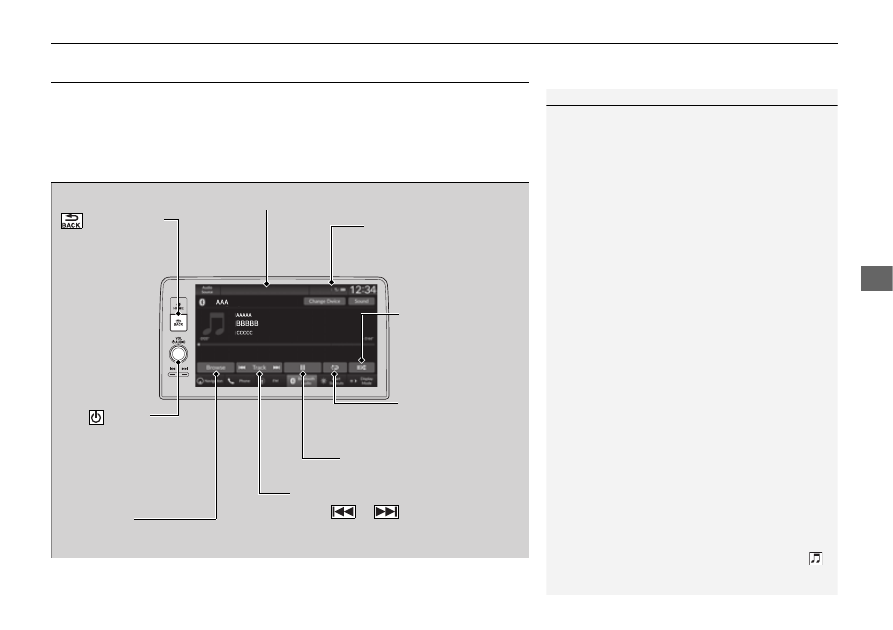
Audio/Information Screen
Browse Icon
Select to display the menu items.
Play/Pause Icon
Bluetooth
Indicator
Appears when your phone
is connected to HFL.
Track Icons
Select
or
to change tracks.
Select and hold to move rapidly
within a track.
Repeat Icon
Select to repeat the
current track.
(Back) Button
Press to go back
to the previous
display.
VOL/
AUDIO
(Volume/Power) Knob
Press to turn the audio
system on and off.
Turn to adjust the
volume.
Shuffle Icon
Select to play all files
in the current
category in random
order.