Honda Accord Hybrid (2022 year). Manual in english - page 27
 

  Index      Manuals     Honda Accord Hybrid (2022 year). Manual in english


Search            copyright infringement  


Content      ..     25      26      27      28     ..


Honda Accord Hybrid (2022 year). Manual in english - page 27


Continued

431

uu

When Driving

u

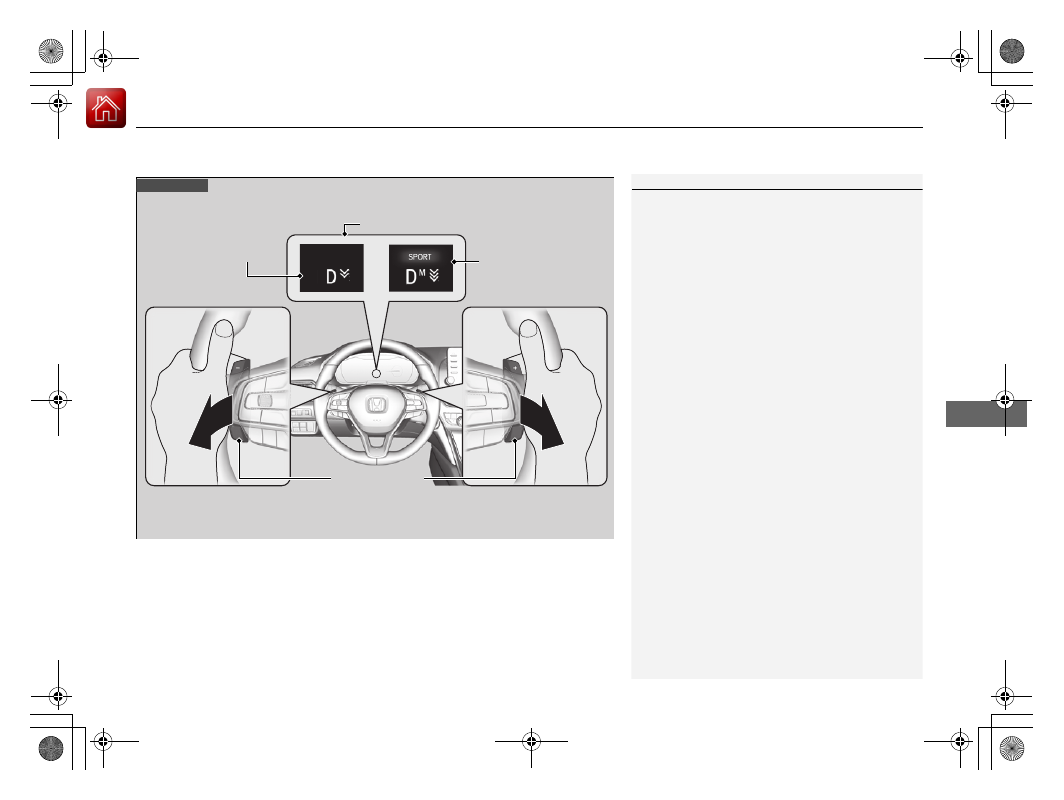
Deceleration Paddle Selector

Driving

1

Deceleration Paddle Selector

In the following situations, the stage may not change 
and the stage icon will blink even if you pull back the 
selector. The deceleration stage may decrease or 
cancel automatically:

The High Voltage battery is fully charged or its 
temperature is too cold or too hot.

The speed of the vehicle is beyond the deceleration 
range with SPORT mode off.

Hybrid system protection is needed.

The paddle selector is operated while your vehicle 
is stopped automatically by ACC with Low Speed 
Follow.

If either paddle selector is operated, ACC with Low 
Speed Follow will cancel automatically.

Increase the deceleration stage 

when pulling the 

(

-

 paddle 

selector (left side)

Paddle Selector

Decrease the deceleration stage 

when pulling the 

(

+

 paddle 

selector (right side)

When to use

Shift position is in 

(

D

Deceleration Stage

When SPORT mode is 

OFF, the deceleration 

stage appears.

When SPORT mode is 

ON, the deceleration 

stage and 

M

 appear.

432

uu

When Driving

u

Deceleration Paddle Selector

Driving

When SPORT mode is OFF

If you pull back the paddle selector, the rate of deceleration will change temporarily, 
and the stage will appear in the driver information interface.
When you want to cancel the deceleration paddle selector, pull the 

(

+

 selector 

(right side) for a few seconds.
The deceleration paddle selector will cancel automatically and deceleration stage in 
the driver information interface disappear when you drive with constant speed, 
situations of acceleration and decelerate just before stopping your vehicle.

When SPORT mode is ON

If you pull back the paddle selector, the rate of deceleration will change and the 
stage along with 

M

 will appear in the driver information interface. The deceleration 

stage will not cancel automatically while SPORT mode is ON.
When you want to cancel the deceleration paddle selector, turn the SPORT mode 
OFF, or pull the 

(

+

 selector (right side) for a few seconds. When canceled, 

deceleration stage in the driver information interface disappears.

433

uu

When Driving

u

ECON Mode

Driving

ECON Mode

*1:Models without adaptive damper system
*2:Models with adaptive damper system

The 

ECON

 button turns the ECON mode on and off.

The ECON mode helps you improve your fuel economy by adjusting the 
performance of the climate control system and the accelerator pedal response.

1

ECON Mode

While in ECON mode, the climate control system has 
greater temperature fluctuation.

*1

*2

434

uu

When Driving

u

Acoustic Vehicle Alerting System

Driving

Acoustic Vehicle Alerting System

Alerts pedestrians when the vehicle transmission is in a position other than 

(

P

 and 

is traveling at speeds of 22 mph (36 km/h) or less.

Adaptive Damper System

*

Constantly controls your vehicle’s front and rear dampers according to current road 
conditions, vehicle speed and steering operation.

You can change handling response by turning the SPORT mode on.

2

SPORT Mode

 P. 429

* Not available on all models

435

uu

When Driving

u

Vehicle Stability Assist

TM

 (VSA

®

), aka Electronic Stability Control (ESC), System

Continued

Driving

Vehicle Stability Assist

TM

 (VSA

®

), aka Electronic 

Stability Control (ESC), System

VSA

®

 helps to stabilize the vehicle during cornering if the vehicle turns more or less 

than what was intended. It also assists in maintaining traction on slippery surfaces. 
It does so by regulating engine and motor output and selectively applying the 
brakes.

When VSA

®

 activates, you may notice that the 

engine and motor do not respond to the 
accelerator. You may also notice some noise 
from the hydraulic brake system. You will also 
see the indicator blink.

VSA

®

 Operation

1

Vehicle Stability Assist

TM

 (VSA

®

), aka Electronic Stability Control 

(ESC), System

The VSA

®

 may not function properly if tire type and 

size are mixed. Make sure to use the same size and 
type of tire, and the air pressures as specified.

When the VSA

®

 indicator comes on and stays on 

while driving, there may be a problem with the 
system. While this may not interfere with normal 
driving, have your vehicle checked by a dealer 
immediately.

VSA

®

 cannot enhance stability in all driving situations 

and does not control the entire braking system. You 
still need to drive and corner at speeds appropriate 
for the conditions and always leave a sufficient 
margin of safety.

The main function of the VSA

®

 system is generally 

known as Electronic Stability Control (ESC). The 
system also includes a traction control function.

The Vehicle Stability Assist

TM

 (VSA

®

) system, Vehicle 

Stability Assist

TM

 (VSA

®

) OFF, adaptive cruise control 

(ACC) with low speed follow, safety support, and low 
tire pressure/TPMS indicators may come on in amber 
along with a message in the driver information 
interface when you set the power mode to ON after 
reconnecting the 12-volt battery.
Drive a short distance at more than 12 mph (20 km/h).
Each indicator should go off. If any do not, have your 
vehicle checked by a dealer.

VSA

®

 System 

Indicator

uu

When Driving

u

Vehicle Stability Assist

TM

 (VSA

®

), aka Electronic Stability Control (ESC), System

436

Driving

This button is on the driver side control panel. 
To partially disable VSA

®

 functionality/

features, press and hold it until you hear a 
beep.

Your vehicle will have normal braking and 
cornering ability, but traction control function 
will be less effective.

To restore VSA

®

 functionality/features, press 

the  

(VSA

®

 OFF) button until you hear a 

beep.

VSA

®

 is turned on every time you turn the 

power system on, even if you turned it off the 
last time you drove the vehicle.

VSA

®

 On and Off

1

Vehicle Stability Assist

TM

 (VSA

®

), aka Electronic Stability Control 

(ESC), System

In certain unusual conditions when your vehicle gets 
stuck in shallow mud or fresh snow, it may be easier 
to free it with the VSA

®

 temporarily switched off.

When the 

 button is pressed, the traction control 

function becomes less effective. This allows for the 
wheels to spin more freely at low speed. You should 
only attempt to free your vehicle with the VSA

®

 off if 

you are not able to free it when the VSA

®

 is on.

Immediately after freeing your vehicle, be sure to 
switch VSA

®

 on again. We do not recommend driving 

your vehicle with the VSA

®

 system switched off.

You may hear a motor sound coming from the 
engine compartment while system checks are being 
performed immediately after turning the power 
system on or while driving. This is normal.

VSA

®


OFF

 Indicator

437

uu

When Driving

u

Agile Handling Assist

Driving

Agile Handling Assist

Lightly brakes the front wheels, as needed, when you turn the steering wheel, and 
helps support the vehicle’s stability and performance during cornering.

1

Agile Handling Assist

The agile handling assist cannot enhance stability in 
all driving situations. You still need to drive and 
corner at speeds appropriate for the conditions and 
always leave a sufficient margin of safety.

When the VSA

®

 system indicator comes on and stays 

on while driving, the agile handling assist does not 
activate.

You may hear a sound coming from the engine 
compartment while the agile handling assist is 
activated. This is normal.

438

uu

When Driving

u

Tire Pressure Monitoring System (TPMS)

Driving

Tire Pressure Monitoring System (TPMS)

Instead of directly measuring the pressure in each tire, the TPMS on this vehicle 
monitors and compares the rolling radius and rotational characteristics of each 
wheel and tire while you are driving to determine if one or more tires are 
significantly under-inflated.

This will cause the low tire pressure/TPMS 
indicator to come on and a message to appear 
on the driver information interface.

1

Tire Pressure Monitoring System (TPMS)

The system does not monitor the tires when driving 
at low speed.

Conditions such as low ambient temperature and 
altitude change directly affect tire pressure and can 
trigger the low tire pressure/TPMS indicator to come 
on.

Tire pressure checked and inflated in:

Warm weather can become under-inflated in 
colder weather.

Cold weather can become overinflated in warmer 
weather.

The low tire pressure/TPMS indicator will not come 
on as a result of overinflation.

The TPMS may not function properly if tire type and 
size are mixed. Make sure to use the same size and 
type of tire.

2

Checking and Maintaining Tires

 P. 564

The low tire pressure/TPMS indicator may come on 
with a delay or may not come on at all when:

You rapidly accelerate, decelerate, or turn the 
steering wheel.

You drive on snowy or slippery roads.

Tire chains are used.

The low tire pressure/TPMS indicator may come on 
under the following conditions:

There is a heavier and uneven load on the tires than 
the condition at calibration.

Tire chains are used.

Low Tire Pressure/TPMS Indicator

Continued

439

uu

When Driving

u

Tire Pressure Monitoring System (TPMS)

Driving

You must start TPMS calibration every time you:

Adjust the pressure in one or more tires.

Rotate the tires.

Replace one or more tires.

Before calibrating the TPMS:

Set the cold tire pressure in all four tires.

2

Checking Tires

 P. 564

Make sure:

The vehicle is at a complete stop.

The transmission is in 

(

P

.

The power mode is in ON.

TPMS Calibration

1

Tire Pressure Monitoring System (TPMS)

The Vehicle Stability Assist

TM

 (VSA

®

) system, Vehicle 

Stability Assist

TM

 (VSA

®

) OFF, adaptive cruise control 

(ACC) with low speed follow, safety support, and low 
tire pressure/TPMS indicators may come on in amber 
along with a message in the driver information 
interface when you set the power mode to ON after 
reconnecting the 12-volt battery.
Drive a short distance at more than 12 mph (20 km/h).
Each indicator should go off. If any do not, have your 
vehicle checked by a dealer.

1

TPMS Calibration

The calibration process requires approximately 30 
minutes of cumulative driving at speeds between 30-
60 mph (48-97 km/h).
During this period, if the power mode is set to ON 
and the vehicle is not moved within 45 seconds, you 
may notice the low tire pressure/TPMS indicator 
comes on briefly. This is normal and indicates that the 
calibration process is not yet complete.

If the Tire chains are installed, remove them before 
calibrating the TPMS.

If the low tire pressure/TPMS indicator comes on even 
when the properly inflated specified regular tires are 
installed, have your vehicle checked by a dealer.

We recommend that the tires be replaced with the 
same brand, model, and size as the originals. Ask a 
dealer for details.

440

uu

When Driving

u

Tire Pressure Monitoring System (TPMS)

Driving

You can calibrate the system from the 
customized feature on the audio/information 
screen.

2

Customized Features

 P. 357

1.

Set the power mode to ON.

2.

Press the 

 button.

3.

Select 

Settings

.

4.

Select 

Vehicle

.

5.

Select 

TPMS Calibration

.

6.

Select 

Calibrate

.

If the 

Calibration Failed To Start.


message appears, repeat step 6.

The calibration process finishes 
automatically.

441

uu

When Driving

u

Tire Pressure Monitoring System (TPMS) - Required Federal Explanation

Continued

Driving

Tire Pressure Monitoring System (TPMS) - Required 
Federal Explanation

Each tire, including the spare (if provided), should be checked 
monthly when cold and inflated to the inflation pressure 
recommended by the vehicle manufacturer on the vehicle placard 
or tire inflation pressure label.

(If your vehicle has tires of a different size than the size indicated 
on the vehicle placard or tire inflation pressure label, you should 
determine the proper tire inflation pressure for those tires.)

As an added safety feature, your vehicle has been equipped with 
a tire pressure monitoring system (TPMS) that illuminates a low 
tire pressure telltale 

when one or more of your tires is significantly under-inflated.

Accordingly, when the low tire pressure telltale illuminates, you 
should stop and check your tires as soon as possible, and inflate 
them to the proper pressure.

Driving on a significantly under-inflated tire causes the tire to 
overheat and can lead to tire failure. Under-inflation also reduces 
fuel efficiency and tire tread life, and may affect the vehicle’s 
handling and stopping ability.

U.S. models

442

uu

When Driving

u

Tire Pressure Monitoring System (TPMS) - Required Federal Explanation

Driving

Please note that the TPMS is not a substitute for proper tire 
maintenance, and it is the driver’s responsibility to maintain 
correct tire pressure, even if under-inflation has not reached the 
level to trigger illumination of the TPMS low tire pressure telltale.

Your vehicle has also been equipped with a TPMS malfunction 
indicator to indicate when the system is not operating properly. 
The TPMS malfunction indicator is combined with the low tire 
pressure telltale. When the system detects a malfunction, the 
telltale will flash for approximately one minute and then remain 
continuously illuminated. This sequence will continue upon 
subsequent vehicle start-ups as long as the malfunction exists.

When the malfunction indicator is illuminated, the system may 
not be able to detect or signal low tire pressure as intended.

TPMS malfunctions may occur for a variety of reasons, including 
the installation of replacement or alternate tires or wheels on the 
vehicle that prevent the TPMS from functioning properly.

Always check the TPMS malfunction telltale after replacing one or 
more tires or wheels on your vehicle to ensure that the 
replacement or alternate tires and wheels allow the TPMS to 
continue to function properly.

443

uu

When Driving

u

Blind spot information System

*

Continued

Driving

Blind spot information System

*

Is designed to detect vehicles in specified alert zones adjacent to your vehicle, 
particularly in harder to see areas commonly known as “blind spots.”

When the system detects vehicles approaching from behind in adjacent lanes, the 
appropriate indicator comes on for a few seconds, providing assistance when you 
change lanes.

How the system works

1

Blind spot information System

*

Important Safety Reminder

Like all assistance systems, blind spot information 
system has limitations. Overreliance on blind spot 
information system may result in a collision.

The blind spot information system alert indicator may 
not come on under the following conditions:

A vehicle does not stay in the alert zone for more 
than two seconds.

A vehicle is parked in a side lane.

The speed difference between your vehicle and the 
vehicle you are passing is greater than 6 mph (10 
km/h).

An object not detected by the radar sensors 
approaches or passes your vehicle.

A vehicle running in the adjacent lane is a 
motorcycle or other small vehicle.

3

WARNING

Failure to visually confirm that it is safe to 
change lanes before doing so may result in 
a crash and serious injury or death.
Do not rely only on the blind spot 
information system when changing lanes.

Always look in your mirrors, to either side 
of your vehicle, and behind you for other 
vehicles before changing lanes.

Alert zone range

A: Approx. 1.6 ft. (0.5 m)
B: Approx. 10 ft. (3 m)
C: Approx. 10 ft. (3 m)

Radar Sensors: 

underneath 

the rear 

bumper 

corners

Alert Zone

A

B

C

The transmission is in 

(

D

.

Your vehicle speed is 
between 20 mph (32 km/h) 
and 100 mph (160 km/h)

* Not available on all models

uu

When Driving

u

Blind spot information System

*

444

Driving

When the system detects a vehicle

Blind spot information System Alert Indicator: 
Located on the outside rearview mirror on 
both sides.

Comes on when:

A vehicle enters the alert zone from behind 
to overtake you with a speed difference of 
no more than 31 mph (50 km/h) from your 
vehicle.

You pass a vehicle with a speed difference 
of no more than 12 mph (20 km/h).

Blinks and a beeper sounds when:
You move the turn signal lever in the direction 
of the detected vehicle. The beeper sounds 
three times.

1

Blind spot information System

*

The system is for your convenience only. Even if an 
object is within the alert zone, the following 
situations may occur.

The blind spot information system alert indicator 
may not come on due to obstruction (splashes, 
etc.) even without the 

Blind Spot Information 

System Not Available

 driver information 

interface appearing.

The blind spot information system alert indicator 
may come on even with the message appearing.

You can change the setting for the blind spot 
information system.

2

Customized Features

 P. 357

Comes On

Blinks

* Not available on all models

445

uu

When Driving

u

Blind spot information System

*

Driving

Blind spot information system on and off

When you turn the blind spot information 
system on and off, do the following.

1.

Press the safety support switch.

2.

Roll the left selector wheel to the 

 symbol 

and push it.

The blind spot information system is in the 
previously selected 

ON

 or 

OFF

 setting each 

time you start the power system.

1

Blind spot information System

*

Blind spot information system may be adversely 
affected when:

Objects (guard rails, poles, trees, etc.) are detected.

An object that does not reflect radio waves well, 
such as a motorcycle, is in the alert zone.

Driving on a curved road.

A vehicle is moving from a far lane to the adjacent 
lane.

The system picks up external electrical interference.

The rear bumper or the sensors have been 
improperly repaired or the rear bumper has been 
deformed.

The orientation of the sensors has been changed.

In bad weather (Heavy rain, snow, and fog).

Making a turn at an intersection.

Driving on a bumpy road.

Making a short turn that slightly tilts the vehicle.

For a proper blind spot information system operation:

Always keep the rear bumper corner area clean.

Do not cover the rear bumper corner area with 
labels or stickers of any kind. 

Take your vehicle to a dealer if you need the rear 
bumper corner area or the radar sensors to be 
repaired, or the rear bumper corner area is strongly 
impacted.

Left Selector 

Wheel

Safety Support Switch

* Not available on all models

446

uu

When Driving

u

High Voltage Battery

Driving

High Voltage Battery

The High Voltage battery gradually discharges even if the vehicle is not in use. As a 
result, if your vehicle is parked for an extended period of time, the battery charge 
level will become low. Extended periods of time at a low state of charge will shorten 
battery life. To maintain the battery state of charge, drive your vehicle for more than 
30 minutes at least once every three months.
Extreme high temperatures can affect the battery life. You can minimize the effects 
by parking the vehicle in the shade during the summer.

1

High Voltage Battery

Be careful not to let the High Voltage battery drain 
too much. If the battery level becomes close to zero, 
it will make it impossible to start the engine.


Content      ..     25      26      27      28     ..