Honda Accord (2022 year). Manual in english - page 25
 

  Index      Manuals     Honda Accord (2022 year). Manual in english


Search            copyright infringement  


Content      ..     23      24      25      26     ..


Honda Accord (2022 year). Manual in english - page 25


398

uu

Bluetooth

®

 HandsFreeLink

®

u

HondaLink

®

 Assist

*

Features

HondaLink

®

 Assist

*

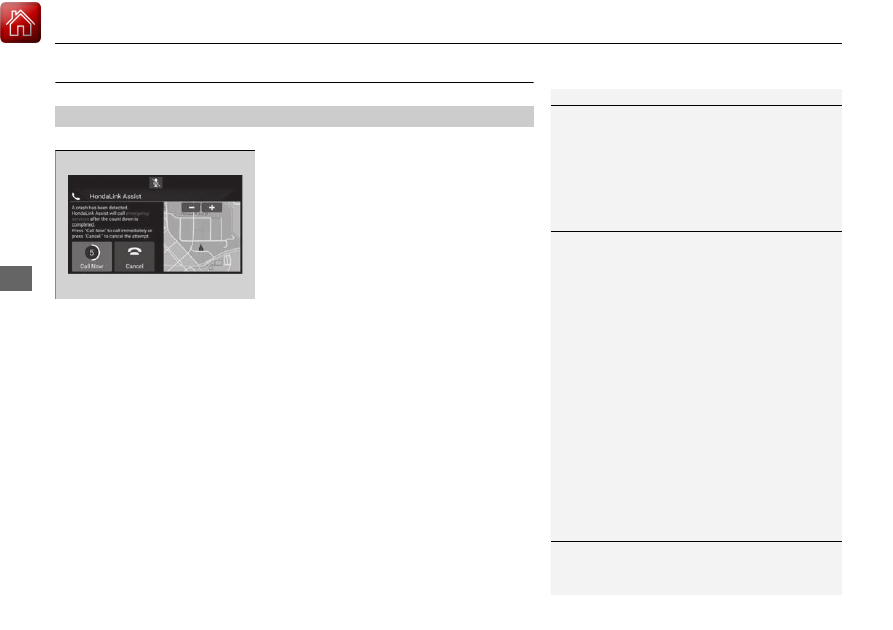
Automatic collision notification

If your vehicle’s airbags deploy or if the unit 
detects that the vehicle is severely impacted, 
your vehicle automatically will attempt to 
connect to the HondaLink

®

 operator. If 

connected, information about your vehicle, its 
location, and its condition can be sent to the 
operator

*1

; you also can speak to the operator 

when connected. 

IMPORTANT:

 For vehicles equipped with HondaLink

®

 Assist, owner activation 

constitutes authorization for Honda to collect information from your vehicle needed 
to provide the service, and agreement to the Terms of Use at 

www.hondalink.com/

TermsAndConditions

. In a crash, HondaLink

®

 Assist will attempt to notify emergency 

services but NEITHER HONDA NOR ITS SERVICE PROVIDERS GUARANTEE THAT 
SUCH NOTIFICATION WILL OCCUR.

Honda reserves the right to terminate HondaLink

®

 Assist services at any time or for 

any reason, and in the future may not be able to provide services due to changes in, 
or obsolescence of, technology integral to the service or changes in governmental 
regulation.

*1: Depending on your phone and adequate cellular coverage, your vehicle’s location may not 
be sent to the operator.

In Case of Emergency

1

HondaLink

®

 Assist

*

HondaLink

®

 Assist also provides services you can 

operate from the Internet or your smartphone.

To subscribe to HondaLink

®

 Assist, or to get more 

information about all of its features, contact a Honda 
dealer, or visi

hondalink.honda.com

1

In Case of Emergency

Your vehicle may not be able to connect to the 
operator if the battery level is low, the line is 
disconnected, or you do not have adequate cellular 
coverage.

You cannot use this emergency services when:

You travel outside the HondaLink

®

 service coverage 

areas.

There is a problem with the connecting devices, 
such as the microphones, speakers, or the unit 
itself.

HondaLink Assist

 is not enabled.

2

To enable notification

 P. 399

You cannot operate other phone-related functions 
using the screen while talking to the operator.
Only the operator can terminate the connection to 
your vehicle.

1

Automatic collision notification

If the unit fails to connect to the operator, it 
repeatedly tries until it succeeds.

* Not available on all models

399

uu

Bluetooth

®

 HandsFreeLink

®

u

HondaLink

®

 Assist

*

Features

To enable notification

1.

Go to the phone settings screen.

2

Phone settings screen

 P. 377

2.

Select 

HondaLink Assist

.

3.

Select 

Yes

 or 

No

.

1

To enable notification

Setting options:

Yes

: Notification is available.

No

: Disable the feature.

400

Features

Refuel Recommend

Your vehicle is equipped with a feature that automatically calculates when to refuel. 
This feature will notify you when refueling is recommended as well as enable you to 
search for gas stations that are located in the vicinity of your vehicle.

1.

When it is time to refuel the vehicle, a 
notification is displayed and a notification 
icon is displayed in the header. 

2.

Touch the box that contains the icon.

3.

Select 

Find Gas Station Now

.

4.

Choose a gas station from the search 
screen of the navigation system.

u

For instructions on how to use the 
navigation system, refer to the 
navigation system manual.

1

Refuel Recommend

You can turn the 

Refuel recommend

 function on 

and off.

2

Customized Features

 P. 351

When you turn off this feature, the refuel 
recommend notification will not display.

This feature can only be used when the gas tank fuel 
level is below 30 percent.

If you select 

Find Gas Station Now

 or put more 

than 5 liters of gasoline into the gas tank, the 
notification for refueling will disappear. If you prefer 
not to be notified, select OFF in the settings for 

Refuel recommend

When you drive on a rough road or ascend or 
descend a hill for an extended period of time, the 
notification may disappear or may not be displayed at 
all.

Models with navigation system

Notification 
icon

401

Driving

This chapter discusses driving and refueling.

Before Driving

................................... 402

Towing a Trailer

................................ 407

When Driving

Starting the Engine .......................... 412
Precautions While Driving................. 418
Transmission .................................... 419
Shifting ............................ 420, 427, 429
SPORT Mode

*

.................................. 433

ECON Mode .................................... 434
Auto Idle Stop

*

................................ 435

Adaptive Damper System

*

............... 440

Vehicle Stability Assist

TM

 (VSA

®

), aka Electronic 

Stability Control (ESC), System..............441

Agile Handling Assist..............................443

Tire Pressure Monitoring System (TPMS) ....444

Tire Pressure Monitoring System (TPMS) - 

Required Federal Explanation ......... 448

Blind spot information System

*

........... 450

Honda Sensing

®

................................ 453

Collision Mitigation Braking System

TM


(CMBS

TM

) ....................................... 456

Low Speed Braking Control

*

............ 465

Adaptive Cruise Control (ACC) with Low 

Speed Follow ................................. 470

Lane Keeping Assist System (LKAS).... 486

Road Departure Mitigation (RDM) 

System ....................................... 494

Traffic Sign Recognition System ....... 498

Front Sensor Camera ....................... 504
Radar Sensor ................................... 506
Sonar Sensors

*

................................ 507

Braking

Brake System ................................... 508
Anti-lock Brake System (ABS) ........... 516
Brake Assist System ......................... 517

Parking Your Vehicle

........................ 518

Multi-View Rear Camera

.................. 529

Refueling

........................................... 531

Fuel Economy and CO

2

 Emissions

.... 534

Turbo Engine Vehicle

....................... 535

* Not available on all models

402

Driving

Before Driving

Driving Preparation

Check the following items before you start driving.

Make sure there are no obstructions on the windows, door mirrors, exterior 
lights, or other parts of the vehicle.

u

Remove any frost, snow, or ice.

u

Remove any snow on the roof, as this can slip down and obstruct your field of 
vision while driving. If frozen solid, remove ice once it has softened.

u

When removing ice from around the wheels, be sure not to damage the wheel 
or wheel components.

Make sure the hood is securely closed.

u

If the hood opens while driving, your front view will be blocked.

Make sure the tires are in good condition.

u

Check air pressure, and check for damage and excessive wear.

2

Checking and Maintaining Tires

 P. 575

Make sure there are no people or objects behind or around the vehicle.

u

There are blind spots from the inside.

Exterior Checks

1

Exterior Checks

NOTICE

When doors are frozen shut, use warm water around 
the door edges to melt any ice. Do not try to force 
them open, as this can damage the rubber trim 
around the doors. When done, wipe dry to avoid 
further freezing.

Do not pour warm water into the key cylinder.
You will be unable to insert the key if the water 
freezes in the hole.

Heat from the engine and exhaust can ignite 
flammable materials left under the hood, causing a 
fire. If you’ve parked your vehicle for an extended 
period, inspect and remove any debris that may have 
collected, such as dried grass and leaves that have 
fallen or have been carried in for use as a nest by a 
small animal. Also, check under the hood for leftover 
flammable materials after you or someone else has 
performed maintenance on your vehicle.

Continued

403

uu

Before Driving

u

Driving Preparation

Driving

Store or secure all items on board properly.

u

Carrying too much cargo, or improperly storing it, can affect your vehicle’s 
handling, stability, stopping distance, and tires, and make it unsafe.

2

Maximum Load Limit

 P. 405

Do not pile items higher than the seat height.

u

They can block your view and may be thrown forward in the event of sudden 
braking.

Do not place anything in the front seat footwells. Make sure to secure the floor 
mat.

u

An object or unsecured floor mat can interfere with your brake and accelerator 
pedal operation while driving.

If you have any animals on board, do not let them move around in the vehicle.

u

They may interfere with driving and a crash could occur.

Securely close and lock all doors and the trunk.

2

Locking/Unlocking the Doors from the Inside

 P. 177

Adjust your seating position properly.

u

Adjust the head restraint, too.

2

Seats

 P. 212

2

Adjusting the Front and Rear Outer

*

 Head Restraint Positions

 P. 219

Adjust the mirrors and steering wheel properly.

u

Adjust them while sitting in the proper driving position.

2

Mirrors

 P. 210

2

Adjusting the Steering Wheel

 P. 209

Interior Checks

1

Interior Checks

The headlight aim is set by the factory, and does not 
need to be adjusted. However, if you regularly carry 
heavy items in the trunk or tow a trailer

*

, have the 

aiming readjusted at a dealer or by a qualified 
technician.

* Not available on all models

404

uu

Before Driving

u

Driving Preparation

Driving

Be sure items placed on the floor behind the front seats cannot roll under the 
seats.

u

They can interfere with the driver’s ability to operate the pedals, or the 
operation of the seats, or the operation of the sensors under the seats.

Everyone in the vehicle must fasten their seat belt.

2

Fastening a Seat Belt

 P. 42

Make sure that the indicators in the instrument panel come on when you start the 
vehicle, and go off soon after.

u

Always have a dealer check the vehicle if a problem is indicated.

2

Indicators

 P. 82

405

uu

Before Driving

u

Maximum Load Limit

Continued

Driving

Maximum Load Limit

The maximum load for your vehicle is 850 lbs (385 kg). See the 
Tire and Loading Information label attached to the driver’s 
doorjamb.

This figure includes the total weight of all occupants, cargo, and 
accessories, and the tongue load if you are towing a trailer

*

.

Steps for Determining Correct Load Limit -

(1)

Locate the statement “The combined weight of occupants and 
cargo should never exceed XXX kg or XXX lbs.” on your 
vehicle’s placard.

(2)

Determine the combined weight of the driver and passengers 
that will be riding in your vehicle.

(3)

Subtract the combined weight of the driver and passengers 
from XXX kg or XXX lbs.

(4)

The resulting figure equals the available amount of cargo and 
luggage load capacity. For example, if the “XXX” amount 
equals 1,400 lbs. and there will be five 150 lb. passengers in 
your vehicle, the amount of available cargo and luggage load 
capacity is 650 lbs. (1,400 - 750 (5 x 150) = 650 lbs.)

1

Maximum Load Limit

Gross Vehicle Weight Rating (GVWR):
The maximum allowable weight of the vehicle, all 
occupants, all accessories, all cargo, and the tongue 
load

*

.

2

Specifications

 P. 632634

Gross Axle Weight Rating (GAWR):
The maximum allowable weight of the vehicle axle.

2

Specifications

 P. 632634

3

WARNING

Overloading or improper loading 
can affect handling and stability 
and cause a crash in which you 
can be hurt or killed.

Follow all load limits and other 
loading guidelines in this manual.

Label Example

* Not available on all models

uu

Before Driving

u

Maximum Load Limit

406

Driving

(5)

Determine the combined weight of luggage and cargo being 
loaded on the vehicle. That weight may not safely exceed the 
available cargo and luggage load capacity calculated in step 4.

(6)

If your vehicle will be towing a trailer, load from your trailer will 
be transferred to your vehicle. Consult this manual to 
determine how this reduces the available cargo and luggage 
load capacity of your vehicle.

In addition, the total weight of the vehicle, all occupants, 
accessories, cargo, and trailer tongue load must not exceed the 
Gross Vehicle Weight Rating (GVWR) or the Gross Axle Weight 
Rating (GAWR). Both are on a label on the driver’s doorjamb.

1

Maximum Load Limit

Towing a Trailer:
See Towing a Trailer to determine whether your 
vehicle is designed to tow a trailer.

2

Towing a Trailer

 P. 407

Load Limits Example

Example1

Max Load 

850 lbs 

(385 kg)

Passenger Weight 

150 lbs x 2 = 300 lbs 

(68 kg x 2 = 136 kg)

Cargo Weight 

550 lbs 

(249 kg)

Example2

Max Load 

850 lbs 

(385 kg)

Passenger Weight 

150 lbs x 5 = 750 lbs 

(68 kg x 5 = 340 kg)

Cargo Weight 

100 lbs 
(45 kg)

407

Continued

Driving

Towing a Trailer

Your vehicle is not designed to tow a trailer. Attempting to do so can void your 
warranties.

Towing Preparation

Your vehicle can tow a trailer if you carefully observe the load limits, use the proper 
equipment, and follow the towing guidelines. Check the load limits before driving.

Total trailer weight

Maximum allowable weight of the trailer, 
cargo, and everything in or on it must not 
exceed 1,000 lbs (450 kg). Towing loads in 
excess of this can seriously affect vehicle 
handling and performance and can damage 
the engine and drivetrain.

Towing Load Limits

1.5 L engine models

2.0 L engine models

1

Towing Load Limits

Check if all loads are within limits at a public scale.
If a public scale is not available, add the estimated 
weight of your cargo load to the weight of your 
trailer (as quoted by the manufacturer), and the 
tongue load.

Break-in Period.
Avoid towing a trailer during your vehicle’s first 
600 miles (1,000 km).

Never exceed the gross weight ratings.
Gross weight information

2

Vehicle Specifications

 P. 634

3

WARNING

Exceeding any load limit or improperly 
loading your vehicle and trailer can cause a 
crash in which you can be seriously hurt or 
killed.

Check the loading of your vehicle and 
trailer carefully before starting to drive.

Total Load

408

uu

Towing a Trailer

u

Towing Preparation

Driving

Tongue load

The weight of the tongue with a fully loaded 
trailer on the hitch should be approximately 
10% of the total trailer weight.

Excessive tongue load reduces front tire 
traction and steering control. Too little 
tongue load can make the trailer unstable 
and cause it to sway.

To achieve a proper tongue load, start by 
loading 60% of the load toward the front 
of the trailer and 40% toward the rear. 
Readjust the load as needed.

Tongue Load

Tongue Load

409

uu

Towing a Trailer

u

Towing Preparation

Driving

Towing equipment varies by the size of your trailer, how much load you are towing, 
and where you are towing.

Hitches

The hitch must be of an approved type and properly bolted to the underbody.

Safety chains

Always use safety chains when you tow a trailer. Leave enough slack to allow the 
trailer to turn corners easily, but do not allow the chains to drag on the ground.

Trailer brakes

There are two common types of trailer brakes: surge and electric. Surge brakes are 
common for boat trailers, since the brakes will get wet. If you choose electric brakes, 
be sure they are electronically actuated. Do not attempt to attach trailer brakes to 
your vehicle’s hydraulic system, as it will lower braking effectiveness and create a 
potential hazard.

Additional towing equipment

Many states and provinces/territories require special outside mirrors when towing a 
trailer. Even if mirrors are not required in your locale, you should install special 
mirrors if visibility is restricted in any way.

Trailer light

Trailer lights and equipment must comply with federal, state, province/territory, and 
local regulations. Check with your local trailer sales or rental agency for the 
requirements in the area where you plan to tow.

Towing Equipment and Accessories

1

Towing Equipment and Accessories

Make sure that all equipment is properly installed and 
maintained, and that it meets federal, state, province/
territory, and local regulations.

Consult your trailer maker for proper installation and 
setup of the equipment.
Improper installation and setup can affect the 
handling, stability, and braking performance of your 
vehicle.

Consult your trailer sales or rental agency if any other 
items are recommended or required for your towing 
situation.

The lighting and wiring of trailers can vary by type 
and brand. If a connector is required, it should only 
be installed by a qualified technician.

410

uu

Towing a Trailer

u

Driving Safely with a Trailer

Driving

Driving Safely with a Trailer

Have the trailer properly serviced and keep it in good condition.

Make sure that all the weights and load in the vehicle and trailer are within limits.

2

Towing Load Limits

 P. 407

Securely attach the hitch, safety chains, and other necessary parts to the trailer.

Securely store all the items in and on the trailer so that they do not shift while 
driving.

Check if the lights and brakes on the trailer are working properly.

Check the pressure of the trailer tires, including the spare.

Turn off the Low Speed Braking Control system. It may activate if it detects the 
vehicle being towed as an obstacle.

2

System On and Off

 P. 467

Turn off the rear parking sensor system.

2

Turning off All Rear Sensors

 P. 524

Drive slower than normal.

Obey posted speed limits for vehicles with trailers.

Use the 

(

D

 position when towing a trailer on level roads.

Turn more slowly and with a wider turning arc than normal.

Allow more time and distance for braking.

Do not brake or turn suddenly.

Things You Need To Know Before Towing a Trailer

Towing Speeds and Gears

Turning and Braking

2.0 L engine models

1

Driving Safely with a Trailer

Operating speed when towing a trailer must not 
exceed 62 mph (100 km/h).

Parking
In addition to the normal precautions, place wheel 
chocks at each of the trailer’s tires.

Models with Low Speed Braking Control

1

Towing Speeds and Gears

When towing a fixed-sided trailer (e.g., camper), do 
not exceed 55 mph (88 km/h). At higher speeds, the 
trailer may sway or affect vehicle handling.

411

uu

Towing a Trailer

u

Towing Behind a Motorhome

Driving

Monitor your temperature gauge. If it nears the red (Hot) mark, turn off the 
climate control system and reduce speed. Pull to the side of the road safely to cool 
down the engine if necessary.

Towing Behind a Motorhome

Your vehicle is not designed to be towed behind a motorhome. If your vehicle needs 
to be towed in an emergency, refer to the emergency towing information.

2

Emergency Towing

 P. 626

Driving in Hilly Terrain

412

Driving

When Driving

Starting the Engine

1.

Make sure the parking brake is applied.

u

The parking brake and brake system 
indicator (red) comes on for 30 seconds 
when you pull up the electric parking 
brake switch.

2.

Depress the brake pedal.

2.

Check that the transmission is in 

(

P

, then 

depress the brake pedal.

u

Although it is possible to start the vehicle 
in 

(

N

, it is safer to start it in 

(

P

.

1

Starting the Engine

Keep your foot firmly on the brake pedal when 
starting the engine.

The engine is harder to start in cold weather and in 
thinner air found at altitudes above 8,000 feet (2,400 
meters).

When starting the engine in cold weather, turn off all 
electrical accessories such as the lights, climate 
control system and rear defogger in order to reduce 
battery drain.

If you live in a region where winter is extremely cold, 
an engine block heater will improve starting and 
warming of the engine. Consult a dealer for details.

If the exhaust system sounds abnormal or you can 
smell exhaust gas inside the vehicle, have your vehicle 
checked by a dealer. There may be a problem with 
the engine or exhaust system.

The immobilizer system protects your vehicle from 
theft.
If an improperly coded device is used, the engine’s 
fuel system is disabled.

2

Immobilizer System

 P. 184

Electric Parking Brake Switch

Brake Pedal

Automatic transmission models

Brake Pedal

Continuously variable transmission models

Continued

413

uu

When Driving

u

Starting the Engine

Driving

3.

Press the 

ENGINE START/STOP

 button 

without depressing the accelerator pedal.

All models

1

Starting the Engine

Bring the keyless remote close to the 

ENGINE 

START/STOP

 button if the battery in the keyless 

remote is weak.

2

If the Keyless Remote Battery is Weak


P. 604

The engine may not start if the keyless remote is 
subjected to strong radio waves.

Do not hold the 

ENGINE START/STOP

 button to 

start the engine.
If the engine does not start, wait at least 30 seconds 
before starting the engine again.


Content      ..     23      24      25      26     ..