Honda Odyssey (2023 year). Manual in english - page 21
 

  Index      Manuals     Honda Odyssey (2023 year). Manual in english


Search            copyright infringement  


Content      ..     19      20      21      22     ..


Honda Odyssey (2023 year). Manual in english - page 21


uu

Audio System Basic Operation

u

Apple CarPlay

334

Features

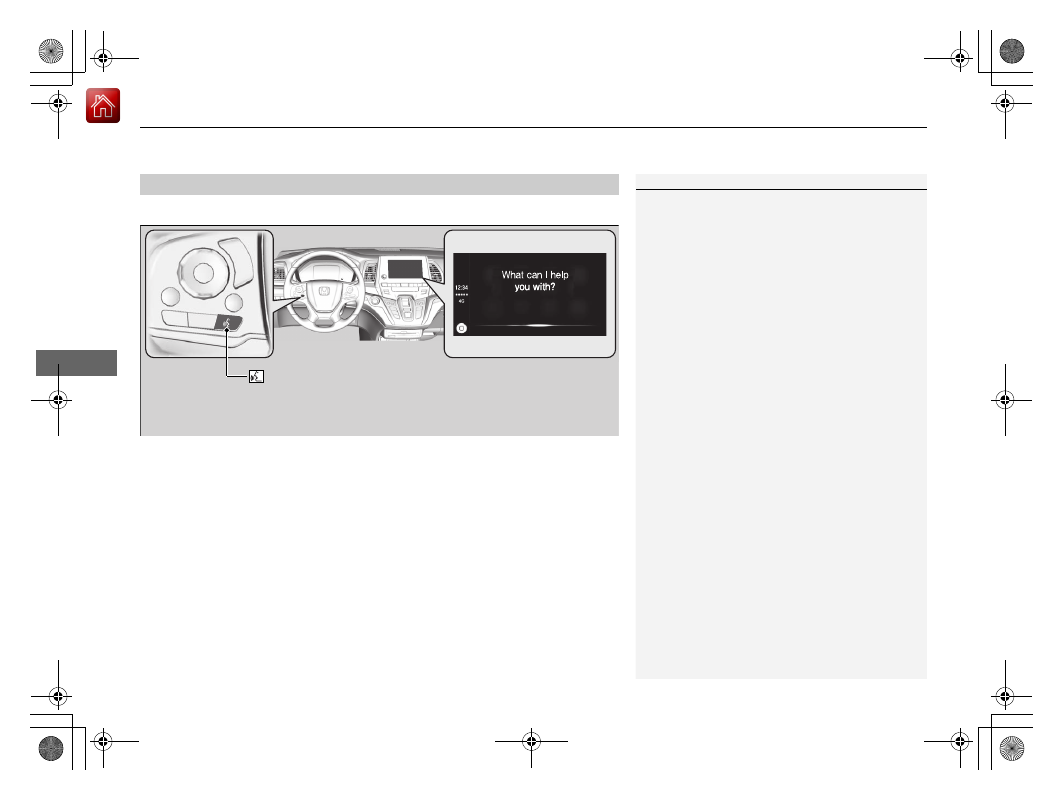
Press and hold the talk button to activate Siri.

Operating Apple CarPlay with Siri

1

Operating Apple CarPlay with Siri

Below are examples of questions and commands for 
Siri:

What movies are playing today?

Call dad at work.

What song is this?

How’s the weather tomorrow?

Read my latest email.

Find a table for four tonight in Chicago.

For more information, please visit 

www.apple.com/ios/siri

.

 (Talk) button:

Press and hold to activate Siri.
Press again to deactivate Siri.
Press and release to activate standard voice recognition system.

335

uu

Audio System Basic Operation

u

Android Auto

TM

Continued

Features

Android Auto

TM

When you connect an Android phone to the audio system via the USB port, Android 
Auto is automatically initiated. When connected via Android Auto, you can use the 
audio/information screen to access the Phone, Google Maps (Navigation), Google 
Play Music, and Google Now functions. When you first use Android Auto, a tutorial 
will appear on the screen.
We recommend that you complete this tutorial while safely parked before using 
Android Auto.

2

USB Ports

 P. 259

2

Auto Pairing Connection

 P. 337

1

Android Auto

TM

Android Auto is a trademark of Google LLC.

To use Android Auto, you need to download the 
Android Auto app from Google Play to your 
smartphone.

We recommend that you update Android OS to the 
latest version when using Android Auto.

Bluetooth

 A2DP cannot be used while your phone is 

connected to Android Auto.

Park in a safe place before connecting your Android 
phone to Android Auto and when launching any 
compatible apps.

To directly access the Android Auto phone function, 
press 

Phone

 on the home screen.

2

Auto Pairing Connection

 P. 337

When your Android phone is connected to Android 
Auto, it is not possible to use the 

Bluetooth

®

 Audio. 

However, other previously paired phones can stream 
audio via 

Bluetooth

®

 while Android Auto is 

connected.

2

Phone Setup

 P. 440

uu

Audio System Basic Operation

u

Android Auto

TM

336

Features

a

 Maps (Navigation)

Display Google Maps and use the navigation function just as you would with your 
Android phone. When the vehicle is in motion, it is not possible to make keyboard 
entries. Stop the vehicle in a safe location to undertake a search or provide other 
inputs.

Only one navigation system (pre-installed navigation or Android Auto) can give 
directions at a time. When you are using one system, directions to any prior 
destination set on the other system will be canceled, and the system you are 
currently using will direct you to your destination.
The audio/information screen shows you turn-by-turn driving directions to your 
destination.

b

 Phone (Communication)

Make and receive phone calls as well as listen to voicemail.

c

 Google Now (Home screen)

Display useful information organized by Android Auto into simple cards that appear 
just when they’re needed.

Android Auto Menu

1

Android Auto

TM

For details on countries and regions where Android 
Auto is available, as well as information pertaining to 
function, refer to the Android Auto homepage.

Screens may differ depending on the version of the 
Android Auto app you are using.

Android Auto Operating Requirements & 
Limitations

Android Auto requires a compatible Android phone 
with an active cellular connection and data plan. 
Your carrier’s rate plans will apply.

Changes in operating systems, hardware, software, 
and other technology integral to providing Android 
Auto functionality, as well as new or revised 
governmental regulations, may result in a decrease or 
cessation of Android Auto functionality and services. 
Honda cannot and does not provide any warranty or 
guarantee of future Android Auto performance or 
functionality.

It is possible to use 3rd party apps if they are 
compatible with Android Auto. Refer to the Android 
Auto homepage for information on compatible apps.

: Go back to the 

home screen

Android Auto icon

6

Models with navigation system

Continued

337

uu

Audio System Basic Operation

u

Android Auto

TM

Features

d

 Music and audio

Play Google Play Music and music apps that are compatible with Android Auto.
To switch between music apps, press this icon.

e

 Go back to the Home Screen.

f

 Voice

Operate Android Auto with your voice.

When you connect an Android phone to the unit via the USB port, Android Auto is 
automatically initiated.

Enabling Android Auto

Enable

: Allows this consent.

Disable

: Does not allow this consent.

You may change the consent settings under 
the 

Connections

 settings menu.

Auto Pairing Connection

1

Enabling Android Auto

Only initialize Android Auto when you are safely 
parked. When Android Auto first detects your phone, 
you will need to set up your phone so that auto 
pairing is possible. Refer to the instruction manual 
that came with your phone.

You can use the method below to change Android 
Auto settings after you have completed the initial 
setup:
Select HOME Settings Connections Android 
Auto

Use of user and vehicle information

The use and handling of user and vehicle information 
transmitted to/from your phone by Android Auto is 
governed by the Google’s Privacy Policy.

uu

Audio System Basic Operation

u

Android Auto

TM

338

Features

Press and hold the talk button to operate Android Auto with your voice.

Operating Android Auto with Voice Recognition

1

Operating Android Auto with Voice Recognition

Below are examples of commands you can give with 
voice recognition:

Reply to text.

Call my wife.

Navigate to Honda.

Play my music.

Send a text message to my wife.

Call flower shop.

For more information, please refer to the Android 
Auto homepage.

You can also activate the voice recognition function 
by pressing the 

 icon in the upper-right corner of 

the screen.

 (Talk) button:

Press and hold to operate Android Auto with your voice.
Press and release to activate standard voice recognition system.

339

Features

Audio Error Messages

iPod/USB Flash Drive

If an error occurs while playing an iPod or USB flash drive, you may see the following 
error messages. If you cannot clear the error message, contact a dealer.

Error Message

Solution

Problem reading connected device. See 
Owner’s Manual for a list of compatible 
devices. If device is compatible, try 
reconnecting device.
If this error remains, contact Honda dealer.

Appears when there is a problem with the audio system. Check if the device is 
compatible with the audio system.

Appears when an incompatible device is connected. Disconnect the device. Then, 
turn the audio system off and turn it on again. Do not reconnect the device that 
caused the error.

Appears when an unsupported iPod is connected. If it appears when a supported 
iPod is connected, update the iPod software to the newer version.

Appears when an unsupported device is connected. If it appears when a supported 
device is connected, reconnect the device.

Appears when the system does not acknowledge the iPod. Reconnect the iPod.

The selected file cannot be played on this 
system

Appears when the files in the USB flash drive are DRM or an unsupported format. This 
error message appears for about three seconds, then plays the next song.

The connected device does not contain any 
files that can be played on this system. See 
Owner’s Manual for a list of compatible file 
types.

Appears when the iPod is empty.

Appears when the USB flash drive is empty or there are no MP3, WMA, or AAC files in 
the USB flash drive.

Check that compatible files are stored on the device.

iPod

USB flash drive

iPod and USB flash drive

340

uu

Audio Error Messages

u

Android/Apps

Features

Android/Apps

If an error occurs while using the audio system or apps, you may see the following 
error messages. If you cannot clear the error message, contact a dealer.

*1:****part is variable characters, and will change depending upon where an error 

occurs.

Error Message

Solution

Unfortunately, **** has 
stopped.

*1

Error has occurred within app, select 

OK

 on the screen to close the app.

**** is not responding. 
Would you like to close 
it?

*1

App is not responding.
Select 

Wait

 if you can wait for a response from app a little longer. If it does not respond even if you keep 

waiting, select 

OK

 to close the app and start it up. If the error message continues, perform 

Factory Data 

Reset

.

2

Defaulting All the Settings

 P. 431

341

Features

General Information on the Audio System

SiriusXM

®

 Radio Service

*

1.

You need your radio ID ready before registering for subscription. To see the ID in 
the screen, select 

Channel

 to 0.

2.

Have your radio ID ready, and either call or visit the SiriusXM

®

 website to 

subscribe.

Switch to the SiriusXM

®

 mode by using the audio remote controls on the steering 

wheel, or through the audio/information screen, and stay in this mode for about 30 
minutes until the service is activated. Make sure your vehicle is in an open area with 
good reception.

Channel not subscribed. Call SiriusXM to subscribe.:

You are not subscribed to the channel selected.

Subscription updated:

SiriusXM

®

 radio is receiving information update from the network.

Channel Not Available:

No such channel exits, or the artist or title information is unavailable.

No Signal:

The signal is too weak in the current location.

Check Tuner:

There is a problem with the SiriusXM

®

 tuner. Contact a dealer.

Check Antenna:

There is a problem with the SiriusXM

®

 antenna. Contact a dealer.

Subscribing to SiriusXM

®

 Radio

Receiving SiriusXM

®

 Radio

SiriusXM

®

 Radio Display Messages

1

Subscribing to SiriusXM

®

 Radio

Contact Information for SiriusXM

®

 Radio:

US: SiriusXM

®

 Radio at 

www.siriusxm.com

 or 1-

800-852-9696

Canada: SiriusXM

®

 Canada at 

www.siriusxm.ca

, or 

1-877-209-0079

1

Receiving SiriusXM

®

 Radio

The SiriusXM

®

 satellites are in orbit over the equator; 

therefore, objects south of the vehicle may cause 
satellite reception interruptions. Satellite signals are 
more likely to be blocked by tall buildings and 
mountains the farther north you travel from the 
equator.

You may experience reception problems under the 
following circumstances:

In a location with an obstruction to the south of 
your vehicle.

In tunnels

On the lower level of a multi-tiered road

Large items carried on the roof rack

* Not available on all models

342

uu

General Information on the Audio System

u

Recommended CDs

*

Features

Recommended CDs

*

Use only high-quality CD-R or CD-RW discs labeled for audio use.

Use only CD-R or CD-RW discs on which the recordings are closed.

Play only standard round-shaped CDs.

Some software files may not allow for audio play or text data display.

Some versions of MP3, WMA or AAC formats may be unsupported.

1

Recommended CDs

*

A Dual-disc cannot play on this audio unit. If recorded 
under certain conditions, a CD-R or CD-RW may not 
play either.

CDs with MP3, WMA or AAC files

The CD packages or jackets should have one of these marks.

* Not available on all models

343

uu

General Information on the Audio System

u

Recommended CDs

*

Features

Protecting CDs

Follow these precautions when handling or storing CDs:

Store a CD in its case when it is not being played.

When wiping a CD, use a soft clean cloth from the center to the outside edge.

Handle a CD by its edge. Never touch either surface.

Never insert foreign objects into the CD player.

Keep CDs out of direct sunlight and extreme heat.

Do not place stabilizer rings or labels on the CD.

Avoid fingerprints, liquids, and felt-tip pens on the CD.

1

Protecting CDs

NOTICE

Do not insert a damaged CD. It may be stuck inside 
and damage the audio unit.

Examples:

Damaged CDs

Bubbled/
Wrinkled

With Label/
Sticker

Using 
Printer Label 
Kit

Sealed

With Plastic Ring

Poor quality 
CDs

Chipped/
Cracked

Warped

Burrs

Small CDs

3-inch 
(8-cm) 
CD

Bubbled, wrinkled, labeled, and 
excessively thick CDs

344

uu

General Information on the Audio System

u

Compatible iPod, iPad, iPhone, and USB Flash Drives

Features

Compatible iPod, iPad, iPhone, and USB Flash Drives

A USB flash drive of 256 MB or higher is recommended.

Some digital audio players may not be compatible.

Some USB flash drives (e.g., a device with security lockout) may not work.

Some software files may not allow for audio play or text data display.

Some versions of MP3, WMA, or AAC formats may be unsupported.

iPod, iPad, and iPhone Model Compatibility

Model

Made for iPod (5th generation)
Made for iPod classic 80GB/160GB (launch in 2007)
Made for iPod classic 120GB (launch in 2008)
Made for iPod classic 160GB (launch in 2009)
Made for iPod nano (1st to 7th generation) released between 2005 and 2012
Made for iPod touch (1st to 5th generation) released between 2007 and 2012
Made for iPhone/iPhone 3G/iPhone 3GS/iPhone 4/iPhone 4s/iPhone 5/iPhone 5c/
iPhone 5s/iPhone 6/iPhone 6 Plus
Made for iPad/iPad 2/iPad (3rd generation)/iPad (4th generation)
Made for iPad Air/iPad Air 2
Made for iPad mini/iPad mini 2/iPad mini 3

USB Flash Drives

1

iPod, iPad, and iPhone Model Compatibility

This system may not work with all software versions 
of these devices.

1

USB Flash Drives

Files on the USB flash drive are played in their stored 
order. This order may be different from the order 
displayed on your PC or device.

345

uu

General Information on the Audio System

u

Honda App License Agreement

Continued

Features

Honda App License Agreement

PLEASE CAREFULLY READ THIS END USER LICENSE AGREEMENT (THIS “AGREEMENT”) WHICH GOVERNS YOUR USE OF THE SOFTWARE 
INSTALLED ON YOUR HONDA OR ACURA VEHICLE (YOUR “VEHICLE”) AS WELL AS THE APPLICATIONS, SERVICES, FUNCTIONS, AND 
CONTENT PROVIDED THROUGH THE SOFTWARE (COLLECTIVELY, THE “SERVICES”). YOUR USE OF THE SOFTWARE OR SERVICES WILL 
SERVE AS YOUR CONSENT TO THE TERMS OF THIS AGREEMENT. THE SOFTWARE IS OWNED (OR LICENSED), PROVIDED, AND/OR 
OPERATED BY AMERICAN HONDA MOTOR CO. INC., (“HONDA,” “US,” “WE,” OR “OUR”), WITH ITS BUSINESS ADDRESS AT 1919 
TORRANCE BLVD., TORRANCE, CA 90501. REFERENCE TO “HONDA” IN THIS AGREEMENT INCLUDES HONDA’S PARENT COMPANY AND 
ITS AFFILIATES AND DESIGNATED AGENTS. THE SERVICES ARE OWNED (OR LICENSED), PROVIDED, AND/OR OPERATED BY HONDA OR A 
THIRD-PARTY SERVICE PROVIDER (A “PROVIDER”). REFERENCE TO A “PROVIDER” IN THIS AGREEMENT INCLUDES SUCH PROVIDER’S 
PARENT COMPANY, AFFILIATES, AND DESIGNATED AGENTS.

A.


Description of the Software.

 The SOFTWARE includes the software, firmware and the like, installed and executing on your VEHICLE 

during manufacture, and thereafter updated from time to time by HONDA, you or an authorized HONDA dealer (a “DEALER”). The 
SOFTWARE allows you to access and use a variety of SERVICES, including but not limited to: (a) HONDA applications, services, and content 
provided through the SOFTWARE (together, “HONDA SERVICES”); and (b) PROVIDER applications, services, and content provided through 
the SOFTWARE (together, “PROVIDER SERVICES”), each of which may provide access to various information, media, content, and services.

B. SOFTWARE Licensing and Intellectual Property.
1.


SOFTWARE.

 This AGREEMENT grants you a non-exclusive, limited, and revocable license to use the SOFTWARE and SERVICES solely (a) 

as installed on your VEHICLE by HONDA, (b) as updated on your Vehicle by HONDA, you (but only as and when directed by HONDA), or a 
DEALER and (c) as permitted under the terms of this AGREEMENT.

2.


HONDA Services.

 The SOFTWARE may provide you with access to various HONDA SERVICES. Installation, activation, or use of HONDA 

SERVICES may require your consent to additional terms, conditions, and privacy policies applicable to those HONDA SERVICES (the 
“HONDA TERMS”). You acknowledge and agree that any collection, use, sharing of data generated by your VEHICLE or your use of your 
VEHICLE, and your use of the HONDA SERVICES shall be subject to this AGREEMENT and any additional HONDA TERMS that may be 
specifically applicable to such HONDA SERVICES or data generation. The HONDA SERVICES may collect, use, and share such data while 
you are using the SOFTWARE.

END USER LICENSE AGREEMENT

346

uu

General Information on the Audio System

u

Honda App License Agreement

Features

3.


Open-Source Software.

 The SOFTWARE and SERVICES may incorporate software licensed to HONDA under free or open-source 

licenses which govern HONDA’s distribution and your use of such software. HONDA and the third-party authors, licensors, and distributors 
of such software disclaim all warranties and all liability arising from any and all use or distribution of the software. To the extent such 
software is provided under terms that differ from the applicable free or open-source licenses, those terms are offered by HONDA alone. 
Additional information regarding free and open-source software incorporated in the SOFTWARE and SERVICES is available in this manual 
or within the SOFTWARE.

4.


Provider Services.

 The SOFTWARE may provide you with access to various PROVIDER SERVICES. Installation or use of such PROVIDER 

SERVICES may require your consent to additional terms, conditions, and privacy policies of the applicable PROVIDER (the “PROVIDER 
TERMS”). This AGREEMENT restricts the manner in which you can install and use PROVIDER SERVICES but does not grant you a license or 
permission to use such PROVIDER SERVICES. Your permission to use PROVIDER SERVICES is limited and subject to any license grants, 
conditions, and limitations included in the PROVIDER TERMS. You acknowledge that any collection, use, sharing of your information, 
targeted advertising practices by PROVIDERS, and your use of the PROVIDER SERVICES shall be subject to both this AGREEMENT and any 
applicable PROVIDER TERMS. The PROVIDER SERVICES may collect, use, and share such information while you are using the SOFTWARE.

5. License Limitations and Restrictions on Use.

(a) Limited License. You understand and agree that the SOFTWARE and SERVICES are licensed, not sold, to you solely for use in accordance 
with this AGREEMENT and any applicable PROVIDER TERMS, and any documentation for the VEHICLE made available to you by HONDA 
(any “DOCUMENTATION”). HONDA and its licensors reserve all rights in the SOFTWARE and HONDA SERVICES not expressly granted to 
you under this AGREEMENT. PROVIDERS and their licensors reserve all rights in the PROVIDER SERVICES not expressly granted to you under 
the applicable PROVIDER TERMS.

347

uu

General Information on the Audio System

u

Honda App License Agreement

Continued

Features

(b) Restrictions on Use. The licenses granted under this AGREEMENT do not permit you to use the SOFTWARE or SERVICES on a device 
other than your VEHICLE. As a condition of using the SOFTWARE and SERVICES, you agree that you may not and will not:

6.


Intellectual Property Rights.

 All title and intellectual property rights in and to the SOFTWARE and SERVICES, the accompanying 

DOCUMENTATION, and all copies of the SOFTWARE or SERVICES are owned by HONDA, PROVIDERS, or their suppliers or licensors. This 
AGREEMENT does not grant you any rights in connection with any trademarks or service marks of HONDA, PROVIDERS, or their licensors, 
affiliates, or suppliers.

(1) copy, download, distribute, modify, publish, sell, rent, lease, lend, license, sublicense, reuse, or create derivative works of the 
SOFTWARE or SERVICES or any of the content or other material within the SOFTWARE or SERVICES, including without limitation, 
HONDA or PROVIDER names, logos, or any other trademarks of HONDA or PROVIDERS or used in association with the SOFTWARE or 
any SERVICES, except as required to use the SOFTWARE or SERVICES in accordance with this AGREEMENT, any applicable PROVIDER 
TERMS, and the DOCUMENTATION;
(2) access or use the SOFTWARE or SERVICES in any manner intended to damage or impair the operation of the SOFTWARE or SERVICES 
or interfere with anyone else’s use and enjoyment of the SOFTWARE or SERVICES;
(3) access or attempt to access any system or server on which the SOFTWARE or SERVICES is hosted or modify or alter the SOFTWARE 
or SERVICES in any way;
(4) use the SOFTWARE or SERVICES for any unlawful purpose, or in violation of any third party rights;
(5) use the SOFTWARE or SERVICES in violation of any applicable traffic regulations, rules or laws, including but not limited to any driver 
distraction laws, rules or regulations;
(6) violate the terms of this AGREEMENT, any HONDA TERMS, any PROVIDER TERMS or other applicable third-party terms, conditions, 
and privacy policies; or
(7) reverse engineer, decompile, disassemble, attempt to derive the source code of, nor permit others to reverse engineer, decompile, 
or disassemble, or attempt to derive the source code of the SOFTWARE or SERVICES, except and only to the extent that such activity is 
expressly permitted (a) by applicable law notwithstanding this limitation or (b) the terms of applicable free or opensource software 
licenses.

348

uu

General Information on the Audio System

u

Honda App License Agreement

Features

7.


Export Restrictions:

 You acknowledge that the SOFTWARE and SERVICES are subject to U.S., European Union, and other export 

jurisdictions. You agree to comply with all applicable international and national laws that apply to the SOFTWARE and SERVICES, including 
the U.S. Export Administration Regulations, as well as end-user, end-use, and destination restrictions issued by the U.S. and other 
governments.

C. SOFTWARE Operation
1.

 HONDA reserves the right to suspend or terminate your access to and use of the SOFTWARE or SERVICES if you are found to be in 

violation of this AGREEMENT or as reasonably deemed necessary by HONDA.

2.

 Eligibility/Registration/Activation. The SOFTWARE is intended for and available to individuals who (a) are of legal age of majority in their 

jurisdiction of residence (and at least 18 years of age), or are younger than 18 years of age and possess a valid driver’s license issued by 
their jurisdiction of residence, and (b) own or have permissive access to a compatible VEHICLE. We do not knowingly collect any 
information, including personal information, from children under 13. If we learn or are notified that we have collected personal 
information of a child under 13, we will immediately take steps to delete such information.

3.

 Use of PROVIDER SERVICES through the SOFTWARE. Certain PROVIDER SERVICES made available through the SOFTWARE may require 

that you register or otherwise have an account with the PROVIDER and agree to PROVIDER TERMS. Any use of any of such PROVIDER 
SERVICES within the SOFTWARE is subject to this AGREEMENT and the applicable PROVIDER TERMS. HONDA does not exercise control 
over such PROVIDER SERVICES and is not responsible or liable for the availability, security, or content of such PROVIDER SERVICES, and the 
inclusion of any PROVIDER SERVICES does not imply a referral from, the approval of, or the endorsement by HONDA of such PROVIDER 
SERVICES. HONDA is not responsible or liable, directly or indirectly, for any damage relating to or resulting from your use of the PROVIDER 
SERVICES.

4.

 Links to Third Party Sites: The SOFTWARE may provide you with the ability to access third-party sites and content through the use of the 

SOFTWARE or SERVICES. The third-party sites and content are not under the control of HONDA. HONDA is not responsible or liable, 
directly or indirectly, for such third-party websites and their content or for any damage relating to or resulting from your access or use of 
such websites and content.

349

uu

General Information on the Audio System

u

Honda App License Agreement

Continued

Features

5.

 Unauthorized Use and Abuse. You are responsible for ensuring your (and any authorized third parties’) use of the SOFTWARE and 

SERVICES remains in compliance with this AGREEMENT and all other applicable HONDA TERMS and PROVIDER TERMS. You acknowledge 
and agree that any use of the SOFTWARE or SERVICES occurring through your VEHICLE will be deemed your actions and that HONDA and 
PROVIDERS may rely upon such actions. You agree to immediately notify us if you suspect fraudulent or abusive activity involving the 
SOFTWARE or SERVICES. If you so notify us or if we otherwise suspect fraudulent or abusive activity, you agree to cooperate with us in any 
fraud investigation and to use any fraud prevention measures we prescribe. Your failure to immediately notify us or cooperate to use such 
measures will result in your liability for all fraudulent usage or abusive activity associated with your VEHICLE.

6.

 SOFTWARE Updates. The SOFTWARE and SERVICES may be updated when your VEHICLE is serviced by a DEALER or remotely, over-the-

air, by HONDA from time to time; such updates may occur with or without further notice or your future consent. The SOFTWARE may be 
updated at HONDA’s discretion and for any purpose including, without limitation, to patch or otherwise improve the SOFTWARE or 
SERVICES functionality, security, or stability. All updates to the SOFTWARE and SERVICES are subject to this AGREEMENT and any other 
applicable HONDA TERMS and PROVIDER TERMS.

7.

 Uninstalling, Removing, and Replacing the SOFTWARE. Replacing SOFTWARE or HONDA SERVICES with software or firmware not 

provided and installed by HONDA or a DEALER will render all representations and warranties for the SOFTWARE, HONDA SERVICES, and 
VEHICLE functionality reliant upon the SOFTWARE or HONDA SERVICES null and void.

D. SOFTWARE Operational Notices and Warnings
1.

 Vehicle Geolocation Information. You acknowledge that your VEHICLE may be equipped with certain traffic and map features. The 

traffic feature will automatically collect and transmit, through GPS technology, your Vehicle’s current location (longitude and latitude), 
travel direction and speed (“VEHICLE GEOLOCATION INFORMATION”) to HONDA and PROVIDERS. The VEHICLE GEOLOCATION 
INFORMATION is used by HONDA and PROVIDERS to provide traffic and navigation-related information to you, but may also be used to 
provide other SERVICES or offers to you. HONDA will not use such VEHICLE GEOLOCATION INFORMATION for its own marketing efforts, 
or provide such information to unaffiliated third parties for their own purposes, without your express consent.


Content      ..     19      20      21      22     ..