Honda Ridgeline (2023 year). Manual in english - page 31
495
uu
Maintenance Minder
TM
u
To Use Maintenance Minder
TM
Main
tenan
ce
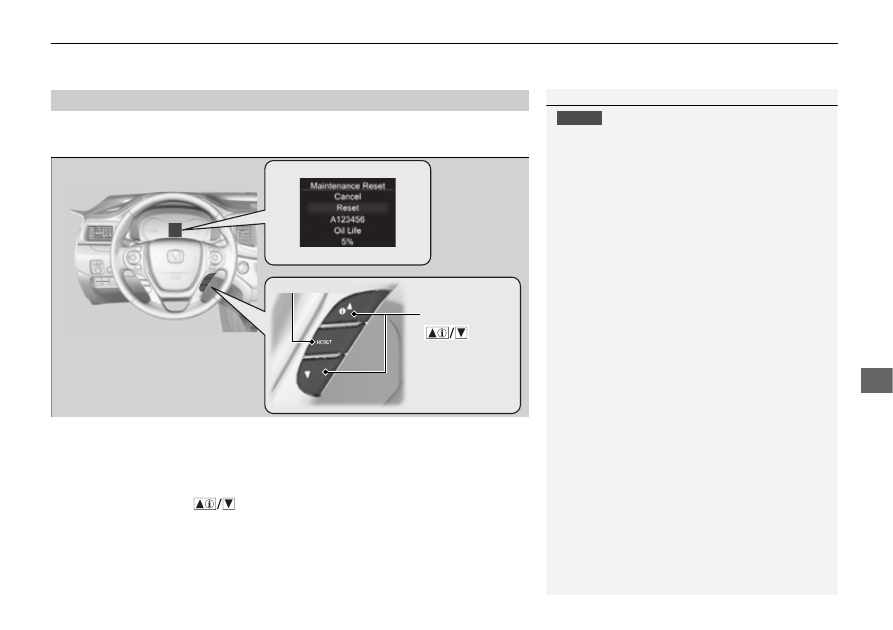
Reset the maintenance minder information display if you have performed the
maintenance service.
1.
Set the power mode to ON.
2.
Display the engine oil life.
2
Displaying the Maintenance Minder Information
P. 491
3.
Press and hold the
RESET
button for about 10 seconds to enter the reset mode.
4.
Select
Reset
with the
(Information) button, then push the
RESET
button.
u
A maintenance reset complete message will be displayed on multi-information
display.
u
The displayed maintenance items disappear, and the engine oil life display
returns to
100%
.
u
To cancel the oil life reset mode, select
Cancel
, then push the
RESET
button.
■
Resetting the Display
1
NOTICE
Failure to reset the Maintenance Minder
TM
display
after a maintenance service results in the system
showing incorrect maintenance intervals, which can
lead to serious mechanical problems.
The dealer will reset the Maintenance Minder
TM
display after completing the required maintenance
service. If someone other than a dealer performs
maintenance service, reset the Maintenance
Minder
TM
display yourself.
You can also reset the Maintenance Minder
TM
display
using the audio/information screen.
2
P. 299
Press the
(Information)
button
RESET
button