Honda Ridgeline (2022 year). Manual in english - page 22
uu
Bluetooth
®
HandsFreeLink
®
u
HFL Menus
350
Features
■
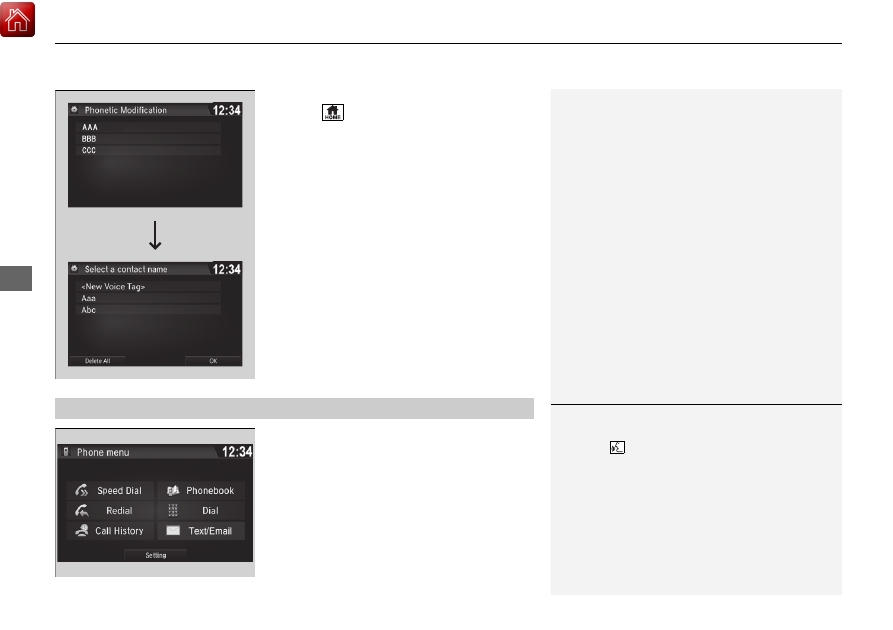
To delete all modified voice tags
1.
Select .
2.
Select
Settings
.
3.
Select
System
.
4.
Select the
Voice Recog
tab.
5.
Select
Phonebook Phonetic
Modification
.
6.
Select the phone you want to delete
phonetic modification.
u
The contact name list appears.
7.
Select
Delete All
.
8.
You will receive a confirmation message on
the screen, then select
Yes
.
You can make calls by inputting any phone
number, or by using the imported
phonebook, call history, speed dial entries, or
redial.
■
Making a Call
1
Any voice-tagged speed dial entry can be dialed by
voice from most screens.
Press the
button and say the voice tag name.
Once a call is connected, you can hear the voice of
the person you are calling through the audio
speakers.
While there is an active connection with Apple
CarPlay, phone calls cannot be made with
HandsFreeLink
®
and are only made from Apple
CarPlay.