Honda Insight (2022 year). Manual in english - page 22
349
Continued
Features
Bluetooth
®
HandsFreeLink
®
Bluetooth
®
HandsFreeLink
®
(HFL) allows you to place and receive phone calls using
your vehicle’s audio system, without handling your cell phone.
Using HFL
■
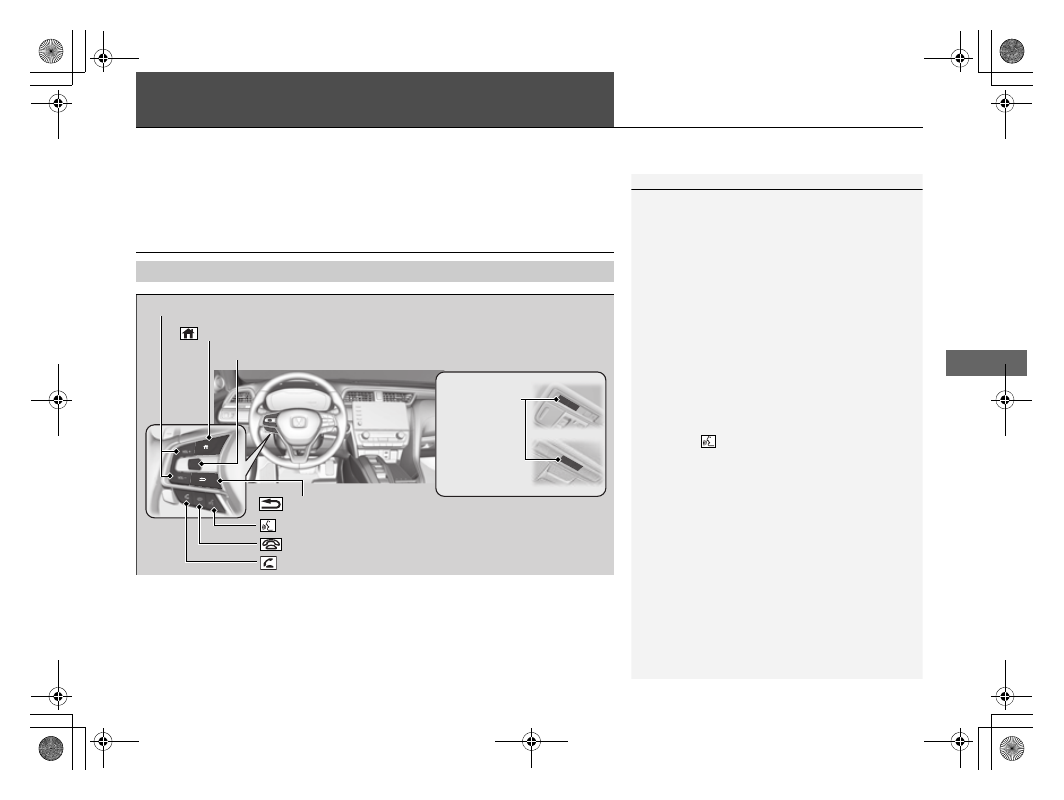
HFL Buttons
1
Place your phone where you can get good reception.
To use HFL, you need a
Bluetooth
-compatible cell
phone. For a list of compatible phones, pairing
procedures, and special feature capabilities, visit
automobiles.honda.com/handsfreelink/
, or call 1-
888-528-7876.
To use the system, the
Bluetooth
setting must be
ON
.
2
P. 354
Voice control tips
•
Aim the vents away from the ceiling and close the
windows, as noise coming from them may interfere
with the microphones.
•
Press the
button when you want to call a
number using a phonebook name or a number.
Speak clearly and naturally after a beep.
•
If the microphone picks up voices other than yours,
the command may be misinterpreted.
•
To change the volume level, select the audio
system’s
VOL
(Volume) or use the remote audio
controls on the steering wheel.
If there is no Favorite Contact entry in the system, the
pop-up notification appears on the screen.
2
(Talk) Button
Microphone
(Hang-up) Button
(Pick-up) Button
(Back) Button
(home) Button
VOL
(
+
/
VOL
(
-
(Volume) Buttons
Left Selector Wheel