Honda CR-V Hybrid (2022 year). Manual in english - page 26
Continued
413
uu
Bluetooth
®
HandsFreeLink
®
u
HFL Menus
Features
Up to 20 speed dial numbers can be stored per phone.
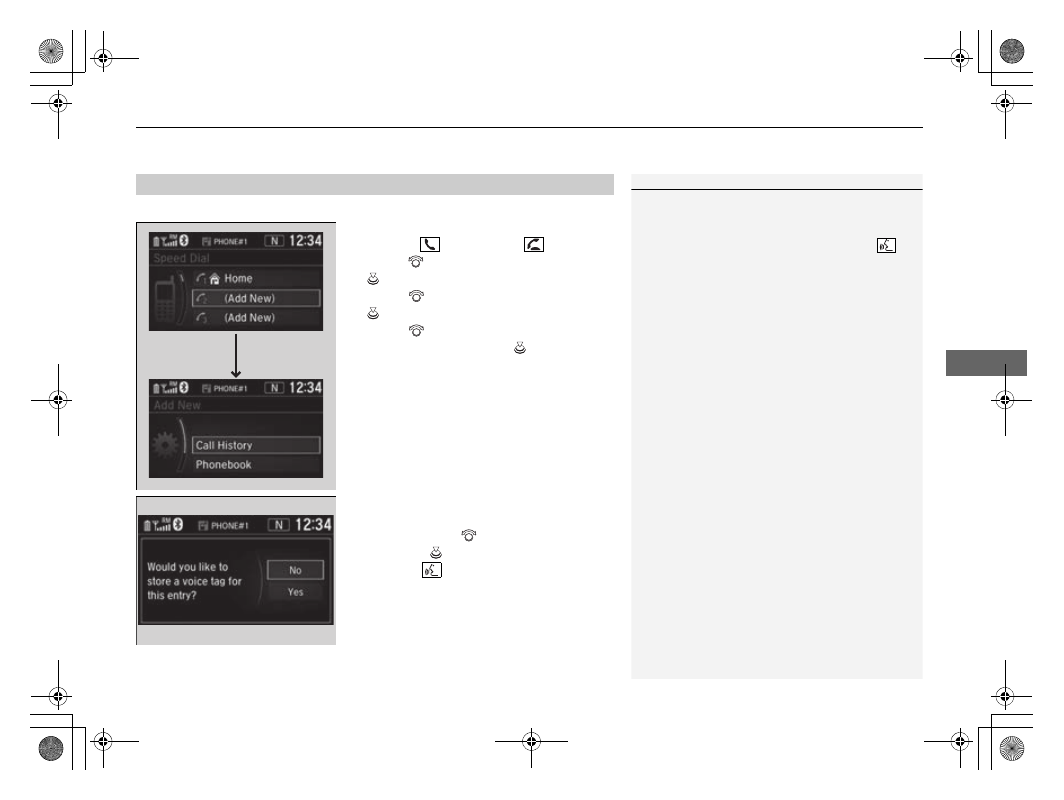
To store a speed dial number:
1.
Press the
button or the
button.
2.
Rotate
to
select
Speed Dial
, then press
.
3.
Rotate
to select
Add New
, then press
.
4.
Rotate
to select a place to choose a
number from, then press
.
From
Call History
:
u
Select a number from the call history.
From
Phonebook
:
u
Select a number from the connected cell
phone’s imported phonebook.
From
Phone Number
:
u
Input the number manually.
5.
When the speed dial is successfully stored,
you are asked to create a voice tag for the
number. Rotate
to select
Yes
or
No
,
then press
.
6.
Using the
button, follow the prompts to
say the name for the speed dial entry.
■
Speed Dial
1
When any preset button is pressed, the
Speed Dial
screen is displayed.
When a voice tag is stored, you can press the
button and call the number using voice commands.