Honda Fit (2019 year). Instruction - part 16
Continued
239
uu
Audio System Basic Operation
u
Audio/Information Screen
Features
You can change, store, and delete the wallpaper on the audio/information screen.
■
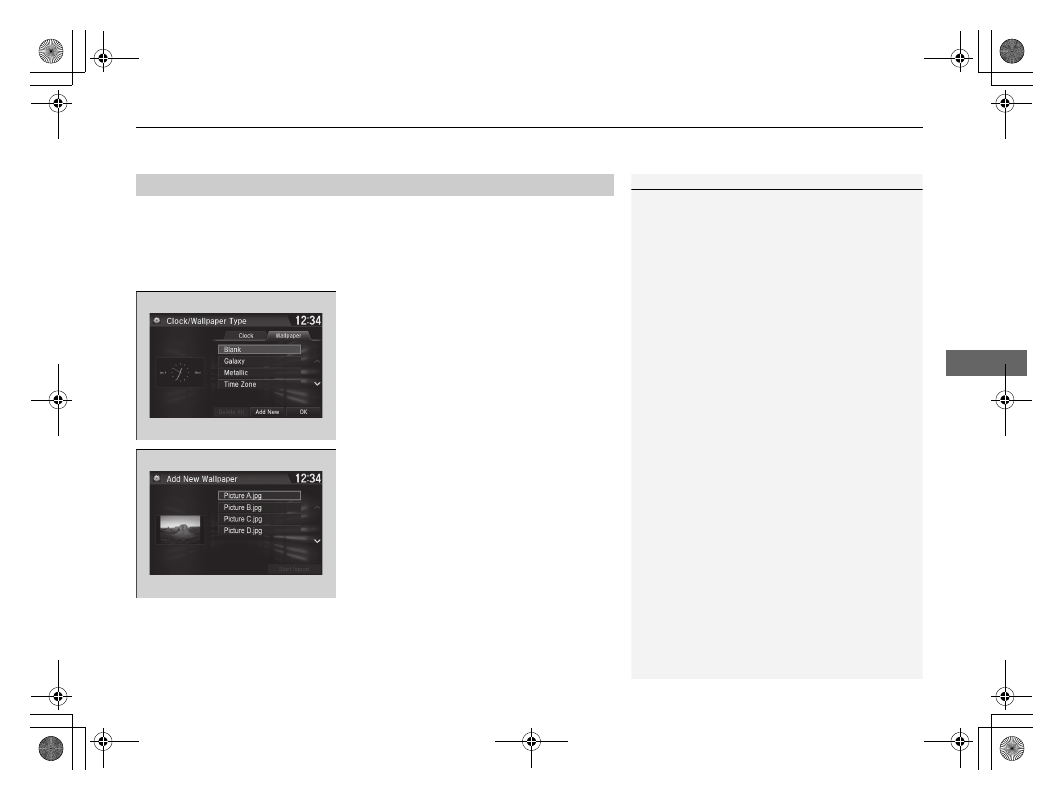
Import wallpaper
You can import up to five images, one at a time, for wallpaper from a USB flash
drive.
1. Connect the USB flash drive to the USB
port.
2 USB Port(s) P. 207
2. Select Settings.
3. Select Clock/Info.
4. Select Clock/Wallpaper Type, then open
the Wallpaper tab.
5. Select Add New.
u
The picture name is displayed on the list.
6. Select a desired picture.
u
The preview is displayed on the left side
on the screen.
7. Select Start Import to save the data.
u
The display will return to the wallpaper
list.
■
Wallpaper Setup
1
•
When importing wallpaper files, the image must be
in the USB flash drive’s root directory.
Images in a folder cannot be imported.
•
The file name must be fewer than 64 characters.
•
The file format of the image that can be imported
is BMP (bmp) or JPEG (jpg).
•
The individual file size limit is 5 MB.
•
The maximum image size is 4,096 x 4,096 pixels. If
the image size is less than 800 × 480 pixels, the
image is displayed in the middle of the screen with
the extra area appearing in black.
•
If the USB flash drive does not have any pictures,
the No files detected message appears.