Honda Civic Hatchback (2018 year). Instruction - part 34
 

  Index      Honda     Honda Civic Hatchback - instruction 2018 year in english


Search            


Content   ..  32  33  34  35   ..


Honda Civic Hatchback (2018 year). Instruction - part 34


uu

When Driving

u

Tire Pressure Monitoring System (TPMS)

*

528

Driving

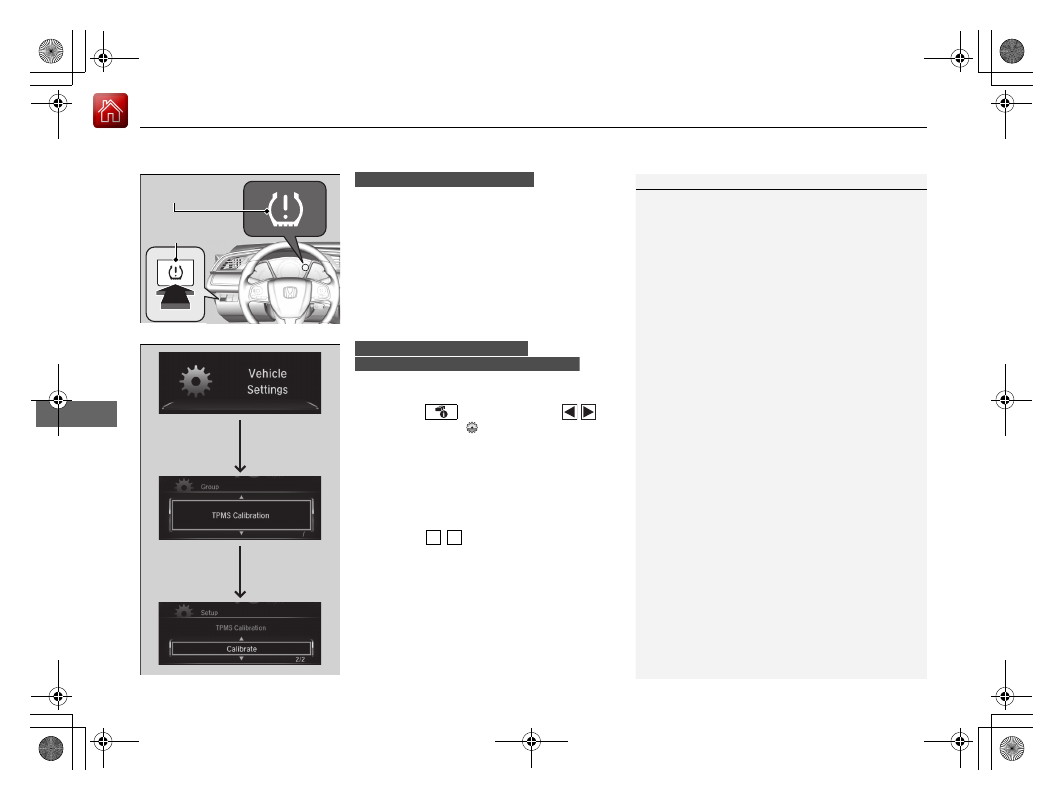
Press and hold the TPMS button until the low 
tire pressure/TPMS indicator blinks twice, 
indicating the calibration process has begun.
• If the low tire pressure/TPMS indicator does 

not blink, confirm the above conditions 
then press and hold the TPMS button again.

• The calibration process finishes 

automatically.

You can calibrate the system from the customized 
features on the driver information interface.
1. Press the 

 button and press 

/


button to select 

 (Vehicle Settings), 

then press the ENTER button.

u

TPMS Calibration appears on the display.

2. Press the ENTER button.

u

The display switches to the 
customization setup screen, where you 
can select Cancel or Calibrate.

3. Press the 

/

 button and select 

Calibrate, then press the ENTER button.

u

Calibration Started screen appears, 
then the display returns to the 
customization menu screen.

• If the Calibration Failed to Start message 

appears, repeat steps 2-3.

• The calibration process finishes automatically.

1

TPMS Calibration

TPMS cannot be calibrated if a compact spare tire

*


is installed.

The calibration process requires approximately 30 
minutes of cumulative driving at speeds between 
30-65 mph (48-105 km/h).

During this period, if the ignition is turned on and 
the vehicle is not moved within 45 seconds, you 
may notice the low tire pressure/TPMS indicator 
comes on briefly. This is normal and indicates that 
the calibration process is not yet complete.

If snow chains

*

 are installed, remove them before 

calibrating the TPMS.

If the low tire pressure/TPMS indicator comes on even 
when the properly inflated specified regular tires are 
installed, have your vehicle checked by a dealer.

We recommend that the tires be replaced with the 
same brand, model, and size as the originals. Ask a 
dealer for details.

The indicators for the Adaptive Cruise Control (ACC) 
with Low Speed Follow (LSF)

*

, Road Departure 

Mitigation (RDM)

*

, Vehicle Stability Assist (VSA®) 

System, Vehicle Stability Assist (VSA®) OFF, low tire 
Pressure/TPMS and Collision Mitigation Braking 
System

TM

 (CMBS

TM

)

*

 may come on after re-

connecting the battery. Drive a short distance at 
more than 12 mph (20 km/h). The indicator should 
go off. If it does not, have your vehicle checked by a 
dealer.

TPMS 
Button

Low Tire Pressure/
TPMS Indicator

Models with information display

Models with color audio system
Models with driver information interface

3 4

* Not available on all models

529

uu

When Driving

u

Tire Pressure Monitoring System (TPMS)

*

Driving

You can calibrate the system from the 
customized feature on the audio/information 
screen.
1. Set the power mode to ON.
2. Select .
3. Select Settings.
4. Select Vehicle.
5. Select TPMS Calibration.
6. Select Cancel or Calibrate.

u

When the calibration is complete, the 
display returns to the customization 
menu screen.

• If the Calibration Failed To Start. 

message appears, repeat steps 4-6.

• The calibration process finishes 

automatically.

Models with Display Audio

530

uu

When Driving

u

Tire Pressure Monitoring System (TPMS) - Required Federal Explanation

*

Driving

Tire Pressure Monitoring System (TPMS) - Required 
Federal Explanation

*

Each tire, including the spare (if provided), should be checked 
monthly when cold and inflated to the inflation pressure 
recommended by the vehicle manufacturer on the vehicle placard 
or tire inflation pressure label.

(If your vehicle has tires of a different size than the size indicated 
on the vehicle placard or tire inflation pressure label, you should 
determine the proper tire inflation pressure for those tires.)

As an added safety feature, your vehicle has been equipped with 
a tire pressure monitoring system (TPMS) that illuminates a low 
tire pressure telltale 

when one or more of your tires is significantly under-inflated.

Accordingly, when the low tire pressure telltale illuminates, you 
should stop and check your tires as soon as possible, and inflate 
them to the proper pressure.

Driving on a significantly under-inflated tire causes the tire to 
overheat and can lead to tire failure. Under-inflation also reduces 
fuel efficiency and tire tread life, and may affect the vehicle's 
handling and stopping ability.

* Not available on all models

531

uu

When Driving

u

Tire Pressure Monitoring System (TPMS) - Required Federal Explanation

*

Driving

Please note that the TPMS is not a substitute for proper tire 
maintenance, and it is the driver's responsibility to maintain 
correct tire pressure, even if under-inflation has not reached the 
level to trigger illumination of the TPMS low tire pressure telltale.

Your vehicle has also been equipped with a TPMS malfunction 
indicator to indicate when the system is not operating properly. 
The TPMS malfunction indicator is combined with the low tire 
pressure telltale. When the system detects a malfunction, the 
telltale will flash for approximately one minute and then remain 
continuously illuminated. This sequence will continue upon 
subsequent vehicle start-ups as long as the malfunction exists.

When the malfunction indicator is illuminated, the system may 
not be able to detect or signal low tire pressure as intended.

TPMS malfunctions may occur for a variety of reasons, including 
the installation of replacement or alternate tires or wheels on the 
vehicle that prevent the TPMS from functioning properly.

Always check the TPMS malfunction telltale after replacing one or 
more tires or wheels on your vehicle to ensure that the 
replacement or alternate tires and wheels allow the TPMS to 
continue to function properly.

532

Driving

Braking

Brake System

Use the parking brake to keep the vehicle stationary when parked. When the 
parking brake is applied, you can manually or automatically release it.

To apply

The electric parking brake can be applied any 
time the vehicle has battery, no matter which 
position the ignition switch

*1

 is in.

Pull the electric parking brake switch up gently 
and securely.

u

The parking brake and brake system 
indicator (red) comes on.

To release

The vehicle must be ON 

(

w

*1

 in order to 

release the electric parking brake.
1. Depress the brake pedal.
2. Press the electric parking brake switch.

u

The parking brake and brake system 
indicator (red) goes off.

Manually releasing the parking brake using 
the switch helps your vehicle start slowly and 
smoothly when facing down hill on steep hills.

*1: Models with the smart entry system have an ENGINE START/STOP button instead of an 
ignition switch.

Parking Brake

1

Parking Brake

You may hear the electric parking brake system 
motor operating from the rear wheel area when you 
apply or release the parking brake, or turn the 
ignition switch to LOCK 

(

0

*1

. This is normal.

The brake pedal may slightly move due to the electric 
parking brake system operation when you apply or 
release the parking brake. This is normal.

You cannot apply or release the parking brake if the 
battery goes dead.

Jump Starting P. 655

If you pull up and hold the electric parking brake 
switch while driving, the brakes on all four 
wheels are applied by the VSA system until the 
vehicle come to a stop. The electric parking 
brake then applies, and the switch should be 
released.

Electric Parking 
Brake Switch

Electric Parking 
Brake Switch

Continued

533

uu

Braking

u

Brake System

Driving

To release automatically

Use the accelerator pedal to release the parking brake when you are starting the 
vehicle facing uphill, or in a traffic jam.

Depressing the accelerator pedal releases the parking brake.

Depress the accelerator pedal while releasing the clutch pedal releases the parking 
brake.

Gently depress the accelerator pedal.

u

The parking brake and brake system 
indicator (red) goes off.

Gently depress the accelerator pedal and 
release the clutch pedal.

u

The parking brake and brake system 
indicator (red) goes off.

1

Parking Brake

In the following situations, the parking brake 
automatically operates.

When the vehicle stops with the automatic brake 
hold system activated for more than 10 minutes.

When the driver’s seat belt is unfastened while 
your vehicle is stopped and brake hold is applied.

When the engine is turned off while brake hold is 
applied.

When there is a problem with the Brake Hold 
System.

When the vehicle stops more than 10 minutes 
while ACC with LSF is activated.

When the driver’s seat belt is unfastened while 
your vehicle is stopped automatically by ACC with 
LSF.

When the engine is turned off while ACC with LSF 
is activated.

When there is a problem with the electric parking 
brake switch, after you turn the ignition switch to 
LOCK 

(

0

*1

.

If the parking brake cannot be released 
automatically, release it manually.

Models with ACC with LSF

Manual transmission models

Continuously variable transmission models

Manual transmission models

Accelerator Pedal

Continuously variable transmission models

Accelerator Pedal

Clutch Pedal

Manual transmission models

uu

Braking

u

Brake System

534

Driving

The parking brake automatically releases as you depress the accelerator pedal when:
• You are wearing the driver’s seat belt.
• The engine is running.

• The transmission is not in 

(

P or 

(

N.

• The transmission is not in 

(

N.

Continuously variable transmission models

Manual transmission models

1

Parking Brake

When the vehicle is traveling uphill, the accelerator 
pedal may need to be pressed farther to 
automatically release the electric parking brake.

The parking brake cannot be released automatically 
while the following indicators are on:

Malfunction indicator lamp

Transmission system indicator

The parking brake may not be released automatically 
while the following indicators are on:

Parking brake and brake system indicator (red)

VSA® system indicator

ABS indicator

Supplemental restraint system indicator

The clutch pedal is fully depressed before gently 
depress the accelerator pedal and release the clutch 
pedal.

Manual transmission models

Continued

535

uu

Braking

u

Brake System

Driving

Your vehicle is equipped with disc brakes at all four wheels. A vacuum power assist 
helps to reduce the effort needed on the brake pedal. The brake assist system 
increases the stopping force when you depress the brake pedal hard in an 
emergency situation. The anti-lock brake system (ABS) helps you retain steering 
control when braking very hard.

Brake Assist System P. 540
Anti-lock Brake System (ABS) P. 539

Brake squeal

To satisfy the performance under a wide range of driving conditions, a high-
performance braking system is equipped on your vehicle. You may hear the brake 
squeal under certain conditions, such as vehicle speed, deceleration, humidity, and 
so on. This is not a malfunction.

Foot Brake

1

Foot Brake

Check the brakes after driving through deep water, 
or if there is a buildup of road surface water. If 
necessary, dry the brakes by lightly depressing the 
pedal several times.

If you hear a continuous metallic friction sound when 
applying the brakes, this is caused by the brake wear 
indicator rubbing on the brake rotor and indicates 
that the brake pads need to be replaced. Have the 
vehicle checked by a dealer. If you hear only an 
occasional squeak or squeal when you initially apply 
the brake pedal, this may be normal and caused by 
high frequency vibration of the brake pads against 
the rotating brake disc. 

Constantly using the brake pedal while going down a 
long hill builds up heat, which reduces the brake 
effectiveness. Apply engine braking by taking your 
foot off the accelerator pedal and downshifting to a 
lower gear/speed position. With manual transmission 
use a lower gear for greater engine braking.

Do not rest your foot on the brake pedal while 
driving, as it will lightly apply the brakes and cause 
them to lose effectiveness over time and reduce pad 
life. It will also confuse drivers behind you.

2.0 L engine models

uu

Braking

u

Brake System

536

Driving

Keeps the brake applied after releasing the brake pedal until the accelerator pedal is 
pressed. You can use this system while the vehicle is temporarily stopped, like at 
traffic lights and in heavy traffic.

Automatic Brake Hold

1

Automatic Brake Hold

3

WARNING

Activating the automatic brake hold system 
on steep hills or slippery roads may still 
allow the vehicle to move if you remove 
your foot from the brake pedal.

If a vehicle unexpectedly moves, it may 
cause a crash resulting in serious injury or 
death.

Never activate the automatic brake hold 
system or rely on it to keep a vehicle from 
moving when stopped on a steep hill or 
slippery roads.

3

WARNING

Using the automatic brake hold system to 
park the vehicle may result in the vehicle 
unexpectedly moving.

If a vehicle moves unexpectedly, it may 
cause a crash, resulting in serious injury or 
death.

Never leave the vehicle when braking is 
temporarily kept by automatic brake hold 
and always park the vehicle by putting the 
transmission in 

(

P

 and applying the parking 

brake.

Continuously variable transmission models

Turning on the system

Fasten your seat belt 
properly, then start the 
engine. Press the 
automatic brake hold 
button.

The automatic brake 
hold system indicator 
comes on. The system 
is turned on.

Activating the system

Depress the brake pedal 
to come to a complete 
stop. The shift lever must 
not be in 

(

P or 

(

R.

The automatic brake 
hold indicator comes 
on. Braking is kept for 
up to 10 minutes.

Release the brake pedal 
after the automatic 
brake hold indicator 
comes on.

Canceling the system

Depress the accelerator 
pedal while the shift 
lever is in a position 
other than 

(

P or 

(

N. The 

system is canceled and 
the vehicle starts to 
move.

The automatic brake 
hold indicator goes 
off. The system 
continues to be on.

Accelerator Pedal

Brake Pedal

Automatic Brake 
Hold Button

Goes 
Off

Comes 
On

U.S.

Canada

Comes 
On

On

Comes 
On

On

537

uu

Braking

u

Brake System

Continued

Driving

Keeps the brake applied after releasing the brake pedal until you change a gear to a 
position other than 

(

N and:

• Release the clutch pedal on a level road or when facing downhill.
• Release the clutch pedal and depress the accelerator pedal when facing uphill.
You can use this system while the vehicle is temporarily stopped, like at traffic lights 
and in heavy traffic.

Manual transmission models

Turning on the system

Fasten your seat belt 
properly, then start the 
engine. Press the 
automatic brake hold 
button.

The automatic brake 
hold system indicator 
comes on. The system 
is turned on.

Activating the system

Depress the brake pedal 
to come to a complete 
stop.

The automatic brake 
hold indicator comes 
on. Braking is kept for 
up to 10 minutes.

Release the brake pedal 
after the automatic 
brake hold indicator 
comes on.

Canceling the system

Shift into one of the 
gears other than 

(

N and: 

Release the clutch 
pedal on a level road 
or when facing 
downhill.

Release the clutch 
pedal and depress the 
accelerator pedal 
when facing uphill.

The system is canceled 
and the vehicle starts to 
move.

The automatic brake 
hold indicator goes off. 
The system continues to 
be on.

Accelerator Pedal

Brake Pedal

Automatic Brake 
Hold Button

Goes 
Off

U.S.

Canada

Clutch Pedal

Comes 
On

On

Comes 
On

Comes 
On

On

uu

Braking

u

Brake System

538

Driving

The system automatically cancels when:

• You engage the parking brake.

• You depress the brake pedal and move the shift lever to 

(

P or 

(

R.

The system automatically cancels and the parking brake is applied when:

• Braking is kept for more than 10 minutes.
• The driver’s seat belt is unfastened.
• The engine is turned off.
• There is a problem with automatic brake hold system.
• The battery is disconnected.

• The engine stalls.

Turning off the automatic brake hold system

While the system is on, press the automatic 
brake hold button again.

u

The automatic brake hold system 
indicator goes off.

If you want to turn off automatic brake hold 
while the system is in operation, press the 
automatic brake hold button with the brake 
pedal depressed.

1

Automatic Brake Hold

While the system is activated, you can turn off the 
engine or park the vehicle through the same 
procedure as you normally do.

When Stopped P. 550

Whether the system is on, or the system is activated, 
the automatic brake hold turns off once the engine is 
off.

The system turns off if the engine stalls while 
automatic brake hold is active or the system is on.

Manual transmission models

Continuously variable transmission models

Manual transmission models

1

Turning off the automatic brake hold system

Make sure to turn off the automatic brake hold 
system before using an automated car wash.

You may hear an operating noise if the vehicle moves 
while the automatic brake hold system is in 
operation. The system generates sound while holding 
the vehicle and it moves.

Automatic Brake 
Hold Button

Goes 
Off

539

uu

Braking

u

Anti-lock Brake System (ABS)

Driving

Anti-lock Brake System (ABS)

Helps prevent the wheels from locking up, and helps you retain steering control by 
pumping the brakes rapidly, much faster than you.

The electronic brake distribution (EBD) system, which is part of the ABS, also 
balances the front-to-rear braking distribution according to vehicle loading.

You should never pump the brake pedal. Let the ABS work for you by always 
keeping firm, steady pressure on the brake pedal. This is sometimes referred to as 
“stomp and steer.”

ABS operation

The brake pedal may pulsate slightly when the ABS is working. Keep holding the 
pedal firmly down. On dry pavement, you will need to press on the brake pedal very 
hard before the ABS activates. However, you may feel the ABS activate immediately 
if you are trying to stop on snow or ice.

ABS may activate when you depress the brake pedal when driving on:
• Wet or snow covered roads.
• Roads paved with stone.
• Roads with uneven surfaces, such as potholes, cracks, manholes, etc.

When the vehicle speed goes under 6 mph (10 km/h), the ABS stops.

ABS

1

Anti-lock Brake System (ABS)

NOTICE

The ABS may not function correctly if you use a tire of 
the wrong size or type.

If the ABS indicator comes on while driving, there 
may be a problem with the system.
While normal braking will not be affected, there is a 
possibility that the ABS will not operating. Have your 
vehicle checked by a dealer immediately.

The ABS is not designed for the purpose of reducing 
the time or distance it takes for a vehicle to stop: It is 
designed to limit brake lockup which can lead to 
skidding and loss of steering control.

In the following cases, your vehicle may need more 
distance to stop than a vehicle without the ABS:

You are driving on rough or uneven road surfaces, 
such as gravel or snow.

The tires are equipped with snow chains

*

.

The following may be observed with the ABS system:

Motor sounds coming from the engine 
compartment when the brakes are applied, or 
when system checks are being performed after the 
engine has been started and while vehicle is 
accelerates.

Brake pedal and/or the vehicle body vibration when 
ABS activates.

These vibrations and sounds are normal to ABS 
systems and are no cause for concern.

* Not available on all models

540

uu

Braking

u

Brake Assist System

Driving

Brake Assist System

Designed to assist the driver by generating greater braking force when you depress 
the brake pedal hard during emergency braking.

Brake assist system operation

Press the brake pedal firmly for more powerful braking.

When brake assist operates, the pedal may wiggle slightly and an operating noise 
may be heard. This is normal. Keep holding the brake pedal firmly down.

Brake Assist System

541

uu

Braking

u

Collision Mitigation Braking System

TM

 (CMBS

TM

)

*

Continued

Driving

Collision Mitigation Braking System

TM

 (CMBS

TM

)

*

Can assist you when there is a possibility of your vehicle colliding with a vehicle or a 
pedestrian detected in front of yours. The CMBS

TM

 is designed to alert you when a 

potential collision is determined, as well as to reduce your vehicle speed to help 
minimize collision severity when a collision is deemed unavoidable.

1

Collision Mitigation Braking System

TM

 (CMBS

TM

)

*

Important Safety Reminder
The CMBS

TM

 is designed to reduce the severity of an 

unavoidable collision. It does not prevent a collision 
nor stop the vehicle automatically. It is still your 
responsibility to operate the brake pedal and steering 
wheel appropriately according to the driving 
conditions.

The CMBS

TM

 may not activate or may not detect a 

vehicle in front of your vehicle under certain 
conditions:

CMBS

TM

 Conditions and Limitations P. 546

You can read about handling information for the 
camera equipped with this system.

Front Sensor Camera

*

 P. 477

Be careful not to have the radar sensor cover strongly 
impacted.

* Not available on all models

uu

Braking

u

Collision Mitigation Braking System

TM

 (CMBS

TM

)

*

542

Driving

How the system works

1

How the system works

When the CMBS

TM

 activates, it may automatically 

apply the brake. It will be canceled when your vehicle 
stops or a potential collision is not determined.

The radar sensor is in 
the lower bumper 
next to the fog light

*

.

The camera is located 
behind the rearview 
mirror.

The system starts monitoring the roadway ahead when your vehicle speed is about 
3 mph (5 km/h) and there is a vehicle in front of you.

When to use

The CMBS

TM

 activates when:

The speed difference between your vehicle and a vehicle or pedestrian detected 
in front of you becomes about 3 mph (5 km/h) and over with a chance of a 
collision.

Your vehicle speed is about 62 mph (100 km/h) or less and the system determines 
there is a chance of a collision with:

 - Vehicles detected in front of you that are stationary, oncoming, or traveling in 
your same direction.
 - A pedestrian who is detected in front of you.

Your vehicle speed is above 62 mph (100 km/h), and the system determines there 
is a chance of a collision with a vehicle detected in front of you traveling in your 
same direction.

* Not available on all models

Continued

543

uu

Braking

u

Collision Mitigation Braking System

TM

 (CMBS

TM

)

*

Driving

When the system activates

At system’s earliest collision alert stage, you can change the distance (Long/
Normal/Short) between vehicles at which alerts will come on through audio/
information screen setting options.

List of customizable options P. 137

1

When the system activates

The camera in the CMBS

TM

 is also designed to detect 

pedestrians.
However, this pedestrian detection feature may not 
activate or may not detect a pedestrian in front of 
your vehicle under certain conditions.
Refer to the ones indicating the pedestrian detection 
limitations from the list.

CMBS

TM

 Conditions and Limitations P. 546

The system provides visual and audible alerts of a possible collision, and stops if the 
collision is avoided.

u

Take appropriate action to prevent a collision (apply the brakes, change 
lanes, etc.)

Visual Alerts

Beep

Audible Alert


Content   ..  32  33  34  35   ..