Honda Element. Manual - part 370
 

  Index      Honda     Honda Element - service repair manual 2007-2008 year


Search            


Content   ..  368  369  370  371   ..


Honda Element. Manual - part 370


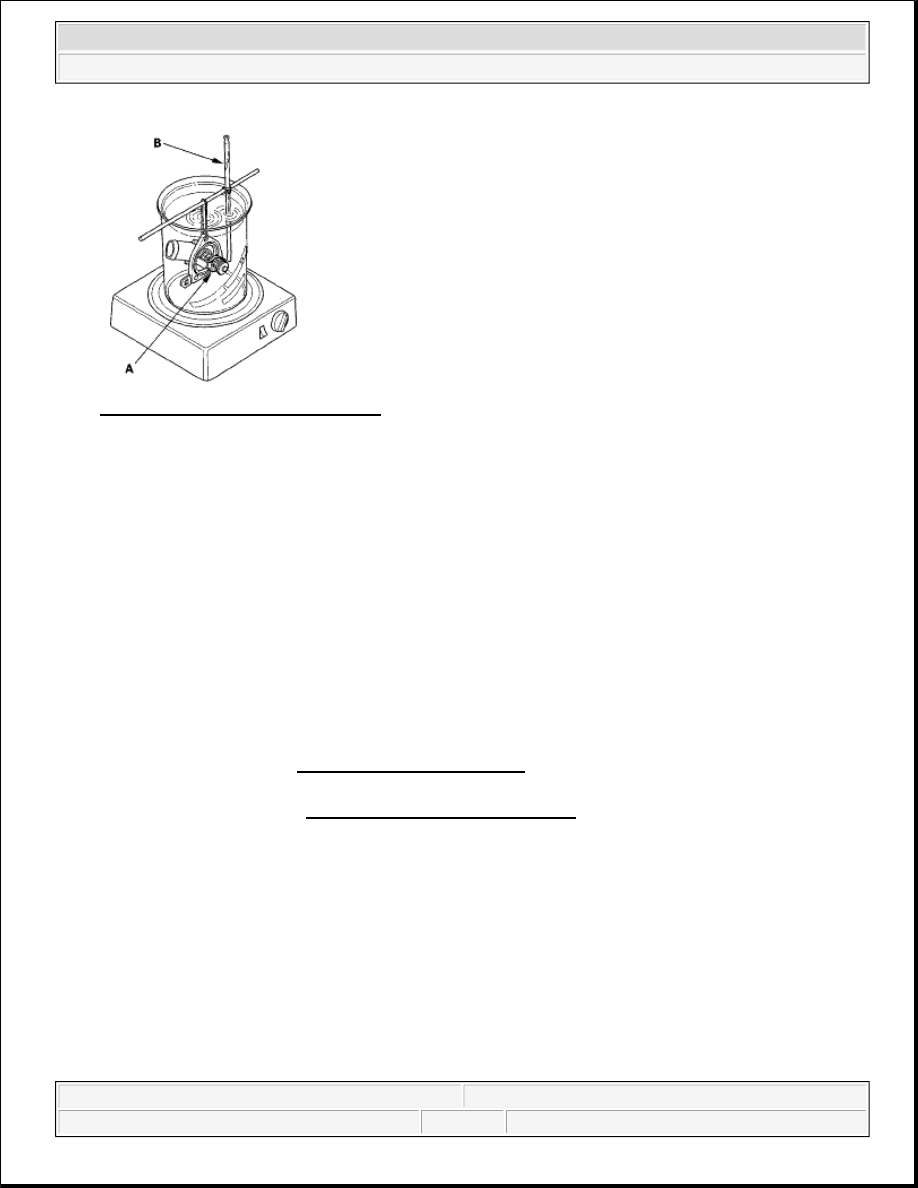
Fig. 5: Placing Thermostat In Water 
Courtesy of AMERICAN HONDA MOTOR CO., INC. 

2. Heat the water, and check the temperature with a thermometer. Check the temperature when the 

thermostat first opens, and when it is fully open.  

3. Measure the lift height of the thermostat when it is fully open. 

Standard Thermostat  

Lift Height: Above 8.0 mm (0.31 in.)  

Starts Opening: 169-176°F (76-80°C)  

Fully Open: 194°F (90°C)  

WATER PUMP INSPECTION 

1. Remove the drive belt (see DRIVE BELT INSPECTION ).  

2. Turn the water pump pulley counterclockwise. Check that it turns freely. If it doesn't turn smoothly, 

replace the water pump (see WATER PUMP REPLACEMENT ). 

NOTE:

When you check the water pump, you may see a small amount of 
"weeping" from the bleed holes (A). This is normal.


2007 Honda Element EX 

2007-08 ENGINE Cooling System - Element


Fig. 6: Identifying Bleed Holes 
Courtesy of AMERICAN HONDA MOTOR CO., INC. 

3. Install the drive belt (see DRIVE BELT REPLACEMENT ).  

WATER PUMP REPLACEMENT 

1. Remove the drive belt (see DRIVE BELT REPLACEMENT ).  

2. Drain the engine coolant (see COOLANT CHECK ).  

3. Remove the crankshaft pulley (see CRANKSHAFT PULLEY REMOVAL AND INSTALLATION ). 

4. Remove the six bolts securing the water pump, then remove the water pump (A). 

Fig. 7: Identifying Water Pump Bolts With Torque Specification 
Courtesy of AMERICAN HONDA MOTOR CO., INC. 

5. Inspect and clean the O-ring groove and mating surface with the water passage.  

6. Install the water pump with new O-rings in the reverse order of removal.  

7. Clean up any spilled engine coolant.  

8. Install the crankshaft pulley (see INSTALLATION ). 


2007 Honda Element EX 

2007-08 ENGINE Cooling System - Element


9. Refill the radiator with engine coolant, and bleed air from the cooling system with the heater valve open 

(see step 10 on Coolant Replacement ).  

COOLANT CHECK 

1. Look at the coolant level in the coolant reservoir. Make sure it is between the MAX mark (A) and MIN 

mark (B). 

Fig. 8: Identifying Coolant Level In MAX Mark And MIN Mark 
Courtesy of AMERICAN HONDA MOTOR CO., INC. 

2. If the coolant level in the coolant reservoir is at or below the MIN mark, add coolant to bring it up to the 

MAX mark, and inspect the cooling system for leaks.  

COOLANT REPLACEMENT 

1. Start the engine. Set the heater temperature control dial to maximum heat, then turn the ignition switch 

OFF. Make sure the engine and radiator are cool to the touch.  

2. Remove the radiator cap.  

3. Loosen the drain plug (A), and drain the coolant. 


2007 Honda Element EX 

2007-08 ENGINE Cooling System - Element


Fig. 9: Identifying Drain Plug 
Courtesy of AMERICAN HONDA MOTOR CO., INC. 

4. After the coolant has drained, torque the radiator drain plug.  

5. Remove, drain, and reinstall the coolant reservoir.  

6. Fill the coolant reservoir to the MAX mark (A) with Honda Long Life Antifreeze/Coolant Type 2 (P/N 

OL999-9001). 

Fig. 10: Identifying Coolant Reservoir To MAX Mark 
Courtesy of AMERICAN HONDA MOTOR CO., INC. 

7. Pour Honda Long Life Antifreeze/Coolant Type 2 into the radiator up to the base of the filler neck. 

NOTE:

Always use Honda Long Life Antifreeze/Coolant Type 2. Using a non-
Honda coolant can result in corrosion, causing the cooling system to 
malfunction or fail.  


2007 Honda Element EX 

2007-08 ENGINE Cooling System - Element


Content   ..  368  369  370  371   ..