Honda Civic. Manual - part 516
 

  Index      Honda     Honda Civic - service repair manual 2006-2009 year


Search            


Content   ..  514  515  516  517   ..


Honda Civic. Manual - part 516


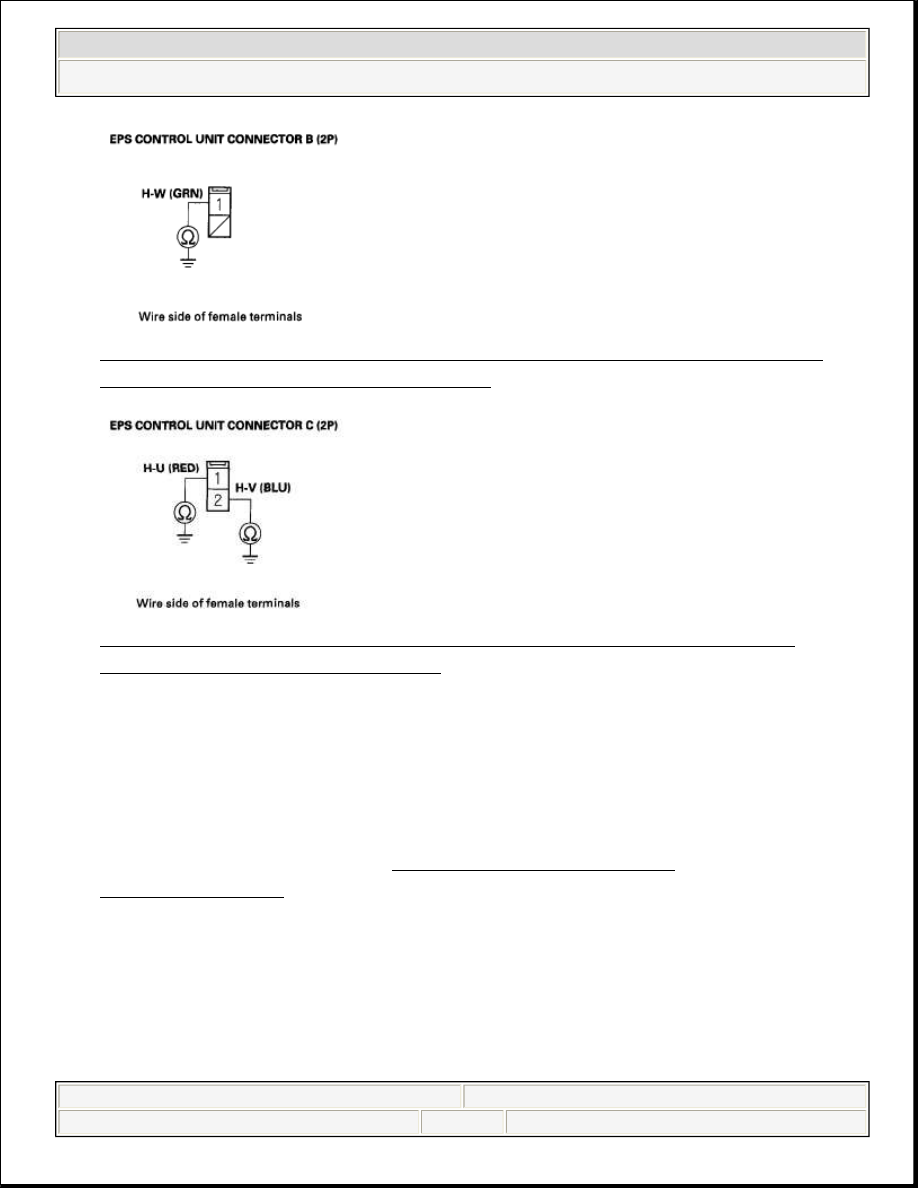
Fig. 47: Checking Continuity Between Body Ground And EPS Control 
Unit Connector B (2P) No. 1 Terminal
 

Fig. 48: Checking Continuity Connector C (2P) No. 1 Terminal And 
Connector C (2P) No. 2 Terminal
 

Is there continuity?  

YES -Repair short to body ground in the wire harness between the EPS control 
unit and the motor. 

NO -Short to the body ground in the motor wire harness, or motor internal 
circuit, replace the motor (see MOTOR REMOVAL AND 
INSTALLATION
 ). 

12. Disconnect the motor 1P connector and the motor 2P connector.  
13. On the motorside, check for continuity between the following terminals of the 

motor 1P and the motor 2P connector. 


2008 Honda Civic EX 

2006-08 STEERING EPS System - Civic (All Except Hybrid & Si)


Fig. 49: Checking Continuity Between Terminals Of Motor 1P And Motor 
2P Connector
 

Is there continuity?  

YES -Repair open in the wire harness between the EPS control unit and the 
motor. 

NO -Open in the motor wire harness, or motor internal circuit, replace the 
motor (see MOTOR REMOVAL AND INSTALLATION ). 

DTC 71-01: MOTOR ANGLE SENSOR (SIN/COS SIGNALS) (STEERING DIAGNOSIS); DTC 71-02: 
MOTOR ANGLE SENSOR (NEUTRAL POSITION LEARNING OF SIN/COS) (INITIAL 
DIAGNOSIS); DTC 71-03: MOTOR ANGLE SENSOR (SIN/COS SIGNALS) (STEERING 
DIAGNOSIS); DTC 71-05: MOTOR ANGLE SENSOR (SIN/COS SIGNALS CHANGING AMOUNT) 
(STEERING DIAGNOSIS); DTC 71-06: MOTOR ANGLE SENSOR (NEUTRAL POSITION OF 
SIN/COS) (INITIAL DIAGNOSIS) 

1. Clear the DTC with the HDS.  
2. Turn the ignition switch to LOCK (0).  
3. Start the engine.  
4. Turn the steering wheel to the right or left, and wait 10 seconds or more. 

Does the EPS indicator come on?  


2008 Honda Civic EX 

2006-08 STEERING EPS System - Civic (All Except Hybrid & Si)


YES -Go to step 5. 

NO -Check for loose terminals or poor connections. If the connections are 
good, the system is OK at this time. 

5. Check for DTCs with the HDS. 

Is DTC 71-01, 71-02, 71-03, 71-05 or 71-06 indicated?  

YES -Go to step 6. 

NO -Troubleshoot the indicated DTC. If there are no DTCs, the system is OK 
at this time. 

6. Turn the ignition switch to LOCK (0).  
7. Disconnect EPS control unit connector D (28P).  
8. Measure the resistance between the following terminals of EPS control unit 

connector D (28P). 

Fig. 50: Measuring Resistance Between Following Terminals Of EPS 
Control Unit Connector D (28P)
 

Is the resistance between R1-R2 13-25 ohms, S1-S3 26-49 ohms, and S2-S4 26-
49 ohms?
  

YES -Go to step 9. 


2008 Honda Civic EX 

2006-08 STEERING EPS System - Civic (All Except Hybrid & Si)


NO -Go to step 12. 

9. Check for continuity between body ground and EPS control unit connector D 

(28P) No. 12 terminal, No. 13 terminal, No. 14 terminal, No. 26 terminal, No. 
27 terminal, and No. 28 terminal individually. 

Fig. 51: Checking Continuity Between Body Ground And EPS Control 
Unit Connector D (28P) No. 12 Terminal, No. 13 Terminal
 

Is there continuity?  

YES -Go to step 10. 

NO -Check for loose terminals in the EPS control unit connectors, and repair if 
necessary. If no poor connections are found, replace the EPS control unit (see 
EPS CONTROL UNIT REMOVAL/INSTALLATION ). 

10. Disconnect the motor angle sensor 6P connector.  
11. Check for continuity between body ground and motor angle sensor 6P 

connector No. 1 terminal, No. 2 terminal, No. 3 terminal, No. 4 terminal, No. 5 
terminal, and No. 6 terminal individually. 


2008 Honda Civic EX 

2006-08 STEERING EPS System - Civic (All Except Hybrid & Si)


Content   ..  514  515  516  517   ..