Honda Civic. Manual - part 253
 

  Index      Honda     Honda Civic - service repair manual 2006-2009 year


Search            


Content   ..  251  252  253  254   ..


Honda Civic. Manual - part 253


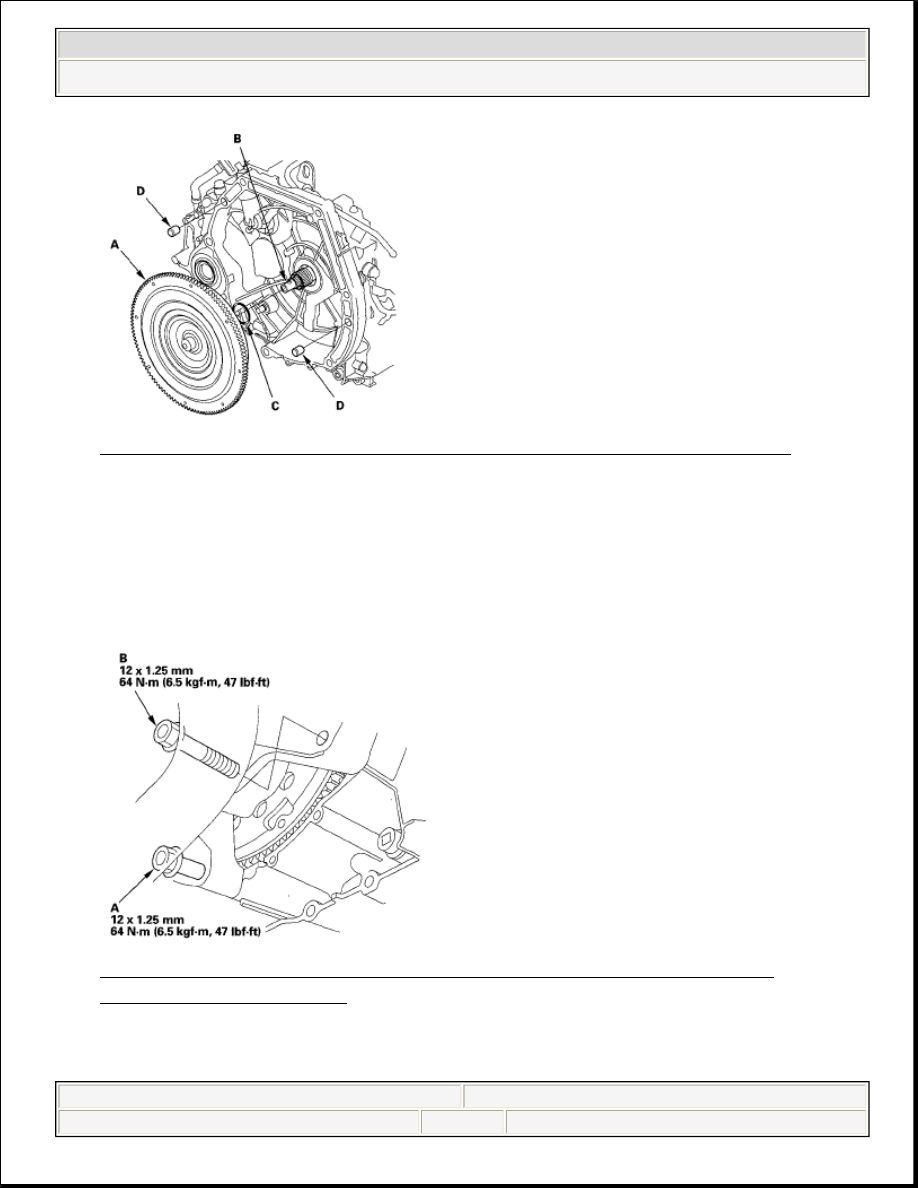
Fig. 254: Identifying Torque Converter On Mainshaft With O-Ring 
Courtesy of AMERICAN HONDA MOTOR CO., INC. 

2. Install the 14 x 20 mm dowel pins (D) in the torque converter housing.  
3. Place the transmission on a jack, and raise the transmission to the engine level.  
4. Install the lower transmission housing mounting bolt (A) part-way in the bolt 

hole on the engine, then attach the transmission to the engine. 

Fig. 255: Identifying Lower Transmission Housing Mounting Bolt 
w/Torque Specifications
 
Courtesy of AMERICAN HONDA MOTOR CO., INC. 

5. Install the lower transmission housing mounting bolt (B), and tighten the bolts.  


2008 Honda Civic LX 

2006-08 TRANSMISSION Automatic Transmission - Civic (Except Hybrid)


6. Install the rear transmission housing mounting bolts. 

Fig. 256: Identifying Rear Transmission Housing Mounting Bolts 
w/Torque Specification
 
Courtesy of AMERICAN HONDA MOTOR CO., INC. 

7. Install the front transmission housing mounting bolts. 

Fig. 257: Identifying Front Transmission Housing Mounting Bolts 
w/Torque Specification
 
Courtesy of AMERICAN HONDA MOTOR CO., INC. 

8. Install the upper transmission housing mounting bolts. 


2008 Honda Civic LX 

2006-08 TRANSMISSION Automatic Transmission - Civic (Except Hybrid)


Fig. 258: Identifying Upper Transmission Housing Mounting Bolts 
w/Torque Specification
 
Courtesy of AMERICAN HONDA MOTOR CO., INC. 

9. Secure the transmission mount bracket on the transmission housing with new 

mounting bolts. 

Fig. 259: Identifying Transmission Mount Bracket & Mounting Bolts 
w/Torque Specification
 
Courtesy of AMERICAN HONDA MOTOR CO., INC. 

10. Install a new set ring (A) on both driveshafts (B). 


2008 Honda Civic LX 

2006-08 TRANSMISSION Automatic Transmission - Civic (Except Hybrid)


Fig. 260: Identifying Set Ring On Driveshafts 
Courtesy of AMERICAN HONDA MOTOR CO., INC. 

11. Clean the areas where the driveshaft contacts the transmission (differential) 

with solvent, and dry with compressed air. Then install the driveshaft, be sure 
not to allow dust or other foreign particles to enter the transmission. Turn the 
steering knuckle fully outward, and slide the driveshaft into the differential 
until you feel its set ring fully engage the side gear.  

12. Attach the torque converter to the drive plate with the eight bolts (A). Rotate 

the crankshaft pulley as necessary to tighten the bolts to 1/2 of the specified 
torque, then to the final torque, in a crisscross pattern. After tightening the last 
bolt, check that the crankshaft rotate freely. 

Fig. 261: Identifying Torque Converter Cover And Bolts w/Torque 
Specifications
 
Courtesy of AMERICAN HONDA MOTOR CO., INC. 


2008 Honda Civic LX 

2006-08 TRANSMISSION Automatic Transmission - Civic (Except Hybrid)


Content   ..  251  252  253  254   ..