Ford F-350 (2022 year). Manual in english - page 22
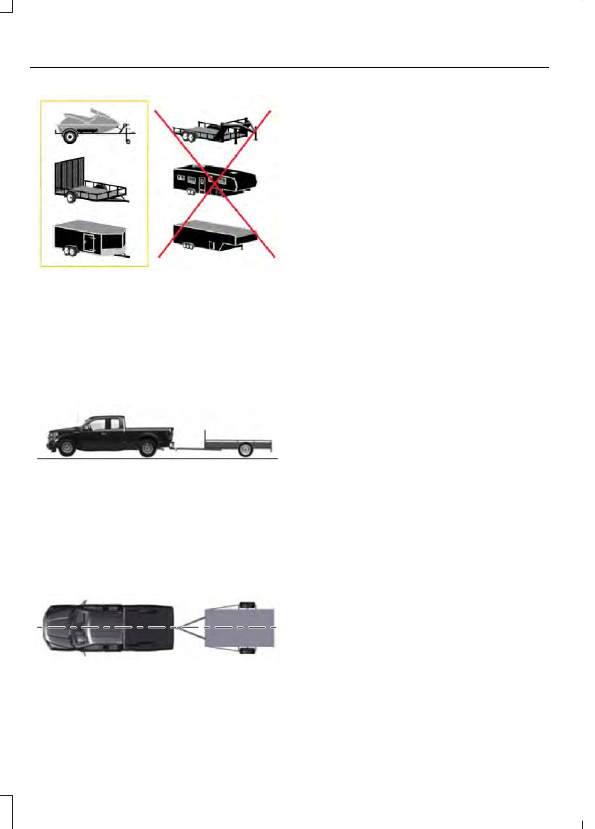
E209766
Positioning the Trailer
Hitch the trailer to your vehicle and
connect the electrical wiring harness.
Check to make sure that the wiring is
working. See
E209759
Park your vehicle and hitched trailer on a
level surface.
For best results, make sure that your trailer
rides level with the ground when you hitch
your vehicle. See
E209760
Make sure that the trailer and your vehicle
are in line with each other. You can do this
by putting the transmission in drive (D) and
pulling straight forward.
Configuring the Trailer in the
Instrument Cluster Display
1.
Shift to reverse (R).
2. Press the camera view button.
3. Press the trailer view icon.
4. Using the instrument cluster controls
on the steering wheel, select
Add
Trailer
.
5. Add a personalized name for the trailer
using the instrument cluster display
prompts. Use the down arrow to scroll
to the preferred letter and then press
the right arrow to advance to the next
letter. Press the
OK
button.
6. Select the trailer brake type.
Note:
Select
Default
Electric/Surge/None
if the trailer has
electric, surge or no brakes.
7.
Select the trailer brake effort.
Note:
The default value is
Low
and is the
recommended setting for most trailers.
Select a different setting if your trailer's
brakes require more initial voltage, or you
prefer more aggressive trailer braking.
8. Select the trailer type.
Note:
The system could prompt you to
setup
Trailer Blind Spot
before continuing
the setup process.
9. Select whether you want to add the
feature.
358
Trailer Reverse Guidance
(If Equipped)