Ford GT (2022 year). Manual in english - page 5
 

  Index      Manuals     Ford GT (2022 year). Manual in english


Search            copyright infringement  


Content      ..     3      4      5      6     ..


Ford GT (2022 year). Manual in english - page 5


Note:

Do not resume your journey if it

illuminates despite the level being correct.
Have the system checked by your authorized
dealer immediately.

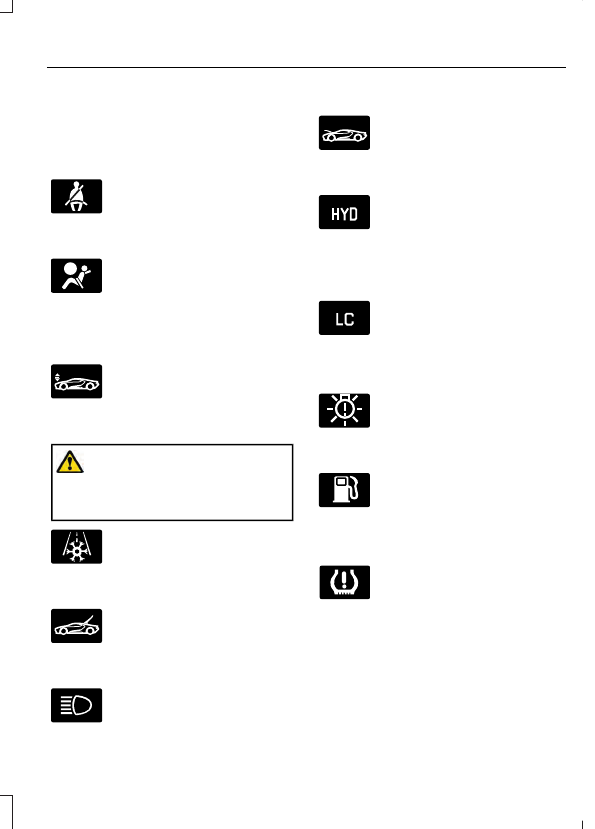
Fasten Seatbelt

E71880

It illuminates and a chime
sounds until you fasten the
seatbelts.

Front Airbag

E67017

If it fails to illuminate when you
start your vehicle, continues to
flash or remains on, it indicates

a malfunction. Have the system checked
by your authorized dealer.

Front Lift Mode Active

E234582

Illuminates when you switch this
feature on.  See 

Drive Mode

Control

 (page 119).

Frost Warning Lamp

WARNING: 

Even if the temperature

rises to above 39°F (4°C) there is no
guarantee that the road is free of hazards
caused by inclement weather.

It illuminates when the outside
air temperature is 39°F (4°C) or
below.

Hatch Ajar

E236451

Displays when the ignition is on
and the hatch is not completely
closed.

High Beam

It illuminates when you switch
the high beam headlamps on or
use the headlamp flasher.

Hood Ajar

E236450

Displays when the ignition is on
and the hood is not completely
closed.

Hydraulic System Fault

E234584

Illuminates when there is an
issue with your vehicle's
hydraulic system. Have the

system checked by your authorized dealer
immediately.

Launch Control

E234583

Illuminates when you switch this
feature on.  See 

Using Stability

Control

 (page 114).

Low Beam Malfunction Warning
Lamp

E181350

It illuminates when there is a
malfunction with a low beam
headlamp bulb.

Low Fuel Level

It will illuminate when the fuel
level is low or the fuel tank is
nearly empty.  Refuel as soon as

possible.

Low Tire Pressure Warning

It will illuminate when your tire
pressure is low. If the lamp
remains on with the engine

running or when driving, check your tire
pressures as soon as possible.

It will also illuminate momentarily when
you switch the ignition on to confirm the
lamp is functional. If it does not illuminate
when you switch the ignition on, or begins
to flash at any time, have the system
checked by your authorized dealer.

71

Instrument Cluster

Parking Lamps

It will illuminate when you switch
the parking lamps on.

Powertrain Fault

Illuminates when a powertrain
fault has been detected.  Have
the system checked as soon as

possible.

Ride Height System Fault

E234585

Illuminates when there is an
issue with the ride height system.

Service Engine Soon

If it illuminates when the engine
is running this indicates a
malfunction.  The On Board

Diagnostics system has detected a
malfunction of the vehicle emission control
system.

If it flashes, engine misfire may be
occurring. Increased exhaust gas
temperatures could damage the catalytic
converter or other vehicle components.
Drive in a moderate fashion (avoid heavy
acceleration and deceleration) and have
your vehicle immediately serviced.

It also illuminates momentarily when you
switch the ignition on prior to engine start
to confirm the lamp is functional and to
indicate whether your vehicle is ready for
Inspection and Maintenance (I/M) testing.

Normally, it illuminates until the engine is
cranked and automatically turns off if no
malfunctions are present. However, if after
15 seconds it flashes eight times, this
indicates that your vehicle is not ready for
Inspection and Maintenance (I/M) testing.
See 

Emission Law

 (page 99).

Stability Control

E236447

Flashes during operation.

If it does not illuminate when you
switch the ignition on, or remains

on when the engine is running, this
indicates a malfunction.  Have your vehicle
checked as soon as possible.

Note:

The system turns off if there is a

malfunction.

See 

Using Stability Control

 (page 114).

Stability Control Off

E236448

It illuminates when you switch
the system off.

Transmission Fault

Illuminates when there is a
malfunction with your
transmission. Have the system

checked by your authorized dealer
immediately.

AUDIBLE WARNINGS AND
INDICATORS

Keyless Warning Alert

The horn will sound twice when you exit
your vehicle with the passive key and your
vehicle is in ON, indicating your vehicle is
still on. The horn will also sound twice
when you exit your vehicle and attempt to
lock the doors manually while the passive
key is still in the vehicle. The doors will not
lock if the passive key remains in the
vehicle.

Headlamps On Warning Chime

Sounds when you remove the key from the
vehicle and you have left the headlamps
or parking lamps on.

72

Instrument Cluster

GENERAL INFORMATION

WARNING: 

Driving while distracted

can result in loss of vehicle control, crash
and injury. We strongly recommend that
you use extreme caution when using any
device that may take your focus off the
road. Your primary responsibility is the
safe operation of your vehicle. We
recommend against the use of any
hand-held device while driving and
encourage the use of voice-operated
systems when possible. Make sure you
are aware of all applicable local laws
that may affect the use of electronic
devices while driving.

Various systems on your vehicle can be
controlled using the information display
controls on the steering wheel.
Corresponding information is displayed in
the information display.

Note:

Some options may appear slightly

different or not at all if the items are
optional.

Information Display Controls

E227121

Press the return arrow button to enter
the menu.

Use the center toggle control to scroll
through and highlight menu options.

Press the 

OK

 button.

Press the 

OK

 button to choose and

confirm settings or messages.

Press the return arrow button to exit a
menu.

Use the 

OK

 button to make a selection.

Some features switch on or off instead of
entering a submenu.

Main Menu

Menu

Launch Control

Information

Navigation - Cancel Route

Rear Wing Deployment

Display Settings

Vehicle Settings

Note:

You cannot switch on Launch Control

in Wet Mode.

73

Information Displays

Information

No Content

Trip/Fuel Economy

Tire Pressure

Navigation

Speedometer km/h

Speedometer MPH

Gauges

Coolant Temperature

Configure Gauges

Oil Temperature

Transmission Temperature

Oil Pressure

Inlet Air Temperature

Turbo Boost Pressure

Voltage

Confirm and Exit

Note:

In order to provide real-time values,

some gauges may display more value
fluctuation than other gauges during normal
operation.

Note:

You can display information for up

to four gauges.

Note:

The information you select for the on

demand screen appears on the right-hand
side of the cluster.

Note:

Navigation only appears if you have

a route active in your navigation.

Rear Wing Deployment

Choose your applicable setting.

Note:

You cannot switch on Rear Wing Deployment in V-Max or Track Modes.

Note:

If you deploy the rear wing, the system cannot lower it until you switch your setting

to auto and drive over a certain speed.  See 

Drive Mode Control

 (page 119).

74

Information Displays

Display Settings

Choose your applicable setting.

Distance

Choose your applicable setting.

Temperature

Choose your applicable setting.

Tire Pressure

Choose your applicable setting.

Language

Note:

Changing the Distance setting also

affects other gauge values.

Vehicle Settings

Choose your applicable setting.

Performance Shift Indicator

Autolamp Delay

Lighting

Daytime Lights

Autolock

Locks

Autounlock

Mislock Chirp

Choose your applicable setting.

Remote Unlock

Choose your applicable setting.

Duration

Remote Start

System

Press and hold the 

OK

 button until the system reset

confirmation appears.

Tire Monitor

Remote Open

Windows

Courtesy Wipe

Wipers

75

Information Displays

INFORMATION MESSAGES

E227121

Press the 

OK

 button to acknowledge and

remove some messages from the
information display.  The information
display automatically removes other
messages after a short time.

You need to confirm certain messages
before you can access the menus.

AdvanceTrac™

Action

Message

The system detects a condition that requires service. Have the

system checked as soon as possible.

Service Advan-

ceTrac

The driver has switched on or switched off the AdvanceTrac system.

AdvanceTrac OFF

AdvanceTrac ON

Displays if you switch on PERFORMANCE mode.  See 

Using

Stability Control

 (page 114).

AdvanceTrac

PERFORMANCE

Displays if you switch on PEFORMANCE+ mode.  See 

Using

Stability Control

 (page 114).

AdvanceTrac

PERFORMANCE +

Displays if the current drive mode does not allow adjustments to

the AdvanceTrac system.  See 

Using Stability Control

 (page 114).

AdvanceTrac

Change Request

Not Available in

Current Drive

Mode

Alarm

Action

Message

Alarm triggered due to unauthorized entry.  See 

Anti-Theft Alarm

(page 55).

Vehicle Alarm To

Stop Alarm, Start

Vehicle.

76

Information Displays

Battery and Charging System

Action

Message

The charging system needs servicing. If the warning stays on or

continues to come on, contact an authorized dealer as soon as

possible.

Charging System

Service Soon

The charging system needs servicing. Contact an authorized dealer

as soon as possible.

Charging System

Service Now

The battery management system determines that the battery is at

a low state of charge. Turn your ignition off as soon as possible to

protect the battery. This message clears once you restart your

vehicle and the battery state of charge has recovered.

Battery State of

Charge Low

Doors and Locks

Action

Message

The door(s) listed is not completely closed.

X Door Ajar

The hood is not completely closed.

Hood Ajar

The hatch is not completely closed.

Hatch Ajar

Displays when the door lock turns off.

Door Unlocked

Indicates a door fault that requires manually opening the door by

the pull strap on the B-pillar. Contact an authorized dealer.

Door Fault Pull

Release Strap

Over Shoulder

Indicates a fault with the electronic door system. Contact an

authorized dealer.

Door Fault Service

Required

Engine

Action

Message

The engine coolant temperature is excessively high.

Engine Coolant

Over Temperature

The engine is overheating and the power has been reduced to assist

in lowering the temperature. Stop in a safe place as soon as it is

possible.

Power Reduced to

Lower Engine

Temp

The engine is on and a door is open.

Vehicle is On

77

Information Displays

Fuel

Action

Message

The fuel fill inlet may not be properly closed.

Check Fuel Fill

Inlet

An early reminder of a low fuel condition showing the estimated

distance until tank is empty.

Fuel Level Low XX

Miles to Empty

Fuel Level Low XX

km to Empty

A reminder of a low fuel condition.

Fuel Level Low

Hill Start Assist

Action

Message

Displays when hill start assist is not available.  Contact your

authorized dealer.

Hill Start Assist

Not Available

Hydraulic System

Action

Message

Displays when Track mode is not available due to the Hydraulic

System Charging.

TRACK Mode Not

Available.

Hydraulic System

Charging

Displays when Track mode is not available due to the Hydraulic

System Charging.

V-MAX Mode Not

Available.

Hydraulic System

Charging

Displays when the ride height system is not functioning properly.

Ride Height

System Fault

Displays when the ride hydraulic system is not functioning properly.

See an authorized dealer.

Hydraulic System

Fault

Displays when front lift is not available due to the Hydraulic System

Charging.

Front Lift Not

Available.

Hydraulic System

Charging

78

Information Displays

Keys and Intelligent Access

Action

Message

The system does not detect a key in your vehicle.  See 

Keyless

Starting

 (page 89).

No Key Detected

You pressed the start/stop button to switch off the engine and your

vehicle does not detect your intelligent access key inside your

vehicle.

Restart Now or

Key is Needed

There is a problem with your vehicle’s starting system. See an

authorized dealer for service.

Starting System

Fault

You have successfully programmed an intelligent access key to the

system.

Key Program

Successful

You have failed to program an intelligent access key to the system.

Key Program

Failure

You have programmed the maximum number of keys to the system.

Max Number of

Keys Learned

You have not programmed enough keys to the system.

Not Enough Keys

Learned

The key battery is low. Change the battery as soon as possible.

Key Battery Low

Replace Soon

Maintenance

Action

Message

Stop your vehicle as soon as safely possible and turn off the engine.
Check the oil level. If the warning stays on or continues to come on

with your engine running, contact an authorized dealer as soon as

possible.

Low Engine Oil

Pressure

The brake fluid level is low, inspect the brake system immediately.

See 

Brake Fluid Check

 (page 162).

Brake Fluid Level

Low

The brake system needs servicing.  Stop your vehicle in a safe place.

Contact an authorized dealer.

Check Brake

System

79

Information Displays

Action

Message

The brake pads need replacement. Contact an authorized dealer.

Ceramic Brakes

Replace All Brake

Pads

Your vehicle is still in Transport or Factory mode. This may not allow

some features to operate properly. See an authorized dealer.

Transport Mode

Contact Dealer

Factory Mode

Contact Dealer

Park Brake

Action

Message

Displays if you attempt to release the electric parking brake manu-

ally without pressing the brake pedal.

To Release: Press
Brake and Switch

Displays if you must manually release the electric parking brake.

Park Brake Use

Switch to Release

Displays if you have not fully applied the electric parking brake.

Park Brake Not

Applied

Displays if you have not fully released the electric parking brake.

Park Brake Not

Released

Displays if the electric parking brake system enters a special mode

used to allow service of the rear brakes. Contact an authorized

dealer.

Park Brake Main-

tenance Mode

Displays if the electric park brake system detects a condition that
requires service. Some functionality may still be available. See an

authorized dealer.

Park Brake Limited

Function Service

Required

Displays if the electric parking brake system detects a condition

that requires service. See an authorized dealer.

Park Brake

Malfunction

Service Now

Displays if the parking brake is set, the engine is running and you

drive the vehicle more than 3 mph (5 km/h). If the warning stays

on after you release the parking brake, contact an authorized dealer.

Park Brake On

80

Information Displays

Remote Start

Action

Message

A reminder to apply the brake and push the start button to drive

your vehicle after a remote start.

To Drive: Press

Brake and Start

Button

Starting System

Action

Message

There is a problem with your vehicle’s starting system. See an

authorized dealer for service.

Starting System

Fault

Steering System

Action

Message

The steering lock system has detected a condition that requires

service. See an authorized dealer.

Steering Lock

Malfunction

Service Now

You need to turn your steering wheel when starting your vehicle to

unlock your steering column.

Steering Col. Lock

Turn Wheel while

Starting vehicle

Tire Pressure Monitoring System

Action

Message

One or more tires on your vehicle has low tire pressure.  See 

Tire

Pressure Monitoring System

 (page 199).

Tire Pressure Low

The tire pressure monitoring system is malfunctioning. If the warning

stays on or continues to come on, contact an authorized dealer.

See 

Tire Pressure Monitoring System

 (page 199).

Tire Pressure

Monitor Fault

A tire pressure sensor is malfunctioning.  See 

Tire Pressure

Monitoring System

 (page 199).  If the warning stays on or continues

to come on, contact an authorized dealer as soon as possible.

Tire Pressure

Sensor Fault

81

Information Displays

Transmission

Action

Message

The transmission has limited functionality.  See an authorized dealer.

Transmission

Limited Function

See Manual

Displays as a reminder to shift into park. This message may also

display after reconnecting or recharging the battery until you switch

the ignition on.  See 

Changing the 12V Battery

 (page 164).

Transmission Not

in Park

Stay in neutral mode is engaged. Transmission automatically shifts

into park when timer reaches zero.

Transmission Not

in Park. Park

Engages in xx:xx

Displays when the transmission has adjusted the shift strategy.

Transmission

Adjusted

Displays when the transmission is adjusting the shift strategy.

Transmission

AdaptMode

Displays when the transmission shift selector is locked and unable

to select gears.

Transmission

IndicatMode

Lockup On

Displays when the transmission shift selector is unlocked and free

to select gears.

Transmission

IndicatMode

Lockup Off

Displays if you cannot shift to the selected gear because of current

vehicle conditions.

Invalid Gear Selec-

tion

Displays when neutral hold is active.  See 

Automatic Transmission

(page 103).

Stay in Neutral

Mode Engaged

Displays if the vehicle will shift to park (P) after it reaches a certain

speed or slower.

Park will engage at

Low Speed

Displays when you need to press manual (M) to enter neutral hold.

See 

Automatic Transmission

 (page 103).

Select M to

Confirm Stay in

Neutral Mode

Displays when there is a fault with the transmission gear selection.

See an authorized dealer.

SHIFT SYS FAULT

Confirm Park

Brake Apply Before

Exiting the Vehicle

The transmission clutch fluid temperature is excessively high.

Transmission

Clutch Fluid Over

Temperature

82

Information Displays

AUTOMATIC CLIMATE
CONTROL

Standard Measurement

E290061

Metric Measurement

E243069

Directing the Airflow

Use the control to direct the airflow.

Direct airflow to the windshield
air vents and de-mister.

Direct airflow to the windshield
air vents and the footwell air
vents.

Direct airflow to the footwell air
vents.

Direct airflow to the instrument
panel air vents and the footwell
air vents.

E244097

Direct airflow to the instrument
panel air vents.

Setting the Blower Motor Speed

Turn the control to adjust the
volume of air circulated in the
vehicle.

Setting the Temperature

Turn the control to set the temperature.

Switching Auto Mode On and Off

Press and release the button to
switch on automatic operation,
then select your preferred

temperature and air distribution.

The system adjusts the blower motor
speed, air conditioning operation, and
outside or recirculated air to reach and
maintain the temperature you have set.

Switching the Air Conditioning On
and Off

Press and release the button.

Use air conditioning with recirculated air
to improve cooling performance and
efficiency.

Switching Recirculated Air On and
Off

E290058

Press and release the button to
switch between outside air and
recirculated air.

83

Climate Control

Recirculated air could turn off, or prevent
you from switching on in all air flow modes
except MAX A/C to reduce the risk of
fogging. Recirculation could also turn on
and off in various air distribution control
combinations to improve heating or cooling
efficiency.

Switching Maximum Defrost On
and Off

Turn the blower to the highest
speed, turn the temperature
control to the highest

temperature and turn the airflow control
to the windshield air vents and de-mister.

HINTS ON CONTROLLING THE
INTERIOR CLIMATE

General Hints

Note:

Prolonged use of recirculated air may

cause the windows to fog up.

Note:

You may feel a small amount of air

from the footwell air vents regardless of the
air distribution setting.

Note:

To reduce humidity build-up inside

your vehicle, do not drive with the system
switched off or with recirculated air always
switched on.

Note:

Do not place objects under the front

seats as this may interfere with the airflow
to the rear seats.

Note:

Remove any snow, ice or leaves from

the air intake area at the base of the
windshield.

Automatic Climate Control

Note:

Adjusting the settings when your

vehicle interior is extremely hot or cold is
not necessary.

Note:

The system adjusts to heat or cool

the interior to the temperature you select
as quickly as possible.

Note:

For the system to function efficiently,

the instrument panel and side air vents
should be fully open.

Note:

If you select 

AUTO

 during cold

outside temperatures, the system directs
air flow to the windshield and side window
air vents. In addition, the blower motor may
run at a slower speed until the engine warms
up.

Note:

If you select 

AUTO

 during hot

temperatures and the inside of the vehicle
is hot, the system uses recirculated air to
maximize interior cooling. Blower motor
speed may also reduce until the air cools.

Quickly Heating the Interior

1.

Press and release 

AUTO

.

2. Adjust the temperature function to the

setting you prefer.

Recommended Settings for
Heating

1.

Press and release 

AUTO

.

2. Adjust the temperature function to the

setting you prefer. Use 72°F (22°C) as
a starting point, then adjust the setting
as necessary.

Quickly Cooling the Interior

1.

Press and release 

AUTO

.

2. Press and release 

A/C

 if is not lit.

3. Adjust the temperature function to the

setting you prefer.

Note:

To improve the time to reach a

comfortable temperature in hot weather,
drive with the windows open until you feel
cold air through the air vents.

84

Climate Control

Recommended Settings for
Cooling

1.

Press and release 

AUTO

.

2. Adjust the temperature function to the

setting you prefer. Use 72°F (22°C) as
a starting point, then adjust the setting
as necessary.

Defogging the Side Windows in
Cold Weather

1.

Direct airflow to the windshield air
vents and de-mister.

2. Adjust the temperature control to the

setting you prefer. Use 72°F (22°C) as
a starting point, then adjust the setting
as necessary.

Defogging the Windshield in Cold
Weather

1.

Adjust the blower motor to the highest
setting.

2. Adjust the temperature control to the

highest setting.

3. Direct airflow to the windshield air

vents and de-mister.

Note:

You can also use this setting to clear

the windshield of a thin covering of ice.

CABIN AIR FILTER

Your vehicle is equipped with a cabin air
filter, which gives you and your passenger
the following benefits:

It improves your driving comfort by
reducing particle concentration.

It improves the interior compartment
cleanliness.

It protects the climate control
components from particle deposits.

You can locate the cabin air filter under the
front hood.

Note:

Make sure you have a cabin air filter

installed at all times. This prevents foreign
objects from entering the system. Running
the system without a filter in place could
result in degradation or damage to the
system.

Replace the filter at regular intervals.  See

Scheduled Maintenance

 (page 279).

For additional cabin air filter information,
or to replace the filter, see a qualified
technician.

85

Climate Control

SITTING IN THE CORRECT
POSITION

WARNING: 

Sitting improperly, out

of position or with the seatback reclined
too far can take weight off the seat
cushion and affect the decision of the
passenger sensing system, resulting in
serious injury or death in the event of a
crash. Always sit upright against your
seat back, with your feet on the floor.

E68595

When you use them properly, the seat,
head restraint, seatbelt and airbags will
provide optimum protection in a crash.

We recommend that you follow these
guidelines:

Sit in an upright position with the base
of your spine as far back as possible.

Keep sufficient distance between
yourself and the steering wheel. We
recommend a minimum of 10 in
(25 cm) between your breastbone and
the airbag cover.

Hold the steering wheel with your arms
slightly bent.

Bend your legs slightly so that you can
press the pedals fully.

Position the shoulder strap of the
seatbelt over the center of your
shoulder and position the lap strap
tightly across your hips.

Make sure that your driving position is
comfortable and that you can maintain full
control of your vehicle.

MANUAL SEATS

WARNING: 

Do not adjust the driver

seat when your vehicle is moving.

E224746

To adjust the seatback:

1.

Lean forward and pull the lever up.

2. With the seatback released, lean back

to a comfortable position while holding
the lever up.

3. Release the lever and let the seat lock

into position.

86

Seats


Content      ..     3      4      5      6     ..