Ford F-600 (2022 year). Manual in english - page 18
When you switch blind spot information
system off, a warning lamp illuminates and
a message displays. When you switch the
system on or off, the alert indicators flash
twice.
Note:
The system remembers the last
setting when you start your vehicle.
To permanently switch the system off,
contact an authorized dealer.
SWITCHING BLIND SPOT
INFORMATION SYSTEM ON
AND OFF - VEHICLES WITH: 8
INCH SCREEN
To switch the system on or off, use the
instrument cluster display:
1.
Select
Driver Assist
.
2. Select
Blind Spot
.
3. Switch the feature on or off.
When you switch blind spot information
system off, a warning lamp illuminates and
a message displays. When you switch the
system on or off, the alert indicators flash
twice.
Note:
The system remembers the last
setting when you start your vehicle.
To permanently switch the system off,
contact an authorized dealer.
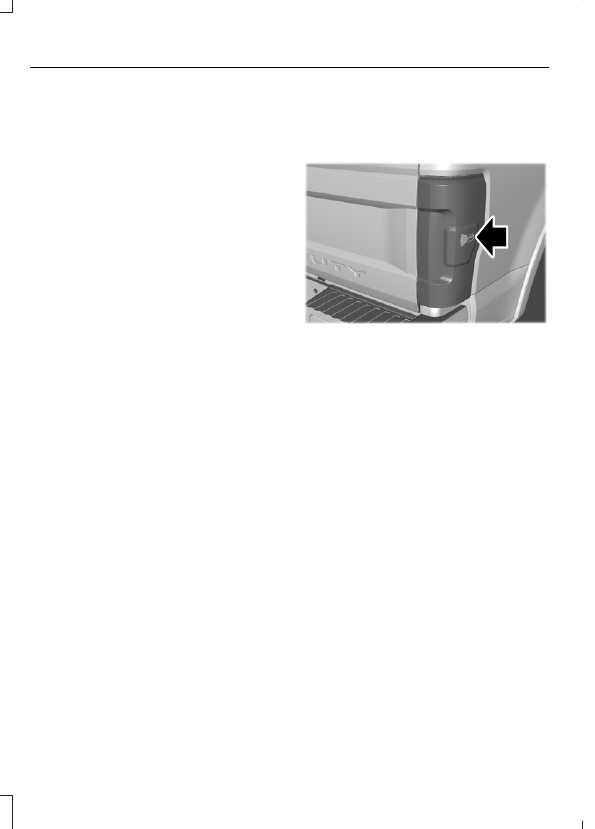
LOCATING THE BLIND SPOT
INFORMATION SYSTEM
SENSORS
E231384
The sensors are inside the brake lamp on
both sides of your vehicle.
Note:
Keep the sensors free from snow, ice
and large accumulations of dirt.
Note:
Do not cover the sensors with bumper
stickers, repair compound or other objects.
Note:
Bike and cargo racks could cause
false alerts due to obstruction of the sensor.
We recommend switching the feature off
when using a bike or cargo rack.
Note:
Blocked sensors may affect system
accuracy.
If the sensors become blocked, a message
appears in the instrument cluster display.
See
Blind Spot Information System –
(page 297). The
alert indicators illuminate but the system
does not alert you.
294
Blind Spot Information System
(If Equipped)