Ford Falcon. Manual - part 345
413-08-23 Interior
Command
Centre 413-08-23
REMOVAL AND INSTALLATION (Continued)
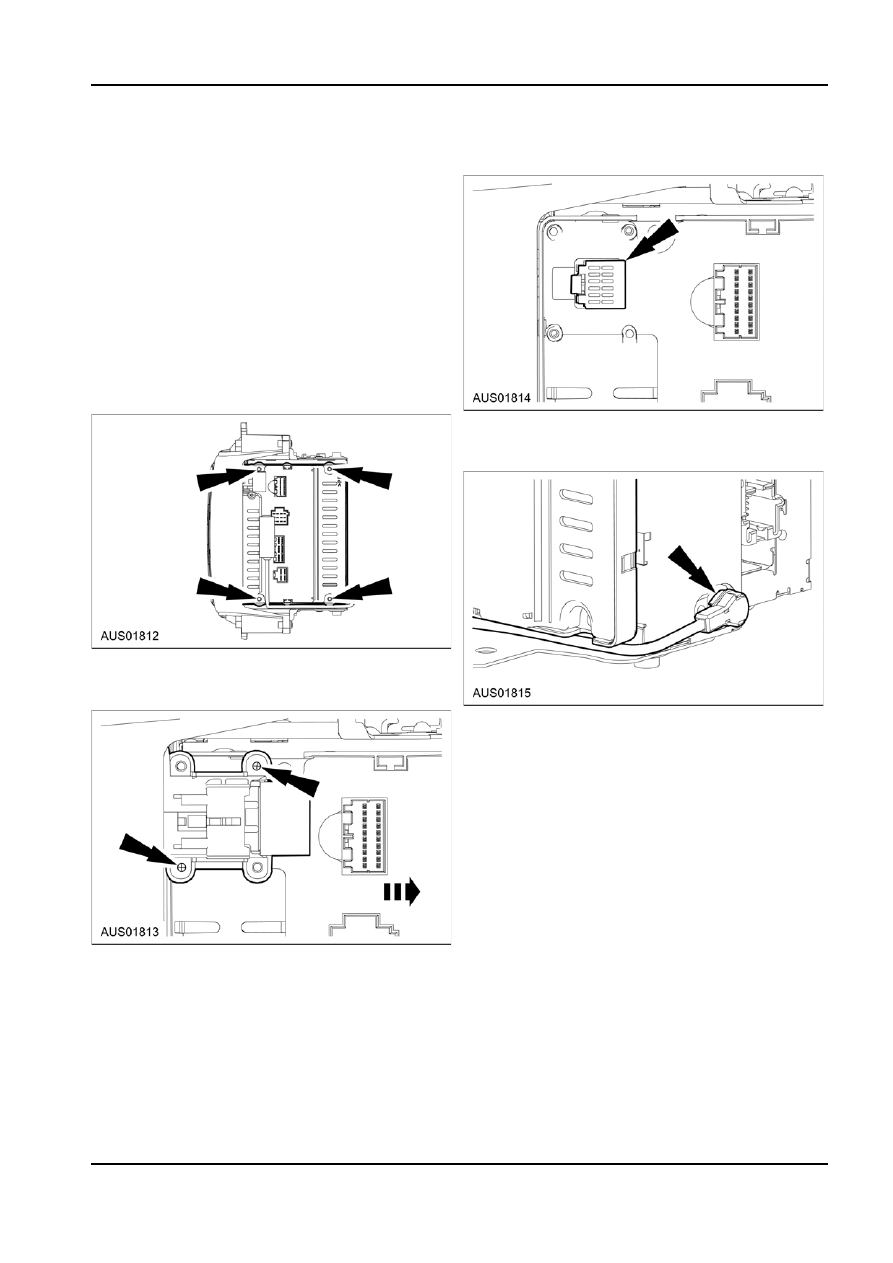
4. Disconnect the remaining black connector from
Service Body Computer (BEM)
Body Computer.
Removal
NOTE: The 6 CD Audio Mechanism for Mid and High
Premium Sound Audio is very fragile. At no stage can
the Audio Module cannot be shocked or excessively
vibrated, especially when rotated beyond 90 degrees.
If the Audio Module is shocked or excessively vibrated
at any stage during removal, service or transport, the
Audio warranty is voided.
1. To access the Body Computer, place the ICC on
its side on a clean surface to prevent damage to
the Class A surface.
2. Remove 4 X M5 screws used to hold the Body
Computer to the Audio module.
5. Disconnect the antenna wire from the Audio
Module and remove Body Computer together with
the antenna cable.
3. If fitted with Satellite Navigation (TFT Screen
connection), remove 2 X M3 screws to separate
connector holder from Body Computer.
6. If only the Body Computer is to be serviced,
remove the antenna cable from the Body
Computer, and retain the antenna cable with the
vehicle.
NOTE: If only the Body Computer is to be
returned, ensure that the original Antenna
Leadwire remains with the vehicle & is fitted to the
replacement Body Computer.
If only the ICC is to be returned, ensure that both
the original Body Computer and original Antenna
Leadwire remain with the vehicle.
Replacement Body Computers are NOT be
supplied with Antenna Leadwires. Serviced ICC’s
are NOT supplied with Body Computers OR
Antenna Leadwires.
G86739 en