Ford Taurus (2018 year). Manual - part 11
 

  Index      Ford     Ford Taurus - service manual 2018 year in english


Search            


Content   ..  9  10  11  12   ..


Ford Taurus (2018 year). Manual - part 11


Use the key blade to start your vehicle and
unlock or lock the driver door from outside
your vehicle. You can also use the key
blade to lock and unlock the glove
compartment. The transmitter portion
functions as the remote control.

E163047

Note:

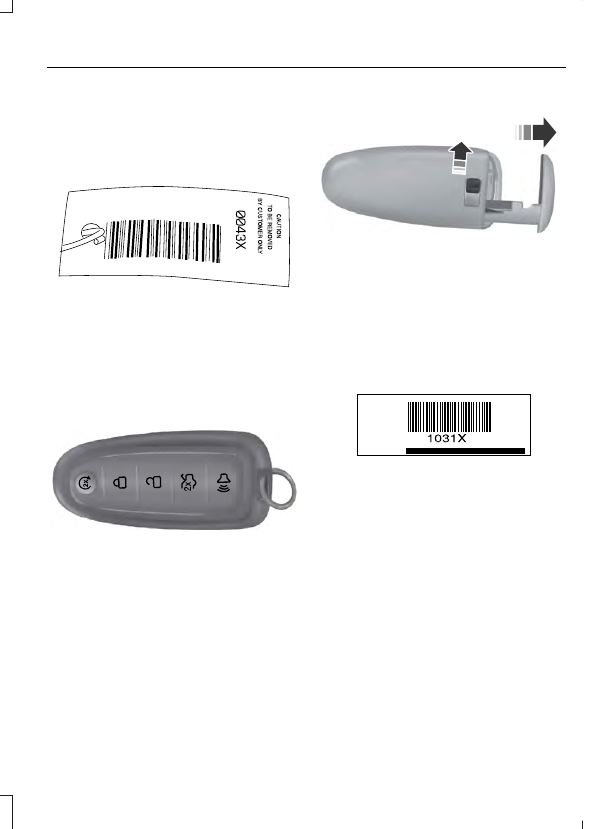
 Your vehicle keys came with a

security label that provides important key
cut information.  Keep the label in a safe
place for future reference.

Intelligent Access Key

 (If Equipped)

Note:

A three-button remote control

operates similarly.

E138616

The intelligent access keys operate the
power locks and the remote start system.
The key must be in your vehicle to use the
push button start.

E142431

The intelligent access key also contains a
removable key blade that you can use to
unlock your vehicle. You can also use the
key blade to lock and unlock the glove
compartment. Slide the release on the
back of the remote control to release the
key blade, then pull the blade out.

E138618

Note:

 Your vehicle keys came with a

security label that provides important key
cut information.  Keep the label in a safe
place for future reference.

Replacing the Battery

Note:

Refer to local regulations when

disposing of transmitter batteries.

Note:

Do not wipe off any grease on the

battery terminals or on the back surface of
the circuit board.

Note:

 Replacing the battery does not erase

the programmed key from your vehicle.  The
transmitter should operate normally.

The remote control uses one coin-type
three-volt lithium battery CR2032 or
equivalent.

Integrated Keyhead Transmitter

E235202

1.

Twist a thin coin in the slot of the
transmitter near the key ring to remove
the battery cover.

2. Carefully remove the rubber gasket

from the transmitter if it does not come
off with the battery cover.

3. Remove the old battery.

E235203

4. Insert a new battery with the + facing

upward. Press the battery down to
make sure it is fully in the housing.

5. Reinstall the battery housing cover

onto the transmitter.

Intelligent Access Key

1.

Remove the key blade from the
transmitter.

E142432

2. Twist a thin coin under the tab hidden

behind the key blade head to remove
the battery cover. Do not use the key
blade to remove the cover or you could
damage it.

E138622

3. Remove the old battery.

4. Insert a new battery with the + facing

downward. Press the battery down to
make sure it is fully in the housing.

5. Reinstall the battery housing cover

onto the transmitter and install the key
blade.

Car Finder

E138623

Press the button twice within
three seconds.

The horn sounds and the direction
indicators flash.  We recommend you use
this method to locate your vehicle, rather
than using the panic alarm.

Note:

If any door or the liftgate is open, or

if the hood is open on vehicles with an
anti-theft alarm or remote start, the horn
will sound twice and the direction indicators
will not flash.

Sounding the Panic Alarm

E138624

Press the button to sound the
panic alarm.  Press the button
again or switch the ignition on to

turn it off.

Note:

The panic alarm only operates when

the ignition is off.

Remote Start

 (If Equipped)

WARNING

To avoid exhaust fumes, do not use
remote start if your vehicle is parked
indoors or in areas that are not well

ventilated.

Note:

Do not use remote start if your fuel

level is low.

E138625

The remote start button is on the
transmitter.

This feature allows you to start your
vehicle from the outside. The transmitter
has an extended operating range.

Vehicles with automatic climate control
can be configured to operate when the
vehicle is remote started.  See Automatic
Climate Control

 (page 109).

Many states and provinces have
restrictions for the use of remote start.
Check your local and state or provincial
laws for specific requirements regarding
remote start systems.

The remote start system does not work if
any of the following occur:

The ignition is on.

The anti-theft alarm triggers.

You switch off the feature.

The hood is open.

The transmission is not in park (P).

The battery voltage is below the
minimum operating voltage.

The service engine soon indicator was
on the last time your vehicle was
driven.

Remote Starting Your Vehicle

Note:

 You must press each button within

three seconds of each other.  If you do not
follow this sequence, your vehicle does not
start remotely, the direction indicators do
not flash twice and the horn does not sound.

E138626

The label on your transmitter details the
starting procedure.

To start your vehicle remotely:

1.

Press the lock button to lock all the
doors.

2. Press the remote start button twice.

The exterior lamps flash twice.

The horn sounds if the system fails to start,
unless quiet start is on. Quiet start runs the
blower fan at a slower speed to reduce
noise. You can switch this feature on or off
in the information display.  See General
Information

 (page 88).

Note:

If you remote start your vehicle with

an integrated keyhead transmitter, you must
switch the ignition on before driving your
vehicle. If you remote start your vehicle with
an intelligent access transmitter, you must
press the push button ignition switch on the
instrument panel once while applying the
brake pedal before driving your vehicle.

The power windows do not work during
remote start and the radio does not turn
on automatically.

The parking lamps remain on and the
vehicle runs for 5, 10 or 15 minutes,
depending on the setting.

Extending the Engine Running Time

To extend the engine running time duration
of your vehicle during remote start, repeat
steps 1 and 2 while the engine is running.
If the duration is set to 10 minutes, the
duration extends by another 10 minutes.
For example, if your vehicle had been
running from the first remote start for 5
minutes, your vehicle continues to run now
for a total of 20 minutes.  You can extend
the remote start up to a maximum of 35
minutes.

Wait at least five seconds before remote
starting after the engine stops running.

Turning Your Vehicle Off After Remote
Starting

E138625

Press the button once.  The
parking lamps turn off.

You may have to be closer to your vehicle
to remotely switch off your vehicle after
remote starting. This is due to the added
noise of your running vehicle.

You can switch this feature on or off in the
information display.  See General
Information

 (page 88).

Memory Feature

 (If Equipped)

You can use the remote control to recall
memory settings for the driver seat, power
mirrors, power steering column and power
adjustable foot pedals. Press the unlock
button on the remote control or unlock
your vehicle with the intelligent access key
to recall the memory positions. You can
program the remote control or intelligent
access key to recall memory positions.  See
Memory Function

 (page 124).

REPLACING A LOST KEY OR
REMOTE CONTROL

 (page 64).


Content   ..  9  10  11  12   ..