Ford Super Duty (2018 year). Manual - part 59
 

  Index      Ford     Ford Super Duty - service manual 2018 year in english


Search            


Content   ..  57  58  59  60   ..


Ford Super Duty (2018 year). Manual - part 59


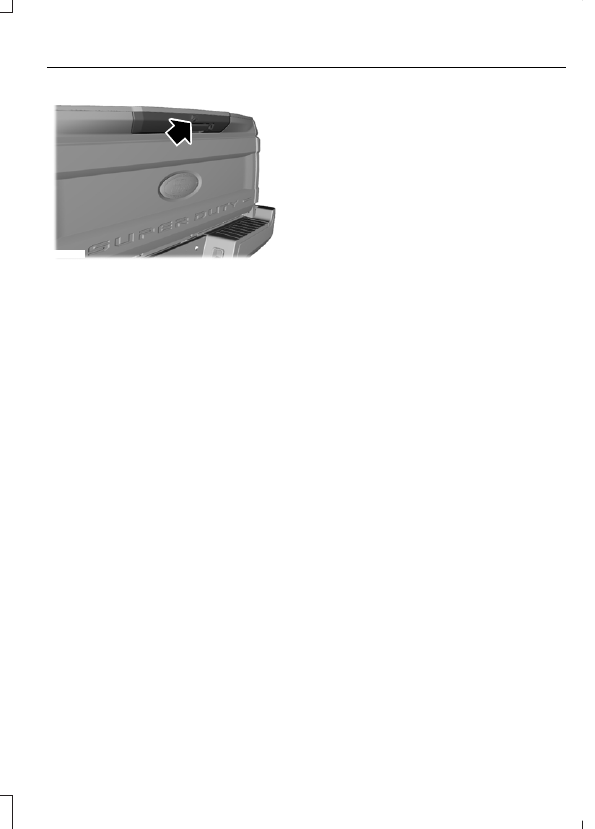
E223144

The rear view camera is located on the
tailgate.

Using the Rear View Camera
System

The system uses three types of guides to
help you see what is behind your vehicle:

Active guidelines: Show the intended
path of your vehicle when reversing.

Fixed guidelines: Show the actual path
your vehicle is moving while reversing
in a straight line. This can be helpful
when backing into a parking space or
aligning your vehicle with another
object behind you.

Centerline: Helps align the center of
your vehicle with an object (for
example, a trailer).

Note: If the transmission is in reverse (R)
and the tailgate is ajar, no rear view camera
features are displayed.

Note: If the image does not turn off while
the transmission is not in reverse (R) and
you are driving over a speed of 5 mph
(8 km/h), have the system inspected by an
authorized dealer.

Note: When towing, the camera only sees
what is being towed behind your vehicle.
This might not provide adequate coverage
as it usually provides in normal operation
and some objects might not be seen. In
some vehicles, the guidelines may disappear
once the trailer tow connector is engaged.

The camera may not operate correctly
under the following conditions:

Nighttime or dark areas if the reverse
lamps are not operating.

Mud, water or debris obstructs the
camera's view. Clean the lens with a
soft, lint-free cloth and non-abrasive
cleaner.

The camera is misaligned due to
damage to the rear of your vehicle.

Camera Guidelines

Note: Active guidelines and fixed guidelines
are only available when the transmission is
in reverse (R).

Note: The centerline is only available if
Active or Fixed guidelines are on.

Note: Some vehicles may not come
equipped with guidelines.

A

B C

D

F

E

E142436

Active guidelines

A

Centerline

B

Fixed guideline: Green zone

C

Fixed guideline: Yellow zone

D

Fixed guideline: Red zone

E

Rear bumper

F

To use active guidelines, turn the steering
wheel to point the guidelines toward an
intended path. If the steering wheel
position is changed while reversing, the
vehicle might deviate from the original
intended path.

The active guidelines fade in and out
depending on the steering wheel position.
The active guidelines are not shown when
the steering wheel position is straight.

Always use caution while reversing.
Objects in the red zone are closest to your
vehicle and objects in the green zone are
farther away. Objects are getting closer to
your vehicle as they move from the green
zone to the yellow or red zones. Use the
side view mirrors and rear view mirror to
get better coverage on both sides and rear
of your vehicle.

Obstacle Distance Indicator

E190459

The system will provide an image of your
vehicle and the sensor zones. The zones
will highlight green, yellow and red when
the parking aid sensors detect an object in
the coverage area.

Rear Camera Delay

Selectable settings for this feature are ON
and OFF.

When shifting the transmission out of
reverse (R) and into any gear other than
park (P), the camera image remains in the
display until:

Your vehicle speed sufficiently
increases.

You shift your vehicle into park (P).

You apply the parking brake on vehicles
with a manual transmission.

360 DEGREE CAMERA

 (If Equipped)

WARNINGS

The 360 degree camera system still
requires the driver to use it in
conjunction with looking out of the

windows, and checking the interior and
exterior mirrors for maximum coverage.

Objects that are close to either
corner of the bumper or under the
bumper, might not be seen on the

screen due to the limited coverage of the
camera system.

Use caution when turning camera
features on or off when the
transmission is not in park (P). Make

sure your vehicle is not moving.

Note: The 360 degree camera system turns
off when your vehicle is in motion at low
speed, except when in reverse (R).

The 360 degree camera system consists
of front, side and rear cameras. The
system:

Allows you to see what is directly in
front or behind your vehicle.

Provides cross traffic view in front and
behind your vehicle.

Allows you to see a top-down view of
the area outside your vehicle, including
the blind spots.

Provides visibility around your vehicle
to you in parking maneuvers such as:

Centering in a parking space.

Obstacles near vehicle.

Parallel parking.

Camera Views

E205884

The camera button is located on
the instrument panel. Pressing
the camera button activates the

system.

When in park (P), neutral (N) or drive (D),
only images from the front cameras are
displayed. Press the camera button to
display the front camera image on the
display screen.

When in reverse (R), only images from the
rear cameras are displayed. When you shift
into reverse (R), the rear view camera
image automatically shows on the display
screen.

Advanced Camera Views

 (If Equipped)

E233726

Additional camera views may be
available for vehicles with
specific features. Press the small

camera icon shown on the top left corner
of the display screen to open the camera
view menu.

The following camera views can be
accessed in park (P), neutral (N) or drive
(D) when you press the camera button:

Front 360 + Normal: Contains the
normal front camera view next to a
360 degree camera view.

Front Normal View: Provides an
image of what is directly in front of your
vehicle.

Front Split View: Provides an
extended view of what is in front of
your vehicle.

Rear High View: Provides an image
of your truck bed and can be used to
assist you when backing up to align and
hitch a fifth wheel or gooseneck trailer.

Auxiliary View: Provides a rear view
image from the back of your trailer
while reversing.

The following camera views can be
accessed when you shift into reverse (R):

Rear 360 + Normal: Contains the
normal rear camera view next to a 360
degree camera view. Press the zoom
(+) button to quickly access Rear
Normal View from this screen.

Rear Normal View: Provides an image
of what is directly behind your vehicle.

Rear Split View: Provides an
extended view of what is behind your
vehicle.

Rear High View: Provides an image
of your truck bed and can be used to
assist you when backing up to align and
hitch a fifth wheel or gooseneck trailer.

Auxiliary View: Provides a rear view
image from the back of your trailer
while reversing.

Trailer Reverse Guidance View:
Provides an image of the rear of your
vehicle using the side cameras, useful
when reversing with a trailer. Use the
arrows at the bottom of the screen to
adjust the side camera position.  See
Trailer Reversing Aids (page 275).

Keep Out Zone

E184448

The Keep Out Zone is represented by the
yellow dotted lines running parallel to your
vehicle. It is designed to give you the
indication on the ground of the fully
extended outside mirror position.

Front Camera

WARNING

The front camera system still
requires the driver to use it in
conjunction with looking out of your

vehicle.

E184044


Content   ..  57  58  59  60   ..