Ford Five Hundred (2007 year). Manual - part 10
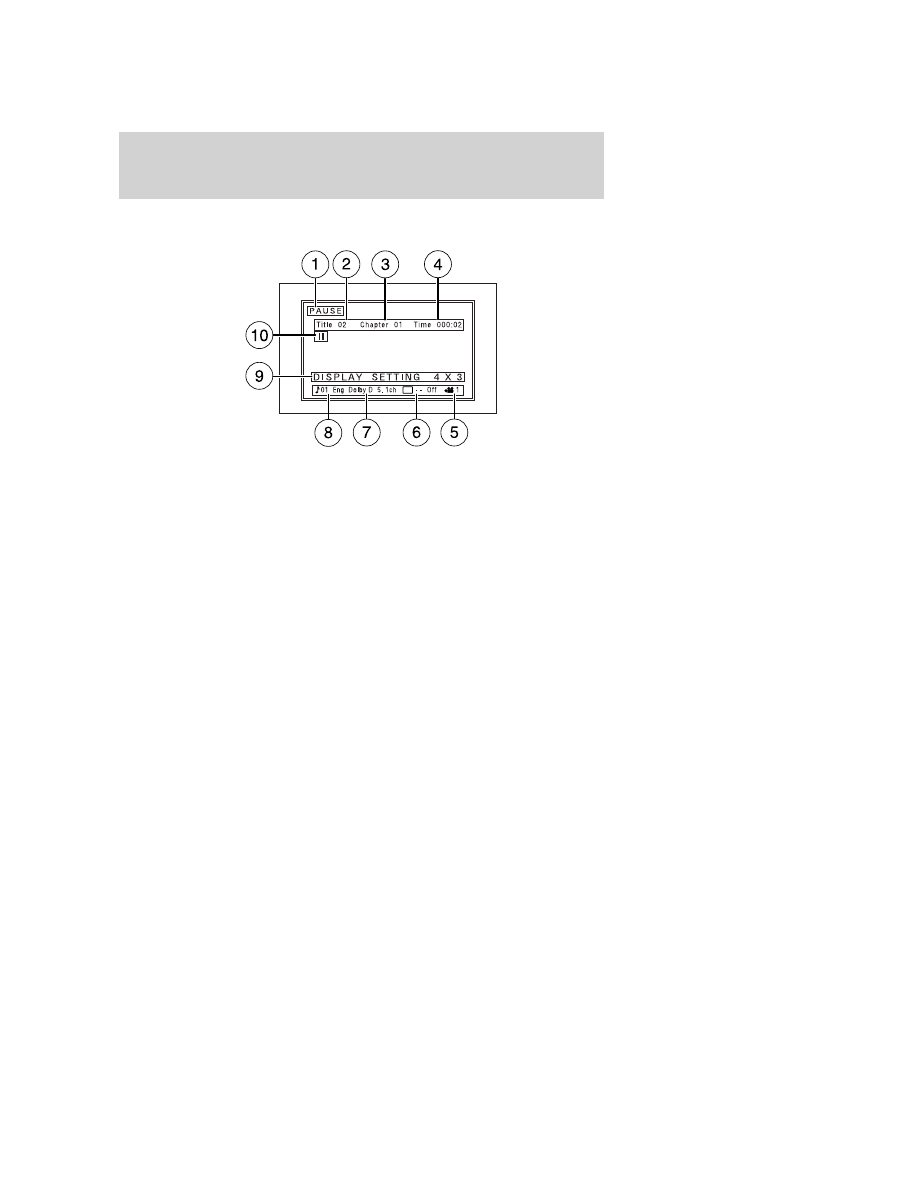
On-screen indicators
Each time a control is pressed, the operational status of the DVD player
is shown on the screen. The following are some possible indicators:
1. DVD/ CD STATUS (PLAY/FWD/REV/PAUSE)
2. CD track number / DVD title
3. DVD chapter number
4. MEDIA COUNTER — displays current viewing time of desired media.
(HOURS:MINUTES:SECONDS)
5. Viewing angle (of picture) - Adjustable with cursor controls and
ENTER control.
6. Subtitles (specific language type - English, Spanish or French,
dependent on disc capability and ON/OFF selection.)
7. AUDIO OUTPUT (not changeable)
8. AUDIO VERSION — (01 ENG., etc.)
9. DISPLAY SETTING (4x3, Zoom, 16x9)
10. STATUS ICON (FWD, x4, x8, x32, REV, x4, x8, x32, etc.)
Safety information
Read all the safety and operating instructions before operating the
system and retain for future reference.
• Do not attempt to service, repair or modify the Family Entertainment
DVD System. See your Ford or Lincoln Mercury dealer.
• Do not insert foreign objects into the DVD compartment.
Entertainment Systems
42