Ford F-150 (2018 year). Manual - part 112
E253670
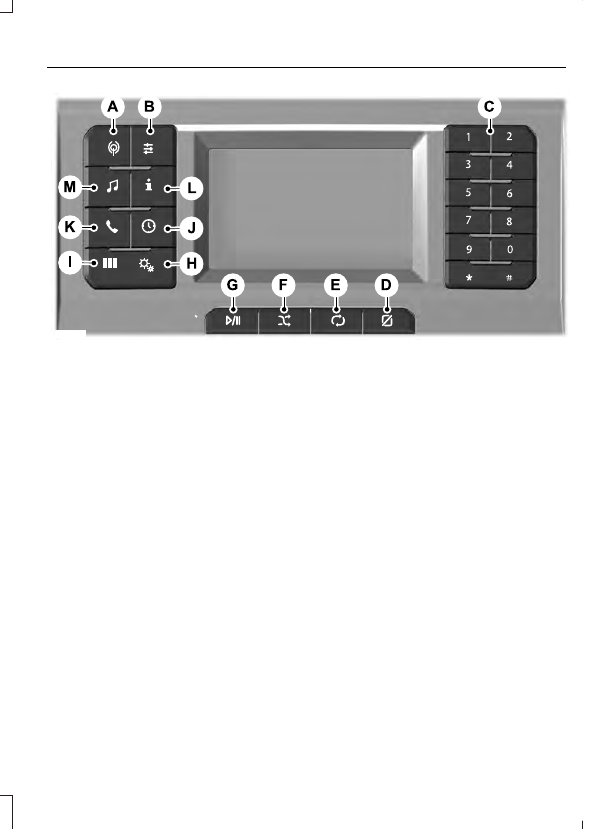
RADIO: Press to select radio mode. Press again to display the available radio
sources. Repeatedly press the button to scroll through the available radio
sources.
A
Sound settings: Press to access the sound settings. Follow the on-screen
prompts to make your selection.
B
Number block: In radio mode, store and recall your favorite radio stations. To
store a radio station, tune to the station, then press and hold a preset button
until sound returns. In phone mode, enter a phone number.
C
Display: Press to switch the display on and off.
D
Repeat: Press to repeat the current media source.
E
Shuffle: Press to shuffle the current media source.
F
Play/Pause: Press to either play or pause a track when listening to a CD.
G
Settings: Press to access the settings menu. Follow the on-screen prompts
to make your selection.
H
Apps: Press to access the apps menu. Follow the on-screen prompts to make
your selection. See your SYNC information.
I
CLOCK: Press to display the clock.
J
PHONE: Press to access the phone features. Follow the on-screen prompts to
make your selection. See your SYNC information.
K
Info: Press to access the information menu. Follow the on-screen prompts to
make your selection.
L
AUX: Press to access or switch between devices you plug into your vehicle.
M