Ford F-150 (2018 year). Manual - part 23
 

  Index      Ford     Ford F-150 - service manual 2018 year in english


Search            


Content   ..  21  22  23  24   ..


Ford F-150 (2018 year). Manual - part 23


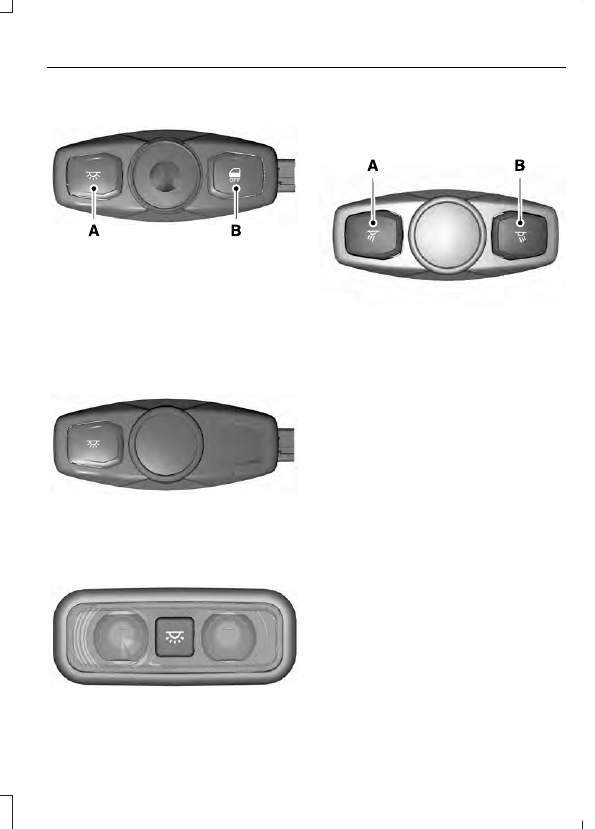
E187342

All lamps on.

A.

Door function.

B.

Rear Interior Lamps

 (If Equipped)

Type One

E187343

Type Two

E187345

Press the button to switch the lamps on
or off.

Type Three

E182517

Driver map lamp.

A.

Passenger map lamp.

B.

POWER WINDOWS

 (If Equipped)

WARNINGS

Do not leave children unattended in
your vehicle and do not let them play
with the power windows. They may

seriously injure themselves.

When closing the power windows,
you should verify they are free of
obstructions and make sure that

children and pets are not in the proximity
of the window openings.

E176215

Press the control to open the window.

Lift the control to close the window.

Note: You may hear a pulsing noise when
just one of the windows is open. Lower the
opposite window slightly to reduce this
noise.

One-Touch Up or Down

 (If Equipped)

Press or lift the switch fully and release it.
Press or lift it again to stop the window.

Note: The window may disable for up to
five minutes if you cycle it up and down
repeatedly. This helps prevent damage to
the motor. Normal operation will resume
once the motor cools.

Restoring the One-Touch Up Function

You may lose the one-touch function if the
vehicle battery is low.

To reset the function after the battery
recharges:

1.

Pull the switch all the way up.

2. Hold the switch until the glass stops

and continue to hold for two seconds.

3. Press the switch down and operate the

window to the full down position.
One-touch up will now be functional.

Note: Perform one-touch up re-calibration
with the door closed. Calibrating with the
door open will cause the window to
continuously bounce back.

Bounce-Back

 (If Equipped)

The window will automatically stop and
reverse some distance if it detects an
obstacle while closing.

Overriding the Bounce-Back Feature

WARNING

When you override the bounce-back
feature the window will not reverse
if it detects an obstacle. Take care

when closing the windows to avoid
personal injury or damage to your vehicle.

Pull up the window switch and hold within
two seconds of the window reaching the
bounce-back position. The window will
travel up with no bounce-back protection.
The window will stop if you release the
switch before the window closes fully.

Window Lock

 (If Equipped)

E176216

Press the control to lock or unlock the rear
window controls.

Accessory Delay

 (If Equipped)

The window switches remain operational
for several minutes when you switch the
ignition off or until you open either front
door.

EXTERIOR MIRRORS

Power Exterior Mirrors

 (If Equipped)

WARNING

Do not adjust the mirrors when your
vehicle is moving.

E144073

Left-hand mirror.

A

Adjustment control.

B

Right-hand mirror.

C

To adjust your mirrors, switch your vehicle
on (with the ignition in accessory mode or
the engine running) and then:
1.

Select the mirror you want to adjust.
The control lights.

2. Use the adjustment control to adjust

the position of the mirror.

3. Press the mirror control again. The

control light turns off.

Fold-Away Exterior Mirrors

Push the mirror toward the door window
glass. Make sure that you fully engage the
mirror in its support when returning it to its
original position.

Telescoping Mirrors

 (If Equipped)

E163061

This feature lets you extend the mirror
about 3 in (75 mm). It is useful when
towing a trailer. You can manually pull out
or push in the mirrors to the desired
position.

Power-Folding Mirrors

 (If Equipped)

E176218

To fold both mirrors, switch your vehicle
on (with the ignition in accessory mode or
the engine running) and then:
1.

Press the control.

2. Press control again to unfold the

mirrors.

Note: Do not stop the mirrors midway
through their movement. Wait until the
mirrors stop moving and press the control
again.

The left-hand and right-hand mirrors move
at different rates. For example, one mirror
may stop while the other one continues to
move. This is normal.
Moving the mirrors 10 or more times within
one minute, or repeated folding and
unfolding of the mirrors while holding the
control down during full travel, may disable
the system to protect the motors from
overheating. Wait approximately three
minutes with the vehicle running, and up to
10 minutes with the vehicle off, for the
system to reset and for function to return to
normal.

Loose Mirror

If your power-folding mirrors are manually
folded, they may not work properly even
after you re-position them. You need to
reset them if:

The mirrors vibrate when you drive.

The mirrors feel loose.

The mirrors do not stay in the folded or
unfolded position.

One of the mirrors is not in its normal
driving position.

To reset the power-fold feature, use the
power-folding mirror control to fold and
unfold the mirrors. You may hear a loud
noise as you reset the power-folding
mirrors. This sound is normal. Repeat this
process as needed each time the mirrors
are manually folded.

PowerScope™ Power Telescoping
Mirrors

 (If Equipped)

This feature lets you position both mirrors
at the same time.


Content   ..  21  22  23  24   ..