Ford Explorer (2018 year). Manual - part 54
 

  Index      Ford     Ford Explorer - service manual 2018 year in english


Search            


Content   ..  52  53  54  55   ..


Ford Explorer (2018 year). Manual - part 54


The system applies the brakes to slow your
vehicle to maintain a safe gap distance
from the vehicle in front.  The system only
applies limited braking.  You can override
the system by applying the brakes.

If the system determines that its maximum
braking level will not be sufficient, an
audible warning sounds when the system
continues to brake.  A red warning bar
displays on the windshield and you must
take immediate action.

Setting the Gap Distance

Note: The gap setting is time dependent
and therefore the distance automatically
adjusts with your vehicle speed.

Note: It is your responsibility to select a gap
appropriate to the driving conditions.

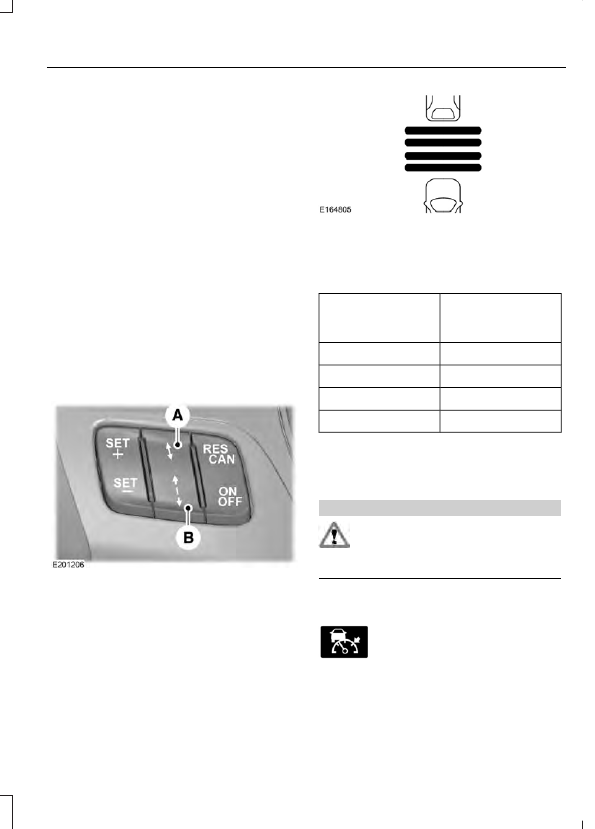
You can decrease or increase the distance
between your vehicle and the vehicle in
front by pressing the gap control.

Gap decrease.

A

Gap increase.

B

The selected gap appears in the
information display as shown by the bars
in the image.

Adaptive Cruise Control Gap Settings

Dynamic behavior

Graphic display,

bars indicated

between vehicles

Sport.

1

Normal.

2

Normal.

3

Comfort.

4

Each time you switch the system on, it
selects the last chosen gap setting.

Overriding the Set Speed

WARNING

If you override the system by pressing
the accelerator pedal, it does not
automatically apply the brakes to

maintain a gap from any vehicle ahead.

When you press the accelerator pedal, you
override the set speed and gap distance.

When you override the system,
the green indicator light
illuminates and the vehicle

graphic does not appear in the information
display.

The system resumes operation when you
release the accelerator pedal. The vehicle
speed decreases to the set speed, or a
lower speed if following a slower vehicle.

Changing the Set Speed

Press SET+ or SET- to change the set
speed in small increments.

Press the accelerator or brake pedal
until you reach the desired speed. Press
SET+ or SET-.

Press and hold SET+ or SET- to
change the set speed in large
increments. Release the control when
you reach the desired speed.

The system may apply the brakes to slow
the vehicle to the new set speed.  The set
speed displays continuously in the
information display when the system is
active.

Canceling the Set Speed

Press CAN or tap the brake pedal.  The set
speed does not erase.

Resuming the Set Speed

Note: Only use resume if you are aware of
the set speed and intend to return to it.

Press RES.  Your vehicle speed returns to
the previously set speed and gap setting.
The set speed displays continuously in the
information display when the system is
active.

Automatic Cancellation

Note: If the engine speed drops too low, an
audible warning sounds and a message
appears in the information display.
Automatic braking releases.

The system does not operate below
12 mph (20 km/h).

Hilly Condition Usage

Note: An audible alarm sounds and the
system shuts down if it applies brakes for
an extended period of time. This allows the
brakes to cool. The system functions
normally again when the brakes have
cooled.

Select a lower gear during prolonged
downhill driving on steep slopes, such as
mountainous areas, when the system is
active. In such situations, the system needs
additional engine braking to reduce the
load on the vehicle’s regular brake system
to prevent the brakes from overheating.

Switching Adaptive Cruise Control
Off

Note: You erase the set speed and gap
setting when you switch the system off.

Press OFF when the system is in standby
mode, or switch the ignition off.

Detection Issues

WARNINGS

On rare occasions, detection issues
can occur due to the road
infrastructures, for example bridges,

tunnels and safety barriers. In these cases,
the system may brake late or
unexpectedly. At all times, you are
responsible for controlling your vehicle,
supervising the system and intervening, if
required.

If the system malfunctions, have your
vehicle checked as soon as possible.

The radar sensor has a limited field of view.
It may not detect vehicles at all or detect
a vehicle later than expected in some
situations. The lead vehicle graphic does
not illuminate if the system does not
detect a vehicle in front of you.

Detection issues can occur:

When driving on a different line
than the vehicle in front.

A

With vehicles that edge into your
lane. The system can only detect
these vehicles once they move
fully into your lane.

B

There may be issues with the
detection of vehicles in front
when driving into and coming out
of a bend or curve in the road.

C

In these cases, the system may brake late
or unexpectedly. You should stay alert and
take action when necessary.

If something hits the front end of your
vehicle or damage occurs, the
radar-sensing zone may change. This could
cause missed or false vehicle detection.

System Not Available

The system may not turn on if there is:

A blocked sensor.

High brake temperature.

A failure in the system or a related
system.

Blocked Sensor

Note: You cannot see the sensor. It is
behind a fascia panel.

A message displays if something obstructs
the radar signals from the sensor.  The
sensor is in the lower grille.  The system
cannot detect a vehicle ahead and does
not function when something blocks the
sensor.

Possible Causes and Actions for This Message Displaying:

Action

Cause

Clean the grille surface in front of the radar
or remove the object causing the obstruc-
tion.

The surface of the radar is dirty or
obstructed.

Wait a short time. It may take several
minutes for the radar to detect that it is free
from obstruction.

The surface of the radar is clean but the
message remains in the display.

Do not use the system in these conditions
because it may not detect any vehicles
ahead.

Heavy rain or snow is interfering with the
radar signals.

Do not use the system in these conditions
because it may not detect any vehicles
ahead.

Water, snow or ice on the surface of the
road may interfere with the radar signals.

Wait a short time or switch to normal cruise
control.

You are in a desert or remote area with no
other vehicles and no roadside objects.

Due to the nature of radar technology, it is possible to get a blockage warning with no
actual block. This happens, for example, when driving in sparse rural or desert
environments. A false blocked condition either self clears, or clears after you restart your
vehicle.

Switching to Normal Cruise
Control

WARNING

Normal cruise control will not brake
when your vehicle is approaching
slower vehicles. Always be aware of

which mode you have selected and apply
the brakes when necessary.

You can manually change from adaptive
cruise control to normal cruise control
through the information display.

The cruise control indicator light
replaces the adaptive cruise
control indicator light if you

select normal cruise control. The gap
setting does not display, and the system
does not automatically respond to lead
vehicles. Automatic braking remains active
to maintain set speed.


Content   ..  52  53  54  55   ..