Ford Explorer (2018 year). Manual - part 36
 

  Index      Ford     Ford Explorer - service manual 2018 year in english


Search            


Content   ..  34  35  36  37   ..


Ford Explorer (2018 year). Manual - part 36


Power Lumbar

 (If Equipped)

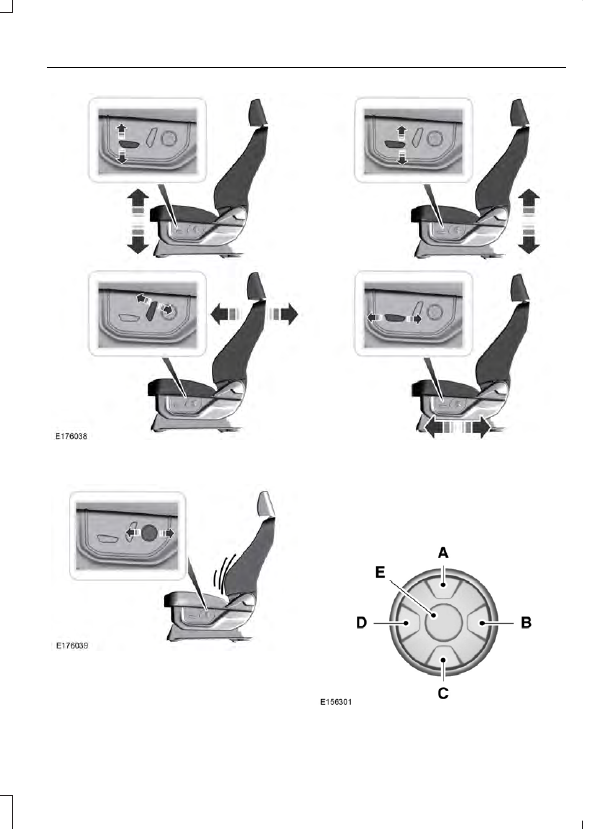
Multi-Contour Front Seats With
Active Motion 

 (If Equipped)

Note: The massage system will turn off
after 20 minutes.

Note: The engine must be running or the
vehicle must be in accessory mode to
activate the seats.

Note: Allow a few seconds for any selection
to activate. The seatback and cushion
massage cannot function at the same time.

Lumbar and bolster mode

Massage mode

Upper lumbar

Back massage intensity

adjustment

A

Lumbar decrease

Massage intensity decrease

and off

*

B

Lower lumbar

**

Cushion massage intensity

adjustment

C

Lumbar increase

Massage intensity increase

D

-

On and off

E

*

The massage feature will default to an

alternating massage mode with back
massage intensity adjustment. The lumbar
and bolster feature will default to the
middle lumbar mode.

**

Press C a second time to adjust the back

bolster. Press C a third time to adjust the
cushion bolster.

You can also adjust this feature through
the touchscreen. When switched on, the
system displays directions for you to adjust
the lumbar settings in your seat or to set
the massage function. To access and make
adjustments to the lumbar setting:

1.

Press the Menu Settings icon > Vehicle
> Multi-contour Seat.

2. Choose the desired seat to adjust.

3. Press the + or - to adjust the lumbar

intensity.

To access and make adjustments to the
massage setting:

1.

Press the Menu Settings icon > Vehicle
>Multi-contour Seat.

2. Choose the desired seat to adjust.

3. Press Off, Lo or Hi.

MEMORY FUNCTION

 (If Equipped)

WARNINGS

Before activating the memory seat,
make sure that the area immediately
surrounding the seat is clear of

obstructions and that all occupants are
clear of moving parts.

Do not use the memory function
when your vehicle is moving.

This feature automatically recalls the
position of the following:

Driver seat.

Power mirrors.

Optional power adjustable foot pedals.

Optional power steering column.

The memory control is on the driver door.

Saving a PreSet Position

1.

Switch the ignition on.

2. Adjust the memory features to your

desired position.

3. Press and hold the desired preset

button until you hear a single tone.

You can save up to three preset memory
positions. You can save a memory preset
at any time.

Recalling a PreSet Position

Press and release the preset button
associated with your desired driving
position. The memory features move to
the position stored for that preset.

Note: You can only recall a preset memory
position when the ignition is off, or when the
transmission is in park (P) or neutral (N) if
the ignition is on.

You can also recall a preset memory
position by:

Pressing the unlock button on your
intelligent access key fob if it is linked
to a preset position.

Unlocking the intelligent driver door
handle if a linked key fob is present.

Note: Using a linked key fob to recall your
memory position when the ignition is off
moves the seat to the Easy Entry position.

Note: Pressing any active memory feature
adjustment control, or any memory button
during a memory recall, cancels the
operation.

Linking a PreSet Position to your
Remote Control or Intelligent
Access Key Fob

Your vehicle can save the preset memory
positions for up to three remote controls
or intelligent access (IA) keys.

1.

With the ignition on, move the memory
features to the desired positions.

2. Press and hold the desired preset

button for about five seconds. A tone
sounds after about two seconds.
Continue holding until you hear a
second tone.

3. Within three seconds, press the lock

button on the remote control you are
linking.

To unlink a remote control, follow the
same procedure – except in step 3, press
the unlock button on the remote control.

Note: If more than one linked remote
control or intelligent access key is in range,
the memory function moves to the settings
of the first key to recall a memory position.

Easy Entry and Exit Feature

If you enable the easy entry and exit
feature, it automatically moves the driver
seat position rearward up to 2 in (5 cm)
when you switch the ignition off.

The driver seat returns to the previous
position when you switch the ignition on.

You can enable or disable this feature in
the information display.  See Information
Displays (page 104).

REAR SEATS

Adjusting the Rear Seats

Second Row Seats

WARNINGS

Always drive and ride with your
seatback upright and the lap belt
snug and low across the hips.

Reclining the seatback can cause an
occupant to slide under the seat's
seatbelt, resulting in severe personal

injuries in the event of a crash.

Recline Adjustment

Lift the handle to adjust the seatback
rearward or forward. The seatback can
also fold forward until it is flat.

Fold flat seatback

Lift the handle and fold the seatback
forward until it is flat.

Note: For the bench seats, make sure the
center seatbelt is unbuckled before folding
the seatback.

Moving the Seats Backward and
Forward (If Equipped)

Third Row Seats (Manual Seats)

WARNINGS

Do not place cargo or any objects
behind the seat backrest before
returning it to the original position.

Pull on the seat backrest to make sure that
it has fully latched after returning the seat
backrest to its original position. An
unlatched seat may become dangerous if
you stop suddenly or have a crash.

Do not adjust a seat or release a seat
floor latch when the vehicle is
moving. Failure to follow this

instruction could result in personal injury
or death in a sudden stop or crash.

Note: Remove items from the second-row
seat. Make sure that no bulky objects such
as purses or briefcases are on the floor in
front of the second-row seats before
tumbling them.


Content   ..  34  35  36  37   ..