Ford Expedition (2018 year). Manual - part 46
 

  Index      Ford     Ford Expedition - service manual 2018 year in english


Search            


Content   ..  44  45  46  47   ..


Ford Expedition (2018 year). Manual - part 46


AUTOMATIC TRANSMISSION

WARNINGS

Always fully apply the parking brake.
Make sure you shift into park (P) for
vehicles with an automatic

transmission. Switch the ignition off and
remove the key whenever you leave your
vehicle.

Do not use tow/haul when the road
surface is slippery. Failure to follow
this instruction could result in the

loss of control of your vehicle.

Note:

You may not be able to shift out of

park (P) unless the intelligent access key is
inside your vehicle.

Understanding the Shift Positions
of your Automatic Transmission

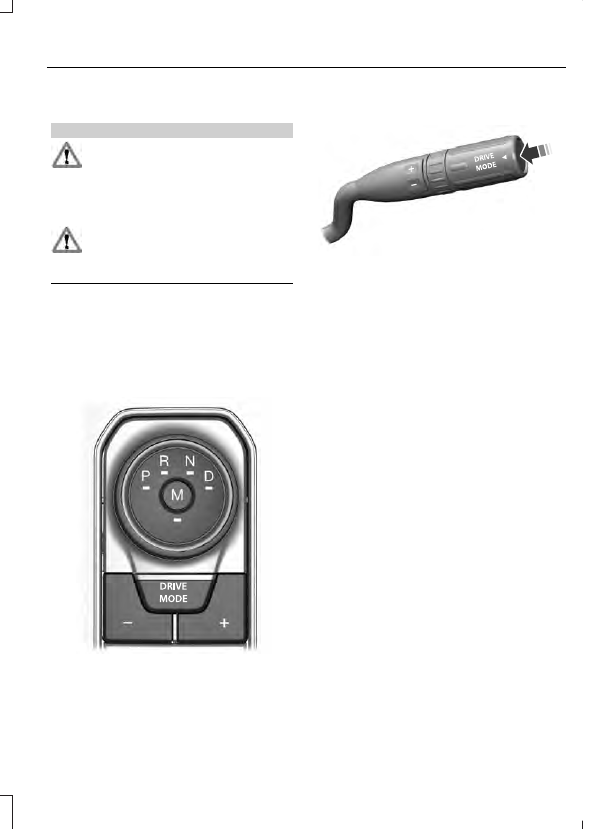
Console Shifter

E252861

Column Shifter (If Equipped)

E249567

Note:

The button on the gearshift lever can

be pressed to cycle through the available
drive modes. See Drive Control (page 251).

Putting your vehicle in or out of gear:

1.

Fully press down on the brake pedal.

2. Move the transmission selector to the

desired gear.

3. When you are finished driving, come to

a complete stop.

4. Move the transmission selector to park

(P).

Park (P)

With the transmission in park (P), your
vehicle locks the transmission and
prevents the wheels from turning. Always
come to a complete stop before putting
your vehicle into and out of park (P).

On a console shifter, when the ignition is
turned off, your vehicle automatically shifts
into park (P). If the ignition is turned off
when the vehicle is moving, it first shifts
into neutral (N) until it comes to a
complete stop. Your vehicle then shifts
into park (P) automatically.

Automatic Return to Park - Console
Shifter

Note:

This feature does not operate when

your vehicle is in Stay in Neutral mode or
neutral tow.

Your vehicle has a feature that will
automatically shift your vehicle into park
(P) when any of the following conditions
occur:

You turn the vehicle off.

You open the driver's door with your
seatbelt unlatched with the vehicle
stopped.

You unlatch your seatbelt when the
driver's door is open with the vehicle
stopped.

If you turn your vehicle off while moving,
your vehicle will first shift into neutral (N)
until it comes to a complete stop and then
shift into park (P) automatically.

Note:

If you have waited an extended

period of time (2-15 minutes) before starting
your vehicle, unlatching your seatbelt causes
this feature to turn on, even with the driver's
door closed.

Note:

This feature may not work properly

if the door ajar switch is malfunctioning. If
your door ajar indicator does not illuminate
when you open the driver’s door or the
indicator illuminates with the driver’s door
closed, see your authorized dealer.

Reverse (R)

With the selector in reverse (R), your
vehicle moves backward. Always come to
a complete stop before shifting into and
out of reverse (R).

Neutral (N)

With the selector in neutral (N), your
vehicle can be started and is free to roll.
Hold the brake pedal down while in this
position.

Stay in Neutral Mode - Console Shifter

Note:

Stay in neutral mode is a temporary

vehicle state with the ignition off. Once in
this mode, sufficient battery voltage must
be maintained or your vehicle returns to
park.

Note:

Always put your vehicle in Stay in

Neutral mode when entering an automatic
car wash. Failure to do this could result in
vehicle damage not covered by warranty.

Stay in Neutral mode allows your vehicle
to stay in neutral when you exit your
vehicle. Your vehicle must be stationary to
enter this mode.

To enter Stay in Neutral mode:

Move the transmission selector to
neutral (N).

A message will appear in your
information display screen prompting
you to press the manual (M) button.

Press the manual (M) button again to
enter Stay in Neutral mode.

A message will appear in your information
display screen when your vehicle has
entered Stay in Neutral mode.

To exit Stay in Neutral mode, apply the
brake and select a different gear.

Stay in Neutral Mode (Console Shifter)
- No Start

Use this feature to move your transmission
from the park position in the event of a no
start situation. If your vehicle has a dead
battery, an external power source will be
required.

Note:

This feature will only function if your

12-volt battery has power and the starter
can spin the engine. If vehicle battery
voltage is not sufficient, an external 12-volt
power source (for example, jumper cables,
battery charger or jump pack) may be
required for this feature to function.

Note:

Once in this mode, sufficient battery

voltage must be maintained or your vehicle
will return to park.

WARNING

When doing this procedure, you need
to take the transmission out of park
(P) which means your vehicle can

roll freely. To avoid unwanted vehicle
movement, always fully apply the parking
brake prior to doing this procedure. Use
wheels chocks if appropriate.

1.

Do not press the brake pedal. Press the
START/STOP button.

2. Fully press down on the brake pedal.

Keep the brakes applied through step
6.

3. Press the accelerator pedal to the floor

and hold through step 6.

4. Rotate transmission selector to Neutral

(N) and press the manual (M) button.

5. Press and release the push to start

button, the transmission needs a
minimum of 2 seconds to exit park.

6. When neutral (N) is displayed, the

brake and accelerator pedals can be
released.

To exit Stay in Neutral mode, select a
different gear.

A message will appear in your information
display screen when your vehicle has
entered Stay in Neutral mode.

Drive (D)

Drive (D) is the normal driving position for
the best fuel economy. The overdrive
function allows automatic upshifts and
downshifts through gears one through ten.

Manual (M)

With the transmission selector in manual
(M), you can change gears up or down as
desired. By pushing the manual (M) button,
you have control of selecting the gear you
desire using the + and - buttons on the
transmission selector.

Tow/Haul Mode

WARNING

Do not use tow/haul when the road
surface is slippery. Failure to follow
this instruction could result in the

loss of control of your vehicle.

E246592

With Column Shifter

To activate tow haul for the
column shifter, press the button

on the gearshift lever to cycle through the
available drive modes until tow haul mode
is selected. See Drive Control (page 251).
The tow haul indicator light illuminates in
the instrument cluster when the system is
active.

Without Column Shifter

To activate tow haul, you press the drive
modes button or rotate the dial, to cycle
through the available drive modes until
tow haul is selected. See Drive Control
(page 251).  T
he two haul indicator light
illuminates in the instrument cluster when
the system is active.

The tow/haul feature:

Moves upshifts to higher engine speeds
to reduce the frequency of
transmission shifting.

Provides engine braking in all forward
gears, which will slow your vehicle and
assist you in controlling your vehicle
when descending a slope.

Depending on driving conditions and
load conditions, may downshift the
transmission, slow your vehicle to help
control your vehicle speed when
descending a hill. The amount of
downshift braking provided varies
based upon the amount the brake
pedal is pressed.

The tow haul feature improves
transmission operation when towing a
trailer or a heavy load.

To deactivate the tow haul feature for
column shifter and return to normal driving
mode, press the button on the gearshift
lever twice. The indicator light deactivates
when the system turns off. Tow haul mode
also deactivates when you power down
your vehicle.

To deactivate the tow haul feature for
vehicles without a column shifter, cycle
through the available drive modes with the
drive modes button or rotary dial until tow
haul is selected and deactivate tow haul
mode. See Drive Control (page 251).  The
indicator light deactivates when the
system turns off.

SelectShift™ Automatic
Transmission

 (If Equipped)

Your vehicle is equipped with a SelectShift
Automatic transmission. The SelectShift
Automatic transmission gives you the
ability to change gears up or down without
a clutch as desired.

In order to prevent the engine from running
at too low an RPM, which may cause it to
stall, SelectShift still automatically makes
some downshifts if it has determined that
you have not downshifted in time.
Although SelectShift makes some
downshifts for you, it still allows you to
downshift at any time as long as the
SelectShift determines that damage will
not be caused to the engine from
over-revving.

Note:

Engine damage may occur if you

maintain excessive engine revving without
shifting.

E252861

The SelectShift Automatic transmission
feature has two modes: Progressive Range
Selection (PRS) and M mode.

Progressive Range Selection (PRS)

Progressive Range Selection gives you the
ability to lockout gears from the automatic
shifting range. This may provide you with
an improved driving experience, for
example, in slippery conditions or when
experiencing a steep slope.


Content   ..  44  45  46  47   ..