Fiat 500 (2022 year). Manual in english - page 10
159
154
F0S1078
The distances from the vehicle ahead
are proportional to speed. The interval
of time with respect to the vehicle
ahead remains constant and varies
from 1 second (for the short distance
1-bar setting) to 2 seconds (for the
maximum distance 4-bar setting).
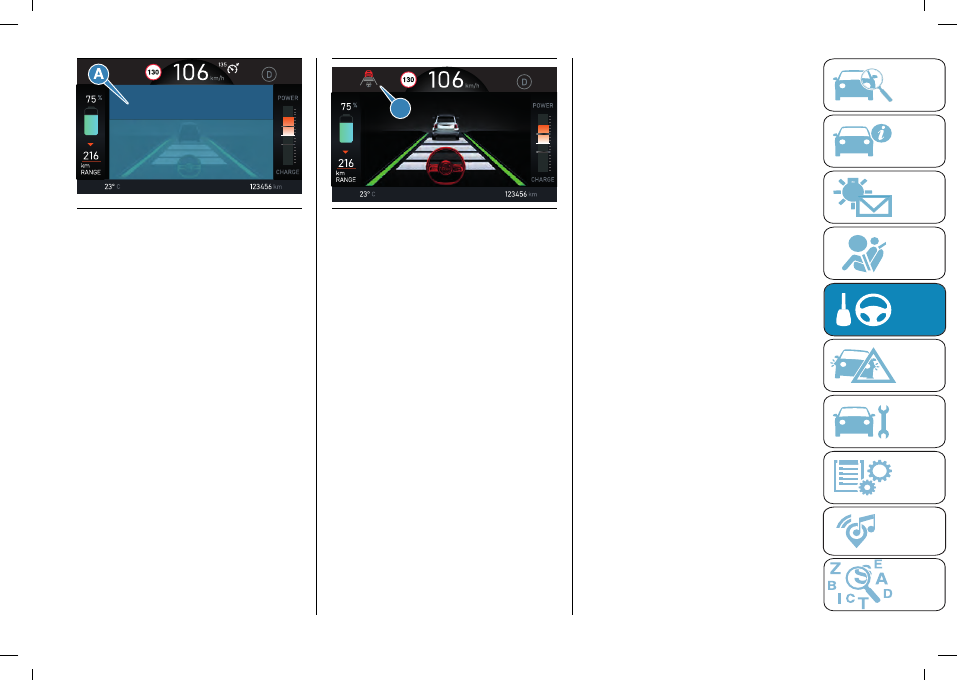
The set distance is shown on the
display by means of a dedicated icon
(A) fig. 155 (or in the “Driver Assist”
area).
The setting is 4 (maximum) the first
time the device is used. After the
distance has been modified by the
driver, the new distance will be stored
also after the system is deactivated and
reactivated.
A
155
F0S1363
To decrease the distance
Press and release the button to
decrease the distance setting (B)
fig. 152.
The distance setting decreases by one
bar (shorter) every time the button is
pressed.
Once the shortest distance has been
reached, a further press of the button
will set the longest distance. The set
speed is held if there are no cars
ahead.
If a vehicle shown on the instrument
panel proceeds in the same lane,
travelling at slower speed, an icon
appears on the display (where
provided). The device will automatically
adjust the car speed to hold the
distance setting regardless of the set
speed.
The car holds the set distance until:
the vehicle ahead accelerates to a
speed higher than the set speed;
the vehicle ahead leaves the lane
or the detection field of the Adaptive
Cruise Control device sensor;
the distance setting is changed;
the Adaptive Cruise Control device is
deactivated/cancelled.
WARNING The maximum braking
applied by the device is limited. The
driver may apply the brakes in all cases
if needed.
WARNING If the system predicts
that the braking level is insufficient to
maintain the set distance, it signals
the driver to pay attention when
approaching the vehicle ahead by
displaying an alert message on the
display. An acoustic warning is also
emitted. In this case, it is advisable to
brake immediately as necessary to hold
a safe distance from the vehicle ahead.
WARNING The driver is responsible for
ensuring that there are no pedestrians,
other cars or objectives along the
direction of the car. Failure to comply
with these precautions may cause
serious accidents and injuries.