Fiat 500 (2022 year). Manual in english - page 5
79
On the right side: time (default setting),
odometer, external temperature, date,
compass (where provided), car status
(ON, OFF, RUN).
E - Multifunctional dial indicator
and driving assistance system
notifications
70
A
B
km/h
km/h
93
F0S1074
The following are displayed in this
position:
(A) fig. 93The current speed and
whether one of the speed control
systems (Cruise Control, Adaptive
Cruise Control, Traffic Sign Recognition
and Intelligent Speed Assist) is active.
The round bar also provides visual
signals for particular states of the
selected speed control system. Refer
to the "Starting and Driving" section
for more information about driving
assistance systems.
(B): Alternative display of the state
of charge indicator and charging
conditions of the high-voltage battery.
A
C
B
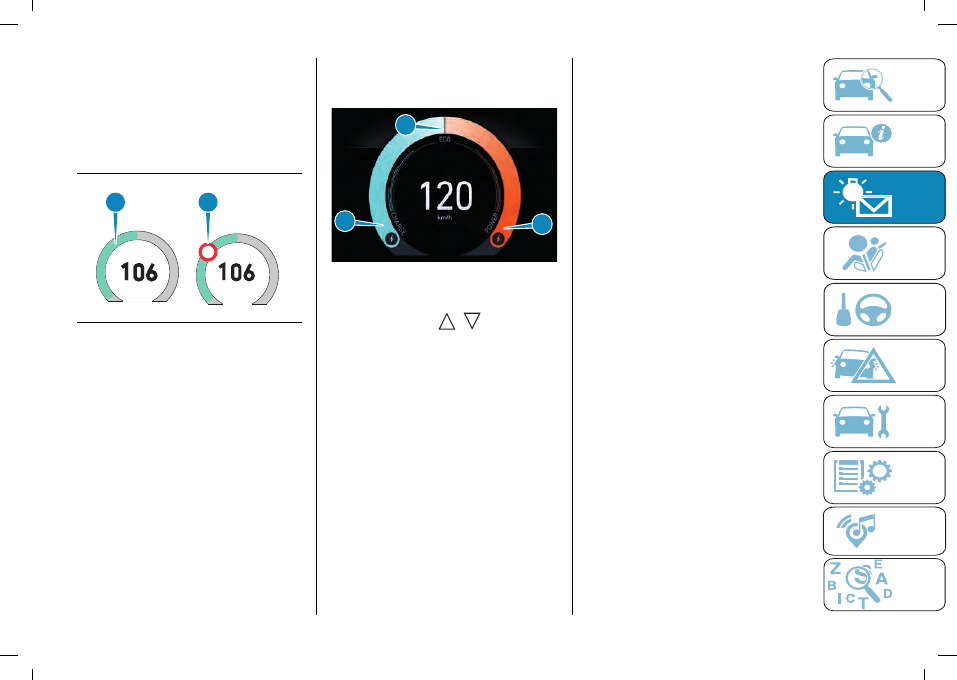
94
F0S1075
Pressing and releasing the controls on
the steering wheel
/
will open
an alternative display that indicates the
driving mode instead of speed. The
driving style is indicated in real-time by
a cursor that can be positioned in the
following areas (see fig. 94):
(A) "CHARGE": regeneration mode.
(B) "ECO": energy-saving driving.
(C) "POWER": more energy-efficient
performance driving.
F - "Compass (where provided)
For versions with
Uconnect™
system
with integrated navigator, in position (F)
fig. 91 the direction the car is travelling
in is shown in real-time.
G - Speedometer
The instantaneous speed of the car
(in km/h or mph) is displayed in this
position, which can also be displayed
at the top of the display.
H - Odometer
Kilometres or miles travelled
(depending on the display settings) are
displayed in position (H) fig. 91.
I - Amber notification or failure
indication icons
The amber notification icons (e.g. brake
pedal pressure request) or failure signal
icons are displayed in succession (in
case of several notifications) in position
(I) fig. 91.
L - Energy management
Through the display customisation
functions (see "Display Settings"
section), the energy management can
be displayed on the graduated scale (L)
fig. 91:
"POWER": the left side of the
indicator turns orange in proportion to
the power required by the electric
motor.
"CHARGE": the right side of the
indicator turns turquoise in proportion
to the amount of regeneration of the
high-voltage battery.
"ECO": the indicator turns orange
and turquoise to indicate energy-saving
driving.