Lincoln Aviator (2023 year). Manual in english - page 19
 

  Index      Manuals     Lincoln Aviator (2023 year). Manual in english


Search            copyright infringement  


Content      ..     17      18      19      20     ..


Lincoln Aviator (2023 year). Manual in english - page 19


Note:

The system turns off the front video

image when your vehicle is in motion at low
speed, except when in reverse (R).

E288873

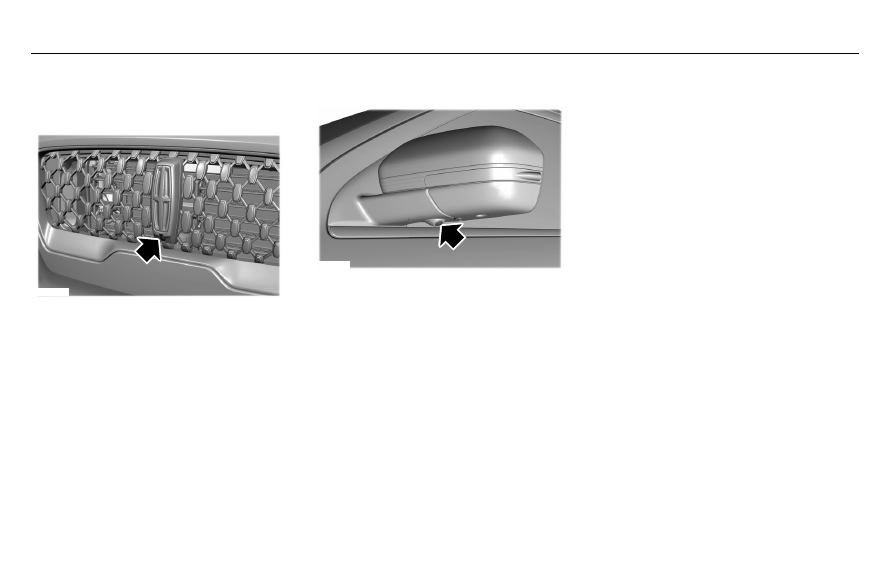
The front video camera is on the grille. It
provides a video image of the area in front
of your vehicle. It adds assistance to the
driver while driving forward at low speeds.
To use the front video camera system, place
the transmission in any gear except reverse
(R). An image displays once you press the
front camera enable button. The image on
the screen may vary according to your
vehicle's orientation or road condition.

Side Camera

E250816

The side view camera, located in the outside
mirror, provides a video image of the area
on the sides of your vehicle as part of the
front 360 + normal view and rear 360 +
normal view. It aids you while parking your
vehicle either forward or backwards.

302

Parking Aids

-------------------------------------------------------------------------------------------------------------------------------------------------------------

WHAT IS CRUISE CONTROL

Cruise control lets you maintain a set speed
without keeping your foot on the accelerator
pedal.

Requirements

Use cruise control when the vehicle speed
is greater than 20 mph (30 km/h).

SWITCHING CRUISE CONTROL ON
AND OFF

WARNING: 

Do not use cruise control

on winding roads, in heavy traffic or when
the road surface is slippery. This could
result in loss of vehicle control, serious
injury or death.

The cruise controls are on the steering
wheel.

Switching Cruise Control On

E71340

Press the button to put the system
in standby mode.

Switching Cruise Control Off

E71340

Press the button when in standby
mode or switch the ignition off.

Note:

When you switch cruise control off the

set speed clears.

SETTING THE CRUISE CONTROL
SPEED

WARNING: 

When you are going

downhill, your vehicle speed could
increase above the set speed. The system
does not apply the brakes.

Drive to the speed you prefer.

Press either button to set the
current speed.

Take your foot off the accelerator pedal.

Note:

The indicator changes color in the

information display.

Changing the Set Speed

Press and release the button to
increase the set speed in small
increments.

Press and hold the button to accelerate.
Release the button when you reach your
preferred speed.

Press and release the button to
decrease the set speed in small
increments.

Press and hold the button to decelerate.
Release the button when you reach your
preferred speed.

303

Cruise Control

-------------------------------------------------------------------------------------------------------------------------------------------------------------

Note:

 If you accelerate by pressing the

accelerator pedal, the set speed does not
change. When you release the accelerator
pedal, your vehicle returns to the speed that
you previously set.

CANCELING THE SET SPEED

E281471

Press the button, or tap the brake
pedal to cancel the set speed.

Note:

The system remembers the set speed.

Note:

The system cancels if the vehicle

speed drops below 10 mph (16 km/h) under
the set speed when driving uphill.

RESUMING THE SET SPEED

E281472

Press the button.

CRUISE CONTROL INDICATORS

E71340

Illuminates when you switch the
system on.

304

Cruise Control

-------------------------------------------------------------------------------------------------------------------------------------------------------------

HOW DOES ADAPTIVE CRUISE
CONTROL WITH STOP AND GO
WORK

Adaptive cruise control with stop and go
uses radar and camera sensors to adjust the
speed of your vehicle to maintain a set gap
from the vehicle in front of you in the same
lane while following it to a complete stop.
You can also engage the system to follow a
vehicle in front of you and adjust set speed
while stopped.

WHAT IS ADAPTIVE CRUISE
CONTROL WITH LANE CENTERING

Adaptive cruise control with lane centering
uses radar and camera sensors to help keep
your vehicle in the lane by applying
continuous assistance steering torque input
toward the lane center on highways.

Note:

The adaptive cruise control gap setting

operates normally.

WHAT IS INTELLIGENT ADAPTIVE
CRUISE CONTROL

Intelligent adaptive cruise control combines
speed sign recognition with adaptive cruise
control to adjust the cruise set speed to the
speed limit detected by the speed sign
recognition system. For example, if the speed
sign recognition system detects a 50 mph
(80 km/h) speed limit, the cruise set speed
is updated to 50 mph (80 km/h) +/- the
driver's selected speed offset.

Note:

The adaptive cruise control gap setting

operates normally.

ADAPTIVE CRUISE CONTROL
PRECAUTIONS - VEHICLES WITH:
ADAPTIVE CRUISE CONTROL
WITH LANE CENTERING

Adaptive cruise control precautions apply to
lane centering unless stated otherwise or
contradicted by a lane centering precaution.
See 

Adaptive Cruise Control Precautions

(page 306).

WARNING: 

Do not use the system

when towing a trailer. Failure to follow this
instruction could result in the loss of
control of your vehicle, personal injury or
death.

WARNING: 

Do not use the system if

any changes or modifications to the
steering wheel have been made. Any
changes or modifications to the steering
wheel could affect the functionality or
performance of the system. Failure to
follow this instruction could result in the
loss of control of your vehicle, personal
injury or death.

305

Adaptive Cruise Control

 (If Equipped)

-------------------------------------------------------------------------------------------------------------------------------------------------------------

ADAPTIVE CRUISE CONTROL
PRECAUTIONS - VEHICLES WITH:
ADAPTIVE CRUISE CONTROL
WITH STOP AND GO

WARNING: 

You are responsible for

controlling your vehicle at all times. The
system is designed to be an aid and does
not relieve you of your responsibility to
drive with due care and attention. Failure
to follow this instruction could result in the
loss of control of your vehicle, personal
injury or death.

WARNING: 

Pay close attention to

changing road conditions such as entering
or leaving a highway, on roads with
intersections or roundabouts, roads
without visible lanes of travel, roads that
are winding, slippery, unpaved, or steep
slopes.

WARNING: 

The system does not

control speed in low traction conditions or
extremely steep slopes. The system is
designed to be an aid and does not relieve
you of your responsibility to drive with due
care and attention. Failure to follow this
instruction could result in personal injury.

WARNING: 

The system is not a crash

warning or avoidance system.

WARNING: 

Do not use the system

when towing a trailer that has aftermarket
electronic trailer brake controls. Failure to
follow this instruction could result in the
loss of control of your vehicle, personal
injury or death.

WARNING: 

Do not use tire sizes

other than those recommended because
this can affect the normal operation of the
system. Failure to do so may result in a loss
of vehicle control, which could result in
serious injury.

WARNING: 

Do not use the system

with a snow plow blade installed.

WARNING: 

Do not use the system in

poor visibility, for example fog, heavy rain,
spray or snow.

When Following a Vehicle

WARNING: 

When following a vehicle

that is braking, your vehicle does not
always decelerate quickly enough to avoid
a crash without driver intervention. Apply
the brakes when necessary. Failure to
follow this instruction could result in
personal injury or death.

306

Adaptive Cruise Control

 (If Equipped)

-------------------------------------------------------------------------------------------------------------------------------------------------------------

Hilly Condition Usage

You should select a lower gear when the
system is active in situations such as
prolonged downhill driving on steep grades,
for example in mountainous areas. The
system needs additional engine braking in
these situations to reduce the load on the
vehicle’s regular brake system to prevent it
from overheating.

Note:

An audible alarm sounds and the

system shuts down if it applies brakes for an
extended period of time. This allows the
brakes to cool. The system functions
normally again after the brakes cool.

ADAPTIVE CRUISE CONTROL
LIMITATIONS - VEHICLES WITH:
ADAPTIVE CRUISE CONTROL
WITH LANE CENTERING

Adaptive cruise control limitations apply to
lane centering unless stated otherwise or
contradicted by a lane centering limitation.
See 

Adaptive Cruise Control Limitations

(page 307).

The system may not correctly operate in any
of the following conditions:

The lane is too narrow or wide.

The system does not detect at least one
lane marking or when lanes merge or
split.

Limited steering torque input is applied.

Areas under construction or new
infrastructure.

When modifications to the steering
system have been made.

When using a spare tire.

Note:

The driving assistance torque is limited

and may not be sufficient for all driving
situations such as driving through tight
curves or driving through curves at high
speeds.

Note:

In exceptional conditions, the system

may deviate from the center line.

ADAPTIVE CRUISE CONTROL
LIMITATIONS - VEHICLES WITH:
ADAPTIVE CRUISE CONTROL
WITH STOP AND GO

Sensor Limitations

WARNING: 

On rare occasions,

detection issues can occur due to the road
infrastructures, for example bridges,
tunnels and safety barriers. In these cases,
the system may brake late or
unexpectedly. At all times, you are
responsible for controlling your vehicle,
supervising the system and intervening, if
required.

WARNING: 

If the system

malfunctions, have your vehicle checked
as soon as possible.

WARNING: 

Large contrasts in outside

lighting can limit sensor performance.

307

Adaptive Cruise Control

 (If Equipped)

-------------------------------------------------------------------------------------------------------------------------------------------------------------

WARNING: 

The system only warns

of vehicles detected by the radar sensor.
In some cases there may be no warning
or a delayed warning. Apply the brakes
when necessary. Failure to follow this
instruction could result in personal injury
or death.

WARNING: 

The system may not

detect stationary or slow moving vehicles
below 6 mph (10 km/h).

WARNING: 

The system does not

detect pedestrians or objects in the road.

WARNING: 

The system does not

detect oncoming vehicles in the same lane.

WARNING: 

The system may not

operate properly if the sensor is blocked.
Keep the windshield free from obstruction.

WARNING: 

The sensor may

incorrectly track lane markings as other
structures or objects. This can result in a
false or missed warning.

E307893

E307893

The camera is mounted on the windshield
behind the interior mirror.

E307892

E307892

The radar sensor is in the lower grille.

Note:

You cannot see the sensor. It is behind

a fascia panel.

Note:

Keep the front of your vehicle free of

dirt, metal badges or objects. Vehicle front
protectors, aftermarket lights, additional
paint or plastic coatings could also degrade
sensor performance.

A message displays if something obstructs
the camera or the sensor. When something
blocks the sensor, the system cannot detect
a vehicle ahead and does not function.  See

How Does Adaptive Cruise Control With
Stop and Go Work

 (page 305).

The radar sensor has a limited field of view.
It may not detect vehicles at all or detect a
vehicle later than expected in some
situations. The lead vehicle image does not
illuminate if the system does not detect a
vehicle in front of you.

308

Adaptive Cruise Control

 (If Equipped)

-------------------------------------------------------------------------------------------------------------------------------------------------------------

Detection issues can occur:

E71621

When driving on a different line
than the vehicle in front.

A

B

With vehicles that edge into your
lane. The system can only detect
these vehicles once they move
fully into your lane.

There may be issues with the
detection of vehicles in front when
driving into and coming out of a
bend or curve in the road.

C

In these cases, the system may brake late or
unexpectedly.

If something hits the front end of your vehicle
or damage occurs, the radar-sensing zone
may change. This could cause missed or
false vehicle detection.

Optimal system performance requires a clear
view of the road by the windshield-mounted
camera.

Optimal performance may not occur if:

The camera is blocked.

There is poor visibility or lighting
conditions.

There are bad weather conditions.

SWITCHING ADAPTIVE CRUISE
CONTROL ON AND OFF

The cruise controls are on the steering
wheel.   See 

Cruise Control

 (page 104).

Switching Adaptive Cruise Control On

E144529

Press the button to set the system
in standby mode.

The indicator, current gap setting and set
speed appear in the information display.

Switching Adaptive Cruise Control Off

E144529

Press the button when the system
is in standby mode, or switch the
ignition off.

Note:

You erase the set speed when you

switch the system off.

Automatic Cancellation or Deactivation

The system may cancel if:

The tires lose traction.

You apply the parking brake.

309

Adaptive Cruise Control

 (If Equipped)

-------------------------------------------------------------------------------------------------------------------------------------------------------------

The system may cancel and set the parking
brake if:

You unbuckle the seatbelt and open the
driver door after you stop your vehicle.

Your vehicle is at a stop continuously for
more than three minutes.

The system may turn off or prevent activating
when requested if:

The vehicle has a blocked sensor.

The brake temperature is too high.

There is a failure in the system or a
related system.

SETTING THE ADAPTIVE CRUISE
CONTROL SPEED

Drive to the speed you prefer.

Press either button to set the
current speed.

Take your foot off the accelerator pedal.

The indicator, current gap setting and set
speed appear in the information display.

E2556

686

E2556

686

6

A vehicle image illuminates if there is a
vehicle detected in front of you.

Note:

When adaptive cruise control is active,

the speedometer may vary slightly from the
set speed displayed in the information
display.

Setting the Adaptive Cruise Speed
from a Complete Stop

Press and release either button
while keeping the brake pedal fully
pressed.

The set speed adjusts to 20 mph (30 km/h).

The indicator, current gap setting and set
speed appear in the information display.

Note:

The system activates from a complete

stop only when it detects a lead vehicle in
close proximity.

Manually Changing the Set Speed

Press and release to increase the
set speed in small increments.

Press and release to decrease the
set speed in small increments.

Press and hold either button to change the
set speed in large increments. Release the
button when the set speed shown is equal
to the speed you prefer.

Press the accelerator or brake pedal until
you reach the speed you prefer. Press either
button to select the current speed as the set
speed.

The system may apply the brakes to slow
the vehicle to the new set speed.  The set
speed displays continuously in the
information display when the system is
active.

310

Adaptive Cruise Control

 (If Equipped)

-------------------------------------------------------------------------------------------------------------------------------------------------------------

SETTING THE ADAPTIVE CRUISE
CONTROL GAP

Press the button to cycle through
the four gap settings.

E2556

686

E2556

686

6

The selected gap appears in the instrument
cluster display as shown by the bars in the
image.

Note:

The gap setting is time dependent and

therefore, the distance adjusts with your
vehicle speed.

Note:

It is your responsibility to select a gap

appropriate to the driving conditions.

Adaptive Cruise Control Gap Settings

Dynamic

Behavior

Gap Distance

Graphic
Display,

Bars Indic-

ated

Between

Vehicles

Sport.

Closest.

1

Normal.

Close.

2

Normal.

Medium.

3

Comfort.

Far.

4

Each time you switch the system on, it
selects the last chosen gap setting.

Following a Vehicle

When a vehicle ahead of you enters the
same lane or a slower vehicle is ahead in the
same lane, the vehicle speed adjusts to
maintain the gap setting.

Note:

When you are following a vehicle and

you switch on a turn signal lamp, adaptive
cruise control may provide a small,
temporary acceleration to help you pass.

Your vehicle maintains a consistent gap from
the vehicle ahead until:

The vehicle in front of you accelerates to
a speed above the set speed.

The vehicle in front of you moves out of
the lane you are in.

You set a new gap distance.

The system applies the brakes to slow down
your vehicle to maintain a safe gap distance
from the vehicle in front of you.  The system
only applies limited braking.  You can
override the system by applying the brakes.

Note:

The brakes may emit noise when

applied by the system.

If the system determines that its maximum
braking level is not sufficient, an audible
warning sounds, a message appears in the
instrument cluster display and an indicator
flashes when the system continues to brake.
Take immediate action.

311

Adaptive Cruise Control

 (If Equipped)

-------------------------------------------------------------------------------------------------------------------------------------------------------------

CANCELING THE SET SPEED

E281471

Press the button or tap the brake
pedal.

The set speed does not erase.

RESUMING THE SET SPEED

E281472

Press the button.

Your vehicle speed returns to the previously
set speed and gap setting.  The set speed
displays continuously in the information
display when the system is active.

Note:

Only use resume if you are aware of

the set speed and intend to return to it.

Resuming the Set Speed from a
Complete Stop

If your vehicle follows a vehicle to a complete
stop and remains stationary for less than
three seconds, your vehicle accelerates from
a stationary position to follow the vehicle
ahead.

E281472

If your vehicle follows a vehicle to
a complete stop and remains
stationary for more than three

seconds, press and release the button or
press the accelerator pedal to follow the
vehicle ahead.

OVERRIDING THE SET SPEED

WARNING: 

If you override the system

by pressing the accelerator pedal, it does
not automatically apply the brakes to
maintain a gap from any vehicle ahead.

When you press the accelerator pedal, you
override the set speed and gap distance.

Use the accelerator pedal to intentionally
exceed the set speed limit.

When you override the system, the green
indicator illuminates and the vehicle icon
does not appear in the instrument cluster
display.

The system resumes operation when you
release the accelerator pedal. The vehicle
speed decreases to the set speed, or a lower
speed if following a slower vehicle.

ADAPTIVE CRUISE CONTROL
INDICATORS - VEHICLES WITH:
ADAPTIVE CRUISE CONTROL
WITH LANE CENTERING

E262175

Illuminates when you switch lane
centering on. The color of the
indicator changes to indicate the

system status.

Gray indicates the system is on but inactive.

Green indicates the system is active and
applying assistance steering torque input to
keep your vehicle in the center of the lane.

Amber with an audible tone and then gray
indicates a system auto-cancellation.

312

Adaptive Cruise Control

 (If Equipped)

-------------------------------------------------------------------------------------------------------------------------------------------------------------

ADAPTIVE CRUISE CONTROL
INDICATORS - VEHICLES WITH:
ADAPTIVE CRUISE CONTROL
WITH STOP AND GO

E144529

Illuminates when you switch
adaptive cruise control on. The
color of the indicator changes to

indicate the system status.

White indicates the system is on but inactive.

Green indicates that you set the speed and
the system is active.

ADAPTIVE CRUISE CONTROL
INDICATORS - VEHICLES WITH:
INTELLIGENT ADAPTIVE CRUISE
CONTROL

E292490

A bracket appears around the set speed and
the detected speed limit sign in the
information display.

System Warnings

If the set speed is increased beyond the
speed limit or speed limit plus a positive
tolerance value, the set speed indicator
flashes.

The warning does not occur if:

You override the set speed using the
accelerator pedal.

The vehicle speed exceeds the set speed
due to being on a downhill slope.

SWITCHING FROM ADAPTIVE
CRUISE CONTROL TO CRUISE
CONTROL

WARNING: 

Normal cruise control will

not brake when your vehicle is
approaching slower vehicles. Always be
aware of which mode you have selected
and apply the brakes when necessary.

Use the touchscreen to select the following:

1.

Select 

Settings

.

2. Select 

Driver Assist

.

3. Select 

Cruise Control

.

4. Select 

Normal

.

313

Adaptive Cruise Control

 (If Equipped)

-------------------------------------------------------------------------------------------------------------------------------------------------------------

E71340

The cruise control indicator
replaces the adaptive cruise
control indicator if you select

normal cruise control.  The gap setting does
not display, and the system does not respond
to lead vehicles.  Automatic braking remains
active to maintain set speed.  The system
remembers the last setting when you start
your vehicle.

SWITCHING LANE CENTERING ON
AND OFF

The cruise controls are on the steering
wheel.   See 

Cruise Control

 (page 104).

E297977

Press the button.

The indicator appears in the information
display. When the system is on, the color of
the indicator changes to indicate the system
status.  See 

Adaptive Cruise Control

Indicators

 (page 312).

Note:

Adaptive cruise control must be on

before you can switch lane centering on.

Activating Lane Centering

The system only activates when all of the
following occur:

You have adaptive cruise control with
stop-and-go on.

The vehicle is centered in the lane.

Your hands are on the steering wheel at
all times.

The system detects both lane markings.

Note:

If it does not detect valid lane

markings, the system stays inactive until
valid markings are available.

You can override the system at any time by
steering your vehicle.

When lane centering is active and the
direction indicator is switched on, the system
immediately cancels. The system remains in
standby mode as long as the direction
indicator is engaged. The system re-activates
automatically once the vehicle is centered
in a lane and the direction indicator is
switched off.

System Alerts and Automatic
Cancellation

You must keep your hands on the steering
wheel at all times.

When the system is active and detects no
steering activity for a certain period of time,
the system alerts you to put your hands on
the steering wheel. If you do not react to the
warnings the system cancels and slows your
vehicle down to idle speeds while
maintaining steering control.

The system also alerts you if your vehicle
crosses lane markings without detected
steering activity.

Note:

The system may detect a light grip or

touch on the steering wheel as hands-off
driving.

When the system is cancelled due to an
external condition, for example, no lane
markings are available and your hands are
not on the steering wheel, the system
immediately alerts you to take control of the
vehicle. If this alert is ignored, the system
slows the vehicle while maintaining steering
control.

314

Adaptive Cruise Control

 (If Equipped)

-------------------------------------------------------------------------------------------------------------------------------------------------------------

Note:

There are instances where the system

can cancel without displaying a message in
the information display.

E281472

If your vehicle starts to slow down,
you must provide steering input to
the wheel and press and release

the button to regain full system performance.

Automatic cancellation can also occur if:

The lane becomes too wide or too
narrow.

The system cannot detect valid lane
markings.

Lane markings are crossed.

Note:

The system disables until the next key

cycle if your vehicle slows down due to driver
inactivity twice within a key cycle.

SWITCHING INTELLIGENT MODE
ON AND OFF

WARNING: 

You are responsible for

controlling your vehicle at all times. The
system is designed to be an aid and does
not relieve you of your responsibility to
drive with due care and attention. Failure
to follow this instruction could result in the
loss of control of your vehicle, personal
injury or death.

1.

Press 

Settings

 on the touchscreen.

2. Press 

Driver Assistance

.

3. Press 

Cruise Control

.

4. Press 

Intelligent

.

Changing the Set Speed with
Intelligent Adaptive Cruise Control

When intelligent mode is on, the system
adjusts the set speed to the speed limit
detected by the camera and the speed limit
information provided by the navigation
system.

Note:

The set speed adjusts when the

system detects a different maximum speed
limit.

Note:

The speed limit information provided

by the navigation map data may be
inaccurate or out of date.  See 

Navigation

(page 538).

Note:

The system alerts you if the set speed

increases beyond the speed limit.  See

Adaptive Cruise Control Indicators

 (page

312).

If the system does not detect a speed limit,
the vehicle speed remains at the current set
speed.

You can override the set speed at any time.
You may need to override or cancel the
system in certain situations such as inclement
weather or if an incorrect speed is set.

Note:

The system may not detect and read

speed limit signs with conditional
information, for example, when a sign is
flashing, during specific time ranges, or when
children are present.

315

Adaptive Cruise Control

 (If Equipped)

-------------------------------------------------------------------------------------------------------------------------------------------------------------

Note:

Under certain conditions, the system

may not adjust the vehicle speed until after
your vehicle passes the speed limit sign.

ADJUSTING THE SET SPEED
TOLERANCE

You can set a permanent speed tolerance
that is above or below the detected speed
limit.

1.

Press 

Settings

 on the touchscreen.

2. Press 

Driver Assistance

.

3. Press 

Cruise Control

.

4. Press 

Intelligent

.

5. Press 

Tolerance

.

6. Use 

+

 and 

-

 to set the tolerance.

Note:

You cannot set the tolerance more

than 20 mph (30 km/h) above or below the
recognized speed.

ADAPTIVE CRUISE CONTROL –
TROUBLESHOOTING

ADAPTIVE CRUISE CONTROL –
INFORMATION MESSAGES - VEHICLES
WITH: ADAPTIVE CRUISE CONTROL
WITH LANE CENTERING

Note:

Depending on your vehicle options

and instrument cluster type, not all messages
display or are available.

Note:

The system could abbreviate or

shorten certain messages depending upon
which cluster type you have.

Action

Message

Return your hands to the steering wheel and provide steering input to cancel the message.

Keep Hands on Steering Wheel

To reset the feature when the vehicle is stationary, return the gear selector to park and turn the

vehicle off. Restart the vehicle with your foot on the brake pedal.

Lane Centering Assist Not Available

You must immediately take full control of the vehicle.

Resume Control

Resume adaptive cruise control with lane centering by applying foot pressure on the accelerator

pedal. You can also resume the feature by pressing the resume button on the steering wheel.

Press Accelerator Pedal to Resume

316

Adaptive Cruise Control

 (If Equipped)

-------------------------------------------------------------------------------------------------------------------------------------------------------------

ADAPTIVE CRUISE CONTROL –
INFORMATION MESSAGES - VEHICLES
WITH: ADAPTIVE CRUISE CONTROL
WITH STOP AND GO

Note:

Depending on your vehicle options

and instrument cluster type, not all messages
display or are available.

Note:

The system could abbreviate or

shorten certain messages depending upon
which cluster type you have.

Action

Message

A malfunction is preventing the adaptive cruise from engaging.

Adaptive Cruise Malfunction

Front Sensor Not Aligned

Contact an authorized dealer to have the radar checked for proper coverage and operation.

Conditions exist preventing the system from being available.

Adaptive Cruise Not Available

You have a blocked radar because of poor radar visibility due to inclement weather or ice, mud,

or water in front of the radar. You can typically clean the sensor to resolve this.

Adaptive Cruise Not Available Sensor

Blocked See Manual

Due to the nature of radar technology, it is possible to get a blockage warning with no actual

block. This happens, for example, when driving in sparse rural or desert environments. A false

blocked condition either self clears, or clears after you restart your vehicle.

You have selected normal cruise control. The system does not brake or react to traffic.

Normal Cruise Active Adaptive Braking Off

Displays when the adaptive cruise control is going to cancel and you must take control.

Adaptive Cruise - Driver Resume Control

Displays when the vehicle speed is too slow to activate the adaptive cruise control and there is

no lead vehicle in range.

Adaptive Cruise Speed Too Low to

Activate

317

Adaptive Cruise Control

 (If Equipped)

-------------------------------------------------------------------------------------------------------------------------------------------------------------


Content      ..     17      18      19      20     ..