Citroen Jumper (2016 year). Instruction - part 5
Ventilation
63
3
EASE OF USE
and
COMFORT
jumper_en_Chap03_Ergo-et-confort_ed01-2015
dIGItAL AIr cOndItIOnInG -
MOnO-zOnE
if your vehicle is fitted with this system, the
controls are located in the middle of the
dashboard.
AutO mode
Switching on FuLL AutO
mode:
pressing the AutO control
switches on the system's functions,
confirmed by the display of FuLL
AutO. This is the normal operating mode for
the digital air conditioning system.
Using the moving ring surrounding the AUTo
control, set the comfort temperature to be
reached according to a setting between:
- HI (High to ≈ 32) and,
- LO (Low to ≈ 16).
The system controls the distribution, flow and
intake of air to ensure comfort equivalent to the
setting displayed and sufficient recirculation of
air in the passenger compartment.
no further adjustments are required.
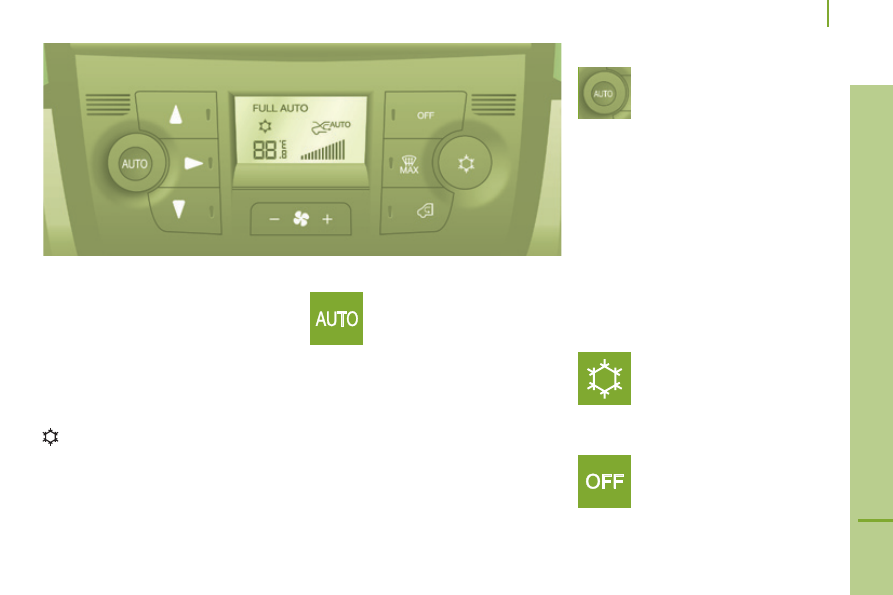
Control screen for your digital air
conditioning system.
AutO mode with personalisation
Switch on in AutO mode, certain
settings can be modified: the
distribution, the air flow, the air
conditioning and the air intake/
recirculation.
The display changes from FuLL AutO to
AutO.
To return to fully automatic operation, press
this button again. The display on the control
panel changes from AutO to FuLL AutO.
if the system is not able to maintain
the setting selected following manual
adjustments, the setting flashes then AutO
is cleared. Press the AutO control to return
to the automatic settings.
Switching off the air conditioning
Pressing this control switches
off the air conditioning functions.
The snowflake is cleared from the
screen.
complete switch-off
Pressing this control switches
the system off. The LED and the
screen switch off.
When the engine is running and the air
conditioning is on, this symbol and the
message FuLL AutO are displayed.
The other components are displayed
according to the settings selected by the user.