Citroen DS4 (2017 year). Instruction - part 6
 

  Index      Citroen     Citroen DS4 - instruction 2017 year in english


Search            


Content   ..  4  5  6  7   ..


Citroen DS4 (2017 year). Instruction - part 6


02

79

Access

DS4_en_Chap02_ouvertures_ed01-2016

This system allows automatic simultaneous locking of the doors and boot as soon as the speed of 
the vehicle exceeds 6 mph (10 km/h).

Anti-intrusion security

Operation

Activation / Deactivation

If one of the doors or the boot is open, the 
automatic central locking does not take place.

Carrying long or 
voluminous object
s

If you want to drive with the boot open, 
you should press the central locking 
button to lock the doors. Otherwise, 
every time the speed of the vehicle 
exceeds 6 mph (10 km/h), the locks 
will rebound and the alerts mentioned 
above will appear.

Pressing the central locking button unlocks the 
vehicle.
Above 6 mph (10 km/h), this unlocking is 
temporary.

Driving with the doors locked may 
render access for the emergency 
services difficult in an emergency.

This is signalled by the sound of 
the locks rebounding, accompanied 
by illumination of this symbol in the 
instrument panel, an audible signal 
and the display of an alert message.

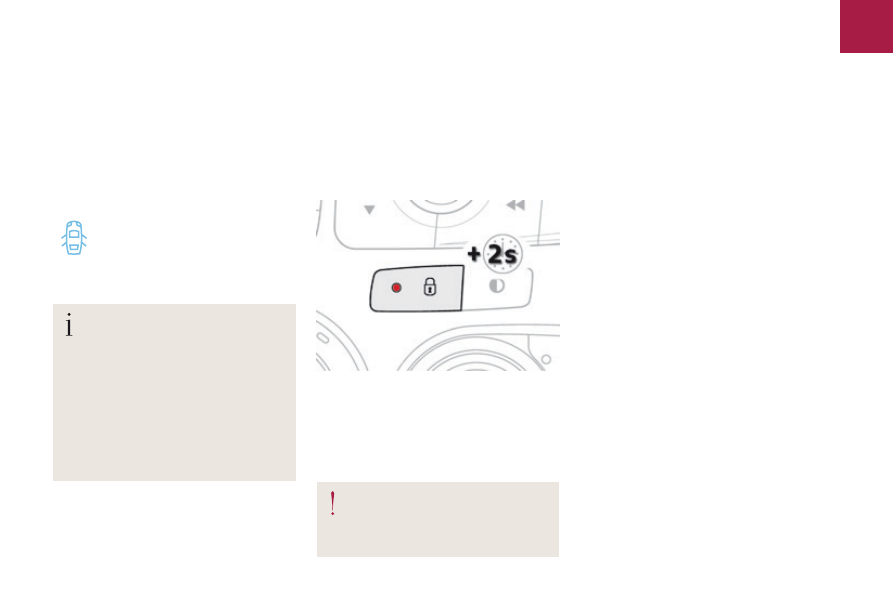
F

  With the ignition on, press this button 

until an audible signal starts and a 
corresponding message is displayed.

The state of the system stays in memory when 
switching off the ignition.

You can activate or deactivate this function 
permanently.

02

80

Access

DS4_en_Chap02_ouvertures_ed01-2016

Doors

Opening

F

  After unlocking the vehicle or with the 

electronic key of the Keyless Entry and 
Starting system in the recognition zone, 
pull the door handle.

F

  Pull the interior control lever of a front door; 

this unlocks the vehicle completely.

Closing

-  with the engine running or the 

vehicle moving (speed below 
6 mph (10 km/h)), this warning 
lamp comes on, accompanied 
by an alert message for a few 
seconds.

-  with the vehicle moving (speed above 

6 mph (10 km/h)), in addition to the warning 
lamp and alert message, there is an 
audible signal for a few seconds.

When the selective unlocking is 
activated, the first press of the remote 
control unlocking button permits 
unlocking of the driver's door only.

With the selective unlocking activated:
-  opening the driver's door unlocks 

the driver's door only (if the vehicle 
has not already been completely 
unlocked).

-  opening the passenger's door 

unlocks the rest of the vehicle.

The interior door controls do 
not operate when the vehicle is 
deadlocked.

From outside

From inside

When a door is not closed correctly:

02

81

Access

DS4_en_Chap02_ouvertures_ed01-2016

Boot

The vehicle or just the boot is unlocked, 
depending on the setting.

Selective unlocking

By default, complete unlocking is activated.
This setting is done in the "Driving" menu, 
then "Vehicle settings"

 and "Vehicle 

access"

.

When unlocking of the boot only is activated:
F

  With the electronic key on your person and 

in the recognition zone A, press the boot 
unlocking control to unlock just the boot, 
then raise the tailgate.

Use this button for access to 
additional information.

F

  Lower the tailgate using one of the interior 

grab handles.

Closing

Opening

F

  After unlocking the vehicle or the boot with 

the Keyless Entry and Starting system 
electronic key on your person in the 
recognition zone A, press the boot opening 
control then raise the tailgate.

If the boot is not closed correctly:

-  with the engine running or the 

vehicle moving (speed below 
6 mph (10 km/h)), this warning 
lamp comes on, accompanied by 
the display of an alert message 
for a few seconds.

-  with the vehicle moving (speed above 

6 mph (10 km/h)), in addition to the warning 
lamp and alert message, there is an an 
audible signal for a few seconds.

Unlocking is signalled by rapid flashing of the 
direction indicators for a few seconds.

Complete unlocking

02

82

Access

DS4_en_Chap02_ouvertures_ed01-2016

To manually unlock the boot in the event of a 
battery or central locking failure.

Back-up release

F

  Fold back the rear seats to gain access to 

the lock from inside the boot.

F

  Insert a small screwdriver into hole A of the 

lock to unlock the tailgate.

F

  Move the latch to the left.

Locking after closing

If the fault persists after closing again, the boot 
will remain locked.

Unlocking

02

83

Access

DS4_en_Chap02_ouvertures_ed01-2016

Alarm*

System which protects and provides a deterrent against theft and break-ins. It provides the following types of monitoring:

-  exterior perimeter

The system checks for opening of the vehicle.
The alarm is triggered if anyone tries to open a 
door, the boot, the bonnet...

-  interior volumetric

The system checks for any variation in the 
volume in the passenger compartment.
The alarm is triggered if anyone breaks a 
window, enters the passenger compartment or 
moves inside the vehicle.

- tilt

The system checks for any change in the 
attitude of the vehicle.
The alarm is triggered if the vehicle is lifted, 
moved or knocked.

Self-protection function

The system checks for the putting out of 
service of its components.
The alarm is triggered if the battery, the central 
control or the siren wiring are put out of service 
or damaged.

For all work on the alarm system, 
contact a CITROËN dealer or a 
qualified workshop.

* Depending on the country of sale.

02

84

Access

DS4_en_Chap02_ouvertures_ed01-2016

Locking the vehicle with full alarm system

F

  Switch off the ignition and get out of the 

vehicle.

F

  Lock the vehicle with the remote control.

or
F

  Lock the vehicle with the "Keyless Entry 

and Starting" system.

The monitoring system is active: the indicator 
lamp in the button flashes once per second 
and the direction indicators come on for about 
2 seconds.
Following an instruction to lock the vehicle, 
the exterior perimeter monitoring is activated 
after a delay of 5 seconds and the interior 
volumetric and anti-tilt monitoring after a delay 
of 45 seconds.

Deactivation

When the vehicle automatically locks 
itself again (as happens if a door or 
boot is not opened within 30 seconds of 
unlocking), the monitoring system is not 
reactivated automatically. To reactivate 
the system, it is necessary to unlock 
the vehicle and then lock it again using 
the remote control or the "Keyless 
Entry and Starting" system.

If an opening (door, boot...) is not closed 
fully, the vehicle is not locked but the exterior 
perimeter monitoring will be activated after a 
delay of 45 seconds at the same time as the 
interior volumetric and anti-tilt monitoring.

Activation

F

  Press the unlocking button on the remote 

control.

or
F

  Unlock the vehicle with the "Keyless Entry 

and Starting" system.

The monitoring system is deactivated: the 
indicator lamp in the button goes off and the 
direction indicators flash for about 2 seconds.

02

85

Access

DS4_en_Chap02_ouvertures_ed01-2016

Deactivate the interior volumetric and anti-tilt 
monitoring to avoid unwanted triggering of the 
alarm in certain cases such as:
-  leaving a pet in the vehicle,
-  leaving a window partially open,
-  washing your vehicle,
-  changing a wheel,
-  having your vehicle towed,
-  transport by sea.

Locking the vehicle with exterior perimeter monitoring only

F

  Switch off the ignition and within 

ten seconds, press the button until the 
indicator lamp is on continuously.

F

  Get out of the vehicle.

F

  Immediately lock the vehicle using the 

remote control or the Keyless Entry and 
Starting system.

The exterior perimeter monitoring alone is 
activated: the indicator lamp in the button 
flashes once per second.

To be effective, this deactivation must 
be carried out each time the ignition is 
switched off.

Reactivating the interior volumetric 

and anti-tilt monitoring

F

  Deactivate the perimeter monitoring by 

unlocking the vehicle with the remote 
control or the Keyless Entry and Starting 
system.


The indicator lamp in the button goes off.

F

  Reactivate all monitoring by locking the 

vehicle with the remote control or the 
Keyless Entry and Starting system.


The indicator lamp in the button flashes 
once per second again.

Deactivating the interior volumetric 

and anti-tilt monitoring

02

86

Access

DS4_en_Chap02_ouvertures_ed01-2016

Triggering of the alarm

This is indicated by sounding of the siren 
and flashing of the direction indicators for 
thirty seconds.
The monitoring functions remain active until 
the alarm has been triggered eleven times in 
succession.
When the vehicle is unlocked using the remote 
control or the Keyless Entry and Starting 
system, rapid flashing of the indicator lamp 
in the button informs you that the alarm was 
triggered during your absence. When the 
ignition is switched on, this flashing stops 
immediately.

Failure of the remote control

To deactivate the monitoring functions:

Locking the vehicle without 

activating the alarm

F

  Lock or deadlock the vehicle using the 

key (integral to the remote control) in the 
driver's door lock.

F

  unlock the vehicle using the key (integral to 

the remote control) in the driver's door lock,

F

  open the door; the alarm is triggered,

F

  switch on the ignition; the alarm stops; the 

indicator lamp in the button goes off.

Operating fault

When the ignition is switched on, fixed 
illumination of the indicator lamp in the button 
indicates a fault with the system.
Have it checked by a CITROËN dealer or a 
qualified workshop.

02

87

Access

DS4_en_Chap02_ouvertures_ed01-2016

1.

  Left hand front window control.

2.

  Right hand front electric window control.

The electric window controls remain 
operational for approximately 
45 seconds after the ignition is 
switched off or until the vehicle is 
locked after a door is opened.
If the passenger 's window cannot be 
operated from the driver's door control 
panel, carry out the operation from the 
passenger's door control panel, and 
vice versa.

Electric windows

Fitted with a safety anti-pinch system.

One-touch electric windows

Manual mode

After approximately ten consecutive 
complete opening/closing movements 
of the window, a protection function is 
activated which only authorises closing 
of the window to prevent damage to the 
electric window motor.
Once the window is closed, the controls 
will become available again after 
approximately 40 minutes.

F

  Press or pull the control firmly. 

The window opens or closes fully 
when the control is released.

F

  Pressing the control again stops 

the movement of the window.

Automatic mode

F

  Press or pull the control gently. 

The window stops when the 
control is released.

02

88

Access

DS4_en_Chap02_ouvertures_ed01-2016

Safety anti-pinch

When the window rises and meets an obstacle, 
it stops and partially lowers again.

Reinitialisation

If a window does not rise automatically, its 
operation must be reinitialised.
F

  Pull the control until the window stops.

F

  Release the control and pull it again until 

the window closes fully.

F

  Continue to hold the control for 

approximately one second after the window 
has closed.

F

  Press the control to lower the window 

automatically to the low position.

F

  When the window has reached the low 

position, press the control again for 
approximately one second.

The safety anti-pinch function is not 
operational during these operations.

If the window cannot be closed (for 
example, in the presence of ice), once 
the window has lowered:
F

  press and hold the control until the 

window opens fully,

F

  then pull the control immediately 

and hold it until the window closes,

F

  continue to hold the control for 

approximately one second after the 
window has closed.

The safety anti-pinch function is not 
operational during these operations.

If an obstacle is encountered during 
operation of the electric windows, you 
must reverse the movement of the 
window. To do this, press the control 
concerned.
When the driver operates the 
passenger's electric window control, 
they must ensure that nothing is 
preventing the windows closing 
correctly.
The driver must ensure that the 
passengers use the electric windows 
correctly.
Be particularly aware of children when 
operating the windows.
Be aware of passengers and/or other 
persons present when closing the 
windows with the key or the "Keyless 
Entry and Starting" system.
Always remove the key from the ignition 
when leaving the vehicle, even for a 
short time.

02

89

Access

DS4_en_Chap02_ouvertures_ed01-2016

DS4_en_Chap03_ergonomie-et-confort_ed01-2016

ERGONOMY AND COMFORT

03

DS4_en_Chap03_ergonomie-et-confort_ed01-2016

03

92

Ease of use and comfort

DS4_en_Chap03_ergonomie-et-confort_ed01-2016

Front seats

Manual adjustments

F

  Raise the control and slide the seat 

forwards or backwards.

F

  Release the control to lock the position.

F

  Pull the control upwards to raise or push 

it downwards to lower, as many times as 
necessary, to obtain the position required.

F

  Turn the control knob to adjust the seat 

backrest angle.

As a safety measure, seat adjustments should only be done when stationary.

Before moving the seat backwards, ensure that there is nothing that might prevent the full travel of the seat.
There is a risk of trapping or pinching passengers if present in the rear seats or jamming the seat if large objects are placed on the floor behind 
the seat.

Forwards-backwards

Seat height

Seat backrest angle

03

93

Ease of use and comfort

DS4_en_Chap03_ergonomie-et-confort_ed01-2016

Driver's seat electric 

adjustments

F

  Push the control forwards or rearwards to 

slide the seat.

F

  Tilt the rear part of the control upwards or 

downwards to obtain the required height.

F

  Tilt the front part of the control upwards or 

downwards to obtain the required angle.

F

  Tilt the control forwards or rearwards to 

adjust the angle of the seat backrest.

The electrical functions of the driver's seat are deactivated approximately one minute after 
the ignition is switched off.
To reactivate them, switch on the ignition.

Before moving the seat backwards, ensure that there is nothing that might prevent the full travel of the seat.
There is a risk of trapping or pinching passengers if present in the rear seats or jamming the seat if large objects are placed on the floor behind 
the seat.

Forwards-backwards

Cushion height and angle

Seat backrest angle

03

94

Ease of use and comfort

DS4_en_Chap03_ergonomie-et-confort_ed01-2016

Additional adjustments

F

  To raise a head restraint, pull it upwards.

F

  To lower the head restraint, press the lug A 

and the head restraint at the same time.

F

  To adjust the angle of the head restraint, tilt 

its lower part forwards or rearwards.

The head restraint is fitted with a frame 
with notches which prevents it from 
lowering; this is a safety device in case 
of impact.
The adjustment is correct when the 
upper edge of the head restraint is 
level with the top of the head.

Removing a head restraint

F

  To remove the head restraint, press the 

lug A and pull the head restraint upwards.

F

  To put the head restraint back in place, 

engage the head restraint stems in the 
openings keeping them in line with the seat 
back and press the lug A at the same time.

Never drive with the head restraints 
removed; they must be in place and 
adjusted correctly.

Head restraint height and angle


Content   ..  4  5  6  7   ..