Citroen Jumpy Dag (2009 year). Instruction - part 1
 

  Index      Citroen     Citroen Jumpy Dag - instruction 2009 year in english


Search            


Content   ..    1  2   ..


Citroen Jumpy Dag (2009 year). Instruction - part 1


 1

7

   Accesses   

R

E

A

D

Y

 T

O

 S

E

T

 O

F

F

2

selectivity of opening between the cab and 
the load space, contact a CITROËN dealer.  

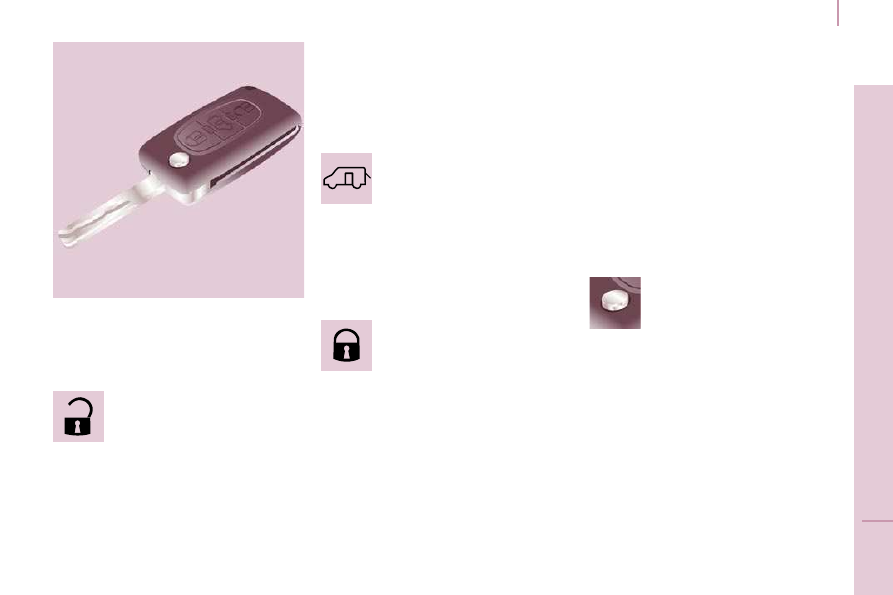
 REMOTE CONTROL 

 This is confirmed by fixed lighting of the 
direction indicators for approximately two 
seconds. 

  ACCESSES  

  Unlocking the cab 

 Press this button once to unlock 
your vehicle's cab. 

 The direction indicators flash 
twice. 

 Press this button a second time to unlock 
the side door(s) and the rear doors. 

 This selective function of the accesses is 
active when the vehicle is delivered. At your 
request, the network can deactivate this 

  Unlocking the load space 

 Press this button to unlock all of 
the rear doors. 

 This separation of the locking 
of the cab and load space is an 

operating security feature. It enables you 
to prevent access to the part of the vehicle 
from which you are absent.  

  Central locking 

 Press this button to lock your 
vehicle, cab and rear doors. 

 The direction indicators flash 
once. 

 If one of the front doors is open or is not 
closed correctly, the central locking will not 
work.  

  Deadlocking 

 If your vehicle is fitted with deadlocking,  
second press
  on the closed padlock on 
the remote control within five seconds after 
locking changes the locking to deadlocking. 

 Deadlocking renders the exterior and interior 
door opening handles inoperative: do not 
leave anyone inside the vehicle when it is 
deadlocked. 

 If deadlocking is activated from inside the 
vehicle, it will change to normal locking 
when the vehicle is started.  

  Folding/unfolding the key 

 Press this button to release the 
key from its housing. 

 To fold the key, press the 
chromed button then fold the key 

into the housing. If you do not press the 
button, the mechanism may be damaged.  

  Good practice 

 Take care not to allow the remote control to 
come into contact with grease, dust, rain or 
a damp environment. 

 A heavy object attached to the key 
(keyring, ...) weighing on the shaft of the key 
in the switch, may cause a malfunction.  

 Accesses 

 KEY 

 This locks and unlocks the locks on the 
vehicle and starts the engine. 

 REMOTE CONTROL 

 ELECTRONIC IMMOBILISER 

 All of the keys contain an electronic 
immobiliser device. 

 This device locks the engine supply system. 
It is activated automatically when the key is 
removed from the ignition. 

 After the ignition is switched on, a dialogue 
is established between the key and the 
electronic immobiliser system. 

 The metal part of the key must be unfolded 
correctly for correct dialogue to take place.  

  Programming the remote control 

 Following changing of the remote control battery 
or disconnection of the vehicle battery, the 
remote control may have to be reprogrammed. 
 Wait at least one minute before using the 
remote control. 
 Insert the key in the ignition switch with the 
buttons (padlocks) of the remote control 
facing you. 

 Switch on the ignition. 

 Press the locking padlock for at least five 
seconds within the next ten seconds. 

 Switch off the ignition. 

 Wait at least one minute before using the 
remote control. 

 The remote control is now working again.  

 There is a risk of damage if the replacement 
battery does not conform. 

 Use only identical batteries or batteries of an 
equivalent type to those recommended by 
CITROËN dealers. 

 Do not discard the remote control batteries, 
they contain metals which are harmful to the 
environment. 

 Deposit them at a CITROËN dealership, or 
at any other approved collection point.  

  Changing the battery 

 Battery ref.: CR1620/3 volts. 

 The information "battery flat" is given by an 
audible signal, accompanied by a message 
on the display. 

 To replace the battery, unclip the casing 
using a coin at the ring. 

 If the remote control does not work after the 
battery has been changed, re-programme 
the remote control. 

  If you lose your keys 

 Visit a CITROËN dealer with the 

vehicle's V5 registration document and your 
identification document. 

 A CITROËN dealer will be able to retrieve 
the key code and the transponder code so 
that a replacement key can be ordered.   

 1

9

   Accesses   

R

E

A

D

Y

 T

O

 S

E

T

 O

F

F

2

 ALARM 

 If fitted on your vehicle, this provides two 
types of protection: 

   -  

exterior protection: it sounds if a front/
rear door or the bonnet is opened. 

  -  

interior protection: it sounds if 
the volume inside the passenger 
compartment changes (breaking of 
a window or a movement inside the 
vehicle).  

  Good practice 

 Do not make any modifications to the 
electronic immobiliser system. 

 Operating the remote control, even when it 
is in your pocket, may result in involuntary 
unlocking of the doors. 

 The simultaneous use of other high 
frequency equipment (mobile telephones, 
domestic alarms…), may interfere with the 
operation of the remote control temporarily. 

 The remote control does not operate while 
the key is in the ignition, even if the ignition 
is off. 

 As a safety precaution (with children on 
board), remove the key from the ignition 
when leaving the vehicle, even for a short 
time. 

 If your vehicle is fitted with a separation 
partition, the interior protection is not active 
in the load space. 

  Locking the vehicle with complete 
alarm  

  Setting the alarm 

   -  

Switch off the ignition and get out of the 
vehicle. 

  When purchasing a second-hand vehicle:  

   -  

have the keys memorised by a 
CITROËN dealer to ensure that the keys 
in your possession are the only ones 
which can start the vehicle.   

  -  

Set the alarm within five minutes of 
getting out of the vehicle, by locking or 
deadlocking using the remote control. 
The red diode, located on the centre 
console, flashes once per second.   

  Disarming 

   -  

Unlock the vehicle with the remote 
control or switch on the ignition, the red 
diode goes out.   

  Locking the vehicle with exterior 
protection only 

 If, while you are away from the vehicle, you 
wish to leave a window partially open or a 
pet inside the vehicle, you should choose 
exterior protection only. 

   -  

Switch off the ignition. 

  -   In the next ten seconds, press 

this button, located on the 
centre console, until the red 
diode is on continuously. 

  -  

Get out of the vehicle. 

  -  

Within the next five minutes, set the 
alarm by locking or deadlocking using 
the remote control (the red diode flashes 
once a second).   

 Accesses 

 KEY 

 This locks and unlocks the locks on the 
vehicle and starts the engine. 

 REMOTE CONTROL 

 ELECTRONIC IMMOBILISER 

 All of the keys contain an electronic 
immobiliser device. 

 This device locks the engine supply system. 
It is activated automatically when the key is 
removed from the ignition. 

 After the ignition is switched on, a dialogue 
is established between the key and the 
electronic immobiliser system. 

 The metal part of the key must be unfolded 
correctly for correct dialogue to take place.  

  Programming the remote control 

 Following changing of the remote control battery 
or disconnection of the vehicle battery, the 
remote control may have to be reprogrammed. 
 Wait at least one minute before using the 
remote control. 
 Insert the key in the ignition switch with the 
buttons (padlocks) of the remote control 
facing you. 

 Switch on the ignition. 

 Press the locking padlock for at least five 
seconds within the next ten seconds. 

 Switch off the ignition. 

 Wait at least one minute before using the 
remote control. 

 The remote control is now working again.  

 There is a risk of damage if the replacement 
battery does not conform. 

 Use only identical batteries or batteries of an 
equivalent type to those recommended by 
CITROËN dealers. 

 Do not discard the remote control batteries, 
they contain metals which are harmful to the 
environment. 

 Deposit them at a CITROËN dealership, or 
at any other approved collection point.  

  Changing the battery 

 Battery ref.: CR1620/3 volts. 

 The information "battery flat" is given by an 
audible signal, accompanied by a message 
on the display. 

 To replace the battery, unclip the casing 
using a coin at the ring. 

 If the remote control does not work after the 
battery has been changed, re-programme 
the remote control. 

  If you lose your keys 

 Visit a CITROËN dealer with the 

vehicle's V5 registration document and your 
identification document. 

 A CITROËN dealer will be able to retrieve 
the key code and the transponder code so 
that a replacement key can be ordered.   

 1

9

   Accesses   

R

E

A

D

Y

 T

O

 S

E

T

 O

F

F

2

 ALARM 

 If fitted on your vehicle, this provides two 
types of protection: 

   -  

exterior protection: it sounds if a front/
rear door or the bonnet is opened. 

  -  

interior protection: it sounds if 
the volume inside the passenger 
compartment changes (breaking of 
a window or a movement inside the 
vehicle).  

  Good practice 

 Do not make any modifications to the 
electronic immobiliser system. 

 Operating the remote control, even when it 
is in your pocket, may result in involuntary 
unlocking of the doors. 

 The simultaneous use of other high 
frequency equipment (mobile telephones, 
domestic alarms…), may interfere with the 
operation of the remote control temporarily. 

 The remote control does not operate while 
the key is in the ignition, even if the ignition 
is off. 

 As a safety precaution (with children on 
board), remove the key from the ignition 
when leaving the vehicle, even for a short 
time. 

 If your vehicle is fitted with a separation 
partition, the interior protection is not active 
in the load space. 

  Locking the vehicle with complete 
alarm  

  Setting the alarm 

   -  

Switch off the ignition and get out of the 
vehicle. 

  When purchasing a second-hand vehicle:  

   -  

have the keys memorised by a 
CITROËN dealer to ensure that the keys 
in your possession are the only ones 
which can start the vehicle.   

  -  

Set the alarm within five minutes of 
getting out of the vehicle, by locking or 
deadlocking using the remote control. 
The red diode, located on the centre 
console, flashes once per second.   

  Disarming 

   -  

Unlock the vehicle with the remote 
control or switch on the ignition, the red 
diode goes out.   

  Locking the vehicle with exterior 
protection only 

 If, while you are away from the vehicle, you 
wish to leave a window partially open or a 
pet inside the vehicle, you should choose 
exterior protection only. 

   -  

Switch off the ignition. 

  -   In the next ten seconds, press 

this button, located on the 
centre console, until the red 
diode is on continuously. 

  -  

Get out of the vehicle. 

  -  

Within the next five minutes, set the 
alarm by locking or deadlocking using 
the remote control (the red diode flashes 
once a second).   

 1

9

   Accesses   

R

E

A

D

Y

 T

O

 S

E

T

 O

F

F

2

 ALARM 

 If fitted on your vehicle, this provides two 
types of protection: 

   -  

exterior protection: it sounds if a front/
rear door or the bonnet is opened. 

  -  

interior protection: it sounds if 
the volume inside the passenger 
compartment changes (breaking of 
a window or a movement inside the 
vehicle).  

  Good practice 

 Do not make any modifications to the 
electronic immobiliser system. 

 Operating the remote control, even when it 
is in your pocket, may result in involuntary 
unlocking of the doors. 

 The simultaneous use of other high 
frequency equipment (mobile telephones, 
domestic alarms…), may interfere with the 
operation of the remote control temporarily. 

 The remote control does not operate while 
the key is in the ignition, even if the ignition 
is off. 

 As a safety precaution (with children on 
board), remove the key from the ignition 
when leaving the vehicle, even for a short 
time. 

 If your vehicle is fitted with a separation 
partition, the interior protection is not active 
in the load space. 

  Locking the vehicle with complete 
alarm  

  Setting the alarm 

   -  

Switch off the ignition and get out of the 
vehicle. 

  When purchasing a second-hand vehicle:  

   -  

have the keys memorised by a 
CITROËN dealer to ensure that the keys 
in your possession are the only ones 
which can start the vehicle.   

  -  

Set the alarm within five minutes of 
getting out of the vehicle, by locking or 
deadlocking using the remote control. 
The red diode, located on the centre 
console, flashes once per second.   

  Disarming 

   -  

Unlock the vehicle with the remote 
control or switch on the ignition, the red 
diode goes out.   

  Locking the vehicle with exterior 
protection only 

 If, while you are away from the vehicle, you 
wish to leave a window partially open or a 
pet inside the vehicle, you should choose 
exterior protection only. 

   -  

Switch off the ignition. 

  -   In the next ten seconds, press 

this button, located on the 
centre console, until the red 
diode is on continuously. 

  -  

Get out of the vehicle. 

  -  

Within the next five minutes, set the 
alarm by locking or deadlocking using 
the remote control (the red diode flashes 
once a second).   

2

0

 Accesses 

  Triggering 

 The siren sounds, the direction indicators 
flash for approximately 30 seconds and the 
red diode flashes rapidly. 

   -  

To switch it off, insert the key and switch 
on the ignition.  

 When the alarm has been triggered ten 
times in succession (when triggered for the 
eleventh time) it is deactivated. Repeat the 
rules for setting the alarm.  

  Incorrect operation 

 When the ignition is switched on, if the red 
diode remains on for ten seconds, there is a 
fault in the siren connection. 

 Contact a CITROËN dealer to have the 
system checked.  

  Locking the vehicle without alarm 

   -  

Insert the key in the lock on the driver's 
door and lock it.  

 Do not set the alarm when washing your 
vehicle.  

  Failure of the remote control 

 When the alarm is set but the remote control 
does not operate: 

   -  

Unlock the doors with the key and open 
the door. The alarm is triggered. 

  -  

Switch on the ignition in the next ten 
seconds. The alarm is disarmed.   

  Automatic setting of the alarm 

 Depending on the country in which the 
vehicle is sold, the alarm is set automatically 
approximately 2 minutes after the last door 
is closed. 

 To prevent triggering of the alarm when a 
door is opened, it is imperative to press the 
remote control unlocking button again. 

 Do not make any modifications to 
the alarm system as this could cause 
faults.  

 2

1

   Accesses   

R

E

A

D

Y

 T

O

 S

E

T

 O

F

F

2

 DOORS 

  Load space 

  -   comes on if the accesses are 

locked and from the time the 
ignition is switched on.    

  From the inside 

  From the outside 

 Use the remote control to lock/unlock the 
vehicle. 

 Insert the metal part of the key in the lock on 
the driver's side if the remote control does 
not work.  

  Cab and load space 

 The first press permits central 
locking of the front and rear 
doors, if they are closed. 

 A second press permits central unlocking of 
the vehicle. 

 The control does not work if the vehicle has 
been locked using the remote control or the 
key from the outside.  

 Pressing permits locking/
unlocking of the rear doors from 
the cab. 

 This selective accesses function 

is activated on delivery. At your request, 
the network can deactivate this opening 
selectivity between the cab and load space, 
contact a CITROËN dealer. 

 The doors can still be opened from the inside. 

 The indicator light on the controls: 

  Protection against attack 

 When the vehicle is started, the system 
automatically locks the front doors. When 
you reach approximately 6 mph (10 km/h), 
the system locks the rear doors. 

  Activation/deactivation of the function 

 With the ignition on, a long 
press on this button activates or 
deactivates the function.   

  Opening warning light 

 If this warning light comes on, 
check that the cab doors and 
the rear or side doors are closed 
correctly.  

   -   flashes if the accesses are 

locked when stationary with 
the engine off, 

2

2

 Accesses 

 SLIDING SIDE DOOR 

 If fitted on your vehicle, do not open the left-
hand side door while filling with fuel as you 
risk damaging the fuel filler flap. 

  From the outside 

 Pull the handle towards you then towards 
the rear.  

  Good practice 

 Take care not to block the guide space on 
the floor to allow the door to slide correctly. 

 For safety and operation reasons, do not 
drive with the sliding side door open.  

  From the inside 

 To unlock and open, push the handle 
towards the rear. Ensure that the door opens 
fully to lock the device at the base of the 
door.  

  Operation in the event of a battery 
failure 

  Front and side passenger doors 

 In the event of a malfunction of the battery 
or of the central locking, use the lock to lock 
the doors mechanically. 

   -  

To open the door and get out of the 
vehicle, pull the interior control. 

  -  

To lock the door, insert the key in the 
lock, located on the edge of the door, 
then turn it  one eighth of a turn .   

  Driver's door 

   -  

Insert the key in the lock, then turn it to 
the right to lock or to the left to unlock.   

 2

3

   Accesses   

R

E

A

D

Y

 T

O

 S

E

T

 O

F

F

2

 HINGED REAR DOORS 

 When parked with the rear 
doors open to 90°, the doors 
mask the rear lights. 

  To signal your position to 
road users travelling in the 
same direction who may 
not have noticed that you 
have stopped, use a warning 
triangle or any other device 
stipulated by the legislation 
and regulations of your 
country.  

 TAILGATE 

  From the outside 

 The two hinged doors open to 90°. 

 To open, pull the handle towards you then 
pull the lever to open the left-hand door. 

 To close, start with the left-hand door then 
close the right-hand door.  

  Opening to 180° 

 A retractable check strap system permits 
extension of the opening from 90° to 180°. 

 Disengage the check strap towards you 
when the door is partially open. 

 The check strap will re-attach automatically 
on closing. 

  From the outside 

 If fitted on your vehicle, locking/unlocking is 
via the remote control. 

 To open, press the control then raise the 
tailgate. 

 A strap is provided to secure the tailgate in 
the upper position.  

  From inside 

  Emergency control 

 In the event of a central unlocking operating 
fault, this permits unlocking of the tailgate 
from the inside. 

 Fold the rear seats to gain access to the lock. 

 Insert a small screwdriver in this opening to 
unlock the tailgate.   

2

4

   Instruments and controls   

 INSTRUMENT PANEL 

   1.   Distance recorder in kilometres/miles. 

  2.   Display. 

  3.   Fuel level, coolant temperature. 

  4.   Rev counter. 

  5.   Instrument panel lighting rheostat. 

  6.   Trip distance recorder/service indicator 

zero reset.  

  Instrument panel display 

   -  

Speed limiter/cruise control. 

  -  

Kilometres/Miles travelled. 

  -  

Service indicator, engine oil level 
indicator, total kilometres/miles. 

  -  

Presence of water in the diesel filter. 

  -  

Diesel pre-heating.   

  Warning light and controls on the 
overhead storage unit 

   -  

Passenger air bag disarmed warning 
light. 

  -  

Driver/passenger heated seat controls 
(version with 2 front seats).   

 INSTRUMENTS AND CONTROLS 

 2

5

   Instruments and controls   

R

E

A

D

Y

 T

O

 S

E

T

 O

F

F

2

 ADJUSTING THE TIME 

  -  

turn to the left: 24 H or 12 H is 
displayed, 

  -  

turn to the right to select 24 H or 12 H, 

  -  

turn to the left to complete the time 
adjustment.  

 After approximately 30 seconds without any 
action, the display returns to the normal 
display.  

  Centre console with display 

 The display - time sequence 
is linked according to model 
(version). The access to the Date 
is only active when the model 
version offers a date in words. 

  Centre console without display 

  To adjust the time of the clock 
on the instrument panel, use the 
left-hand button on the instrument 
panel then carry out the 
operations in the following order: 

   -  

turn to the left: the minutes flash, 

  -  

turn to the right to increase the minutes 
(hold the button to the right for rapid 
scrolling), 

  -  

turn to the left: the hours flash, 

  -  

turn to the right to increase the hours 
(hold the button to the right for rapid 
scrolling), 

 To adjust the time indicated on the 
display, refer to the "Adjusting the date 
and time" section of chapter 9.  

  Instrument panel without display  

 2

5

   Instruments and controls   

R

E

A

D

Y

 T

O

 S

E

T

 O

F

F

2

 ADJUSTING THE TIME 

  -  

turn to the left: 24 H or 12 H is 
displayed, 

  -  

turn to the right to select 24 H or 12 H, 

  -  

turn to the left to complete the time 
adjustment.  

 After approximately 30 seconds without any 
action, the display returns to the normal 
display.  

  Centre console with display 

 The display - time sequence 
is linked according to model 
(version). The access to the Date 
is only active when the model 
version offers a date in words. 

  Centre console without display 

  To adjust the time of the clock 
on the instrument panel, use the 
left-hand button on the instrument 
panel then carry out the 
operations in the following order: 

   -  

turn to the left: the minutes flash, 

  -  

turn to the right to increase the minutes 
(hold the button to the right for rapid 
scrolling), 

  -  

turn to the left: the hours flash, 

  -  

turn to the right to increase the hours 
(hold the button to the right for rapid 
scrolling), 

 To adjust the time indicated on the 
display, refer to the "Adjusting the date 
and time" section of chapter 9.  

  Instrument panel without display  

   Instruments and controls   

 WARNING LIGHTS 

 Each time the engine is started: a series of warning lights comes on applying a check auto-test. They are switched off almost immediately. 
When the engine is running: the warning light becomes a warning if it remains on continuously or flashes. This initial warning may be 
accompanied by an audible signal and a message on the display. 

 Do not ignore these warnings 

  Warning light  

  is  

  indicates  

  Solution - action  

  STOP  

 lit, associated 
with another 
warning 
light and 
accompanied by 
a message on 
the display. 

 major faults linked with the 
"Brake fluid level", "Engine oil 
pressure and temperature", 
"Coolant temperature", 
"Electronic brake force 
distribution" and "Power 
steering" warning lights. 

  You must stop, park, switch off the ignition and call 
a  CITROËN
  dealer.  

  Handbrake/
Brake fluid 
level/EBFD
  

 lit. 

 handbrake applied or not 
released correctly. 

 Releasing the handbrake switches off the warning light. 

 lit. 

 low brake fluid level. 

 Top up using a fluid recommended by CITROËN. 

 remaining on, 
even though the 
level is correct 
and associated 
with the ABS 
warning light. 

 failure of the electronic brake 
force distribution. 

  You must stop, park, switch off the ignition and call 
a
  CITROËN   dealer.  

  Engine oil 
pressure and 
temperature
  

 lit while driving. 

 insufficient pressure or 
temperature too high. 

 Park, switch off the ignition and allow to cool. Visually 
check the level. Chapter 6, "Levels" section. 

 remaining on, 
even though the 
level is correct. 

 major fault. 

 Call a CITROËN dealer. 

 2

7

   Instruments and controls   

R

E

A

D

Y

 T

O

 S

E

T

 O

F

F

2

  Warning light  

  is  

  indicates  

  Solution - action  


  Coolant 
temperature 
and level
  

 lit with needle in 
the red zone. 

 abnormal increase in 
temperature. 

 Park and switch off the ignition then allow to cool. 
Visually check the level. 

 flashing. 

 drop in coolant level. 

 Chapter 6, "Levels" section. Contact a CITROËN dealer. 


  Service  

 lit temporarily. 

 minor faults or warnings. 

 Consult the warnings log on the display or on the 
screen.  

See chapter 9, "Trip computer" section then "Warnings 
log".  

Depending on the seriousness of the fault, contact a 
CITROËN dealer. 

 remaining on. 

 major faults. 


  Row 1 seat belt 
not fastened
  

 lit then flashing. 

 the driver or a front passenger 
has not fastened his seat belt. 

 Pull the strap then insert the tongue in the buckle. 

 accompanied 
by an audible 
signal then 
remains on. 

 the vehicle is moving with the 
driver or front passenger seat 
belt not fastened. 

 Check that the seat belt is fastened by pulling the strap. 
Chapter 4, "Seat belts" section. 

 The driver must ensure that all passengers have 
fastened their seat belt and use it correctly. 

2

8

   Instruments and controls   

  Warning light  

  is  

  indicates  

  Solution - action  


  Front/side/
curtain air bag
  

 flashing or 
remaining on. 

 failure of an air bag. 

 Have the system checked by a CITROËN dealer without 
delay. Chapter 4, "Air bags" section. 


  Front 
passenger air 
bag disarmed
  

 lit. 

 intentional disarming of this air 
bag in the presence of a rear 
facing child seat. 

 Chapter 4, "Air bags-children on board" section. 


  Low fuel level  

 lit with gauge 
needle in the red 
zone. 

 that when it first comes on 
 approximately 8 litres  of fuel 
remain. 

 It is essential to fill the tank to avoid running out of fuel.  

Never continue to drive until you run out of fuel, this 
could damage the emission control and injection 
systems.  

Tank capacity: approximately 80 litres 

 remaining on each 
time the ignition is 
switched on. 

 an insufficient top-up of the 
fuel. 

 flashing. 

 cutting off of the supply 
following a serious impact. 

 Restore the supply. Chapter 6, "Fuel" section. 


  EOBD emission 
control system
  

 flashing or 
remaining on. 

 failure of the system. 

 Have the system checked by a CITROËN dealer as 
soon as possible. 


  Battery charge  

 lit. 

 fault in the charging circuit. 

 Check the battery terminals, … Chapter 7, "Battery" 
section. 

 flashing. 

 placing of the active functions 
on standby (economy mode). 

 Chapter 7, "Battery" section. 

 remaining on, 
in spite of the 
checks. 

 faulty circuit, injection or 
ignition malfunction. 

 Call a CITROËN dealer. 


Content   ..    1  2   ..