Alfa Romeo Giulia GTA (2022 year). Manual in english - page 3
 

  Index      Manuals     Alfa Romeo Giulia GTA (2022 year). Manual in english


Search            copyright infringement  


Content      ..     1      2      3      4      ..


Alfa Romeo Giulia GTA (2022 year). Manual in english - page 3


43

Right-hand drive versions

50

05026S0086EM

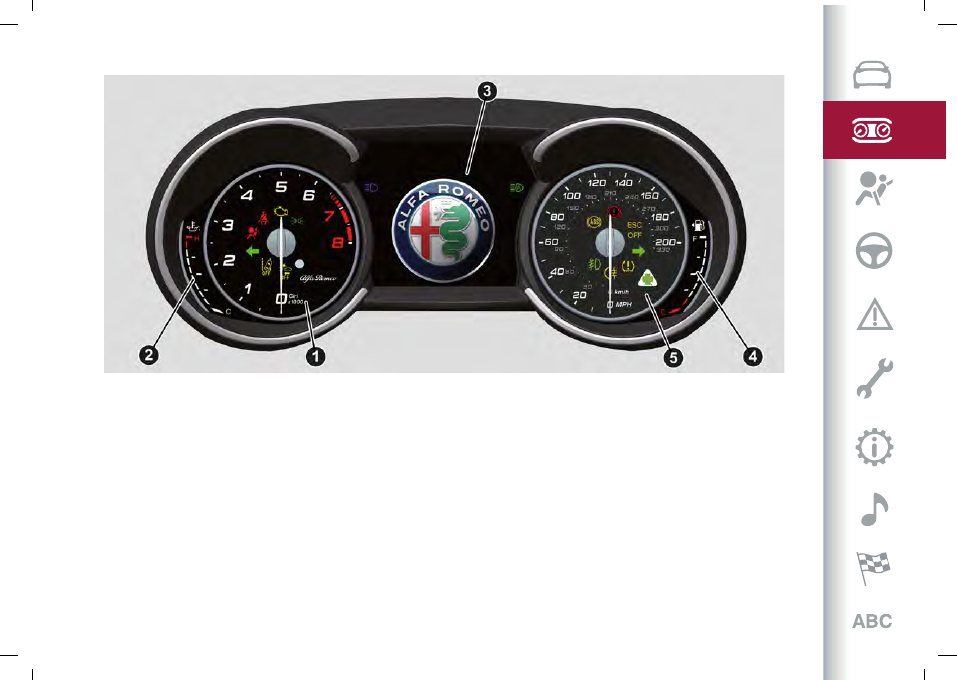
1. Tachometer / 2. Digital engine oil temperature gauge with overheating warning light / 3. Display / 4. Digital fuel level gauge (the

triangle on the left side of the symbol indicates the side of the vehicle with the fuel filler) / 5. Speedometer
Apart from the instrument panel display size, there may be small differences according to the version or the end market destination

of the car.

-------------------------------------------------------------------------------------------------------------------------------------------------------------

 KNOWING THE INSTRUMENT PANEL

44

DISPLAY

INFORMATION ON THE DISPLAY

51

05036S0093EM

1. External lights (low beam/high beam) display / 2. Transmission information / 3. Speed Limiter display / 4. Cruise Control (CC)

or Speed Limiter information display / 5. Time / 6. External temperature / 7. Main display area: car speed display, Trip Computer

information, etc ... / 8. Driving mode display (Alfa DNA™ Pro system) / 9. Distance covered in km (or miles) display (trip meter) / 10. Fuel

consumption graphic bar / 11. Warning indications display (e.g. danger of ice, open doors, ABS operation, etc.) / 12. Range

-------------------------------------------------------------------------------------------------------------------------------------------------------------

45

DISPLAY DESCRIPTION

The vehicle is equipped with a 7" TFT

Display.
When one of the doors is opened/closed,

with the engine turned off, the display is

activated, showing the total mileage for a

few seconds.
During operation, the display is divided

into multiple sections which show driving

data, warnings and failure indications.

Gearbox information

The following information is displayed:

gearbox operation mode (M, P, R, N, D)
information regarding the “Launch

Mode” function
In automatic driving mode (D), when

changing gear using the steering wheel

levers, or manual driving mode (M), it also

shows the gear engaged by means of a

number.
In manual driving mode (M), it also alerts

the driver when a gear shift either up or

down is required.

Speed Limiter

Displays operation of the Speed Limiter

device.
For further details, refer to the "Speed

Limiter" paragraph in the "Starting and

driving” chapter.

Cruise Control

Displays operation of the Cruise Control

(CC) device.

For further details, refer to the "Cruise

Control" paragraph in the "Starting and

driving” chapter.

Reconfigurable main area

The following screens may appear:

Home
Trip A
Trip B (this can be

activated/deactivated on the Connect

system)

Performance
Alternative Performance

The screens can be selected, on rotation,

by pressing the button shown in fig. 52.

52

05036S0035EM

Depending on the chosen driving mode

(Dynamic, Normal, Advanced Efficiency),

which can be selected through the “Alfa

DNA™ Pro” system, the screens can be

graphically different.
Navigation instructions and call

information can be repeated, besides on

the Connect system display, also in this

area of the display, these functions can

be set using the Connect system.

Home

The parameters shown on the display
fig. 53, for the modes: Dynamic, Normal

and Advanced Efficiency are:

Time (1)
External temperature (2)
Current speed (3) (shown only if

the repeat mode of the “Navigation”

and “Phone” functions have not been

previously activated)

Range (4)
Trip meter (5) (total kilometre or miles

travelled)
NOTE The driver may customise the

parameters listed above: they may

therefore be shown in different zones of

the display (the same parameter cannot

be displayed in more than one zone).

53

05036S0189EM

In RACE mode (where provided) the

consumption indication index is not

-------------------------------------------------------------------------------------------------------------------------------------------------------------

 KNOWING THE INSTRUMENT PANEL

46

active and a sports gearshift indicator,

consisting of three yellow segments
fig. 54, is displayed.
The two white notches which are shown

at the third segment blink to indicate the

need to shift gear.

54

05036S0177EM

Trip A and B

For all driving modes (“Dynamic”,

“Normal” and “Advanced Efficiency”),

with the ignition device ON, the "Trip

computer" can be used to display the

values related to the car’s operating

state.
This function is characterised by two

separate records, called "Trip A" and

"Trip B" (the latter can be deactivated

by Connect system), where the car’s

"complete missions" (journeys) are

recorded in a reciprocally independent

manner.
"Trip A” and "Trip B” are used to display
the values relating to fig. 55:

Travel Distance
Average fuel consumption
Average Speed
Active trip
Fuel level gauge

55

05036S0122EM

To reset the values, press and hold down
the button on the right stalk fig. 56.

56

05036S0035EM

Performance

The parameters displayed are different

depending on the active driving mode.

The driving modes which can be selected

using the "Alfa DNA™ Pro” system are as

follows:

Normal
Advanced Efficiency
Dynamic
Race

Normal

The screen fig. 57 graphically reproduces

some parameters closely linked to the

efficiency of the driving style, with a view

to limiting consumption.

57

05036S0168EM

Advanced Efficiency

The screen fig. 58 shows:

fuel consumption index (numerical and

graphic) with instantaneous value in the

unit of measurement currently selected;

average fuel consumption value (based

on "Trip A”). The numbers are replaced

by dashes (--.-) after a reset or if the data

are not available. The value can be reset

-------------------------------------------------------------------------------------------------------------------------------------------------------------

47

by holding down the MENU button on the
steering wheel right lever fig. 56.
With the car at a standstill, or if the

signal is not available, the graph on the

display is blank and the instantaneous

consumption value appears as flashing

(--.-).
NOTE If the unit of measurement

set is "km/l" (or "mpg"), in case of an

interruption or in all other conditions in

which the calculated fuel consumption

exceeds the maximum the graphic

scale on the display is able to show, the

instantaneous numerical values will show

the upper limit of the scale.

58

05036S0173EM

Dynamic

The parameters shown on the display
fig. 59 refer to the car’s stability.

The graphs illustrate the trend of the

longitudinal/lateral accelerations (G-

meter information), considering gravity

acceleration as a reference unit.

Lateral acceleration peaks are also

displayed.

59

05036S0170EM

Race

The parameters shown on the display
fig. 60 are related to car stability,

the graphs illustrate the trend of the

longitudinal/lateral accelerations (G-

meter information), considering gravity

acceleration as a reference unit.
Lateral and longitudinal acceleration

peaks are also displayed.

60

05036S0171EM

Alternative Performance

The parameters displayed are different

depending on the active driving mode.
The driving modes which can be selected

using the "Alfa DNA™ Pro” system are as

follows:

Normal
Advanced Efficiency
Dynamic
Race

Normal

The display fig. 61 graphically shows the

values of:

instantaneous consumption;
average fuel consumption (based on

"Trip A");
Below a certain speed value, when the

accelerator pedal is not pressed or in the

event of failure, dashes are displayed in

place of the consumption value ("– –. –").

61

05036S0187EM

-------------------------------------------------------------------------------------------------------------------------------------------------------------

 KNOWING THE INSTRUMENT PANEL

48

water

brake

gas

62

05036S0174EM

Dynamic

The display fig. 62 graphically shows the

values of:

accelerator pedal position (expressed

in percentage);

brake pedal position (expressed in

percentage);

engine coolant temperature (H = hot C

= cold).

Race

The display fig. 63 graphically shows the

values of:

engine torque;
turbocharger pressure;
engine oil pressure (L = low pressure/H

= high pressure).
NOTE The engine torque and

turbocharger pressure values vary

according to the engine type.

oil

turbo

torque

63

05036S0175EM

Compass

Views the position indicating the cardinal

point.

Odometer

Displays the total kilometres (or miles)

travelled.

Fault indications

Area dedicated to displaying failures, the

following symbols could be displayed on

rotation:

Low criticality symbols (yellow amber)
High criticality symbols (red)

Vehicle range

Displays the kilometres (or miles) left

before the fuel tank is empty.

External lights symbols

Displays the icon related to the active

mode among the following:

dipped beam headlights;
main beam headlights.

PARAMETERS SETTABLE BY THE

DRIVER

A series of functions can be set using the

Connect system.
The basic settings only are described:

"Units & Language"
"Clock & Date"
"Cluster"

Proceed as follows to see the list

containing the items shown above:

in the main menu, that can be activated

by pressing button (1)fig. 64, select the

"Settings" function that can be used by

turning and pressing the Rotary Pad (2);

turn the Rotary Pad to select the

required item;

press the Rotary Pad to activate the

required item.

64

04026S0555EM

Units & Language

The following settings can be modified

when this mode is selected:

-------------------------------------------------------------------------------------------------------------------------------------------------------------

49

Units

” (by selecting this item you can

choose between the metric, imperial or

custom systems; this last option lets you

set the measure unit for each individual

size).

Language

” (by selecting this item

you can choose the system viewing

language).

Restore Settings

” (allows you to

delete the current menu settings and

restore the factory settings).
To access and adjust the various

settings, turn and press the Rotary Pad

to select and confirm the selection.

Clock and Date

The following settings can be modified

when this mode is selected:

Sync with GPS Time

(activates/deactivates the clock

synchronization through the GPS: if the

function is deactivated, the options “Set

Time” and “Set Date” are enabled).

Set Time

” (allows manual setting of

the time).

"

Set Date

” (to set the date manually).

Time Format

” (offers choice of the

time format between a “24H” and “12h”

clock).

Restore Clock and Date Settings

(allows you to delete the current menu

settings and restore the factory

settings).

To access and adjust the various

settings, turn and press the Rotary Pad

to select and confirm the selection.

Cluster

The following settings can be modified

when this mode is selected:

"

Warning Buzzer Volume

" (allows you

to set the volume of the warning buzzer

on seven levels).

"

Trip B

" (to activate/deactivate the

function).

"

Show Phone Info

" (allows you to

activate/deactivate repetition of the

phone function screens also on the

instrument panel display).

"

Show Audio Info

" (allows you to

activate/deactivate repetition of the

audio function screens (Radio and Media)

also on the instrument panel display).

Show Nav Info

” (allows you to

activate/deactivate repetition of the

navigator function screens also on the

instrument panel display).

"Digital speed on all screens"

: this

allows you to activate/deactivating of

digital speed on the instrument panel

display screens other than the main

screen).

"Consumption Bar"

: allows you to

activate/deactivate the consumption bar

on the display screens of the instrument

panel where it is available).

"Performance pages"

: allows you to

choose, for each driving mode, one of the

two alternative contents displayed in the

screen).

"Custom areas"

: allows you to select

which content to display in each of the

three customisable areas on the display

of the instrument panel: time, date,

outside temperature, radio information,

compass);

Restore Settings

” (deletes the current

settings and restores the factory

settings).
To access and adjust the various

settings, turn and press the Rotary Pad

to select and confirm the selection.

-------------------------------------------------------------------------------------------------------------------------------------------------------------

 KNOWING THE INSTRUMENT PANEL

50

WARNING LIGHTS AND MESSAGES

WARNING The warning light switches on together with a dedicated message and/or acoustic signal when applicable.These

indications are indicative and precautionary and as such must not be considered as exhaustive and/or alternative to the information

contained in the Owner Handbook, which you are advised to read carefully in all cases. Always refer to the information in this section

in the event of a failure indication.
WARNING The failure indicators appearing on the display are divided into two categories: very serious and less serious failures.

Serious faults are indicated by a repeated and prolonged warning "cycle". Less serious faults are indicated by a warning "cycle" with

a shorter duration. You can stop the warning cycle in both cases by pressing the button located on the windscreen wiper lever. The

instrument panel warning light will stay on until the cause of the failure is eliminated.

WARNING LIGHTS ON INSTRUMENT PANEL

Possible detailed messages and/or acoustic signalling can be matched to a few warning lights and symbols.

Red warning lights

Warning light

What it means

What to do

INSUFFICIENT BRAKE FLUID / ELECTRIC PARKING

BRAKE ON
The warning light switches on when the ignition device

is brought to ON, but it should switch off after a few

seconds.

Low brake fluid level

The warning light turns on when the level of the brake

fluid in the reservoir falls below the minimum level,

possibly due to a leak in the circuit.

Go to a Dedicated Alfa Romeo Dealership to have the

system checked as soon as possible.

Electric parking brake on

The warning light switches on when the electric parking

brake is engaged.
WARNING If the car is parked on a gradient of more than

30% and/or the brake temperature is greater than 662°F

(350°C), when the parking brake is engaged, the warning

light will flash to indicate a potentially unsafe condition.

Release the electric parking brake, then check that the

warning light has switched off.
If the warning light stays on, contact a Dedicated Alfa

Romeo Dealership.

-------------------------------------------------------------------------------------------------------------------------------------------------------------

51

Warning light

What it means

What to do

EBD FAILURE
The simultaneous switching on of the

(red) and

(amber) warning lights with the engine on indicates either

a failure of the EBD system or that the system is not

available. In this case, the rear wheels may suddenly lock

and the vehicle may swerve when braking sharply.

Drive very carefully to the nearest Dedicated Alfa Romeo

Dealership to have the system inspected immediately.

AIRBAG FAILURE
The warning light switches on when the ignition device

is brought to ON, but it should switch off after a few

seconds.
If the warning light switches on constantly, this indicates

a failure in the airbag system.

25) 26)

FRONT SEAT BELTS NOT FASTENED
The warning light switches on constantly if the vehicle

is stationary and the driver side or passenger side seat

belt, with the passenger seated, is not fastened.
The warning light flashes and an acoustic warning will

sound if the car is in motion and the driver side or

passenger side seat belt, with the passenger seated, is

not correctly fastened.

Fasten or check correct fastening of the front occupants'

seat belts.

HOT ENGINE OIL
The warning light switches on in the case of engine oil

overheating.

10)

If the problem persists, contact a Dedicated Alfa Romeo

Dealership.

WARNING

25)

The failure of the

warning light is signalled by the switching on of the

icon on the instrument panel. In this case, the warning light may

not indicate problems with the restraint systems. Before proceeding, contact a Dedicated Alfa Romeo Dealership to have the system checked

immediately.

-------------------------------------------------------------------------------------------------------------------------------------------------------------

 KNOWING THE INSTRUMENT PANEL

52

26)

If the

warning light does not switch on when the ignition device is moved to ON or if it stays on while driving (together with the message on

the display), there might be a fault in the restraint systems; in this case, the air bags or pretensioners may not deploy in the event of an accident

or, in a lower number of cases, they could deploy erroneously. Before proceeding, contact a Dedicated Alfa Romeo Dealership to have the system

checked immediately.

IMPORTANT

10)

If the symbol switches on while driving, stop the car and the engine immediately.

Amber warning lights

Warning light

What it means

What to do

ABS FAILURE
The warning light switches on when the ignition device

is brought to ON, but it should switch off after a few

seconds.
The warning light switches on to indicate an ABS fault.

In this case the braking system maintains its efficiency

unaltered but without the advantage of the ABS system.

Drive carefully and contact a Dedicated Alfa Romeo

Dealership as soon as possible.

TPMS FAILURE
The warning light switches on when a failure is detected

in the TPMS. Should one or more wheels be fitted

without sensors, the display will show a warning message

until initial conditions are restored.

Do not continue driving with one or more flat tyres as

handling may be compromised. Stop the car, avoiding

sharp braking and steering. Immediately restore the

correct inflation pressure using the Tire Repair Kit (see

"Repairing a wheel" paragraph in the "In an emergency"

chapter) and contact the Dedicated Alfa Romeo

Dealership as soon as possible.

-------------------------------------------------------------------------------------------------------------------------------------------------------------

53

Warning light

What it means

What to do

Low tyre pressure

The warning light switches on to indicate that the tyre

pressure is lower than the recommended value and/or

that slow pressure loss is occurring. In these cases,

optimal tyre duration and fuel consumption may not be

guaranteed.

In any situation in which the message on the display is

"See manual", it is ESSENTIAL to refer to the contents

of the "Wheels and rims" paragraph in the "Technical

Specifications" chapter, strictly complying with the

indications that you find there.

ESC SYSTEM
When the ignition device is brought to ON, the warning

light switches on, but should switch off as soon as the

engine is started.

ESC system intervention

: Intervention by the system is

indicated by the flashing of the warning light: it indicates

that the car is in critical stability and grip conditions.

ECS system failure

: If the warning light does not switch

off, or if it stays on with the engine running, a failure was

found in the ESC system.

In these cases, contact a Dedicated Alfa Romeo

Dealership as soon as possible.

Hill Start Assist system failure

: the switching on of the

warning light indicates a Hill Start Assist system failure.

PARTIAL / TOTAL DEACTIVATION OF ACTIVE SAFETY

SYSTEMS (where provided)
When the ignition device is brought to ON, the warning

light switches on, but should switch off as soon as the

engine is started.
The warning light switches on to indicate that some

active safety systems have been partially or totally

deactivated.
For further details about the active safety systems see

the "Active safety systems" paragraph in the "Safety"

chapter. When the active safety systems are reactivated,

the warning light switches off.

-------------------------------------------------------------------------------------------------------------------------------------------------------------

 KNOWING THE INSTRUMENT PANEL

54

Warning light

What it means

What to do

EOBD/INJECTION SYSTEM FAILURE
In normal conditions, when the ignition device is brought

to ON, the warning light switches on, but it should switch

off as soon as the engine is started.
The operation of the warning light may be checked by

the traffic police using specific devices. Comply with

the laws and regulations of the country where you are

driving.

11)

Injection system failure

If the warning light remains on, or it switches on whilst

driving, the injection system is not working properly.

The warning light on fixed signals a malfunction in

the supply/ignition system which could cause high

exhaust emissions, a possible loss of performance, poor

driveability and high consumption.
The warning light switches off if the malfunction

disappears, but is still stored by the system.

Under these conditions, the vehicle can continue travelling

at moderate speed but without demanding excessive

effort from the engine or high speed. Prolonged use of

the car with the warning light on constantly may cause

damage. Contact a Dedicated Alfa Romeo Dealership as

soon as possible.

CATALYTIC CONVERTER DAMAGE
If the warning light flashes, it means that the catalytic

converter may be damaged.

Release the accelerator pedal to lower the speed of the

engine until the warning light stops flashing.
Drive at moderate speed, attempting to avoid driving

conditions which may cause the light to flash again, and

contact a Dedicated Alfa Romeo Dealership as soon as

possible.

REAR FOG LIGHT
The warning light switches on when the rear fog light is

turned on.

FUEL RESERVE/LIMITED RANGE
The warning light (or the symbol in the display) switches

on when about 2 UK gal (9 litres) of fuel are left in the

tank.

12)

-------------------------------------------------------------------------------------------------------------------------------------------------------------

55

IMPORTANT

11)

If, turning the ignition device to ON, the

warning light does not turn on or if it turns on steadily or flashing while driving (on some versions

together with the message on the display), contact a Dedicated Alfa Romeo Dealership as soon as possible.

12)

If the warning light (or the icon on the display) flashes while driving, contact a Dedicated Alfa Romeo Dealership.

Green Telltale Indicator Lights

Warning light

What it means

What to do

SIDE LIGHTS AND DIPPED BEAM HEADLIGHTS
The warning light switches on when the side/tail lights or

dipped headlights are turned on.

"Follow me" function engaged

This function allows the headlights to remain on for 30,

60 or 90 seconds after the ignition device was placed in

STOP position.

LEFT DIRECTION INDICATOR
The warning light switches on when the direction

indicator stalk is moved upwards or, together with the

left direction indicator, when the hazard warning light

button is pressed.

RIGHT DIRECTION INDICATOR
The warning light switches on when the direction

indicator stalk is moved upwards or, together with the

left direction indicator, when the hazard warning light

button is pressed.

-------------------------------------------------------------------------------------------------------------------------------------------------------------

 KNOWING THE INSTRUMENT PANEL

56

SYMBOLS ON THE DISPLAY

Red Symbols

Symbol

What it means

What to do

LOW ENGINE OIL PRESSURE
The symbol indicates that the engine oil pressure is low.
If it turns on temporarily or flashes (for about 5 seconds),

check the oil level by following the corresponding

procedure (see the description in the "Checking levels"

paragraph in the "Maintenance and care" chapter) and

top up to the correct level if necessary.
If the symbol turns on continuously, contact a Dedicated

Alfa Romeo Dealership to have the system checked.
WARNING IF THE SYMBOL TURNS ON

CONTINUOUSLY: Do not use the car until the failure has

been solved. When the symbol turns on, it does not

indicate the amount of oil in the engine: the oil level can

be checked on the display upon entering the vehicle and

also by activating the "Oil level" function on the Connect

system.

13)

ENGINE COOLANT TEMPERATURE TOO HIGH
The symbol lights up when the engine has overheated.

In normal driving conditions

: stop the car, switch off the

engine and check that the coolant level in the reservoir is

not below the MIN mark. In this case, wait for the engine to

cool down, then slowly and carefully open the cap, top up

with coolant and check that the level is between the MIN

and MAX marks on the reservoir itself. Also check visually

for any fluid leaks. Contact a Dedicated Alfa Romeo

Dealership if the symbol comes on when the engine is

started again.

If the vehicle is used under demanding conditions

: (e.g. in

high-performance driving): slow down and, if the symbol

stays on, stop the vehicle.
Stop for two or three minutes with the engine running and

slightly accelerated to facilitate better coolant circulation,

then stop the engine. Check that the coolant level is

correct as described above.

-------------------------------------------------------------------------------------------------------------------------------------------------------------

57

Symbol

What it means

What to do

POWER STEERING FAILURE
If the symbol remains on, you could not have steering

assistance and the effort required to operate the

steering wheel could be increased; steering is, however,

possible.

Contact a Dedicated Alfa Romeo Dealership as soon as

possible.

DOORS OPEN
The symbol switches on when one or more doors are not

completely shut. An acoustic signal is activated with the

doors open and the car moving.
NOTE The symbol shown on the display varies according

to the door that has remained open.

Close the doors properly.

BONNET NOT PROPERLY SHUT
The symbol switches on when the engine bonnet is not

properly shut. As well as the symbol lighting up on the

instrument panel, the image of the car with the bonnet

open is also shown.
A buzzer is heard when the bonnet is open and the

vehicle is moving.

Close the bonnet properly.

LUGGAGE COMPARTMENT NOT PROPERLY SHUT
The symbol switches on when the boot is not properly

shut. As well as the symbol lighting up on the instrument

panel, the image of the car with the boot open is also

shown.
A buzzer is heard when the boot is open and the vehicle is

moving.

Close the boot properly.

AUTOMATIC TRANSMISSION FAILURE
The symbol switches on, together with an acoustic

warning, to indicate that the automatic transmission is

faulty.

Contact a Dedicated Alfa Romeo Dealership as soon as

possible.

14)

-------------------------------------------------------------------------------------------------------------------------------------------------------------

 KNOWING THE INSTRUMENT PANEL

58

Symbol

What it means

What to do

INSUFFICIENT ENGINE OIL LEVEL
The symbol switches on, along with the related message

on the display, to indicate low engine oil level. Top up the

oil as soon as possible in order to restore the correct

level in the sump (see "Engine compartment - Checking

the levels" paragraph in the "Maintenance and care"

chapter for information on the quantity to be top up).
You may carry out this operation on your own, using a

suitable type of oil, as prescribed by Alfa Romeo (see

the "Fluids and lubricants" paragraph in the "Technical

specifications" chapter for detailed information).
The level must also be checked using the dipstick below

the boot (see "Servicing and care” chapter).

OIL OVER MAXIMUM LEVEL
The symbol switches on, along with the respective

message on the display, to indicate that the engine oil

level is too high.

Go to a Dedicated Alfa Romeo dealership as soon

as possible to have the correct level restored. In the

meantime, do not exceed an engine speed of 3000 rpm.

ALTERNATOR FAILURE
The switching on of the symbol with engine on

corresponds to an alternator failure.

Contact a Dedicated Alfa Romeo Dealership as soon as

possible.

ALFA™ SYSTEM STEERING TORQUE (AST) FAILURE
The switching on of the symbol signals a failure in the

automatic steering correction system.

Contact a Dedicated Alfa Romeo Dealership to have the

system checked.

SPEED LIMIT EXCEEDED (where provided)
The symbol switches on when the speed limit of 74.5 mph

(120 km/h) is exceeded.

-------------------------------------------------------------------------------------------------------------------------------------------------------------


Content      ..     1      2      3      4      ..