Acura RDX (2021 year). Manual in english - page 10
 

  Index      Manuals     Acura RDX (2021 year). Manual in english


Search            copyright infringement  


Content      ..     8      9      10      11     ..


Acura RDX (2021 year). Manual in english - page 10


Continued

157

uu

Locking and Unlocking the Doors

u

Locking/Unlocking the Doors from the Outside

Co
ntrols

Locking the doors and tailgate (Walk 
away auto lock

®

)

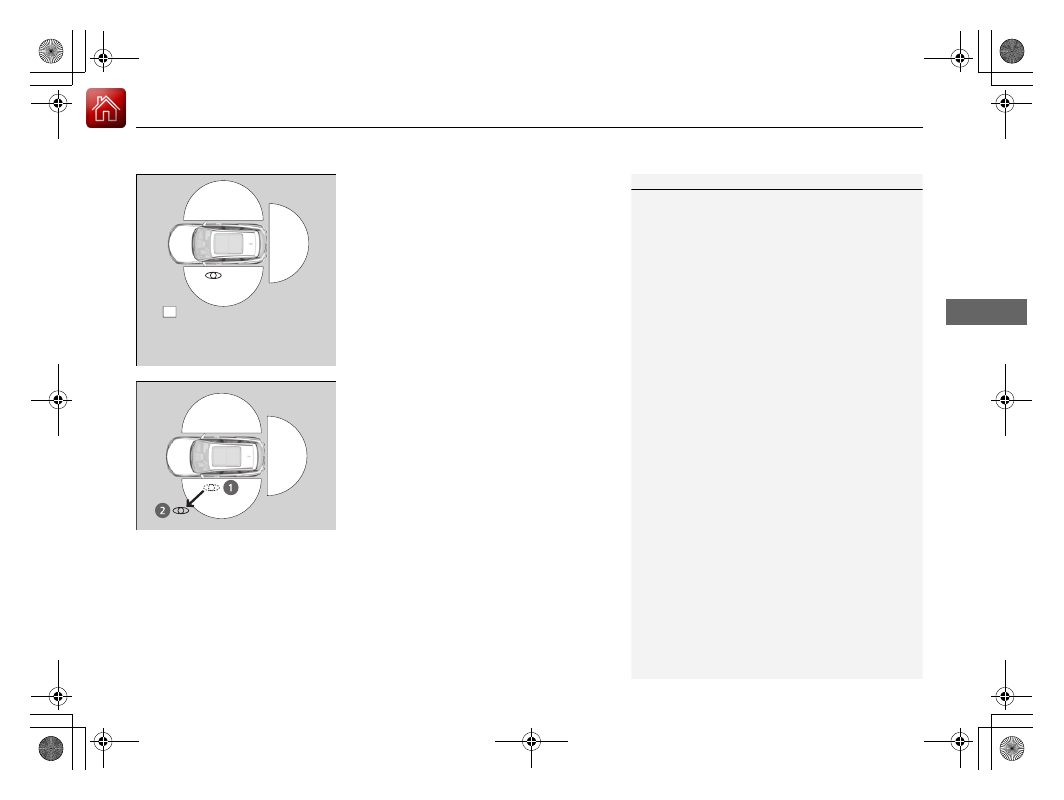
When you walk away from the vehicle with all 
doors closed and while carrying the keyless 
access remote, the doors will automatically 
lock.
The auto lock function activates when all 
doors and tailgate are closed, and the keyless 
access remote is within about 5 feet (1.5 m) 
radius of the outside door handle.
Exit vehicle while carrying keyless access 
remote and close door(s).

1.

While within about 5 feet (1.5 m) radius of 
the vehicle.

u

The beeper sounds; the auto lock 
function will be activated.

2.

Carry the keyless access remote beyond 
about 5 feet (1.5 m) from the vehicle and 
remain outside this range for 2 or more 
seconds.

u

Some exterior lights flash; the beeper 
sounds; all doors and tailgate will then 
lock.

1

Locking the doors and tailgate (Walk away auto lock

®

)

The auto lock function is set to OFF as the factory 
default setting. The auto lock function can be set to 
ON using the audio/information screen.
If you set the auto lock function to ON using the 
audio/information screen, only the remote 
transmitter that was used to unlock the driver’s door 
prior to the setting change can activate auto lock.

2

Customized Features

 P. 341

After the auto lock function has been activated, 
when you stay within the locking/unlocking 
operation range, the indicator on the keyless access 
remote will continue to flash until the doors are 
locked.

When you stay beside the vehicle within the 
operation range, the doors will automatically lock 
approximately 30 seconds after the auto lock 
function activating beeper sounds.

When you open a door after the auto lock function 
activating beeper sounds, the auto lock function will 
be delayed until all doors and tailgate are closed.

Under the following circumstances, the auto lock 
function will not activate: 

The keyless access remote is inside the vehicle.

The keyless access remote is taken out of its 
operational range before all the doors and tailgate 
are closed.

u

The beeper will not sound.

u

The beeper will sound.

The activation range of 
the auto lock function is 
about 5 feet (1.5 m)

-------------------------------------------------------------------------------------------------------------------------------------------------------------

uu

Locking and Unlocking the Doors

u

Locking/Unlocking the Doors from the Outside

158

Co
ntrols

To temporarily deactivate the function:

1.

Set the power mode to OFF.

2.

Open the driver’s door.

3.

Using the master door lock switch, operate 
the lock as follows:
Lock  

Unlock  

Lock  

Unlock.

u

The beeper sounds and the function is 
deactivated.

To restore the function:

Set the power mode to ON.

Lock the vehicle without using the auto lock 
function.

With the keyless access remote on you, 
move out of the auto lock function 
operation range.

Open any door.

1

Locking the doors and tailgate (Walk away auto lock

®

)

You must wait until the power tailgate fully closes 
before the auto lock function will be activated.

The auto lock function does not operate when any of 
the following conditions are met.

The keyless access remote is inside the vehicle.

A door or the hood is not closed.

The power mode is set to any mode other than 
OFF.

The keyless access remote is not located within a 
radius of about 5 feet (1.5 m) from the vehicle 
when you get out of the vehicle and close the 
doors.

Auto lock function operation stop beeper

After the auto lock function has been activated, the 
auto lock operation stop beeper sounds for 
approximately two seconds in the following cases.

The keyless access remote is put inside the vehicle 
through a window.

You are located too close to the vehicle.

The keyless access remote is put inside the tailgate.

If the warning beeper sounds, check that you are 
carrying the keyless access remote. Then, open/close 
a door and confirm the auto lock activation beeper 
sounds once.

-------------------------------------------------------------------------------------------------------------------------------------------------------------

Continued

159

uu

Locking and Unlocking the Doors

u

Locking/Unlocking the Doors from the Outside

Co
ntrols

Locking the doors and tailgate

Press the lock button.

Once:

u

Some exterior lights flash, all the doors, 
tailgate, and fuel fill door lock, and the 
security system sets.

Twice (within five seconds after the first 
push):

u

The beeper sounds and verifies the 
security system is set.

Unlocking the doors and tailgate

Press the unlock button.

Once:

u

Some exterior lights flash twice, and the 
driver’s door and fuel fill door unlock.

Twice:

u

The remaining doors and tailgate unlock.

*1 :

Checking Door Lock Status

*

 P. 162

Using the Remote Transmitter

1

Using the Remote Transmitter

If you do not open a door or the tailgate within 30 
seconds of unlocking the vehicle with the remote 
transmitter, the doors and tailgate will automatically 
relock.
You can change the relock timer setting.

2

Customized Features

 P. 341

You can lock or unlock doors using the remote 
transmitter only when the power mode is in VEHICLE 
OFF.

The remote transmitter uses low-power signals, so 
the operating range may vary depending on the 
surroundings.

The remote will not lock the vehicle when a door is 
open.

If the distance at which the remote transmitter works 
varies, the battery is probably low.
If the LED does not come on when you press a 
button, the battery is dead.

2

Replacing the Button Battery

 P. 577

You can customize the door unlock mode setting.

2

Customized Features

 P. 341

LED

Unlock 
Button

Lock 
Button

LED

*1

Unlock 
Button

Lock 
Button

* Not available on all models

-------------------------------------------------------------------------------------------------------------------------------------------------------------

uu

Locking and Unlocking the Doors

u

Locking/Unlocking the Doors from the Outside

160

Co
ntrols

If the lock or unlock button of the keyless access remote does not work, use the key 
instead.

2

Replacing the Button Battery

 P. 577

Fully insert the key and turn it.

Locking/Unlocking the Doors Using a Key

1

Locking/Unlocking the Doors Using a Key

When you lock the driver’s door with a key, all the 
other doors, tailgate and fuel fill door lock at the 
same time. When unlocking, the driver’s door 
unlocks first. Turn the key a second time within a few 
seconds to unlock the remaining doors, fuel fill door 
and the tailgate.

You can customize the door unlock mode setting.

2

Customized Features

 P. 341

Lock

Unlock

-------------------------------------------------------------------------------------------------------------------------------------------------------------

Continued

161

uu

Locking and Unlocking the Doors

u

Locking/Unlocking the Doors from the Outside

Co
ntrols

If you do not have the key on you, or if for some reason you cannot lock a door using 
the key, you can lock the door without it.

Locking the front doors

Push the lock tab forward 

a

 or push the 

master door lock switch in the lock direction 

b

, and close the door.

Locking the rear doors

Push the lock tab forward and close the door.

Lockout prevention system

The doors and the tailgate cannot be locked when the keyless access remote is 
inside the vehicle.

Locking a Door Without Using a Key

1

Locking a Door Without Using a Key

When you lock the driver’s door, all the other doors, 
tailgate and fuel fill door lock at the same time.
Before locking a door, make sure that the key is not 
inside the vehicle.

-------------------------------------------------------------------------------------------------------------------------------------------------------------

uu

Locking and Unlocking the Doors

u

Locking/Unlocking the Doors from the Outside

162

Co
ntrols

You can remotely check if your vehicle’s doors 
are all locked or any are unlocked using the 
keyless access remote from extended 
distances.

Press the lock button, the Amber (left) LED blinks once. Then after three seconds one 
of the following feedback will come:

Green (center) comes on: Acknowledges that the doors are locked.

Red (right) comes on: Acknowledges that doors are not locked, or any door is not 
completely closed.

Red (right) blinks three times: The remote does not receive the door lock status 
from the vehicle.

Checking Door Lock Status

*

1

Checking Door Lock Status

*

Operate the remote in an open space. If there are 
buildings or other obstacles between your vehicle 
and the remote, the remote may not work even 
within the operable range. However, the range 
required for unlocking the tailgate and all the doors 
as well as activating the panic function is the same as 
that required for operating the standard keyless 
access remote.

2

Using the Remote Transmitter

 P. 159

When checking the door lock status, you can also 
start or stop the engine.

2

Remote Engine Start

*

 P. 421

Red

Green

Amber

Lock Button

* Not available on all models

-------------------------------------------------------------------------------------------------------------------------------------------------------------

163

uu

Locking and Unlocking the Doors

u

Locking/Unlocking the Doors from the Inside

Continued

Co
ntrols

Locking/Unlocking the Doors from the Inside

Locking a door

Push the lock tab forward.

Unlocking a door

Pull the lock tab rearward.

Using the Lock Tab

1

Using the Lock Tab

When you lock the door using the lock tab on the 
driver’s door, all of the other doors, tailgate and fuel 
fill door lock at the same time.
When you unlock the door using the lock tab on the 
driver’s door, only the driver’s door will unlock.

To Unlock

Lock Tab

To Lock

-------------------------------------------------------------------------------------------------------------------------------------------------------------

uu

Locking and Unlocking the Doors

u

Locking/Unlocking the Doors from the Inside

164

Co
ntrols

Pull the front door inner handle.

u

The door unlocks and opens in one 
motion.

Unlocking and opening the driver’s door from the inner handle unlocks all the other 
doors.

To avoid all the doors to be unlocked, use the lock tab on the driver’s door to unlock, 
then lock again before opening the door.

u

This setting works for one time only. If you do not want all the doors to be 
unlocked all the time, customize the 

Auto Door Unlock

 setting to 

Off

 using 

the audio/information screen.

Unlocking Using the Front Door Inner Handle

1

Unlocking Using the Front Door Inner Handle

The front door inner handles are designed to allow 
front seat occupants to open the door in one motion. 
However, this feature requires that front seat 
occupants never pull a front door inner handle while 
the vehicle is in motion.

Children should always ride in a rear seat where 
childproof door locks are provided.

2

Childproof Door Locks

 P. 165

Inner Handle

-------------------------------------------------------------------------------------------------------------------------------------------------------------

165

uu

Locking and Unlocking the Doors

u

Childproof Door Locks

Co
ntrols

Press the master door lock switch in as shown 
to lock or unlock all the doors, tailgate and 
fuel fill door.

Childproof Door Locks

The childproof door locks prevent the rear doors from being opened from the inside 
regardless of the position of the lock tab.

Slide the lever in the rear door to the lock 
position, and close the door.

When opening the door

Open the door using the outside door handle.

Using the Master Door Lock Switch

1

Using the Master Door Lock Switch

When you lock/unlock either front door using the 
master door lock switch, all the other doors, tailgate 
and fuel fill door lock/unlock at the same time.

To Lock

Master Door 
Lock Switch

To Unlock

Setting the Childproof Door Locks

1

Childproof Door Locks

To open the door from the inside when the 
childproof door lock is on, put the lock tab in the 
unlock position, lower the rear window, put your 
hand out of the window, and pull the outside door 
handle.

Lock

Unlock

-------------------------------------------------------------------------------------------------------------------------------------------------------------

166

uu

Locking and Unlocking the Doors

u

Auto Door Locking/Unlocking

Co
ntrols

Auto Door Locking/Unlocking

Your vehicle locks or unlocks all doors automatically when a certain condition is met.

Drive lock mode

All doors and tailgate lock when the vehicle’s speed reaches about 10 mph (15 km/h).

Driver’s door open mode

All doors and tailgate unlock when the driver’s door is opened.

Auto Door Locking

Auto Door Unlocking

1

Auto Door Locking/Unlocking

You can turn off or change to another auto door 
locking/unlocking setting using the audio/
information screen.

2

Customized Features

 P. 341

-------------------------------------------------------------------------------------------------------------------------------------------------------------

167

Continued

Co
ntrols

Opening and Closing the Tailgate

Precautions for Opening/Closing the Tailgate

Always make sure individuals and objects are clear of the tailgate before opening or 
closing it.

Keep the tailgate closed while driving to:

u

Avoid possible damage.

u

Prevent exhaust gas from leaking into the vehicle.

2

Carbon Monoxide Gas

 P. 75

1

Precautions for Opening/Closing the Tailgate

Be careful not to hit your head on the tailgate or to 
put your hands between the tailgate and the cargo 
area when closing the tailgate.

When you are storing or picking up luggage from the 
cargo area, or by using a forward and back kicking 
motion under the center of the rear bumper for 
hands free access

*

, while the engine is idling, do not 

stand in front of the exhaust pipe. You may get 
burned.

Do not allow any passenger in the cargo space. They 
may get hurt during hard braking, a sudden 
acceleration, or a crash.

3

WARNING

Anyone caught in the path of a tailgate 
that is being opened or closed can be 
seriously injured.

Make sure that all people are clear of the 
tailgate before opening or closing it.

* Not available on all models

-------------------------------------------------------------------------------------------------------------------------------------------------------------

uu

Opening and Closing the Tailgate

u

Precautions for Opening/Closing the Tailgate

168

Co
ntrols

The power tailgate can be operated by pressing the power tailgate button on the 
remote transmitter, pressing the power tailgate button on the driver’s door, pressing 
the outer handle on the tailgate, or by using a forward and back kicking motion 
under the center of the rear bumper for hands free access

*

.

The power tailgate can be opened/closed when the transmission is in 

(

P

.

1

Precautions for Opening/Closing the Tailgate

NOTICE

Do not push or pull on the power tailgate when it is 
being automatically opened or closed.
Forcibly opening or closing the power tailgate while 
in operation can deform the tailgate frame.

When operating the power tailgate, make sure there 
is enough space around your vehicle. People near the 
tailgate may be seriously hurt if the tailgate hits or 
closes on their heads. Be especially cautious if 
children are around.

The power tailgate may not open or close under the 
following conditions:

You start the engine while the tailgate is 
automatically opening or closing.

The vehicle is parked on a steep hill.

The vehicle is swayed in a strong wind.

The tailgate or the roof is covered with snow or ice.

* Not available on all models

-------------------------------------------------------------------------------------------------------------------------------------------------------------

169

uu

Opening and Closing the Tailgate

u

Opening/Closing the Power Tailgate

Continued

Co
ntrols

Opening/Closing the Power Tailgate

Use a forward and back kicking motion under 
the center of the rear bumper to open or close 
the power tailgate while carrying the keyless 
access remote.

u

Some exterior lights flash twice and a 
beeper sounds once, then the tailgate 
begins to move.

Using the Hands Free Access

*

1

Opening/Closing the Power Tailgate

During rain or in other instances when the vehicle 
becomes wet, the sensor may not properly detect 
your foot motion.

When performing work on or around the rear section 
of the vehicle, you may inadvertently open or close 
the tailgate.
To prevent this from happening, select Customized 
Features on the audio/information screen and then 
select OFF for the feature.

2

Customized Features

 P. 341

The duration of the kicking motion should be 
approximately one second.

If you hold your foot under the bumper for too long, 
the power tailgate does not open or close.

3

WARNING

Opening or closing a power tailgate while 
any part of a passenger is in the tailgate’s 
operating path can cause serious injury.

Make sure all passengers or objects are 
clear of the tailgate operating range 
before opening or closing the tailgate.

Models with Hands Free Access

1 sec.

* Not available on all models

-------------------------------------------------------------------------------------------------------------------------------------------------------------

uu

Opening and Closing the Tailgate

u

Opening/Closing the Power Tailgate

170

Co
ntrols

Press the power tailgate button for more than 
one second to operate when the power mode 
is in VEHICLE OFF (LOCK).

u

Some exterior lights flash and the beeper 
sounds.

If you press the button again while the power 
tailgate is moving, it will stop.
Press the button for more than one second, 
and the power tailgate will reverse direction.

Customizing when to open the tailgate

Anytime: 

The power tailgate unlocks and opens at the same time. This is the 

default setting.

When Unlocked: 

The tailgate opens when all doors are unlocked.

2

Customized Features

 P. 341

Using the Remote Transmitter

1

Opening/Closing the Power Tailgate

This function will not operate if you don’t have the 
keyless access remote on you. Please make sure you 
have the keyless access remote on you.

If you close the power tailgate when all the doors are 
locked, the power tailgate locks automatically.

If you replace the battery or the power tailgate fuse 
while the tailgate is open, the power tailgate may be 
disabled. The power tailgate resumes once you 
manually close the tailgate.

Installing aftermarket components other than Acura 
genuine accessories on the power tailgate may 
prevent it from fully opening or closing.

Make sure the power tailgate is fully open before you 
get your luggage in and out.

Make sure the power tailgate is fully closed before 
you start the vehicle.

The beeper sounds when you start driving while the 
power tailgate is still open, or closing.

HOLD

Power 
Tailgate 
Button

HOLD

-------------------------------------------------------------------------------------------------------------------------------------------------------------

Continued

171

uu

Opening and Closing the Tailgate

u

Opening/Closing the Power Tailgate

Co
ntrols

To open or close the power tailgate, press the 
power tailgate button for about one second.

u

Some exterior lights flash and the beeper 
sounds.

If you press the button again while the power 
tailgate is moving, it will stop.
Press the button for about one second, and 
the power tailgate will reverse direction.

Using the Power Tailgate Button

1

Opening/Closing the Power Tailgate

If the power tailgate meets resistance while opening 
or closing, the auto reverse feature reverses the 
direction. The beeper sounds three times.

The auto reverse function stops sensing when the 
tailgate is almost closed to make sure that it fully 
closes.

Do not touch the sensors located on both sides of the 
tailgate. The power tailgate does not close if you 
touch either sensor when you are trying to close the 
tailgate.

Be careful not to scratch the sensors with a sharp 
object. If scratched, they can be damaged, and the 
power tailgate closing feature malfunctions.

Power Tailgate Button

-------------------------------------------------------------------------------------------------------------------------------------------------------------

uu

Opening and Closing the Tailgate

u

Opening/Closing the Power Tailgate

172

Co
ntrols

If you press the outer handle of the tailgate for 
no longer than one second, the tailgate opens 
automatically.

u

The beeper sounds.

u

If you want to open the tailgate 
manually, press the button for more than 
one second.

2

Opening/Closing the Tailgate

 P. 176

If you are carrying the keyless access remote, 
you do not have to unlock the tailgate before 
opening it.

If you press the outer handle again while the 
power tailgate is moving, it will stop.
Press the outer handle again, and the power 
tailgate will reverse direction.

Using the Tailgate Outer Handle

1

Opening/Closing the Power Tailgate

Do not leave the keyless access remote in the cargo 
area before closing the tailgate.

Even if you are not carrying the keyless access 
remote, you can lock/unlock the tailgate while 
someone else with the remote is within range.

You can change the power tailgate operation setting 
on and off.

2

Customized Features

 P. 341

Outer Handle

-------------------------------------------------------------------------------------------------------------------------------------------------------------


Content      ..     8      9      10      11     ..