Acura ILX (2021 year). Manual in english - page 20
 

  Index      Manuals     Acura ILX (2021 year). Manual in english


Search            copyright infringement  


Content      ..     18      19      20      21     ..


Acura ILX (2021 year). Manual in english - page 20


318

uu

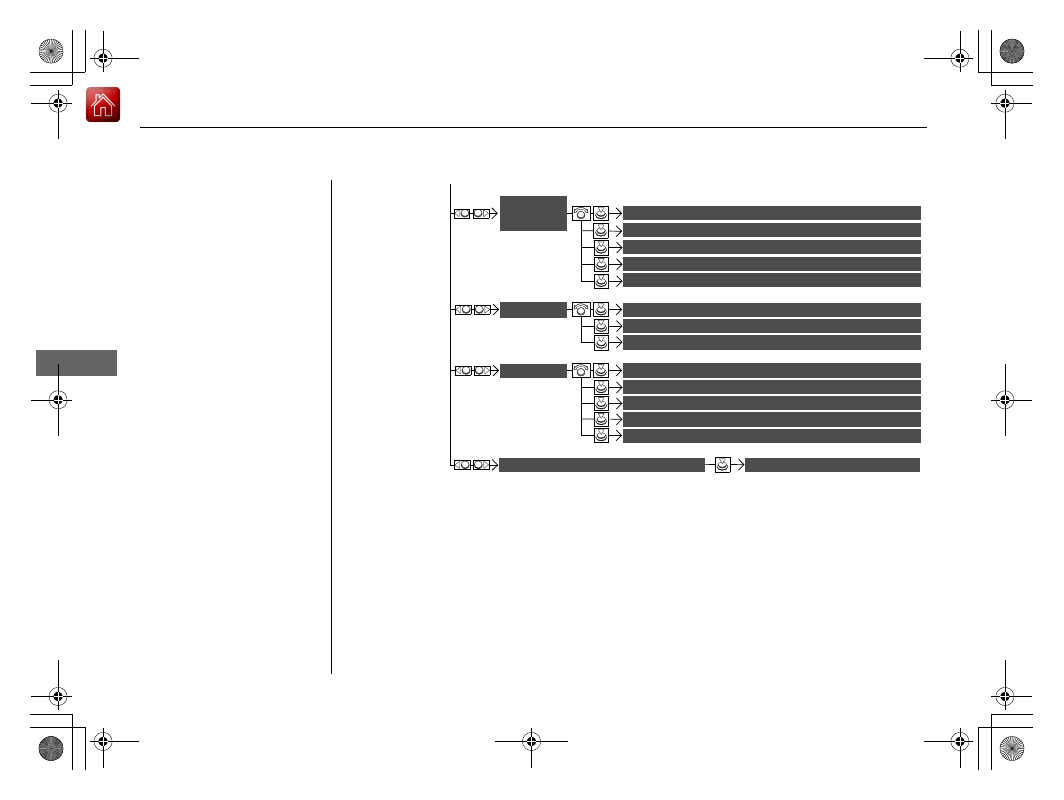
Customized Features

u

Features


Maintenance Reset

Maintenance Info.

Key And Remote Unlock Mode

Keyless Lock Answer Back

Security Relock Timer

Auto Door Lock

Auto Door Unlock


Door

Door Unlock Mode

Keyless Access Beep


Interior Light Dimming Time

Headlight Auto Off Timer

Auto Light Sensitivity

*

Remote Start System On/Off

*

Walk Away Auto Lock


Lighting


Keyless 

Access

Keyless Access Light Flash

* Not available on all models

-------------------------------------------------------------------------------------------------------------------------------------------------------------

319

uu

Customized Features

u

Continued

Features

Auto Time Zone

*


Clock/Wallpaper Type

Clock Adjustment

Clock 

Settings

Clock Format

Default

Auto Daylight

*

Clock Reset


AcuraLink Msg Notice

Delete AcuraLink Messages

AcuraLink 

Settings

*

AcuraLink Subscription Status

Default


* Not available on all models

-------------------------------------------------------------------------------------------------------------------------------------------------------------

320

uu

Customized Features

u

Features


Voice Prompt

Brightness

Contrast

Black Level


Default

Display

System 

Settings

Voice 
Reco.

Sync Display Brightness

System Device Information

*

Header Clock Display


Language

Operation Restriction Tips

*

Others


Default

Apple CarPlay Device List

Android Auto Device List


Smartphone 

Settings

Smartphone Volume


Factory Data Reset

Units

*

Song By Voice

*

Song By Voice Phonetic Modification

*

Phonebook Phonetic Modification

*

Guidance Volume

*


Feedback

*

Guidance Volume

Verbal Reminder

* Not available on all models

-------------------------------------------------------------------------------------------------------------------------------------------------------------

321

uu

Customized Features

u

Continued

Features

List of customizable options

*1:Default Setting

Setup 

Group

Customizable Features

Description

Selectable Settings

Bluetooth/
Phone 
Settings

Default

Cancels/Resets all customized items in the 

Bluetooth/Phone Settings

 group as default.

Yes

/

No

Bluetooth

Bluetooth

Turns the 

Bluetooth

®

 on and off.

On

*1

/

Off

Bluetooth Device List

Pairs a new phone to HFL, edits or deletes a 
paired phone, or creates a security PIN.

2

Phone Setup

 P. 381

Edit Pairing Code

Changes a pairing code.

2

To change the pairing code setting

 P. 383

Random

/

Fixed

*1

Phone

Edit Speed Dial

Edits, adds or deletes a speed dial entry.

2

Phone Setup

 P. 381

Auto Transfer

Sets calls to automatically transfer from your 
phone to HFL when you enter the vehicle.

On

*1

/

Off

Auto Answer

Sets whether to automatically answer an 
incoming call after about four seconds.

On

/

Off

*1

Information Screen

-------------------------------------------------------------------------------------------------------------------------------------------------------------

322

uu

Customized Features

u

Features

*1:Default Setting

Setup 

Group

Customizable Features

Description

Selectable Settings

Bluetooth/
Phone 
Settings

Phone

Ring Tone

Selects a fixed ring tone or the one from the 
connected cell phone.

Fixed

/

Mobile 

Phone

*1

/

Off

Automatic Phone Sync

Sets a phonebook data to be automatically 
imported when a phone is paired to HFL.

On

/

Off

Use Contact Photo

Displays a caller’s picture on an incoming call 
screen.

On

*1

/

Off

Text/Email

Enable Text/Email

Turns the text/e-mail message function on and 
off.

On

*1

/

Off

Select Account

Selects a text or e-mail message account.

New Text/Email Alert

Selects whether a pop-up alert comes on the 
screen when HFL receives a new text/e-mail 
message.

Message Auto Reading

*

Selects whether the system automatically reads 
out messages, and, if selected, whether only 
when driving.

On

*1

/

Off

* Not available on all models

-------------------------------------------------------------------------------------------------------------------------------------------------------------

323

uu

Customized Features

u

Continued

Features

*1:Default Setting

Setup 

Group

Customizable Features

Description

Selectable Settings

Camera 
Settings

Default

Cancels/Resets all customized items in the 

Camera Settings

 group as default.

Yes

/

No

Rear 
Camera

Fixed Guideline

Selects whether the fixed guidelines come on the 
rear camera monitor.

On

*1

/

Off

Dynamic Guideline

Selects whether the dynamic guidelines come on 
the rear camera monitor.

On

*1

/

Off

Cross 
Traffic 
Monitor

Cross Traffic Monitor

Turns the cross traffic monitor feature on and off.

On

*1

/

Off

-------------------------------------------------------------------------------------------------------------------------------------------------------------

324

uu

Customized Features

u

Features

*1:Default Setting

Setup 

Group

Customizable Features

Description

Selectable Settings

Vehicle 
Settings

Default

Cancels/Resets all customized items in the 

Vehicle Settings

 group as default.

Yes

/

No

Driver 
Assist

Forward Collision 
Warning Distance

Changes at which distance CMBS

TM

 alerts.

Long

/

Normal

*1

/

Short

ACC Forward Vehicle 
Detect Beep

Causes the system to beep when the system 
detects a vehicle, or when the vehicle goes out of 
the ACC range.

On

/

Off

*1

ACC Display Speed Unit

Changes the speed unit for ACC on the multi-
information display.

mph

*1

/

km/h

 (U.S.)

mph

/

km/h

*1

 (Canada)

Road Departure 
Mitigation Setting

Changes the setting for the road departure 
mitigation system.

Normal

*1

/

Wide

/

Warning Only

Lane Keeping Assist 
Suspend Beep

Causes the system to beep when the LKAS is 
suspended.

On

/

Off

*1

Blind Spot Info

Changes the setting for the blind spot 
information.

Audible And Visual 
Alert

*1

/

Visual Alert

/

Off

-------------------------------------------------------------------------------------------------------------------------------------------------------------

325

uu

Customized Features

u

Continued

Features

*1:Default Setting

Setup 

Group

Customizable Features

Description

Selectable Settings

Vehicle 
Settings

Meter

Language Selection

Changes the displayed language on the multi-
information display.

English

*1

/

Français

/

Español

Adjust Outside Temp. 
Display

Adjusts the temperature reading by a few 
degrees.

-5°F ~ ±0°F

*1


~ +5°F

(U.S.)

-3°C ~ ±0°C

*1


~ +3°C

(Canada)

“Trip A” Reset Timing

Changes the setting of how to reset trip meter A, 
average fuel economy A, average speed A, and 
elapsed time A.

When Refueled

/

IGN 

Off

/

Manually Reset

*1

“Trip B” Reset Timing

Changes the setting of how to reset trip meter B, 
average fuel economy B, average speed B, and 
elapsed time B.

When Refueled

/

IGN 

Off

/

Manually Reset

*1

Turn by Turn Display

*

Selects whether the turn-by-turn display comes 
on during the route guidance.

On

*1

/

Off

* Not available on all models

-------------------------------------------------------------------------------------------------------------------------------------------------------------

326

uu

Customized Features

u

Features

*1:Default Setting

Setup 

Group

Customizable Features

Description

Selectable Settings

Vehicle 
Settings

Driving 
Position 

Memory Position Link

Turns the driving position memory system on and 
off.

On

*1

/

Off

Keyless 
Access

Door Unlock Mode

Changes which doors unlock when you grab the 
driver’s door handle.

Driver Door Only

*1

/

All Doors

Keyless Access Light 
Flash

Causes some exterior lights to flash when you 
unlock/lock the doors.

On

*1

/

Off

Keyless Access Beep

Causes the beeper to sound when you unlock/
lock the doors.

On

*1

/

Off

Remote Start System 
On/Off

*

Turns the remote engine start feature on and off.

On

*1

/

Off

Walk Away Auto Lock

Changes the settings for the automatic locking 
the doors when you walk away from the vehicle 
while carrying the keyless access remote.

On

/

Off

*1

* Not available on all models

-------------------------------------------------------------------------------------------------------------------------------------------------------------

327

uu

Customized Features

u

Continued

Features

*1:Default Setting

Setup 

Group

Customizable Features

Description

Selectable Settings

Vehicle 
Settings

Lighting

Interior Light Dimming 
Time

Changes the length of time the interior lights stay 
on after you close the doors.

60seconds

/

30seconds

*1

/

15seconds

Headlight Auto Off 
Timer

Changes the length of time the exterior lights 
stay on after you close the driver’s door.

60seconds

/

30seconds

/

15seconds

*1

/

0seconds

Auto Light Sensitivity

*

Changes the timing for the headlights to come 
on.

Max

/

High

/

Mid

*1

/

Low

/

Min

* Not available on all models

-------------------------------------------------------------------------------------------------------------------------------------------------------------

328

uu

Customized Features

u

Features

*1:Default Setting

Setup 

Group

Customizable Features

Description

Selectable Settings

Vehicle 
Settings

Door

Auto Door Lock

Changes the setting for when the doors 
automatically lock.

With Vehicle 
Speed

*1

/

Shift from P

/

Off

Auto Door Unlock

Changes the setting for when the doors unlock 
automatically.

All Doors When 
Driver’s Door 
Opens

*1

/

All Doors 

When Shifted to 
Park

/

All Doors When 

Ignition Switched 
Off

/

Off

Key And Remote Unlock 
Mode

Sets up either the driver’s door or all doors to 
unlock on the first push of the remote or built-in 
key.

Driver Door

*1

/

All 

Doors

Keyless Lock Answer 
Back

LOCK/UNLOCK- The exterior lights flash.
LOCK (2nd push)- The beeper sounds.

On

*1

/

Off

Security Relock Timer

Changes the time it takes for the doors to relock 
and the security system to set after you unlock 
the vehicle without opening any door.

90seconds

/

60seconds

/

30seconds

*1

Maintenance 
Info.

Maintenance Reset

Resets the engine oil life display when you have 
performed the maintenance service.

-------------------------------------------------------------------------------------------------------------------------------------------------------------

329

uu

Customized Features

u

Continued

Features

*1:Default Setting

Setup 

Group

Customizable Features

Description

Selectable Settings

Clock 
Settings

Default

Cancels/Resets all customized items in the 

Clock 

Settings

 group as default.

Yes

/

No

Clock/
Wallpaper 
Type

Clock

Changes the clock display type.

Analog

/

Digital

*1

/

Small Digital

/

Off

Wallpaper

Changes the wallpaper type.

Imports an image file for a new wallpaper.

Deletes an image file for a wallpaper.

2

Wallpaper Setup

 P. 218

Blank

/

Galaxy

*1

/

Metallic

/

Options...

Clock Adjustment

Adjusts Clock.

2

Wallpaper Setup

 P. 218

Clock Format

Selects the digital clock display from 12H to 24H.

12H

*1

/

24H

Auto Time Zone

*

Sets the audio system to automatically adjust the 
clock when driving through different time zones.

On

*1

/

Off

Auto Daylight

*

Sets the audio system to automatically adjust the 
clock (“spring ahead” or “fall back” by one hour) 
when a daylight saving time change occurs.

On

*1

/

Off

Clock Reset

Resets the clock settings to the factory default.

Yes

/

No

* Not available on all models

-------------------------------------------------------------------------------------------------------------------------------------------------------------

330

uu

Customized Features

u

Features

*1:Default Setting

Setup 

Group

Customizable Features

Description

Selectable Settings

AcuraLink 
Settings

*

Default

Cancels/Resets all customized items in the 

AcuraLink Settings

 group as default.

Yes

/

No

AcuraLink Msg Notice

Selects whether newly received AcuraLink 
messages are to be displayed.

On

*1

/

Off

Delete AcuraLink Message

Deletes AcuraLink messages.

AcuraLink Subscription Status

Displays your current AcuraLink subscription 
status.

* Not available on all models

-------------------------------------------------------------------------------------------------------------------------------------------------------------

331

uu

Customized Features

u

Continued

Features

*1:Default Setting

Setup 

Group

Customizable Features

Description

Selectable Settings

System 
Settings

Default

Cancels/Resets all customized items in the 

System Settings

 group as default.

Yes

/

No

Display

Sync Display Brightness

Selects whether the display brightness 
synchronizes with the instrument panel 
brightness.

On

*1

/

Off

Brightness

Changes the brightness of the information 
screen.

Contrast

Changes the contrast of the information screen.

Black Level

Changes the black level of the information 
screen.

Feedback

*

Guidance Volume

Changes the volume of the audio speakers.

0

~

8

*1

~

11

Verbal Reminder

Turns the verbal reminders on and off.

On

*1

/

Off

* Not available on all models

-------------------------------------------------------------------------------------------------------------------------------------------------------------

332

uu

Customized Features

u

Features

*1:Default Setting

Setup 

Group

Customizable Features

Description

Selectable Settings

System 
Settings

Voice 
Reco.

Voice Prompt

Beginner: 

Explains each option.

Expert: 

Turns off voice prompts.

Beginner

*1

/

Expert

Turns the voice prompt on and off.

On

*1

/

Off

Song By Voice

*

Turns the Song By Voice

TM

 on and off.

2

Song By Voice

TM

 (SBV)

 P. 258

On

*1

/

Off

Song By Voice Phonetic 
Modification

*

Modifies a voice command for music stored in 
the HDD or an iPod.

2

Phonetic Modification

 P. 260

Phonebook Phonetic 
Modification

*

Modifies a voice command for the phonebook.

2

Phonebook Phonetic Modification

*

 P. 396

Guidance Volume

*

Changes the volume of the voice prompt.

Models without navigation system

Models with navigation system

* Not available on all models

-------------------------------------------------------------------------------------------------------------------------------------------------------------

333

uu

Customized Features

u

Continued

Features

*1:Default Setting

Setup 

Group

Customizable Features

Description

Selectable Settings

System 
Settings

Others

Units

*

Changes the distance unit on the navigation map 
screen.

mile

*1

/

km

 (U.S.)

mile

/

km

*1

 (Canada)

Language

Changes the display language.

English

*1

/

Français

/

Español

Operation Restriction 
Tips

*

Alerts you when manual control of the system is 
disabled to prevent distraction while driving. Only 
voice commands are available.

On

*1

/

Off

Header Clock Display

Selects whether the clock display comes on.

On

*1

/

Off

System Device 
Information

*

Displays the system/device information.

Factory Data Reset

Resets all the settings to their factory default.

2

Defaulting All the Settings

 P. 340

Smartphone 
Settings

Default

Cancels/Resets all customized items in the 

Smartphone Settings

 group as default.

Yes

/

No

Apple CarPlay Device List

Sets up the Apple CarPlay connection.

Android Auto Device List

Sets up the Android Auto connection.

Smartphone Volume

Adjusts the volume of the smartphone function.

1

~

8

*1

~

11

Version

Shows software version of Apple CarPlay and 
Android Auto unit.

* Not available on all models

-------------------------------------------------------------------------------------------------------------------------------------------------------------


Content      ..     18      19      20      21     ..