Acura MDX (2020 year). Manual in english - page 30
 

  Index      Manuals     Acura MDX (2020 year). Manual in english


Search            copyright infringement  


Content      ..     28      29      30      31     ..


Acura MDX (2020 year). Manual in english - page 30


477

uu

When Driving

u

Shifting

Continued

Driving

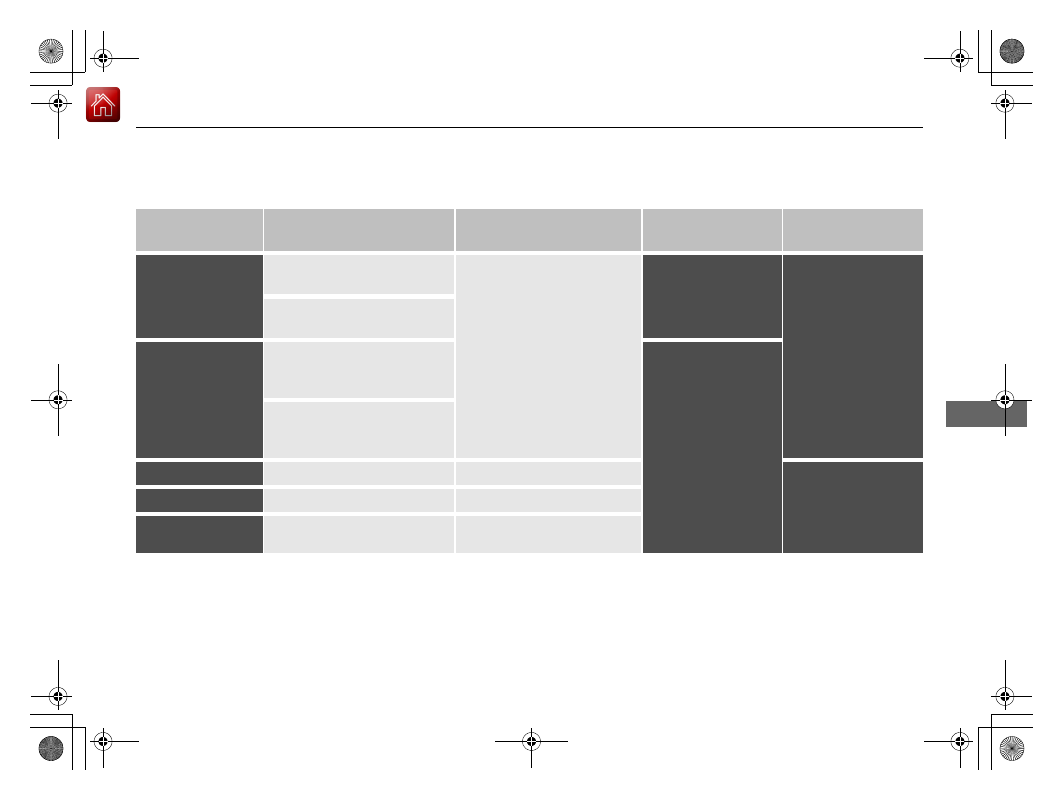
Restriction on selecting a gear position

You cannot select a gear position under certain circumstances that may lead to a crash.

When the 
transmission is in:

1. Under the circumstances 
of that:

2. You cannot select:

3. The gear position 
remains in/changes to:

How to change the 
gear position

(

P

The brake pedal is not 
depressed.

Other gear position

(

P

Release the accelerator 
pedal and depress the 
brake pedal.

The accelerator pedal is 
depressed.

(

N

The vehicle is moving at low 
speed without the brake pedal 
depressed.

(

N

The vehicle is moving at low 
speed with the accelerator 
pedal depressed.

(

N

(

D

 or 

(

S

The vehicle is moving forward.

(

R

Stop your vehicle in a 
safe place, depress the 
brake pedal, and select 
the appropriate gear 
position.

(

R

 or 

(

N

The vehicle is moving backward.

(

D

(

S

(

R

(

N

(

D

 or 

(

S

The vehicle is moving.

(

P

-------------------------------------------------------------------------------------------------------------------------------------------------------------

478

uu

When Driving

u

Shifting

Driving

Use the paddle shifters to change between 1st and 9th gears without releasing your 
hands from the steering wheel. The transmission will switch to the sequential mode.

When the transmission is in 

(

D

:

The vehicle will go into the sequential mode momentarily, and the sequential mode 
gear selection indicator will come on.
Once you start traveling at a constant speed, the sequential mode will automatically 
switch off, and the sequential mode gear selection indicator will go off.

Hold the 

(

+

 paddle shifter for two seconds or push the 

 button to return to 

normal drive.

When the transmission is in 

(

S

The vehicle will go into the sequential mode, and the 

M

 (sequential mode) indicator 

and sequential mode gear selection indicator will come on.
If the vehicle speed increases and the engine speed reaches near the tachometer’s 
red zone, the transmission automatically shifts up to the next gear.
You can cancel this mode by holding the 

(

+

 paddle shifter for two seconds or push 

the 

 button. When the sequential mode is canceled, the sequential mode 

indicator and sequential mode gear selection indicator will turn off.

Sequential Mode

D/S

D/S

-------------------------------------------------------------------------------------------------------------------------------------------------------------

479

uu

When Driving

u

Shifting

Driving

Sequential Mode Operation

1

Sequential Mode Operation

Each paddle shift operation makes a single gear 
change.
To change gears continuously, release the paddle 
shifter before pulling it again for the next gear.

If the sequential mode gear selection indicator blinks 
when you try to shift up or down, this means your 
vehicle speed is not in its allowable gear range.
Slightly accelerate to shift up and decelerate to shift 
down while the indicator is blinking.

Downshifting when pulling 
the 

 paddle shifter.

(Changes to a lower gear)

Upshifting when pulling 
the 

 paddle shifter.

(Changes to a higher gear)

Paddle Shifter 
(Shift down)

Paddle Shifter 
(Shift up)

-------------------------------------------------------------------------------------------------------------------------------------------------------------

480

uu

When Driving

u

Auto Idle Stop

Driving

Auto Idle Stop

To help maximize fuel economy, the engine automatically stops when the vehicle 
comes to a stop, depending on environmental and vehicle operating conditions. The 
indicator (green) comes on at this time.

The engine then restarts once the vehicle is 
about to move again, or depending on 
environmental and vehicle conditions, and the 
indicator (green) goes off.

2

The Engine Automatically Restarts When:


P. 484

The environmental and vehicle conditions that 
impact Auto Idle Stop system operation are 
varied.

2

Auto Idle Stop Activates When:

 P. 482, 483

If the driver’s door is opened while the 
indicator (green) comes on, a buzzer sounds 
to notify you that the Auto Idle Stop function 
is in operation.

A message associated with Auto Idle Stop 
appears on the MID.

2

Indicators

 P. 92

2

Customized Features

 P. 126, 358

1

Auto Idle Stop

The 12-volt battery installed in this vehicle is 
specifically designed for a model with Auto Idle Stop. 
Using a 12-volt battery other than this specified type 
may shorten the 12-volt battery life, and prevent 
Auto Idle Stop from activating. If you need to replace 
the 12-volt battery, make sure to select the specified 
type. Ask a dealer for more details.

Auto Idle Stop 
Indicator (Green)

-------------------------------------------------------------------------------------------------------------------------------------------------------------

Continued

481

uu

When Driving

u

Auto Idle Stop

Driving

To turn the Auto Idle Stop system off, press 
this button. The Auto Idle Stop system stops.

u

Auto Idle Stop system will stop and the 
indicator (amber) will come on.

The Auto Idle Stop system is turned on every 
time you start the engine, even if you turned it 
off the last time you drove the vehicle.

Auto Idle Stop System ON/OFF

1

Auto Idle Stop System ON/OFF

Pressing the Auto Idle Stop 

OFF

 button restarts the 

engine during the Auto Idle Stop activated.

Auto Idle Stop System 
Indicator (Amber)

-------------------------------------------------------------------------------------------------------------------------------------------------------------

uu

When Driving

u

Auto Idle Stop

482

Driving

The vehicle stops with the gear position in 

(

D

 and the brake pedal depressed.

When you put the transmission into 

(

P

, the Auto Idle Stop continues to operate, 

even if the brake pedal is released.

u

If you change the gear position, the engine may automatically restarts.

Auto Idle Stop does not activate when:

The Auto Idle Stop 

OFF

 button is pressed.

The driver’s seat belt is not fastened.

The engine coolant temperature is low or high.

The transmission fluid temperature is low or high.

The vehicle comes to a stop again before the vehicle speed reaches 3 mph (5 
km/h) after the engine starts.

Stopped on a steep incline.

The transmission is in a position other than 

(

D

.

The engine is started with the hood open.

u

Turn off the engine. Close the hood before you restart the engine to activate 
Auto Idle Stop.

The battery charge is low.

The internal temperature of the battery is 14°F (−10°C). or less.

The climate control system is in use, and the outside temperature is below −4°F 
(−20°C) or over 104°F (40°C).

The climate control system is in use, and the temperature is set to the 

Hi

 or 

Lo

.

 is ON (indicator on).

When the rear fan is set to maximum speed.

u

Auto Idle Stop may not activate under other conditions when the rear climate 
control system is in use.

Auto Idle Stop Activates When:

1

Auto Idle Stop Activates When:

Do not open the hood while the Auto Idle Stop 
function is activated. If the hood is opened, the 
engine will not restart automatically.

In this case, restart the engine with the 

ENGINE 

START/STOP

 button.

2

Starting the Engine

 P. 464

When ACC with Low Speed Follow is in operation, 
the vehicle stops without depressing the brake pedal 
and Auto Idle Stop may activate.

Pressing the 

ENGINE START/STOP

 button changes 

the power mode to ACCESSORY even while Auto Idle 
Stop is in operation. Once in ACCESSORY, the engine 
no longer restarts automatically. Follow the standard 
procedure to start the engine.

2

Starting the Engine

 P. 464

-------------------------------------------------------------------------------------------------------------------------------------------------------------

483

uu

When Driving

u

Auto Idle Stop

Continued

Driving

Auto Idle Stop may not activate when:

The vehicle is stopped by braking suddenly.

The steering wheel is operated.

The fan speed is high.

Altitude is high.

The climate control system is in use, and there is a significant difference between 
the set temperature and the actual interior temperature.

The climate control system is in use, and humidity in the interior is high.

The rear fan is set to maximum speed.

u

Auto Idle Stop may not activate under other conditions when the rear climate 
control system is in use.

-------------------------------------------------------------------------------------------------------------------------------------------------------------

uu

When Driving

u

Auto Idle Stop

484

Driving

The brake pedal is released (without the automatic brake hold system activated).

The accelerator pedal is depressed (with the automatic brake hold system 
activated).

2

Automatic Brake Hold

 P. 533

The engine restarts even if the brake pedal is depressed

*1

 when:

The Auto Idle Stop 

OFF

 button is pressed.

A steering wheel is operated.

The transmission is put into 

(

R

 or 

(

S

, or when it is set from 

(

N

 to 

(

D

.

u

If you put the transmission into 

(

P

 after the Auto Idle Stop activates, the Auto 

Idle Stop continues to operate. In this case, the engine restarts when you 
change the gear position other than 

(

P

. When changing the gear position, the 

brake pedal must be firmly depressed.

The pressure on the brake pedal is reduced and the vehicle starts moving while 
stopped on an incline.

The pressure on the brake pedal is repeatedly applied and released slightly during 
a stop.

The battery charge becomes low.

The accelerator pedal is depressed.

The driver’s seat belt is unlatched.

 is ON (indicator on).

The climate control system is in use, and the difference between the set 
temperature and actual interior temperature becomes significant.

The climate control system is being used to dehumidify the interior.

The vehicle ahead of you starts again when your vehicle stops automatically with 
ACC with Low Speed Follow.

The Engine Automatically Restarts When:

1

The Engine Automatically Restarts When:

If you are using an electronic device during Auto Idle 
Stop, the device may temporarily be turned off when 
the engine restarts.

1

The engine restarts even if the brake pedal is depressed

*1

 when:

*1: With the automatic brake hold system activated, 
you can release the brake pedal during Auto Idle Stop 
is in operation.
If the automatic brake hold system has been turned 
off, or if there is a problem with the system, the 
engine will restart automatically when you release 
the brake pedal.

2

Automatic Brake Hold

 P. 533

-------------------------------------------------------------------------------------------------------------------------------------------------------------

485

uu

When Driving

u

Auto Idle Stop

Driving

Briefly keeps the brake applied after releasing the brake pedal to restart the engine. 
This can keep your vehicle from unexpectedly moving while on an incline.

Starting Assist Brake Function

-------------------------------------------------------------------------------------------------------------------------------------------------------------

486

uu

When Driving

u

Integrated Dynamics System

Driving

Integrated Dynamics System

Modifies the dynamic character of the vehicle. There are three modes to select from: 

Comfort

Normal

, and 

Sport

.

Press the 

Dynamic Mode

 button to select a mode. The mode you have selected 

appears on the MID.
You can customize the mode default setting using the MID.

2

Customized Features

 P. 126, 358

Normal

Balanced driving 
performance for most 
driving situations.

Sport

Enhances vehicle response 
feel through decreased 
steering assist, heightened 
throttle response, increased 
SH-AWD

*

 torque bias, and 

modified active sound 
control.

Comfort

Maximizes driver comfort 
through increased steering 
assist.

Dynamic Mode


Button

* Not available on all models

-------------------------------------------------------------------------------------------------------------------------------------------------------------

487

uu

When Driving

u

Front Sensor Camera

Continued

Driving

Front Sensor Camera

The camera, used in systems such as LKAS, RDM, ACC with Low Speed Follow, 
CMBS

TM

, and auto high-beam, is designed to detect an object that triggers any of 

the systems to operate its functions.

This camera is located behind the rearview 
mirror.

To help reduce the likelihood that high interior 
temperatures will cause the camera’s sensing 
system to shut off, when parking, find a shady 
area or face the front of the vehicle away from 
the sun. If you use a reflective sun shade, do 
not allow it to cover the camera housing. 
Covering the camera can concentrate heat on 
it.

Camera Location and Handling Tips

1

Front Sensor Camera

Never apply a film or attach any objects to the 
windshield, the hood, or the front grille that could 
obstruct the camera’s field of vision and cause the 
system to operate abnormally.
Scratches, nicks, and other damage to the windshield 
within the camera’s field of vision can cause the 
system to operate abnormally. If this occurs, we 
recommend that you replace the windshield with a 
genuine Acura replacement windshield. Making even 
minor repairs within the camera’s field of vision or 
installing an aftermarket replacement windshield 
may also cause the system to operate abnormally.
After replacing the windshield, have a dealer 
recalibrate the camera. Proper calibration of the 
camera is necessary for the system to operate 
properly.

Do not place an object on the top of the instrument 
panel. It may reflect onto the windshield and prevent 
the system from detecting lane lines properly.

Front Sensor 
Camera

-------------------------------------------------------------------------------------------------------------------------------------------------------------

uu

When Driving

u

Front Sensor Camera

488

Driving

1

Front Sensor Camera

If the 

Some Driver Assist Systems Cannot 

Operate: Camera Temperature Too High

 message 

appears:

Use the climate control system to cool down the 
interior and, if necessary, also use defroster mode 
with the airflow directed towards the camera.

Start driving the vehicle to lower the windshield 
temperature, which cools down the area around 
the camera.

If the 

Some Driver Assist Systems Cannot 

Operate: Clean Front Windshield

 message 

appears:

Park your vehicle in a safe place, and clean the 
windshield. If the message does not disappear after 
you have cleaned the windshield and driven for a 
while, have your vehicle checked by a dealer.

-------------------------------------------------------------------------------------------------------------------------------------------------------------

489

uu

When Driving

u

Adaptive Cruise Control (ACC) with Low Speed Follow

Continued

Driving

Adaptive Cruise Control (ACC) with Low Speed 
Follow

Helps maintain a constant vehicle speed and a set following-interval behind a vehicle 
detected ahead of yours and, if the detected vehicle comes to a stop, can decelerate 
and stop your vehicle, without you having to keep your foot on the brake or the 
accelerator.
When ACC with Low Speed Follow slows your vehicle by applying the brakes, your 
vehicle’s brake lights will illuminate.

1

Adaptive Cruise Control (ACC) with Low Speed Follow

Important Reminder

As with any system, there are limits to ACC with Low 
Speed Follow. Use the brake pedal whenever 
necessary, and always keep a safe interval between 
your vehicle and other vehicles.

Be careful not to severely impact the radar sensor 
cover.

3

WARNING

Improper use of ACC with Low Speed 
Follow can lead to a crash.

Use ACC with Low Speed Follow only when 
driving on expressways or freeways and in 
good weather conditions.

3

WARNING

ACC with Low Speed Follow has limited 
braking capability and may not stop your 
vehicle in time to avoid a collision with a 
vehicle that quickly stops in front of you.

Always be prepared to apply the brake 
pedal if the conditions require.

When to use

Vehicle speed for ACC with Low Speed Follow: 

A vehicle is detected ahead 

within ACC with Low Speed Follow range

 – ACC with Low Speed Follow 

operates at speeds up to 90 mph (145 km/h).

No vehicle is detected within ACC with Low Speed Follow range

 – ACC with 

Low Speed Follow operates at the speed of about 25 mph (40 km/h) or above.

Gear position for ACC with Low Speed Follow: In 

(

D

 or 

(

S

.

The radar sensor is 
behind the emblem.

The camera is 
located behind the 
rearview mirror.

-------------------------------------------------------------------------------------------------------------------------------------------------------------

uu

When Driving

u

Adaptive Cruise Control (ACC) with Low Speed Follow

490

Driving

How to activate the system

1

Adaptive Cruise Control (ACC) with Low Speed Follow

When the 

MAIN

 button is pressed, both ACC with 

Low Speed Follow and the Lane Keeping Assist 
System (LKAS) are either turned on or off.

ACC with Low Speed Follow may not work properly 
under certain conditions.

2

ACC with Low Speed Follow Conditions 
and Limitations

 P. 496

When not using ACC with Low Speed Follow: Turn 
off adaptive cruise by pressing the 

MAIN

 button. This 

also will turn off the Lane Keeping Assist System 
(LKAS).

Do not use ACC with Low Speed Follow under the 
following conditions.

On roads with heavy traffic or while driving in 
continuous stop and go traffic.

On roads with sharp turns.

On roads with steep downhill sections, as the set 
vehicle speed can be exceeded by coasting. In such 
cases, ACC with Low Speed Follow will not apply 
the brakes to maintain the set speed.

On roads with toll collection facilities or other 
objects between lanes of traffic, or in parking 
areas, or facilities with drive through access.

Press the 

MAIN

 button on 

the steering wheel.

ACC

 (green) is on in the 

instrument panel.
ACC with Low Speed 
Follow is ready to use.

How to use

-------------------------------------------------------------------------------------------------------------------------------------------------------------

491

uu

When Driving

u

Adaptive Cruise Control (ACC) with Low Speed Follow

Continued

Driving

When driving at about 25 mph (40 km/h) or above: 

Take your foot off the 

pedal and press down the 

RES/+

/

SET/–

 switch when you reach the desired speed. 

The moment you release the switch, the set speed is fixed, and ACC with Low Speed 
Follow begins.

To Set the Vehicle Speed

On when ACC with Low 
Speed Follow begins

Press down and release

RES/+

/

SET/−

 Switch

-------------------------------------------------------------------------------------------------------------------------------------------------------------

492

uu

When Driving

u

Adaptive Cruise Control (ACC) with Low Speed Follow

Driving

When driving at slower than about 25 mph (40 km/h): 

If the vehicle is moving 

and the brake pedal is not depressed, pressing the switch fixes the set speed to 
about 25 mph (40 km/h) regardless of current vehicle speed. While stationary and a 
vehicle is ahead of you, the vehicle speed can be set, even with the brake pedal 
depressed.

When ACC with Low Speed Follow starts 
operating, the vehicle icon, interval bars and 
set speed appear on the MID. 

Set Vehicle Speed

Set Vehicle Interval

-------------------------------------------------------------------------------------------------------------------------------------------------------------


Content      ..     28      29      30      31     ..