Acura MDX (2020 year). Manual in english - page 1
 

  Index      Manuals     Acura MDX (2020 year). Manual in english


Search            copyright infringement  


Content      ..      1       2         ..


Acura MDX (2020 year). Manual in english - page 1


9

Quick

 Referenc

e Guide

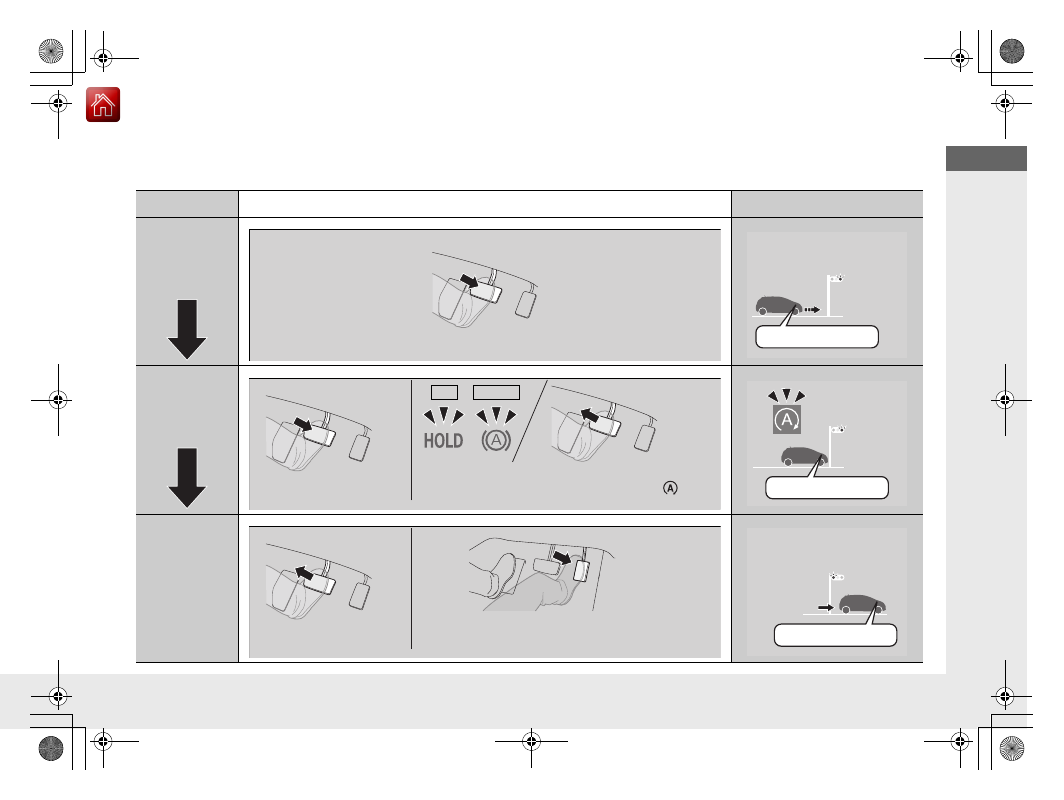
Auto Idle Stop Function

To improve fuel economy, the engine stops and then restarts as detailed below. When Auto Idle Stop is on, the Auto Idle Stop indicator 
(green) comes on. 

(P480)

At

Automatic transmission

Engine status

Deceleration

Stop

Start-up

Stop the vehicle and depress the brake pedal.

On

Keep the brake pedal 
depressed.

U.S.

Canada

With the automatic brake hold system activated, 
you can release the brake pedal when the 


indicator comes on.

Off

Release the brake pedal.

With the automatic brake hold system activated, 
depress the accelerator pedal.

Restarting

*

 Not available on all models

-------------------------------------------------------------------------------------------------------------------------------------------------------------

10

Quick

 Referenc

e Guide

Safe Driving 

(P27)

Airbags 

(P41)

Your vehicle is fitted with airbags to help protect you and 
your passengers during a moderate-to-severe collision.

Child Safety 

(P56)

All children 12 and younger should be seated in the rear seat.

Smaller children should be properly restrained in a forward-facing child seat.

Infants must be properly restrained in a rear-facing child seat.

Exhaust Gas Hazard 

(P74)

Your vehicle emits dangerous exhaust gases that contain carbon 
monoxide. Do not run the engine in confined spaces where carbon 
monoxide gas can accumulate.

Before Driving Checklist 

(P32)

Before driving, check that the front seats, head restraints, 
steering wheel, and mirrors have been properly adjusted.

Seat Belts 

(P33)

Fasten your seat belt and sit upright well 
back in the seat.

Check that your passengers are wearing 
their seat belts correctly.

Fasten your lap belt as 
low as possible.

-------------------------------------------------------------------------------------------------------------------------------------------------------------

11

Quick

 Referenc

e Guide

Instrument Panel 

(P77)

System Indicators

Malfunction Indicator 

Lamp

Low Oil Pressure 

Indicator

Charging System 

Indicator

Anti-lock Brake System 

(

ABS

) Indicator

Vehicle Stability Assist

®


(VSA

®

) System 

Indicator
Vehicle Stability Assist

®


(VSA

®

) OFF Indicator

Speed-sensitive Electric 

Power Steering (EPS) 

System Indicator

Lights Indicators

Lights On Indicator

High Beam Indicator

Immobilizer System 

Indicator

Seat Belt Reminder 

Indicator

System Indicators

System Message 

Indicator

Brake System 

Indicator (Red)

Supplemental 

Restraint System 

Indicator

Low Fuel Indicator

Gauges 

(P119)

/Multi-Information Display (MID) 

(P120)

/System Indicators 

(P78)

Low Tire Pressure/

TPMS Indicator

Turn Signal and 

Hazard Warning 

Indicators

Keyless Access System 

Indicator

Temperature 

Gauge

Security System Alarm Indicator

Fuel 

Gauge

Tachometer

MID

Speedometer

Gear Position Indicator

M

 (sequential mode) Indicator/

Sequential Mode Gear Selection 

Indicator

Brake System 

Indicator (Amber)

SH-AWD

 Indicator

*

Blind spot information 

System Indicator

*

System Indicators

Collision Mitigation Braking 

System

TM

 (CMBS

TM

) Indicator

Road Departure Mitigation 

(RDM) Indicator

Lane Keeping Assist System 

(

LKAS

) Indicator

Adaptive Cruise Control (

ACC

with Low Speed Follow 

Indicator

U.S.

Canada

U.S.

Canada

Fog Light Indicator

*

Auto Idle Stop System 

Indicator (Amber)/

Auto Idle Stop 

Indicator (Green)

Automatic Brake Hold 

System Indicator

Automatic Brake Hold 

Indicator

U.S.

Canada

Electric Parking Brake 

System Indicator

Electric Parking Brake 

Indicator

U.S.

Canada

Auto High-Beam 

Indicator

*

 Not available on all models

-------------------------------------------------------------------------------------------------------------------------------------------------------------

12

Quick

 Referenc

e Guide

Controls 

(P137)

Clock 

(P138)

a

Enter the 

Clock Adjustment

 screen.

2

Adjusting the Clock 

(P138)

b

Rotate 

 to change hour, then move 

.

c

Rotate 

 to change minute, then 

press .

The navigation system receives signals from 
GPS satellites, updating the clock 
automatically.

Models with navigation system

ENGINE START/STOP 
Button 

(P168)

Press the button to change the vehicle’s 
power mode.

Turn Signals 

(P171)

Lights 

(P172)

Turn Signal Control Lever

Right

Left

Light Control Switches

Low Beam

High Beam

Flashing

-------------------------------------------------------------------------------------------------------------------------------------------------------------

13

Quick

 Referenc

e Guide

Wipers and Washers 

(P179)

*1:Models with automatic intermittent 

wipers

*2:Models without automatic intermittent 

wipers

Wiper/Washer Control Lever

MIST
OFF
AUTO

*1

: Wiper speed varies 

automatically

INT

*2

: Low speed with 

intermittent

LO

: Low speed wipe

HI

: High speed wipe

Pull toward 
you to spray 
washer fluid.

Adjustment Ring

(

-

: Low Sensitivity

*1

    : Lower speed, fewer sweeps

*2

(

+

: High Sensitivity

*1

    : Higher speed, more sweeps

*2

AUTO

 should always be turned 

OFF

 before 

the following situations in order to prevent 
severe damage to the wiper system:

Cleaning the windshield

Driving through a car wash

No rain present

Steering Wheel 

(P187)

To adjust, push and hold the adjustment 
switch to move the steering wheel to the 
desired position.

Models with automatic intermittent wipers

Unlocking the Front 
Doors from the Inside 

(P152)

Pull either front door inner handle to 
unlock and open it at the same time.

Tailgate 

(P161, 156)

Press the tailgate outer handle to unlock 
and open the tailgate when you carry the 
keyless access remote.

Press the power tailgate button on the 
driver’s door or the remote transmitter to 
open and close the power tailgate.

Tailgate Outer Handle

-------------------------------------------------------------------------------------------------------------------------------------------------------------

14

Quick

 Referenc

e Guide

Power Door Mirrors 

(P189)

With the power mode in ON, move the 
selector switch to 

L

 or 

R

.

Push the appropriate edge of the 
adjustment switch to adjust the mirror.

Press the fold button

*

 to fold the door 

mirrors.

Selector Switch

Adjustment Switch

Fold Button

*

Power Windows 

(P165)

With the power mode in ON, open and 
close the power windows.

If the power window lock button is in the 
off position, each passenger’s window 
can be opened and closed with its own 
switch.

If the power window lock button is in the 
on position (indicator is on), each 
passenger’s window switch is disabled.

Power Window Lock Button

Window Switch

Indicator

-------------------------------------------------------------------------------------------------------------------------------------------------------------

15

Quick

 Referenc

e Guide

Climate Control System 

(P219)

Press the 

AUTO

 button to activate the climate control system.

Press the 

 button to turn the system on or off.

Press the 

 button or select the 

Front


 icon to defrost the windshield.

Driver’s Side 
Temperature 
Control Switch

Air flows from floor and 
windshield defroster vents.

Air flows from floor vents.

Air flows from floor and 
dashboard vents.

Air flows from dashboard vents.

AUTO

 Button

Passenger’s Side 
Temperature 
Control Switch

 (On/Off) Button

Driver’s Side 
Temperature Icon

Passenger’s Side 
Temperature Icon

On Demand 
Multi-Use 
Display

TM

 (Windshield Defroster) Button

A/C

 (Air 

Conditioning) and 

SYNC


(Synchronization) 
Icon

Recirculation/
Fresh Air Mode 
Icon

Fan Control Icon

REAR

 (Rear Climate 

Control) Icon

Vent Mode 
Control Icon

Rear Climate Control 

(P229)

Press the 

AUTO

 button to activate the 

rear climate control system.

Press the 

 button to turn the system 

on or off.

Rear Temperature 
Control Buttons

 / 


(Fan Control) 
Button

AUTO

 Button

 (On/Off) 

Button

Mode Control Button

Air flows from the rear floor vents.

Air flow from the rear console 
vents and floor vents.

Air flows from the rear console vents.

*

 Not available on all models

-------------------------------------------------------------------------------------------------------------------------------------------------------------

16

Quick

 Referenc

e Guide

Features 

(P231)

Audio System 

(P239)


For navigation system operation


()

 See the Navigation System Manual

*1:Icons that appear on the screen vary by the source selected.

Information Screen

Audio Menu

 (CD Eject) Button

VOL

/

 (Volume/Power) Knob

BACK

 Button

Interface Dial (

ENTER/MENU


Button)

INFO

 Button

On Demand Multi-Use Display

TM

PHONE

 Button

 (Tune Down) Icon

*1

Source

 (Day/Night) Button

Tune

*1

CD Slot

 (Information) Icon

Preset Icons

*1

 (Tune Up) Icon

*1

Stations

*1

SCAN

*1

SMARTPHONE

 Button

SETTINGS

 Button

Front

/

Rear

*

NAV

 Button

*

HD Radio List

*, *1

-------------------------------------------------------------------------------------------------------------------------------------------------------------

17

Quick

 Referenc

e Guide

Models with rear entertainment system

Disc Slot

REAR


(Power) 

Button

 (Eject) Button

Audio Remote Controls 

(P237)

SOURCE

 Button

Press to change the audio mode: FM/AM/
SiriusXM

®

/CD/Rear DVD

*

/HDD

*

/USB/iPod/

Apple CarPlay/Android Auto/

Bluetooth

®


Audio/Pandora

®

*

/AUX.

Left Selector Wheel
Roll to adjust the volume up/down.
Radio:Move to a side to change the 

preset station.
Move to a side and hold to select 
the next or previous strong station.

CD/HDD

*

/USB device:

Move to a side to skip to the 
beginning of the next song or 
return to the beginning of the 
current song.
Move to a side and hold to change 
a folder.

Left Selector Wheel

SOURCE

 Button

*

 Not available on all models

-------------------------------------------------------------------------------------------------------------------------------------------------------------

18

Quick

 Referenc

e Guide

Driving 

(P445)

Automatic Transmission 

(P472)

Always depress the brake pedal before selecting 

(

P

 or changing the gear position from 

(

P

.

Select 

(

P

 and depress the brake pedal when starting the engine.

Park

Press the 

(

P

 button.

Used when parking or before 
turn off or start the engine.
Transmission is locked.

Reverse

Pull back the 

(

R

 button.

Used when reversing.

Neutral

Press the 

(

N

 button.

Transmission is not locked.

Drive

Press the 

 button.

Used for normal driving.
Sequential shift mode can be used 
temporarily.

D/S

Gear Position Indicator

The gear position indicator and the 
shift button indicator indicate the 
current gear selection.

Gear Position Indicator

Shift Button 
Indicator

Shifting

S Position

Press the 

 button twice.

Sequential shift mode can be used.

D/S

-------------------------------------------------------------------------------------------------------------------------------------------------------------

19

Quick

 Referenc

e Guide

Sequential Mode 

(P479)

Paddle shifters allow you to shift gears much like a manual 
transmission (1st through 7th). This is useful for engine braking.

When the transmission is in 

(

D

The transmission will shift back to 
automatic mode once the system 
detects that the vehicle is cruising.

When the transmission is in 

(

S

Holds the selected gear, and the 

M

 (sequential mode) indicator 

comes on.

The sequential mode gear 
selection is shown in the 
instrument panel.

Gear Position Indicator

Shift Down 

(

-


Paddle Shifter

Shift Up 

(

+


Paddle Shifter

Selected Gear Number

M

 Indicator

-------------------------------------------------------------------------------------------------------------------------------------------------------------

20

Quick

 Referenc

e Guide

VSA

®

 On and Off 

(P519)

The Vehicle Stability Assist

®

 (VSA

®

) system 

helps stabilize the vehicle during 
cornering, and helps maintain traction 
while accelerating on loose or slippery 
road surfaces.

VSA

®

 comes on automatically every time 

you start the engine.

To partially disable or fully restore VSA

®


function, press and hold the button until 
you hear a beep.

CMBS

TM

 On and Off 

(P540)

When a possible collision is likely 
unavoidable, the CMBS

TM

 can help you to 

reduce the vehicle speed and the severity 
of the collision.

The CMBS

TM

 is turned on every time you 

start the engine.

To turn the CMBS

TM

 on or off, press and 

hold the button until you hear a beep.

Tire Pressure Monitoring System (TPMS) with Tire 
Fill Assist 

(P522, 660)

The TPMS monitors tire pressure.

TPMS is turned on automatically every time you start the engine.

TPMS fill assist provides audible and visual guidance during tire pressure adjustment.

Refueling 

(P569)

a

Press the fuel fill door 
release button.

b

After refueling, wait for 
about five seconds 
before removing the 
filler nozzle.

Fuel recommendation: Unleaded premium gasoline, pump octane number 91 or 

higher recommended

Fuel tank capacity: 19.5 US gal (73.8 L)

Wait for five seconds

-------------------------------------------------------------------------------------------------------------------------------------------------------------

21

Quick

 Referenc

e Guide

AcuraWatch

TM

AcuraWatch

TM

 is a driver support system 

which employs the use of two distinctly 
different kinds of sensors, a radar sensor 
located behind the emblem and a front 
sensor camera mounted to the interior side 
of the windshield, behind the rearview 
mirror.

The camera is located 
behind the rearview 
mirror.

The radar sensor is 
behind the emblem.

Front Sensor 
Camera

Radar Sensor

Adaptive Cruise Control 
(ACC) with Low Speed 
Follow 

(P489)

Helps maintain a constant vehicle speed and 
a set following-interval behind a vehicle 
detected ahead of yours and, if the detected 
vehicle comes to a stop, can decelerate and 
stop your vehicle, without you having to 
keep your foot on the brake or the 
accelerator.

Road Departure 
Mitigation (RDM) System 

(P505)

Alerts and helps to assist you when the 
system detects a possibility of your vehicle 
unintentionally crossing over detected lane 
markings and/or leaving the roadway 
altogether.

Lane Keeping Assist 
System (LKAS) 

(P510)

Provides steering input to help keep the 
vehicle in the middle of a detected lane and 
provides tactile and visual alerts if the 
vehicle is detected drifting out of its lane.

Collision Mitigation 
Braking System

TM


(CMBS

TM

(P537)

Can assist you when there is a possibility of 
your vehicle colliding with a vehicle or a 
pedestrian detected in front of yours. The 
CMBS

TM

 is designed to alert you when a 

potential collision is determined, as well as 
to reduce your vehicle speed to help 
minimize collision severity when a collision is 
deemed unavoidable.

-------------------------------------------------------------------------------------------------------------------------------------------------------------

22

Quick

 Referenc

e Guide

Maintenance 

(P573)

Under the Hood 

(P581)

Check engine oil, engine coolant, and windshield washer 
fluid. Add when necessary.

Check brake fluid.

Check the battery condition monthly.

a

Pull the hood release handle under the corner of the 
dashboard.

b

Locate the hood latch lever, push it to the side, and then 
raise the hood. Once you have raised the hood slightly, you 
can release the lever.

c

When finished, close the hood and make sure it is firmly 
locked in place.

Lights 

(P593)

Inspect all lights regularly.

Wiper Blades 

(P598)

Replace blades if they leave streaks 
across the windshield.

Tires 

(P602)

Inspect tires and wheels regularly.

Check tire pressures regularly.

Install snow tires for winter 
driving.

-------------------------------------------------------------------------------------------------------------------------------------------------------------

Quick

 Referenc

e Guide

23

Handling the Unexpected 

(P625)

Flat Tire 

(P627)

Park in a safe location and repair the flat 
tire using the tire repair kit.

Park in a safe location and replace the 
flat tire with the compact spare tire 
located under the cargo area.

Indicators Come On 

(P656)

Identify the indicator and consult the 
owner’s manual.

Models with tire repair kit

Models with a compact spare tire

Engine Won’t Start 

(P649)

If the battery is dead, jump start using a 
booster battery.

Blown Fuse 

(P662)

Check for a blown fuse if an electrical 
device does not operate.

Overheating 

(P654)

Park in a safe location. If you do not see 
steam under the hood, open the hood, 
and let the engine cool down.

Emergency Towing 

(P670)

Call a professional towing service if you 
need to tow your vehicle.

-------------------------------------------------------------------------------------------------------------------------------------------------------------

24

Quick

 Referenc

e Guide

What to Do If

The power mode does not 
change from VEHICLE OFF 
(LOCK) to ACCESSORY. 
Why?

The steering wheel may be locked.

Move the steering wheel left and right 
after pressing the 

ENGINE START/STOP


button.

Why does the brake pedal 
pulsate slightly when 
applying the brakes?

This can occur when the ABS activates and does not indicate a 
problem. Apply firm, steady pressure on the brake pedal. Never 
pump the brake pedal.

2

Anti-lock Brake System (ABS) 

(P535)

The rear door cannot be 
opened from inside the 
vehicle. Why?

Check if the childproof lock is in the 
lock position. If so, open the rear 
door with the outside door handle.
To cancel this function, slide the 
lever up to the unlock position.

Why do the doors lock 
after I unlocked the doors?

If you do not open the doors within 30 seconds, the doors are 
relocked automatically for security.

Canadian models

-------------------------------------------------------------------------------------------------------------------------------------------------------------


Content      ..      1       2         ..


///////////////////////////////////////